Yes but you must remember that spawned terminal is asynchronous process and both know nothing about each other. KM macro will go to the next steps without knowledge does terminal process finished or not.
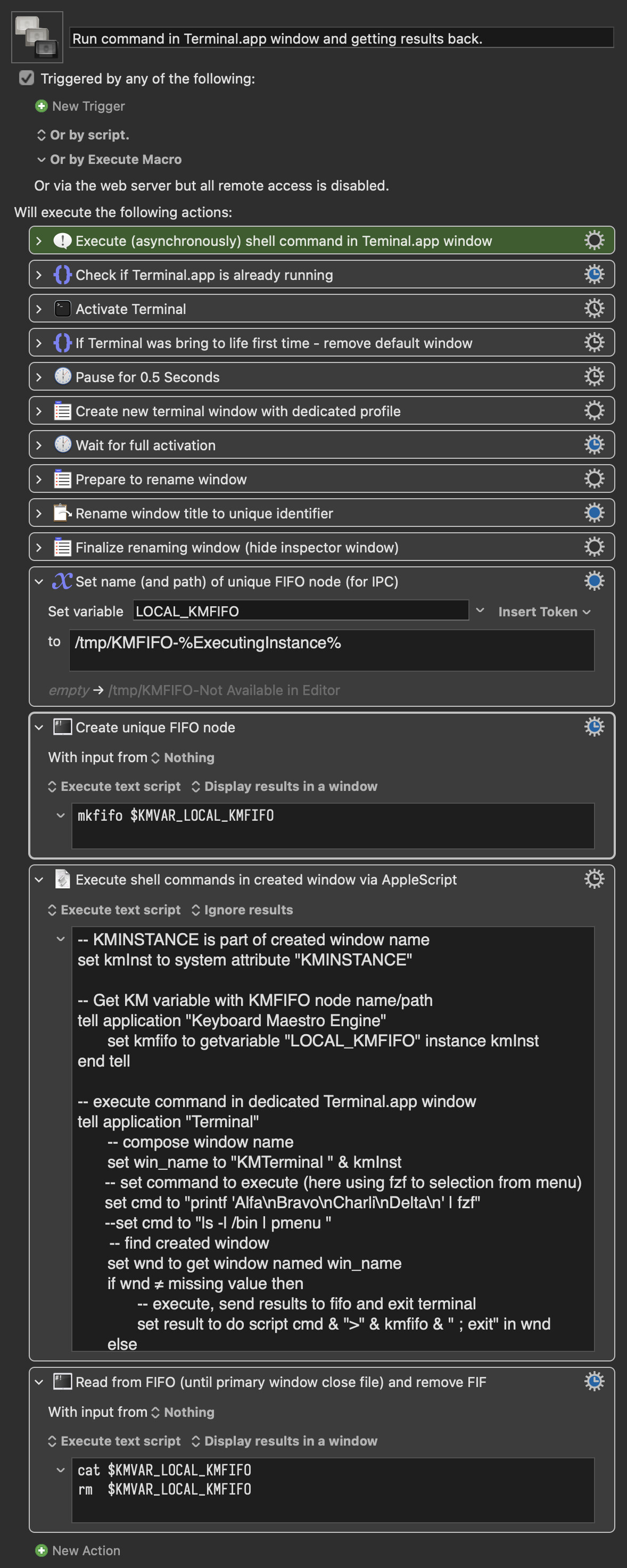
Here is my solution to synchronise both - I use classical FIFO object (man mkfifo), to do interprocess communication.
Before running terminal I prepare local KM variable with unique name(path) FIFO object (using %ExcutionInstance%"). Next I create FIFO object using shell script.
In AppleScript I get FIFO path and compose command for shell with stdout redirection, executing it.
KM is going to the next step, but here is another shell process which read from FIFO object. There reading is in blocking mode, so until Terminal.app not finish or not close handle to FIFO object, this KM step will wait.
When Terminal.app command exits, the cat command in KM step finish also and go the remove FIFO object. (The last step can be done in the last step of macro, if this FIFO object will be used more times.
The result i presented in the window.
In example I use fzf tool, which is simple interface to select (in full screen mode) some element from list, but it could be any other terminal app. If user don't want to get results from command, the redirection to FIFO can be done as last step before exit like
cat /dev/null > KMFIFO
FIFO channel can also be way to transfer basic information like status and name of temporary file etc.
Run command in Terminal.app window and getting results back..kmmacros (16 KB)