Run command in Terminal.app window Macro (v11.0.4)

Run command in Terminal.app window Macro (v11.0.4)

Notice: Below is extended example with interprocess communication between Termina application and KM macro.

Presented macro was created after reading question:

as proposal to execute terminal app which require terminal window (f.ex. progress bar) triggered from KM.

In real it is first part of solution, I plan to use interprocess communication mechanizm between KM macro and spawned terminal (for example to get results and wait for finishing terminal process), but currently first part is just asynchronous running shell command/script.

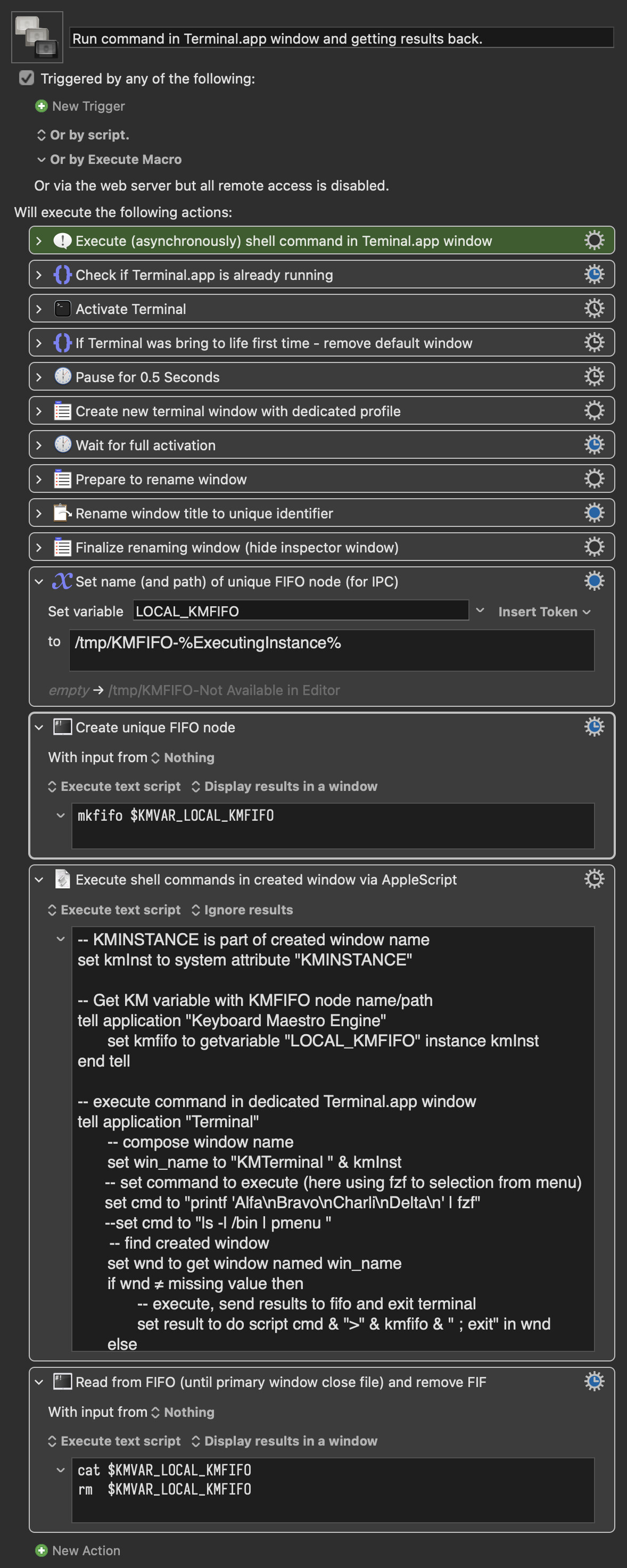
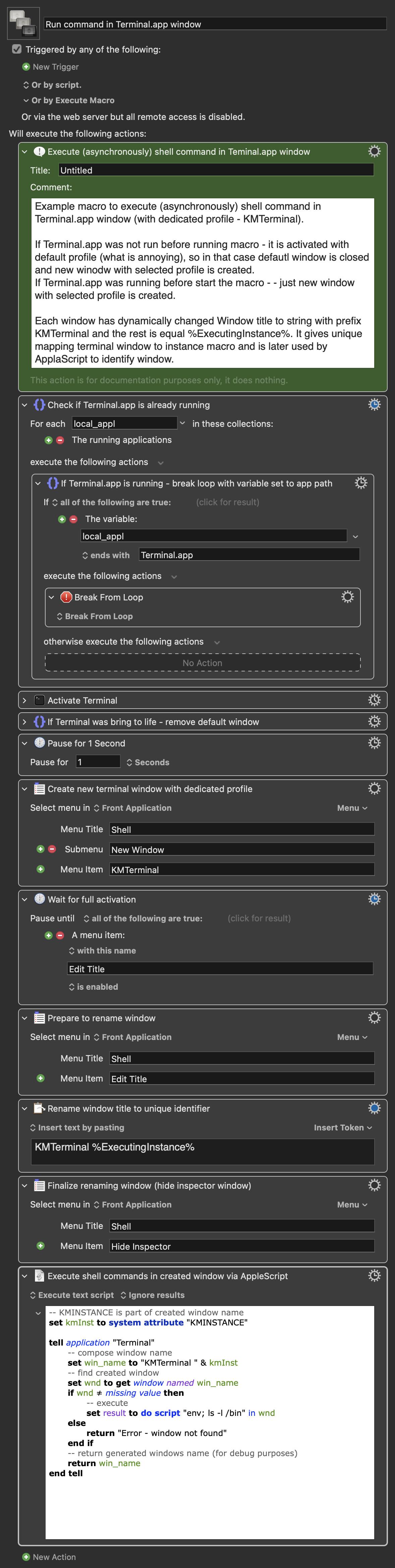
The macro executes (asynchronously) shell command in Terminal.app window (with dedicated profile - KMTerminal).

If Terminal.app was not running before start the macro - it will be activated with default profile (what is annoying for me), so in that case default window is closed and new window with selected profile is created.
If Terminal.app was running before start the macro - just new window with selected profile is created.

Each window has dynamically changed Window title to string with prefix KMTerminal and the rest is composed from %ExecutingInstance%. It gives unique name of terminal window and allows the AppleScript to identify valid target.

Before implementation Terminal.app has to have defined profile KMTerminal, with disabled all elements in Title section.

Run command in Terminal.app window.kmmacros (14 KB)

Have you tried creating and setting up the new window as part of the AppleScript, rather than as KM actions? For example:

tell application "Terminal"
	set theSettings to item 1 of (get every settings set whose name is "Homebrew")
	set theTab to (do script " ")
	set current settings of theTab to theSettings
	set custom title of theTab to "My Custom Title"
	do script "ls -l ~/Desktop" in theTab
end tell

Yes , but it still open new window with default profile if Terminal was not run when you start AppleScript. Do you see any reason to do that in AppleScript? My idea is (not finished yet) to run some program in terminal as part of bigger KM macro, wait for finishing process, get the results and go the next steps in KM. I start thinking about KM as main engine to coordinate different tasks.

The terminal window gives me the chance to observe process for example during compilation, packaging or executing remote processes (ansible via ssh).

I've checked your code in my system and it generates TWO windows - one with default profile and second with selected profile but ... that second window has geometry taken from default (so not use columns and rows from profile, only fonts and background colour). :frowning:

I use this:

It was a question, not a suggestion. While I have multiple windows open in Terminal all the time they are nearly all sshs into other *nix boxes, managed switches, etc so I don't have much use for Profiles. So you'll know way more about the pros and cons of either approach than me!

Since Terminal is always running, I wouldn't know :wink:

Not for me. Was that with Terminal not running as well?

Yeah, looks like it doesn't run the shell startup command either -- so there's probably other things missing too.

So it'll work for me because I generally only want to set some distinguishing colours and a non-Profile custom size (eg set {number of rows of theTab, number of columns of theTab} to {40, 100}) -- proper Terminal users like yourself will be left wanting more.

Ooo I even didn’t know about this plugin :slight_smile:
Thanks, I will check.

Generally I mostly use iTerm (one tab to each ssh session) and run tmux inside each tab. I have many scripts/macros using advanced possibilities of tmux (even some kind of snippets :wink: )
Here it is rather solution to work with KM macros directly and (as I hope to implement) to get data back after terminal process finish work).

In my daily job I work from Linux machine and connect to other systems, but connection to that Linux is just PuTTY, without any sophisticated bells and whistles. Possibilities of tmux are then priceless.

Lots of choice here -- write to a temp file that your macro can read, include an osascript statement in your shell script that uses AS to write to a KM variable (even a local/instance variable if you can get the macro's instance UUID into your shell), if iTerm is as AppleScriptable as Terminal you could get the contents of the tab -- you could even use image detection, with or without OCR, at a pinch!

Yes but you must remember that spawned terminal is asynchronous process and both know nothing about each other. KM macro will go to the next steps without knowledge does terminal process finished or not.

Here is my solution to synchronise both - I use classical FIFO object (man mkfifo), to do interprocess communication.

Before running terminal I prepare local KM variable with unique name(path) FIFO object (using %ExcutionInstance%"). Next I create FIFO object using shell script.

In AppleScript I get FIFO path and compose command for shell with stdout redirection, executing it.

KM is going to the next step, but here is another shell process which read from FIFO object. There reading is in blocking mode, so until Terminal.app not finish or not close handle to FIFO object, this KM step will wait.
When Terminal.app command exits, the cat command in KM step finish also and go the remove FIFO object. (The last step can be done in the last step of macro, if this FIFO object will be used more times.

The result i presented in the window.

In example I use fzf tool, which is simple interface to select (in full screen mode) some element from list, but it could be any other terminal app. If user don't want to get results from command, the redirection to FIFO can be done as last step before exit like

cat /dev/null > KMFIFO

FIFO channel can also be way to transfer basic information like status and name of temporary file etc.

Run command in Terminal.app window and getting results back..kmmacros (16 KB)

That very much depends on what you're doing and the functionality of your terminal app.

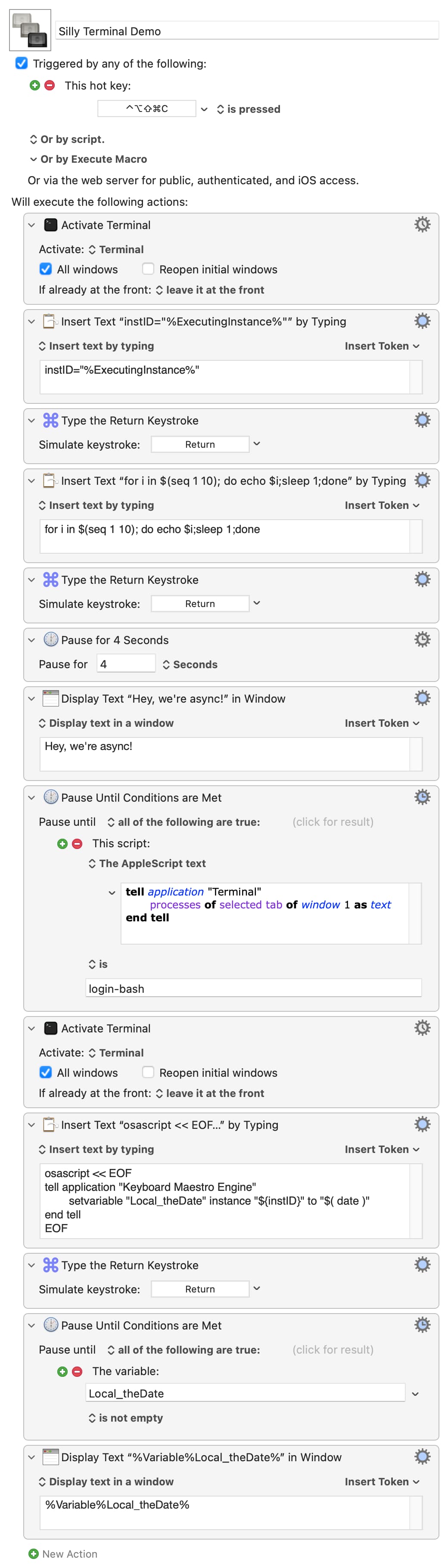
Silly Terminal example -- launch Terminal and make a new window, set it use bash, then run this:

Silly Terminal Demo.kmmacros (9.4 KB)

Image

...and you can see that not only can you easily access local KM variables from Terminal, you can have the macro wait on Terminal's state before sending the next command.

TMTOWTDI, and the way you chose will very much depend on the "it" and what you want "to do". Plus, of course, personal preference and how comfortable you are with the different tools available.

Of course as always - it depends.
Everything what you presented is some kind "injection" by typing commands. My example just show how KM can wait for asynchronous shell proces and get the results. Nothing more. Of course you may type commands, but next you have to analyse their results what sometimes can be hard - like trapping stdout to temorary file to save it in next step inside KM local variable by executing osascript.

As I wrote in first entry - this macro was just result of thinking how to execute full screen terminal process (with f.ex. progress bar, displaying temporary results on the screen - f. ex. during compilation), next how wait for finishing that process(window) and optionally get results back to KM.
Of course using AppleScript and osascript is another kind of IPC (Apple Events) so finally we use some kind of Interprocess Communication.

BTW
I found why your AppleScript not setup valid columns/rows - you must change it like this:

tell application "Terminal"
	set theSettings to item 1 of (get every settings set whose name is "KMTerminal")
	set default settings to theSettings
	set theTab to (do script " ")
	set custom title of theTab to "My Custom Title"
	do script "ls -l ~/Desktop" in theTab
end tell

set default settings before set theTab was the problem.

And thanks to @noisneil - I've checked implementation of the plugin and found how to check is that terminal process already running and implemented in AppleScript all that stupid tasks with closing window and changing the title (which is not needed anymore in practice).
Now the script is very simple - AppleScript do most of the work.

It's hardly to learn AppleScript for me - it so different than all my Unix tools :frowning: and always I have to back to my notes and invent the wheel once again :slight_smile:.

No, it isn't.

The "injection" is a quick and easy way to do the Terminal activity in a self-contained demo macro.

The second "Insert Text by Typing" contains no KM tokens or similar -- it could equally be typed in by the user or be part of a longer shell script file being run in the Terminal. The point is that the Terminal command is happening async and the macro is paused until Terminal has set the KM variable Local_theDate -- a demonstration of both macro flow control by Terminal and data passing from Terminal to the macro.

The first "Pause Until..." shows flow control in the other direction -- KM waiting for a particular Terminal state (in this case, that all processes other than login and bash have completed, signifying that the for script has finished).

The first "Insert..." shows an easy way to set a Terminal shell's environment variable, but could just as easily be done by setting a KM Global then using osascript in the shell script to read that value in.

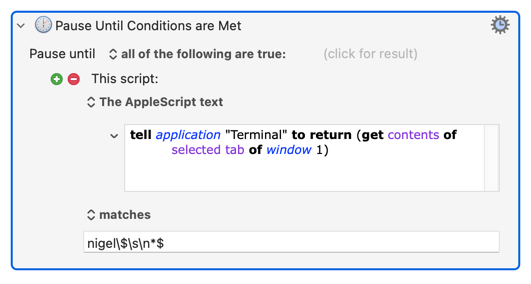
Or consider the following:
image

...which, since my Terminal prompt ends nigel$<space>, pauses the macro until terminal is ready for another command.

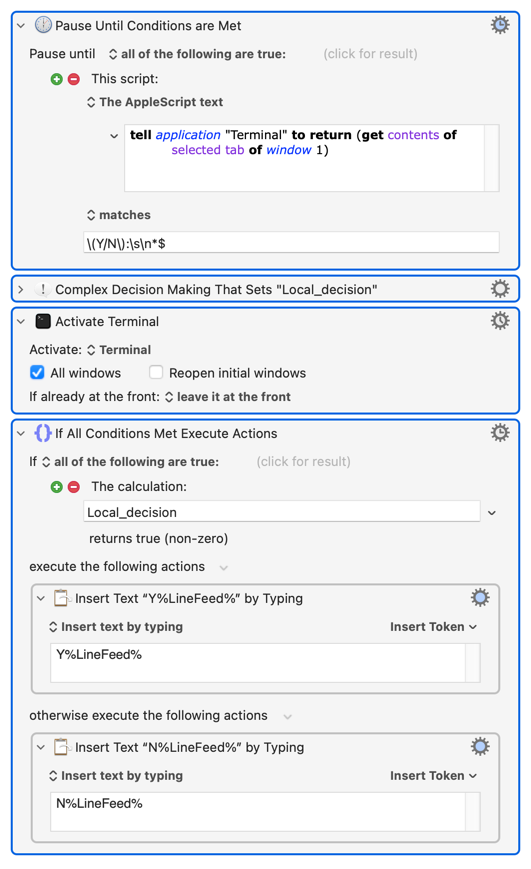
Or this:
image

...so that when your Terminal is does something long-winded then waits for user confirmation before continuing:

for i in $(seq 1 10); do echo $i;sleep 1;done
read -p "Continue? (Y/N): " unPause
# do more if answer was Y

...you can use a complex, multi-step, decision tree in your macro to proceed with the next step in Terminal.

And lo, we've rolled our own expect -- but with KM actions we know and love and with a lot more easily-accessible functionality.

And that's the point. Once you grok that you can use osascript and AS in your shell scripts as a link between Terminal and KM, the possibilities are endless... As well as running macros and getting/setting KM variables you can use process tokens to bring data from your web browser's frontmost page into your script, or the contents of a Past or Named KM Clipboard. Since you can create and execute "mini macros" on the fly with XML you can make "pretty prompts" for your shell scripts, drive other apps, do flow control in your shell script using image detection!

And since we're on flow control -- remember that "Semaphore Lock/Unlock" are only KM actions, like all the others. You can easily set a lock in your shell script, unlock it later, and have your KM macros pause/abort for the duration. You can also do it the other way round, locking in KM first, but since your shell script will pause in the middle of the AppleScript and wait for the lock to be released you'll probably have to play with AS with timeout.

I'm not dissing the mkfifo approach -- it's simple, elegant, and will be enough in many cases. But there's a whole host of other ways to achieve similar and/or more, especially for those of us more comfortable with KM actions than *nix IPC :wink:

Nicely done -- but don't forget to save and later restore default settings if you use this pattern in a "public" macro.
1 Like