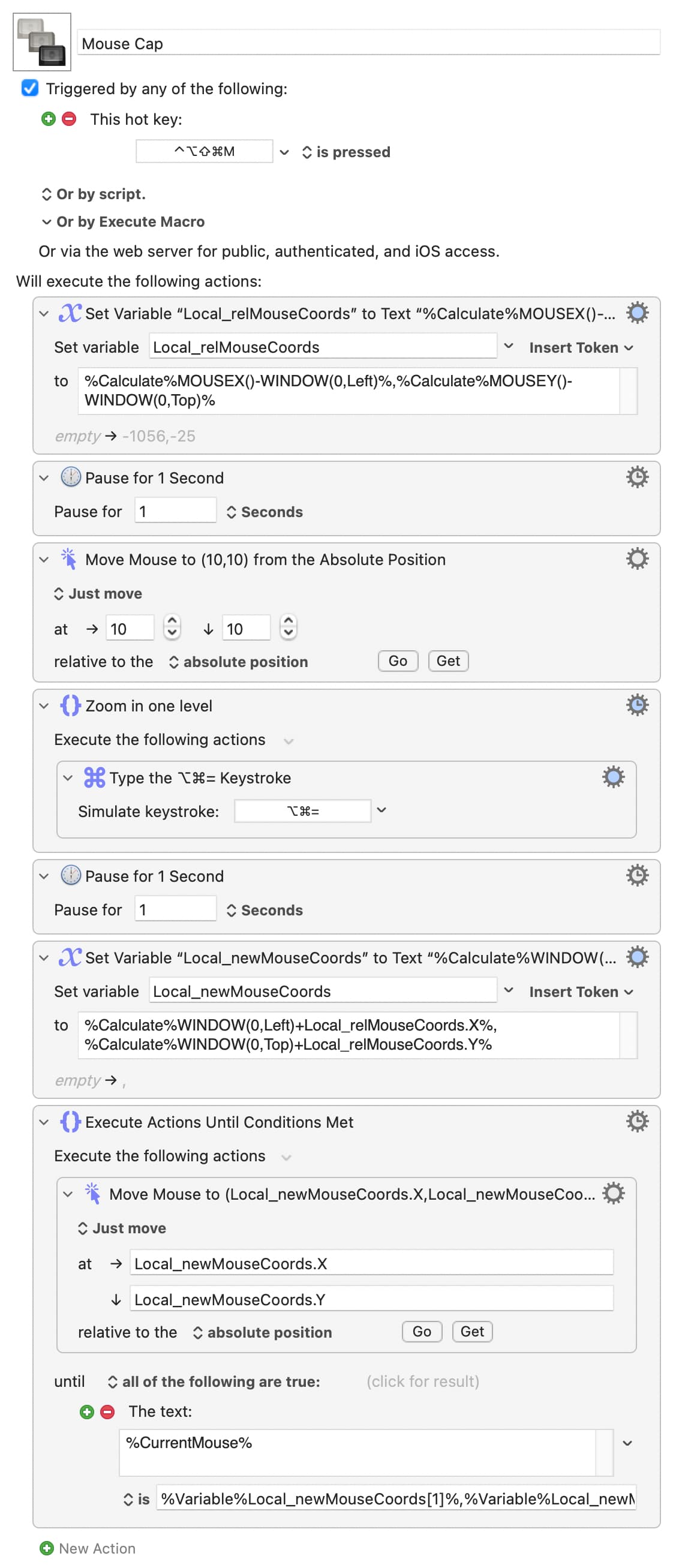
Screen Coordinates while zoomed in

I have a macro that, when triggered, records the coordinates of the Next & Previous Preset buttons on a VST’s window into a json file. I simply hover the mouse over the desired button and then trigger the macro. The coordinates I store are relative to the Top-Left corner of the VST window using the following calculation:
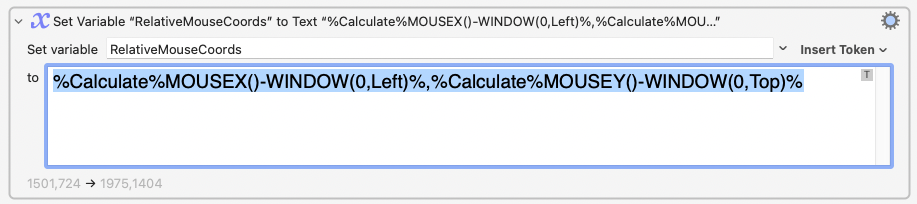
Due to my aging eyes, I often use the Ctrl + two-finger scroll gesture to zoom in on the display. Using the above calculation, the value of “RelativeMouseCoords” is the same regardless of zoom level. You can test this yourself by using KM’s Mouse Display (Cmd-5). Keep the mouse pointer at the same location, and change the display zoom and you will notice that the coordinates do not change.

Later, I use another macro that retrieves the coordinates from the json file and uses that to click the VST’s button. This has worked perfectly for years as long as the display’s zoom is at 100%.

But, if I have the display zoomed-in to say 137%, I can’t seem to get back to the same location. I’m using the following calculation to put the mouse at the correct coordinates:
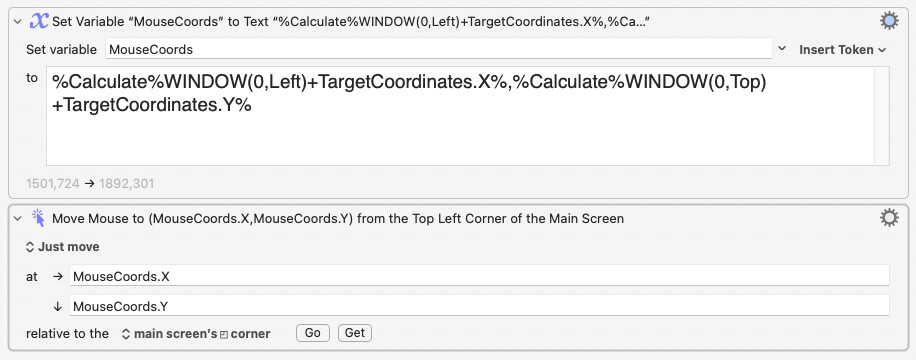
So, in summary, getting the mouse pointer’s coordinates works regardless of zoom level, but setting the coordinates does not. Any suggestions on how to fix this?
Where “VST” refers to an audio effect plug-in in some application like Ableton or Cubase ?

Why? Can you not use a Global variable for this?

For clarity -- does this break when you capture the pointer position at 100% view but try to set it at 137%? Or does it not work when both capture and reset are both done at 137% (or another, non-100% level, that's the same for both ops)?

It'll help if you can upload a minimal viable macros, including the writing to and reading from the JSON file if that's required, that demonstrate your problem. I can't replicate it here, but that probably means my macros aren't doing the same as yours...

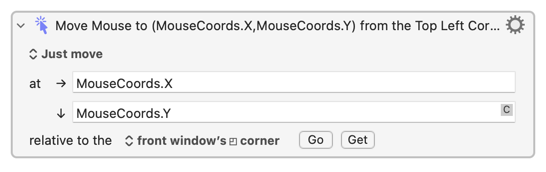
Unless there's a particular reason for the two-step method of your second screen shot, ditch the calculation and use TargetCoordinates directly, relative to the front window's corner:

That alone may fix things.

But this issue may be OS version related, since that's where the zoom is happening. What version of macOS are you on?

Yes, the OP is inded referring to an audio software plug-in that is in the VST format.

I can’t run a test right now, but I am not surprised to read that, since zooming in can often present small problems with software (for instance, text expansion gets a bit scrambled in Espanso).

If no other solution become available, perhaps your macro could be adjust such that it starts by restoring 100% zoom..?

It is certainly a useful gesture on the trackpad, but if it is needed very often, it might be time to think about one or more of the following: changing the screen resolution (buying a larger display monitor if necessary); changing your setup so that you are viewing the monitor from an optimal distance; and of course the other usual stuff about optical health.

Audio effect or instrument plugin in any given audio host application.

For data permanence. The json file stores the control coordinates and much more information for several hundred VST plugins based on the plugin’s name, manufacturer and version number. Training of each button control’s coordinates (which only takes a few keystrokes) is only done once when a new plugin is installed on the system. The json file makes sure all this data is retained through system restarts.

Example: When a Next Preset button is pressed on a MIDI controller, the KM macro determines which plugin currently has focus, retrieves the data for that particular VST from the json file, uses that to click on its Next Preset button, waits for the new preset to load and then uses OCR to capture the new preset’s name which is then passed back to the MIDI controller for display on the hardware. I was trying to simplify my post by not including irrelevant details. :slightly_smiling_face:

The first case. Getting coordinates gives consistent values regardless of zoom amount. Setting coordinates alway works at 100% but fails at any other zoom amount.

The two step method was done for debugging purposes. Assigning the value to a variable allowed me to display its value in real time using KM’s Value Inspector window.

Again, the “real” version of my macro is way more sophisticated: Many VST plugin windows can be resized but usually the coords of the controls I need to recall will remain at the same distance relative to one of the window’s four corners. So, when saving the coordinates for each control, it also stores which corner was used as a reference. When it comes time to click on the control later, the relative coords and reference corner data are used to calculate the actual screen coordinates. This allows it to work even if the window is resized.

Also, many plugins (especially those from U-he) require more “dwell” time between the mouse down and mouse up system messages in order to register it as an actual button click. Otherwise, the mouse click is ignored. Because of this, I “just move” to the desired location and then split the mouse click into separate mouse down & release actions with a 0.15s delay in between. Splitting it also allows for parameters to be passed to the macro to indicate which mouse button to use as well as simulate any combination of modifier keys while clicking. The macro also stores the original mouse location and restores it once it completes.

I’m running Sequoia 15.6.1 on a Mac Studio with m1 Ultra.

No can do. I do a lot of audio and photography work and I need all the screen real estate. Changing to a lower, non-native screen resolution: a) reduces graphic performance; and b) reduces the amount of audio timeline or photo image area that can be displayed at one time. The monitor is 32” and is color calibrated for photo work. Unfortunately, most Adobe apps do not allow you to change their GUI scaling so that elements such as menus and toolbars display larger without changing screen resolution. Because of this, the tools are sometimes microscopic on screen when displayed at the native 5K resolution.

1 Like

It sounds as though you have set up a powerful system there! So the “Next & Previous Preset buttons” are on the MIDI controller, I see.

Yes, that is often a challenge.[1]

I have a couple of ideas that I will be able to try out later if @Nige_S has not already come up with a solution.


  1. Sometimes it can be useful to hide extra details in footnotes. :slight_smile: ↩︎

KM Global variables are also persistent, and you could even store JSON text in one.

But yes, with that much structured data a JSON file is a good approach (which also allows you to version control, back up separately, hand-edit if needed, and so on).

And there did follow a whole screed, now deleted because I've suddenly managed to recreate the problem using Safari... I think that's because it depends on where you zoom at -- the "centre point" is the pointer position.

Here's a demo of OP's problem -- try it in Safari with a Forum post showing, the pointer hovering over the post's "Select if this reply solves the problem" button:

Note that you'll have to have "Use keyboard shortcuts to zoom" turned on in System Settings... -> Accessibility -> Zoom. Use ⌥⌘- to zoom out again afterwards.

Mouse Cap.kmmacros (6.1 KB)

Image

The final "Until" Action manages to put the pointer in the right place as far as KM is concerned, otherwise the loop would keep looping -- and if you take a ruler to the screen you should find it is back in the starting position. But the pointer position is now offset with respect to the magnified UI...

But if you watch very carefully you'll see a brief flicker of the "Select..." button at the end of the macro, indicating the pointer did go over it. And if you do the tiniest of nudges with mouse/trackpad, even in a "wrong" direction, the pointer is suddenly in the right place! (Unfortunately that physical action can't be replicated with a KM-simulated 1-pixel nudge...)

What you can do (limited testing) is zoom out to 100%, putting the pointer in the right place again, then zoom in again -- because the pointer is now over the target element the zoom is entered on that, keeping everything in the right relative position. By default ⌥⌘8 will toggle between the current and the 100% zoom levels, as in this version:

Mouse Cap (fixed?).kmmacros (7.0 KB)

If that doesn't work for you then, luckily, @kevinb has a couple of ideas :wink:

The pressure! :laughing:

Yes, it seems to me that solutions or workarounds using no other software than KM mean either changing OP’s workflow or else would be fiddly at best. So I have no good news from my experiments with KM...

Edit: Sorry, but returning to this I realise that the following is almost certainly not of any use in itself but I shall the text here just in case it provokes any useful ideas. See the edit below for further thoughts.

However, my first thought on this had been to check how BetterTouchTool would cope with restoring mouse pointer co-ordinates under different amounts of “zoom”, and I am pleased to find that it does not have the problem that KM does.

I think the least disruptive solution would be, if suitable, to have the macro call BTT’s actions “Save current mouse position” and “Restore saved mouse position” (via Applescript or your preferred triggering method).

I write “if suitable” because I have not turned my attention fully to how this might be properly integrated with a KM macro in a way that would meet @karlfranz’s needs and I do not have time to investigate further right now. However, it seems to me that this approach has some promise, no..?

Cons (if this approach is even of value): a BTT licence would be needed (beyond the trial period); basic knowledge of how to use BTT would be required (but help is readily available here since BTT is often used with KM).

Edit: The problem is that BTT can—I think—only store and recall absolute screen co-ordinates and I don’t think there is a way to make that useful for this problem... unless perhaps BTT’s move mouse to position action could be of use; that position can be set relative to the top-left corner of the active window. Could the co-ordinates be variables that use values sent by KM? Perhaps one of the BTT experts here may be able to offer ideas.

Haven’t tried this because the idea of having the screen toggle through zoom levels on each call to the macro would be unacceptable, if not seizure inducing. :slight_smile:

So, would it be safe to agree there is a bug with the way KM handles screen coordinates when using the “Move Mouse To…” action because it doesn’t account for world coordinates when the screen is zoomed-in? Obviously the MOUSEX() and MOUSEY() functions know how to handle this properly.

@peternlewis ?

Here is more useless information that you should skip—unless you are a BTT expert and see any merit in the idea of a solution based on telling BTT to move the mouse pointer (since KM gets it wrong when zoom is used).

To answer my own question…

It seems to me that it should be possible to pass the desired position of the mouse pointer from KM to BTT as follows. In this example, the KM variables local_mousex and local_mousey contain the co-ordinates.

tell application "BetterTouchTool"
	trigger_action "{
  BTTIsPureAction: 1,
  BTTPredefinedActionType: 153,
  BTTPredefinedActionName: 'Move Mouse To Position',
  BTTAdditionalActionData: '{\\\"BTTMouseMoveX\\\":%Variable%local_mousex%,\\\"BTTMouseMoveDuration\\\":0.20000000298023224,\\\"BTTMouseMoveY\\\":%Variable%local_mousey%}',
}"
end tell

This is the code produced by “copy Applescript to trigger action” in BTT, but with the default hard-coded value of 0 for x and yreplaced with KM variables local_mousex and local_mousey which contain the co-ordinates.

In practice, even with hard-coded values, the script gives the result “missing value”. So do my attempts at using other Applescript methods[1] to call actions and “named triggers” (macros) and BTT won’t respond to URL or Javascript triggers either. :laughing:[2]

So… I am disappointed to say that, even if there is any theoretical merit to this idea, I did not manage to make any progress with this line of research.

I leave this dead end exposed here just for the record… and to perhaps inspire a BTT expert to try!


  1. For what it maybe be worth: I see reports of similar problems from 2019, with examples, here: Getting missing value returned from Applescript - Configuration Help & General Discussion - BetterTouchTool Community. ↩︎

  2. I’ve wasted hours on this; I don’t know why I’m laughing! Maybe it’s hysteria. :wink: ↩︎

1 Like

Beats me, I don't know anything about how the Mac behaves when it is zoomed in.

I'm going to say "doubtful". Not because I'm a KM fanboi :wink: but because KM, famously, restricts itself to Apple's public APIs for these things. If KM's simply saying "Oi, Apple, put the pointer here" and it goes in the wrong place, is that KM's fault?

My guess is that there's a difference between Apple's getter and setter APIs. The getters are working to "world" coordinates and compensating for zoom level, the setters are working to screen coordinates with no compensation. And at one level that makes sense -- if the setters weren't constrained in that way you could put the pointer (or move windows, and so on) outside the visible screen area when zoomed in.

Do at least try it and see if it solves the problem. The demo is, perhaps, worst case with back-to-back zooms. From your description your actual use would be more "zoom out, move pointer, wait a beat, button down, wait a beat, button up, restore mouse, zoom in", which may make it more acceptable.

And try @kevinb's BTT workaround -- I would give it a go, but I've run out of devices to activate the BTT trial period on!

2 Likes

Yes indeed and in case anyone is in any doubt: I was not being disparaging when I wrote “KM gets it wrong when zoom is used” but presuming that there was no public API for this situation. That’s when I go off-road and try integration with another automation application… but fail anyway… but at least learn some things while doing so..!

Today I tried triggering BTT actions etc. on another Mac and was again just getting “missing value” results. Maybe OP might have more luck, or else it is probably an issue that could be resolved by contacting BTT’s developer or user community. I cannot spare time to do that myself currently.

If you are for any reason not happy with @Nige_S’s solution, I wonder whether you might be able to consider (depending of course upon factors such as ergonomics and available space) adding a smaller monitor running at a lower resolution (or an iPad, and use Sidecar) and arrange for audio plug-ins to always open in, or be automatically moved to, that second display.