I have been unable to get a macro to run past where the password is input. The error message says SecurityAgent is probably the culprit, and that I need to turn it off. How do you do that?
It is not clear what you mean.
What macro? Run past how? What specific error message?

Secure input prevents any other app from seeing keystrokes, so you need to find whatever is triggering secure input and close/quit it. The Keyboard Maestro menu bar icon might be useful, as it will try to find the offender:
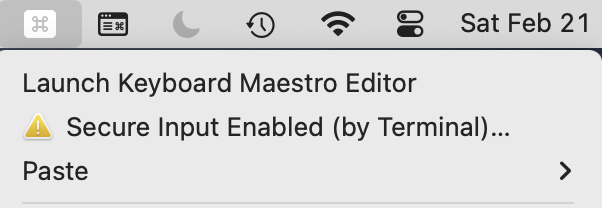
But more often than not, it won't be able to figure out what's causing the problem. You'll have to close browser windows and/or quit other apps, one at a time, until the message goes away.
There is no workaround for this, as this is an OS-level security feature.
-rob.
It looks like you are trying to do something with OnyX that requires authentication. If so, what? There's probably a way round it -- much of OnyX is a GUI to command line tools that can be run passwordless if you set up sudoers correctly.
Perhaps a better question is "Do you even need to run OnyX?". What problem(s) are you solving with it?
I'm confused as to what you mean by "stops and displays this message".
A running macro will not stop because Secure Input Mode is enabled. Secure Input Mode itself wont cause the macro to stop, it will just not let it read the keyboard status. So the macro might not be able to be triggered, or it might type the wrong thing (because it cannot sense the modifiers or the keys that are pressed), but it wont “stop”.
And that message will only be displayed if you click on one of the warnings Keyboard Maestro provides that Secure Input Mode is enabled.