I used the action, Move and Center Click on my second monitor, but it won’t click the window where the cursor moves to. How can I get the action to click the window where the cursor moves to?
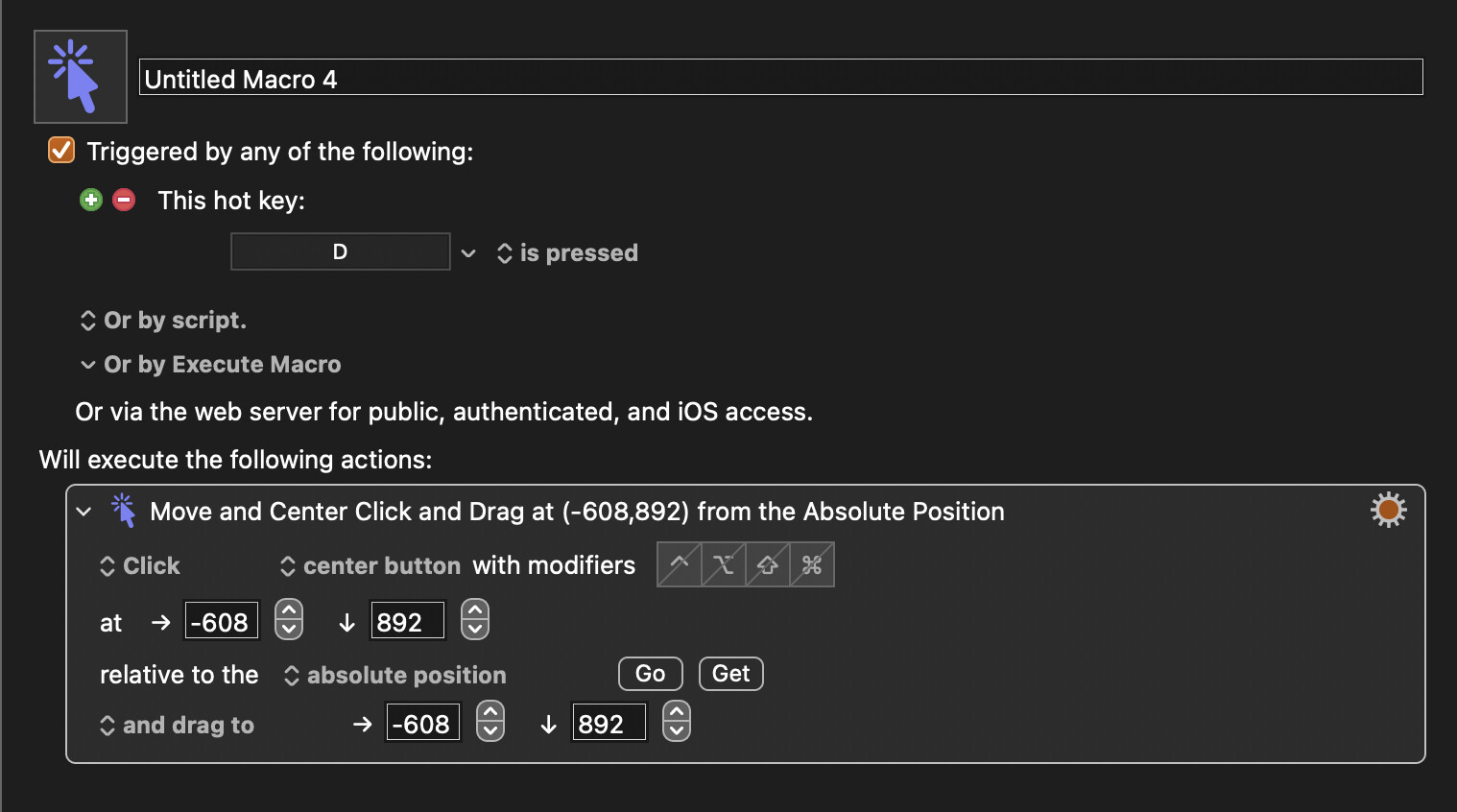
This action can work for some apps, but it can fail for some apps because some apps use non-standard ways of handling mouse input. The simplest way to fix this is usually to MOVE the mouse first, without clicking, then pause for 0.1 seconds, then use a second action to click and drag.
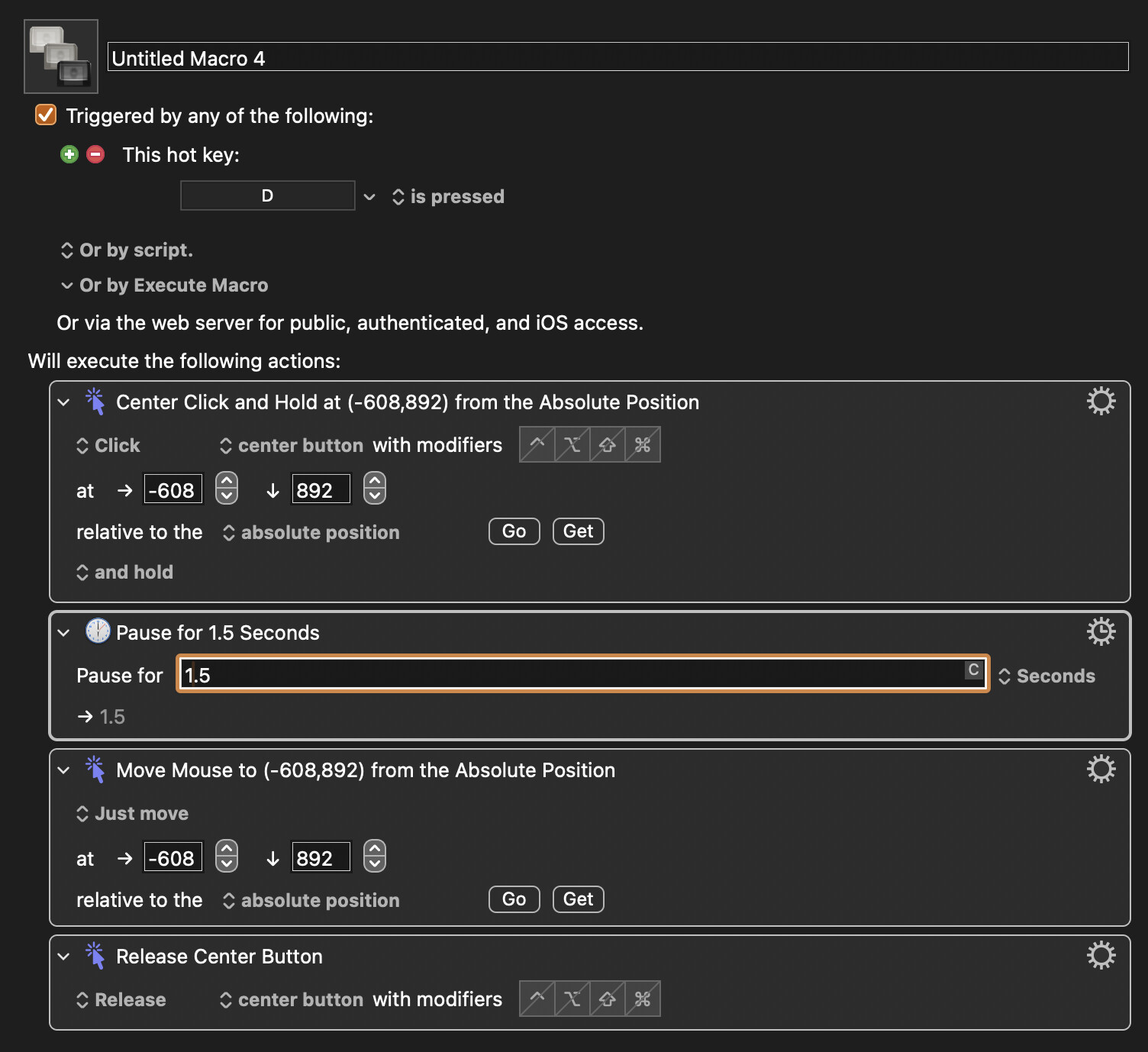
But if that doesn't work, it can sometimes fix it if you split the click and drag action into three actions. The first action would be click and HOLD, then the second action would be move, then the third action would be to release the button (with small pauses between.)
It might help if you tell us the name of the app so we can test for ourselves, if we own the app.
P.S. The title of the thread says "Select window..." but your action does a drag and drop. So I'm a little confused. One doesn't select windows using a drag and drop. I'm inferring what you really wanted was to drag and drop something inside a window, but I'm not certain.
Airy, thanks so much for your help. Here’s what I created, but unfortunately it doesn’t work. I’m trying click an Arc Browser window. I’m not trying to drop anything. I want the window to be selected, and then the last action it trigger, Command+R to Refresh the window. To do it manually, I have to drag the cursor over to the window, and then tap (click) it, and then Refresh it.
I’m trying to see if BetterTouchTool can do it.
Let me know if I set up the macro incorrectly.
If you are trying to make the Arc window frontmost, you don't need the mouse to do that. You can just use the Activate Application action and select your Arc app as the app to activate. It will look something like this: (but use your Arc name instead of Activity Monitor.)
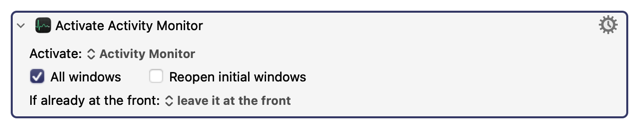
Once you do that, you can follow that action with the Type Key action to send the CMD+R key, like this:

Your draft macro has a couple of mistakes. For one, you are using negative numbers for your X coordinate. You don't need all those actions if you are just trying to activate the app. Just try my method with the two actions I just gave you. If my method above doesn't work, we can discuss how to do it with the mouse.
Thanks for the feedback. I should of pointed out that I’m usually working in an Arc window on my primary monitor, and I want to select another Arc window on my secondary monitor. Really apologize for the confusion.
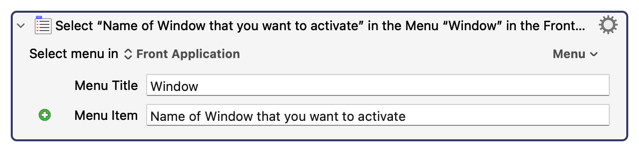
Oh. I didn't realize that. Even so, there are still better ways than using the mouse. You can select a window using the Menu system for any Mac app. Here's what it should probably look like:
But if you really want to use the mouse, that should work too.
I just realized that in a two-monitor Mac, which you said you have, negative numbers may work in the Click and Move Mouse actions. It just depends how you set up your monitors, and since I don't know how you set up your monitors, I can't tell if your actions (with negative numbers) will work or not.
While the mouse actions can be made to work, they require a lot of detail to work properly. So why not try my Select action, above, and see if that works. It probably will work, you just have to give the name of the window in that field.
Hey Airy, the Select Window action works, but I want to select the front-most window on the secondary monitor, not a specific named window because the window can often change as I work. Sorry to be such a pain on this one. You have been very helpful and patient with me. I appreciate that.
It’s just that when I’m working web design projects or similar tasks, I typically have a Preview window open on my secondary monitor that I click and Refresh as I edit and update in a web app on my primary monitor.
As for the reason for the negative number is that my secondary monitor is left side of my primary monitor. I used KM’s “Get” feature to get the coordinates of the secondary monitor.
Is there a specific reason you need to click the window with the centre mouse button? If not, changing it to left click might work. And maybe change to without dragging since you said you're not trying to drag anything.
Okay. Sometimes I fail to give the best advice because I don't know exactly what the requirements are. Therefore, back-and-forth support is often required. No big deal. I enjoy challenges.
That clarifies what you want, maybe a little bit. But I could guess wrong again. If you are alternating between two windows in the same app, then there may be a much better way than using the mouse. There seems to be a way to alternate between the last two windows using a shortcut. You see, there's an action in KM that looks like this:
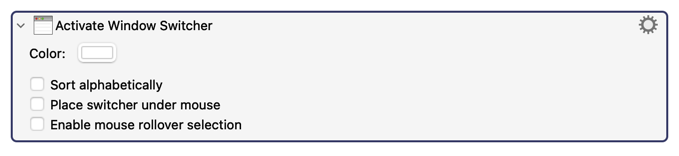
And this will let you choose between any window in any app. By default, this shows a window contains the images of apps and their open windows. I haven't used this tool before today, but I was able to trick it into switching to the "last active window". If you are switching between the app's main window, and the app's preview window, then there's a chance my solution will be what you need. My solution worked for me in the app that I tested it on, but since I don't know what app you are using, I can't test it for you. Here's my solution:
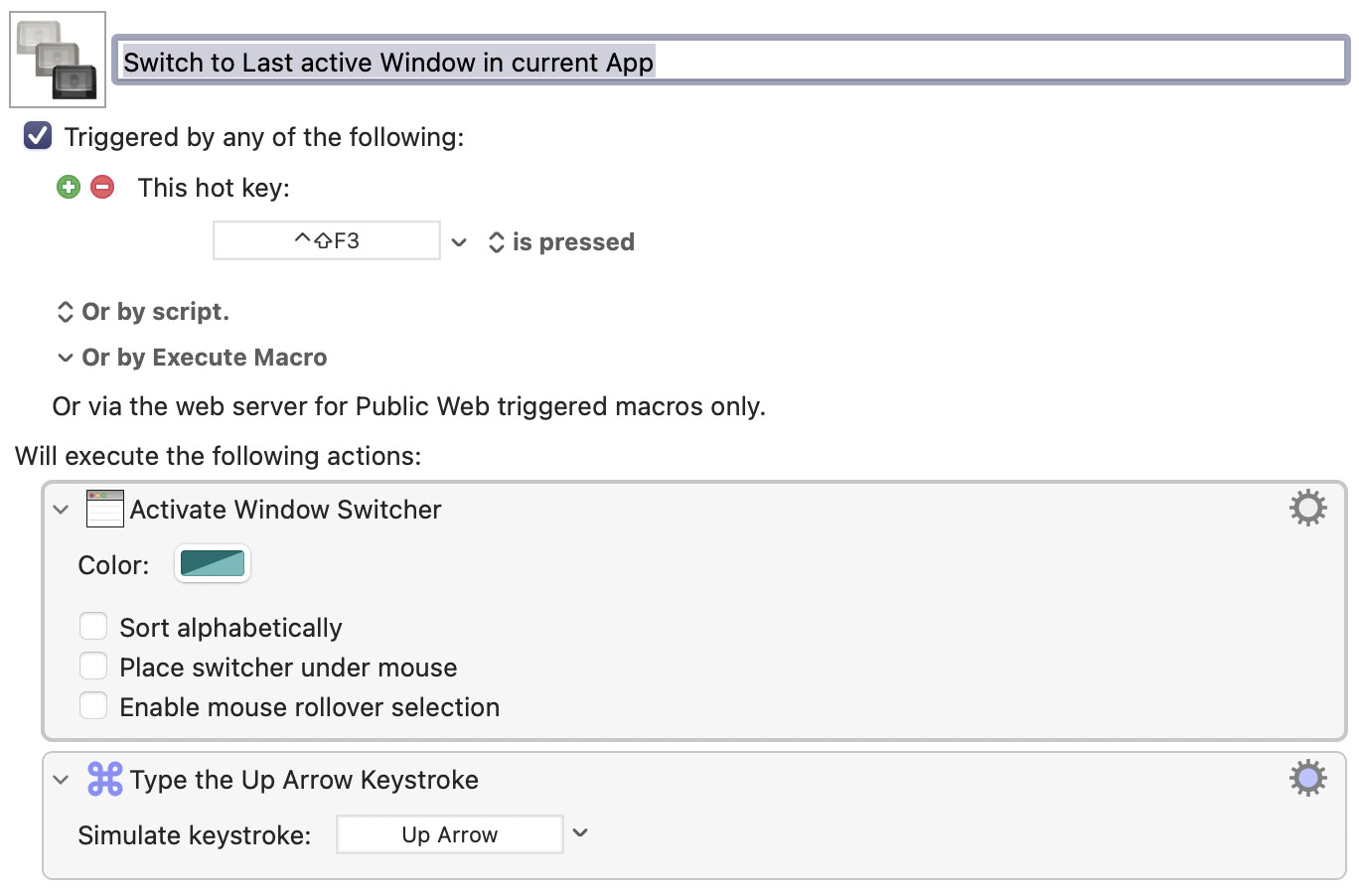
To be honest, this is so new to me, that I'm only 90% sure that I can explain why it works. But it works for me. I just can't guarantee it will work for you because I don't know what app you are using, nor am I sure that you are trying to switch between two windows. (And the fact that it works at all may be because this macro uses a very sneaky trick that may not work in all situations.)
In any case, using the mouse can also be made to work, but I want you to have a solution that's reliable and easy to use. Using the mouse could fail if, for example, the windows change position. That's why I'm trying to avoid the mouse.
2 Likes
Bingo! That works. Sort like the tab switcher in Arc, the KM Activate Switcher seems to switch between the most recent two windows. I’ll use a stringer trigger and BetterTouchTool finger gesture when I find myself switching back and forth between two windows.
Thank you, thank you for your help. Send me a link and I’ll buy you coffee. I bet you have awesome KM library of macros. I’ve been using KM for several years and I love these types of challenges. But I didn’t think of the window switcher. Great idea.
P.S., sorry for replying so later. I stepped away to go get dinner.
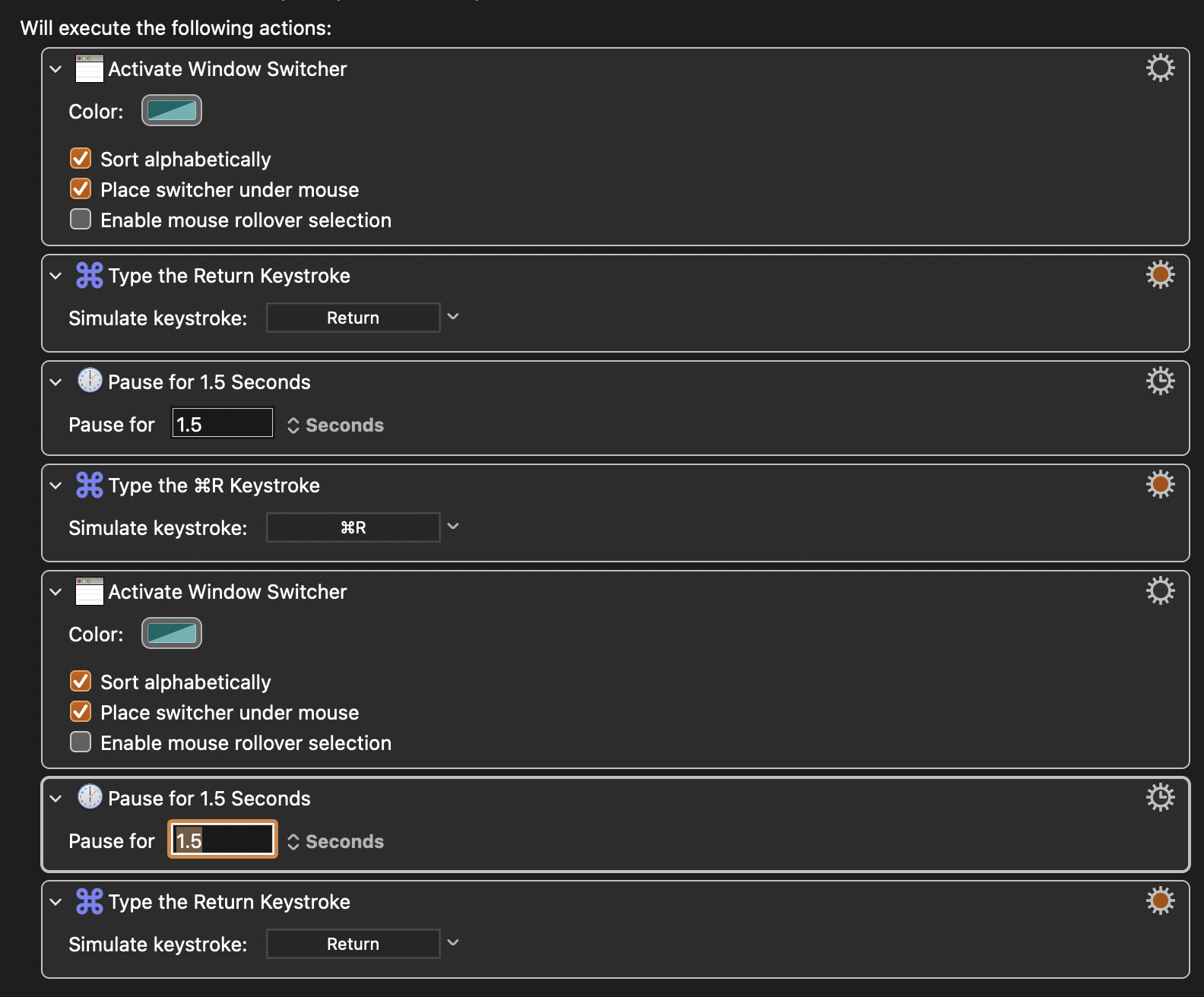
You didn't copy my macro exactly, but if you say it works, then there's nothing more for me to do.
It's not the KM Activate Switch action that does the switch. It was my macro that does it.
If I did that, I wouldn't feel good about helping you. I prefer to keep an anonymous profile.
I can do some cool stuff that I've never published.
Now we've a better idea of what you want to achieve...
Arc does respect System Settings's "Move focus to next window" shortcut (System Settings -> Keyboard -> Keyboard) which is ⌘` by default so, if the two windows you want to switch between are 1 and 2 in the stacking order, you can simply type
   ⌘`
   ⌘R
   ⌘`
...to refresh your preview and go back to your code window.
It's probably easier to not make a macro because you can easily not do the last ⌘` if you want to continue interacting with your now-refreshed web app.
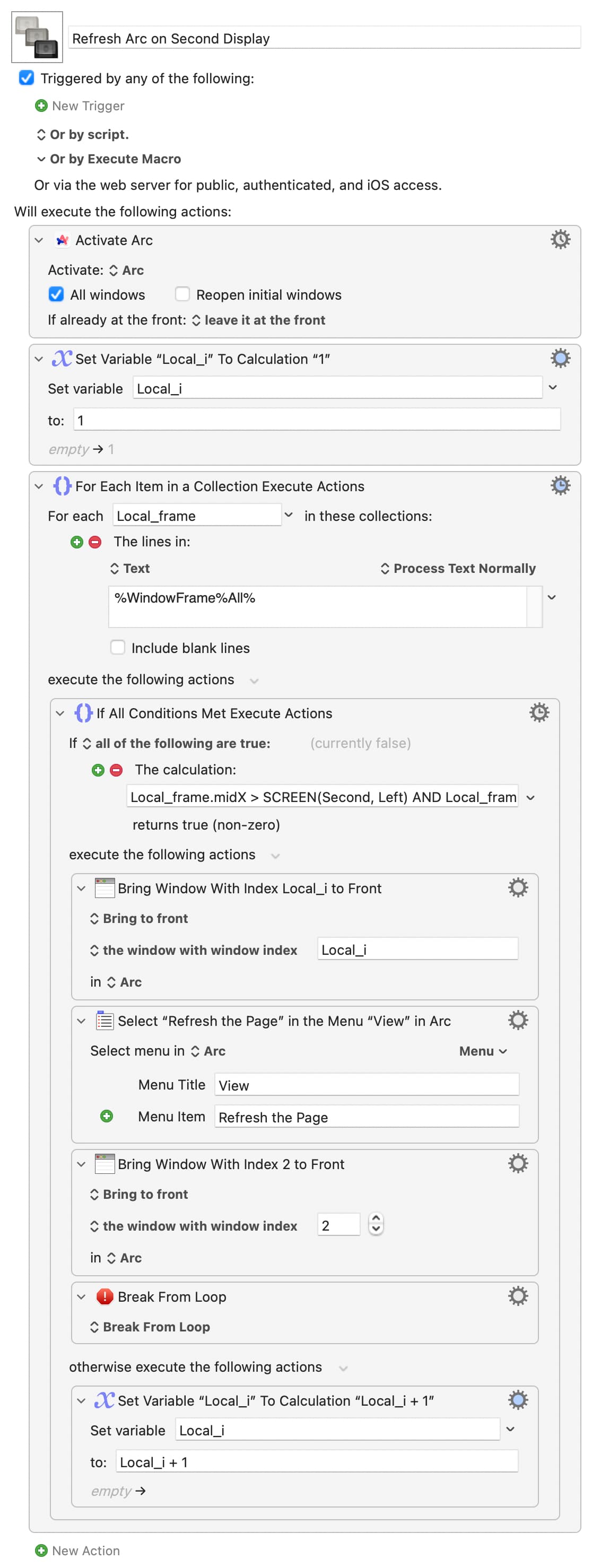
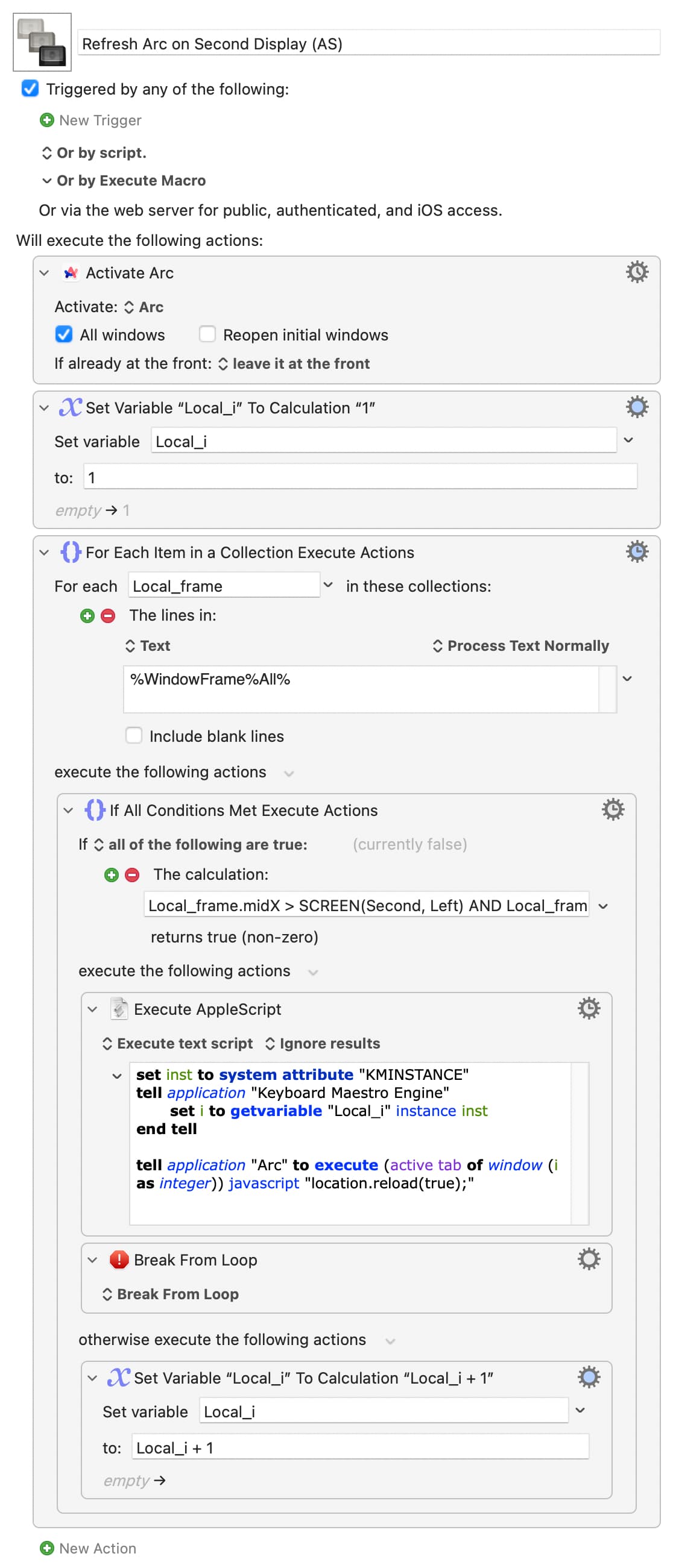
Otherwise, and especially if you have many windows and can't guarantee their order, when Arc is the active app you can get all its windows "frames" with the %WindowFrame%All% token (we'll avoid %WindowPosition% in case the top-left corner of your "coding" window ever sneaks onto your second display).
The windows are listed in front-to-back order. That's handy, because the first window in the list whose frame is on your left screen will be the window you want to activate. So you go through the list, counting as you go, and when you find the window whose mid-point is on your not-main display:
Local_frame.midX > SCREEN(Second, Left) AND Local_frame.midX < SCREEN(Second, Right) AND Local_frame.midY > SCREEN(Second, Top) AND Local_frame.midY < SCREEN(Second, Bottom)
...you activate and refresh it. So:
Refresh Arc on Second Display.kmmacros (7.1 KB)
Of course, Arc has some AppleScript support so you can use JavaScript to refresh the window without activating it, so without losing focus on your "coding" window. Same logic to find the target, just a different refresh method:
Hi Nige, thanks for your help. I located Settings shortcut, but for some reason it won’t trigger the “Move focus to next window” action. I also tried changing the shortcut, but it still doesn’t work. I’ll look into or download your other solutions. Appreciate your help.