This is probably by design, and not a bug, but the Set Next Engine Window action, which allows you to specify each of the four corners of the screen, only works accurately with the upper left corner. The other three corners are actually based on the midpoint of the screen. So you can't place the windows lower (or righter) than halfway.
I suppose that's a reasonable thing to do, since the action doesn't know what the size of the next Engine window will be, (although it could make that calculation later, when the window opens) but I would have preferred that I be allowed to use the other three corners of the screen.
I didn't find an existing thread about this, so I am mentioning it here today.
It allows you to set the top-left corner coordinates and, if using the "Move and size" option, the size and height of the window. You can easily position the next Engine window in the bottom-right quadrant of your screen if the window will fit.
Are you accidentally entering Right and Bottom coordinates into the width and height fields? That'll cause what you seem to be describing, as the Engine prioritises size and adjusts position to get the window to fit.
Otherwise, post a demo macro so people can check on their systems -- it might be a KM or OS version issue...
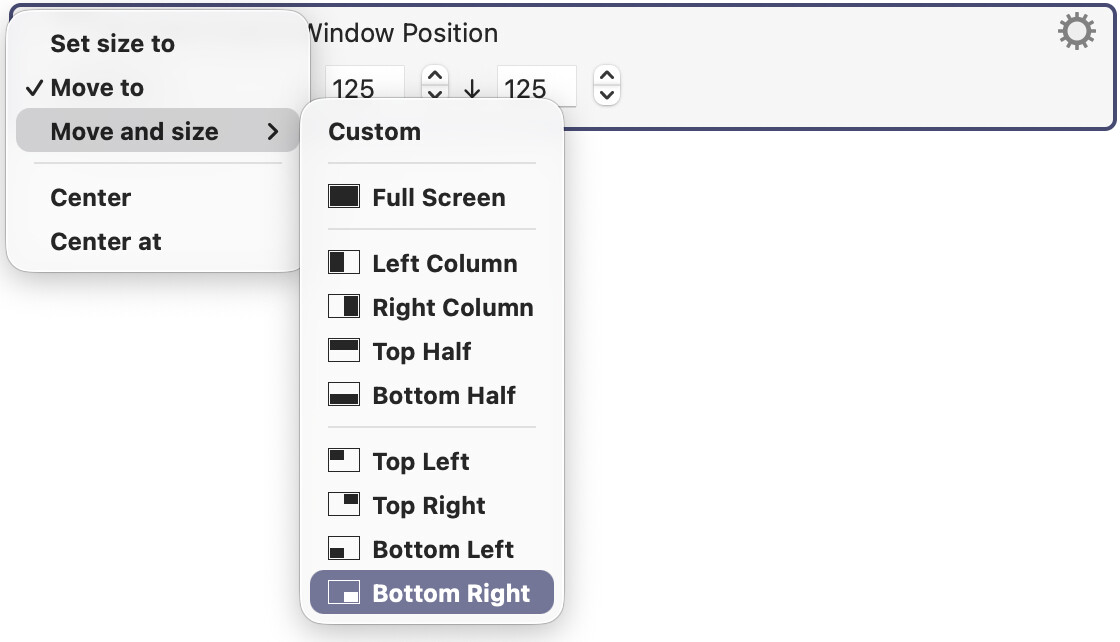
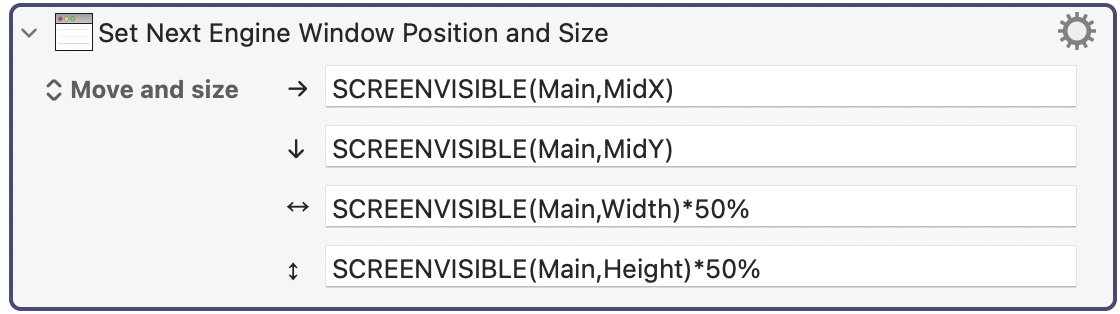
Okay, it isn't easy to screenshot because when you press the Screenshot key, the action's pop-up menu disappears. But I managed a way to solve that. Here is where the problem lies:
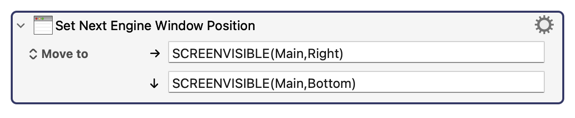
If you test this out, you will see that all three corners, other than the upper left corner, are using formulas that refer to the middle of the screen, not their respective corners.
And that worked, partially. For example, if I try to position the Prompt for User Input action this way, it works, but for the Display Progress action, it placed the action partly off the screen when I specify lower left, and completely off the screen if I specify lower right. And then it gets worse. Once it's off the screen completely, it resists all commands to place it back on the visible screen, even when using the Set Next Window action to try to move it back. You have to reboot the Engine before it reappears.
Someone should probably test the position of all the KM Engine windows for each of the four corners of the screen. But clearly the Display Progress action is not working as intended.
Display Progress isn't resizable -- all KM can do is position the top-left corner as requested, then throw up its hands in despair. If you want the dialog to snuggle into the corners of the (visible?) screen you'll have to do calculations referencing the width and height of the dialog.
You can get the dimensions by spawning the prompt you want then running
tell application "Keyboard Maestro Engine"
	set theRect to bounds of window 1
	return {(item 3 of theRect) - (item 1 of theRect), (item 4 of theRect) - (item 2 of theRect)}
end tell
I'm perplexed. When an action like "Display Progress Bar" can go offscreen, and then when it can't go back on screen without rebooting the Engine, both of those things to me are "not working as intended."
If it's working for you, then that's wonderful. Maybe you are using a different OS version or something. But if it's not working for me, I am forced to believe that it's not working as intended.
When you have to manually adjust the Set Next Engine window action for three of the four corners, I think that's not proof that the action is working as intended. You don't have to do that for other KM actions, so why do we have to do that for the Display Progress action? Why can the KM Engine handle cases where windows are resizable, but not handle simpler cases where windows are fixed in size?
The Action's presets work as intended -- they position the top-left corner of the dialog in the top-left corner of the quadrant. They can't expand the dialog to fill the quadrant because, unlike other windows, those dialogs aren't resizable.
I'm not going to waste any more time trying to guess what you might be doing that breaks things. Demo macro -- if it isn't reproducible it isn't a bug.
Move And Resize Bottom Right moves and resizes the window so it goes from the center of the screen to the bottom right corner of the screen.
If the window cannot be resized, then it will move so the top left corner is the center of the screen. The "Bottom Right" is a preset, not a concept, so for a fixed size window, it is not going to give the behaviour of moving the bottom right corner of the window to the bottom right corner of the screen.
As noted by @Nige_S, you can use the fixed size of the window to move it to that offset from the bottom right corner of the screen.
The issue is not that you cannot move the window back on to the screen, the issue is that if the Display Progress window is already displayed it will not move when you use the Display Progress action because it is already open. And thus you can endlessly run the Set Next Engine Window Position/Display Progress action sequence and nothing will happen.
If you run the Display Progress action with 100, then the window will close, and then if you run the sequence Set Next Engine Window Position/Display Progress (less than 100), the window will appear where specified. No restarting of the Keyboard Maestro Engine is necessary. But the window will need to be closed before it can be opened, and it needs to be opened for the Set Next Engine Window Position to have any affect on the location.
You can also use AppleScript to reposition the window:
tell application "Keyboard Maestro Engine"
	set theWindow to item 1 of (get every window whose name contains "Progress")
	set theBounds to bounds of theWindow
	set bounds of theWindow to {100, 100, (100 + (item 3 of theBounds) - (item 1 of theBounds)), (100 + (item 4 of theBounds) - (item 2 of theBounds))}
end tell
Change the name filter to suit. The calculation is there because you can change the size of the non-resizable window when setting its bounds -- but we don't want to.
If you prefer to use KM's "Manipulate a Window" Action, you can't use %LastWindowID% because (I think) that is only available within an executing instance. But you can get the ID using AS -- this time we're targeting the first window:

 -- but we don't want to.