Set Windows in Parallels to the Same Mode as macOS, Dark or Light

If, like me, you need to run a Windows virtual machine in Parallels (because MSFT purposely cripples Office for macOS), and would like to automatically set Windows to the same mode as macOS, dark or light, when macOS switches mode, then the below macro will be a interest.

It sets Windows to macOS' mode whenever i) macOS changes appearance or ii) Windows starts.

The one gap is resuming a suspended Windows virtual machine as explained in the comments. While this is possible, I have not built it because I never "Pause and Resume" my virtual machine (preferring to shut it down and restart it), I would be happy to build it should there be a desire.

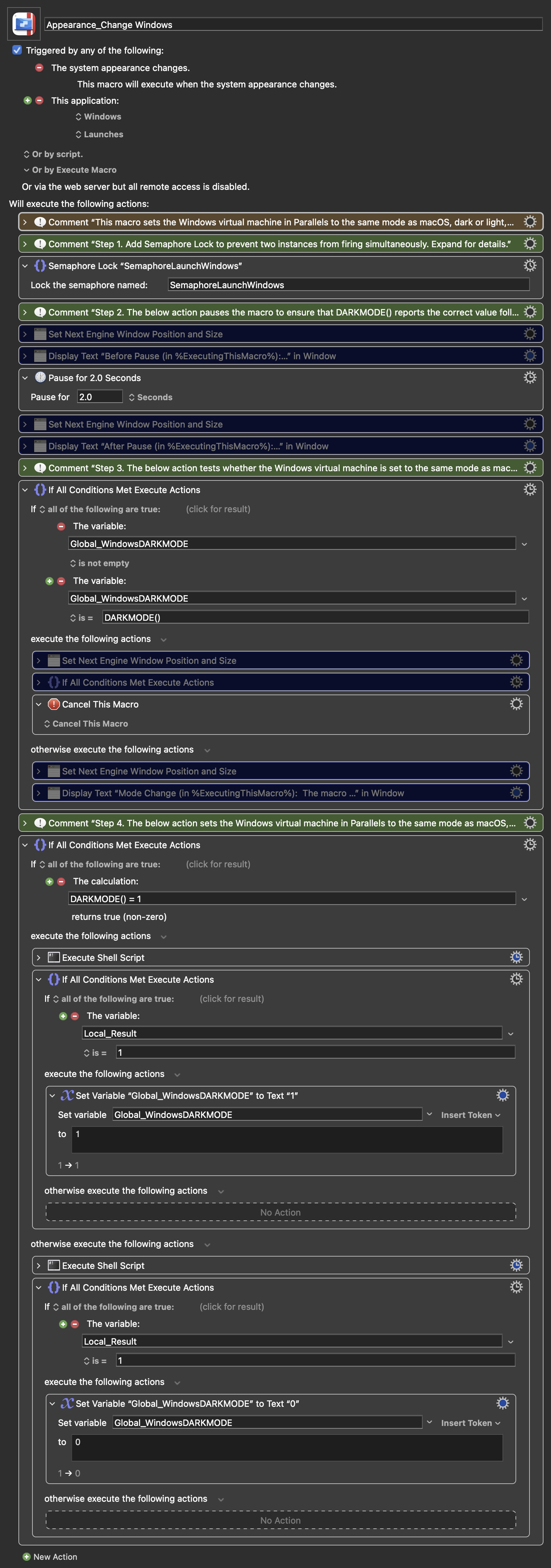
NOTE: The purple-coloured actions are for debug and testing purposes only and can be removed.

Image

Appearance_Change Windows.kmmacros (56.6 KB)

I hope this is helpful.

Update 1: Revised macro posted in the original posting above.

  1. Why the update: two switches, one flash.

Windows keeps two separate dark/light settings: AppsUseLightTheme (apps) and SystemUsesLightTheme (Windows itself, such as the taskbar and Start menu). Both must be flipped for a complete mode change. Even then, windows that are already open, such as File Explorer, only partly repaint until Windows is told the theme has changed, so the macro now also sends the WM_SETTINGCHANGE "ImmersiveColorSet" broadcast.

All three steps now run in a single PowerShell call inside the VM, instead of separate commands that each flashed a console window. The result is one brief PowerShell flash per run. As far as I can find, that is the minimum when running as the logged-in Windows user: -WindowStyle Hidden still flashes, and conhost --headless hid the window but made no change while still reporting success.

Other changes: the macro checks that the VM is running, retries while Windows is still booting, and uses a Semaphore Lock because the "Windows launches" trigger fires twice (VM.app starts two helper processes).

  1. Dictation (F5) can trigger a false run (a macOS bug).

On macOS 27, pressing F5 to start Dictation sometimes makes macOS send every running app a "System appearance change" about half a second later, even though the appearance has not changed. The system log shows loginwindow, SystemUIServer, Control Center, Safari and Keyboard Maestro Engine all logging it at the same moment, with identical appearance values before and after. Keyboard Maestro is just reacting to it, so the Appearance Changed trigger fires.

In this macro the effect is harmless: it rewrites the mode Windows already has, with its usual single PowerShell flash. I tried filtering it out, but both options were worse (a USB Device Key trigger on F5 stopped Dictation from starting, and a global variable would add state for a cosmetic issue), so I have left it and documented it in the macro's comments.

Resuming a suspended VM is still not handled, as before; happy to add it if anyone needs it.

Keyboard Maestro 11.1.1 / macOS 27.0.1
Update 2: revised macro now included in the OP!!

  1. False Dictation (F5) runs are now skipped, with no PowerShell flash.
    The macro keeps a global variable, Global_WindowsDARKMODE, holding the mode Windows actually has (1 dark, 0 light). Before contacting Windows, it compares that with DARKMODE(); if they match, there is nothing to do and the run is cancelled. That catches the macOS bug where pressing F5 sometimes broadcasts an appearance change without any change.

  2. The variable is only updated when Windows really changed.
    Each shell script now prints 1 if Windows accepted the change and 0 if not (VM not running, or it never accepted the command). The variable is set only on 1. So if macOS switches while Windows is shut down, the variable still reflects Windows' real mode, and the next Windows launch applies the correct one. Side benefits: starting Windows when it already matches macOS no longer flashes, and after resuming a suspended VM that is out of step, the next appearance trigger corrects it.

  3. Note on speed: a run normally takes about a second. Once, Windows got into a state where any command run in the logged-in session (prlctl exec --current-user) took 12 to 55 seconds, with the PowerShell panel visible throughout; restarting Windows cleared it. If switching becomes slow, restart Windows.

Keyboard Maestro 11.1.1 / macOS 27.0.1

I'd greatly appreciate if you could elaborate a little on this topic: what's worse in Office for macOS? What are you missing?

Thanks!

As to the difference they essentially fall into two categories:

  1. Configurability which impacts (at least for me) workflow. The Windows version is far more configurable in terms of the quick access toolbar, the ability to add VBA macros to the toolbar (more on this below), and the like. The differences are numerous.

  2. Functionality which impacts (at least for me) productivity and workflow. The Windows version is far more robust through its support of power query and VBA (and more), which is critical in my day-to-day work in the financial / modelling world. The Windows version - through power query [think of it as a very powerful data scrubber] and VBA - enables users to do things that simply cannot be done in the macOS version (which is most unfortunate as I greatly prefer macOS over Windows).

It is my understanding that Microsoft purposely differentiates the two versions to drive people to Windows. This is unfortunate as it means i) I need to run Parallels (or other VM software) in order to run the Windows version of Office 365 and ii) it is very unlikely that Microsoft will ever give the macOS version of Office 365 similar capabilities.

It is also worth noting that the configurability and functionality differences, which I note above, run through the entire suite of Office 365 products and are not limited to just Excel.

Should you like more detail on the differences or specific examples, please let me know.

1 Like

Update 3: the macro in the first post has been updated. Changes since Update 2, all tested over the past week:

  1. False Dictation (F5) runs are now skipped, with no PowerShell flash.
    The macro keeps a global variable, Global_WindowsDARKMODE, holding the mode Windows actually has (1 dark, 0 light). Before contacting Windows it compares that with DARKMODE(); if they match, there is nothing to do and the run is cancelled. This also skips Windows launches where Windows is already in the right mode.

  2. The variable is only updated when Windows really changed.
    Each shell script prints 1 if Windows accepted the change and 0 if not (VM not running, or it never accepted the command), and the variable is set only on 1. So if macOS switches while Windows is shut down or suspended, the variable still reflects Windows' real mode, and the next launch or resume applies the correct one.

  3. A 2-second pause before the check.
    DARKMODE() can briefly report the old mode when the Appearance Changed trigger fires. On two sunset Auto switches (Light to Dark), DARKMODE() still read Light at the moment the trigger fired, even though windows were already being drawn Dark; two seconds later it read Dark. No lag was seen on sunrise switches. Without the pause, those real changes would have been skipped as "no change".

  4. What causes the false F5 trigger.
    It happens only when DictationIM, the background program behind Dictation, has to start fresh. macOS shuts it down after roughly 2 to 5 minutes idle (measured; not a fixed time), and the next Dictation relaunches it. In the system log, every running app logs "System appearance change" about 2 ms after the freshly launched DictationIM finishes setting up, with identical appearance values before and after. If DictationIM is already running, there is no broadcast. Why its relaunch produces the broadcast is inside macOS; it looks like a macOS bug.

  5. Suspend and Pause.

    • Suspend is covered: suspending closes the VM's app (its Dock icon disappears) and resuming starts it again, so the "Windows launches" trigger fires and Windows is corrected.
    • Pause is not covered: the VM's app stays open, so un-pausing is not a launch. Windows catches up at the next trigger. An "activates" trigger would cover it, but I left it out because it would run the macro every time a Windows window comes to the front, for a case I rarely use.
  6. Notes:

    • Outlook (classic) may leave the message in the Reading Pane in the old colours until it redraws (select another message); the rest of Outlook switches immediately.
    • A run normally takes about a second after the pause. Once, Windows got into a state where any command run in the logged-in session (prlctl exec --current-user) took 12 to 55 seconds; restarting Windows cleared it.
    • The macro includes purple debug actions, disabled by default, that display what each run sees and why it was cancelled; the macro's main comment (item 11) explains how to use them.

Keyboard Maestro 11.1.1 / macOS 27.0.1