Slow / unordered "type the [x] keystroke" execution

i have created a series of macros to allow me to use one letter keystrokes in apple mail to allow fast triage of the inbox. f for forward, r for reply, d for delete, a for archive etc.

i’m running into an issue which i wonder if anyone else has experience with. with the target applciation when i type quickly, the “typed keystroke” lands out of order from my typing. so if i type “fo” i may end up “fo” but if i type quickly i am getting “of”. this does NOT happen outside of apple mail which is the application targeted by my macro group.

these single key shortcuts are the only marcos i’ve created so far, so all other settings and environment config is default.

an example:

triggered by any of the following when Mail is at front
the hot key: F is pressed
will execute the following actions if ALL condtions are met
a menu item with this name “Delete” is enabled
execute the follownig actions
select “Forward” in the Menu “Message” in Mail
otherwise execute the following actions
type the F keystroke

i have not applied any config to the type f keystore (so it’s the default up and down) and i have not set any sort of keystroke dealay in this or any other macro.

all keys that are not part of any macro land as pressed in mail.

also, i have a special macro for “m” for move which does NOT have any problems with typing the “m” keystroke in order - that marco is as follows:

triggered by any of the following when Mail is at front
the hot key: M is pressed
will execute the following actions if ALL condtions are met
a menu item with this name “Delete” is enabled
execute the follownig actions
show palette of marcros (macro group)
otherwise execute the following actions
type the M keystroke

finally combinations that involve two macros such as “fa” for “fast” do NOT land out of order. it seems to be specific to some mapped macro trigger keys followed by a normal (unmapped) key press. “fi” will yield “if” and “ro” will yeild “or”.

if i disable the marcro group, all is well.

some keys don’t have this problem, if i change the trigger from “f” to “q” and leave the rest of the macro the same, all is well. (“qo” always lands in order.)

if i target another application at the macro group level, i still have the same general issue but the problem keys change - for instance in BBEdit, “qo” will land as “oq”.

thanks for any insight.
The simple solution is to stop using alphabetic characters as hotkeys. Perhaps use CTRL-keys instead. Another solution would be to type slower. Another solution would be to use a faster Mac. Another solution is to create a macro for each key on your keyboard, and put a “Semaphore Lock (Name=”Keyboard”)” action at the top of each macro. This way each macro would have to finish before your next key inserts a new keystroke. And perhaps other people can come up with other solutions.

hi, thank you for taking the time to read the post and offer some ideas. indeed, typing slower works and using modifier keys works. my goal was to have the most rapid keystroke possible as i enjoy this functionality in other apps - but those were designed specifically for it. i am using a macbook pro m4max so i don’t think speed is the issue. since it’s key dependent i imagine there is some kind of conflict resolution that is happening. i will investigate the idea of mapping all keys when inside mac os mail - that sounds promising. i also figured i’d post this just any case anyone else tried it as i didnt find any related content doing some google searches - other than references to people who had set delays.

You have to understand the Keyboard Maestro Event Queue.

When keys are typed (by you or by Keyboard Maestro) they go into an event queue.

When they come out of that queue, they are processed (by the system, and then by the application or Keyboard Maestro).

So when a key comes out of the event queue the system processes it, and decides it is a hot key, and swallows the keystroke and tells Keyboard Maestro. But if the second key is already in the event queue, it is going to be processed next regardless of anything you or Keyboard Maestro do.

So a macro like you describe will not work reliably - any macro that swallows a key and then retypes it is going to have this sort of issue.

If you create a macro for each possible key on your keyboard that you might type (not just alphanumeric characters), and insert a Semaphore Lock action at the top of the macro (each action with the exact same name; I use “Keyboard” for this purpose) I think you will find my solution will work well. Each of these macros will be simple, fast and reliable. Of course, I didn’t actually test this, I’m just basing my advice on my experience.

thank you @peternlewis that helped me think to find the event log and see what order KM at least sees the keys, which was the right order, but indeed, the system is doing its own thing. i imagine the reason for the sometimes working sometimes not has to do with what mail’s current context is. anyway, i tried switching from hot keys to typed strings as the trigger which sort of helped but mail uses arbitrary letters as search input so it would search the inbox then run my macro resulting in the action on the wrong item though the typed ordering was consistent again. i guess if i really wanted to keep sleuthing i’d learn more about how hot keys work.

thank you @DocOck i did a quick experiment putting locks around macros for the f r o m keys (i created a hot key map for “o” just to trap it and updated the others) and they now come out in the correct order regardless of typing speed or run the expected action when there is mail available to triage. i will have to play with it more and implement the other keys to make sure there are no other strange interactions as far as mail goes but as far as getting they keys to come out in the right order this appears to be the solution.

It really isn't -- it's doing what you are telling it to!

Anything you do on a computer takes a finite amount of time, even if that time is very, very, small. A KM macros "ticks" at one Action every 1ms or until the Action completes, whichever is longer. And checking a menu item's state is a (relatively) slow process.

So, in very abstract terms, typing fi when f triggers a macro and i doesn't will go go something like:

ms     action                                                                character buffer
1     You type an "f"
      -- that's a hot key so KM "swallows" it and the macro is triggered         <empty>
2     Your "f" macro initialises and starts to execute
3     The "If" Action is executed, the Condition found, the OS asked
          about the state of *all* the current menu items
4     -- waiting for the OS to respond
5     --- still waiting
6     You type an "i"                                                               i
      -- that isn't a hot key so it passes straight to the System,
      --which puts it in the buffer
7     ---- macro is still waiting for an answer about menu items
8     The OS replies, KM finds there's no enabled "Delete" menu item,
          the "If" Action proceeds to the "otherwise" block
9     The "otherwise" block executes
10    KM sends a simulate "f" keypress to the OS, which appends it to the buffer    if
11    Macro exits

And you can see how things end up "out of order".

Speeding up your Mac generally won't help -- you'll get a faster response to your menu items query, but KM Actions will still be limited to the "at least 1ms" tick rate.

You can hot key all the characters, as @DocOck suggests, putting every character you type through the same, time consuming, processing. But every macro must have similar steps else you could process a later-typed character faster than an earlier and still go "out of order".

A bigger problem is that your typing can easily out-pace KM's processing! If you are using a Semaphore to maintain an orderly queue and trigger macros faster than they can execute you'll soon reach KM's default limit of 50 simultaneously-executing instances -- the Engine will force-reload and you'll lose everything still in the old queue.

All you're doing is adding more and more hoops to jump through to reduce the frequency of errors -- but there will always be some errors.

Better, if you can, to use modified keystrokes that won't interfere with "normal" text entry.

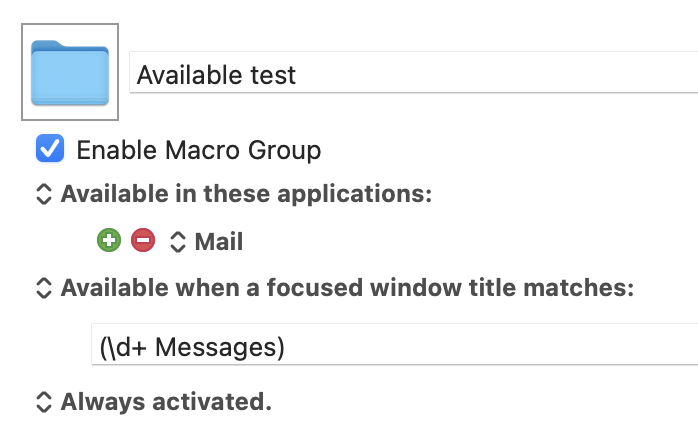
But if you simply must use unmodified keystrokes as hot key triggers, control their enabled/available state at the Macro Group level or manually. You could, for example, only make the macros available when Mail is frontmost and the front window title includes a message count (a good indicator that you are working in a mail folder and not a reply or new email):

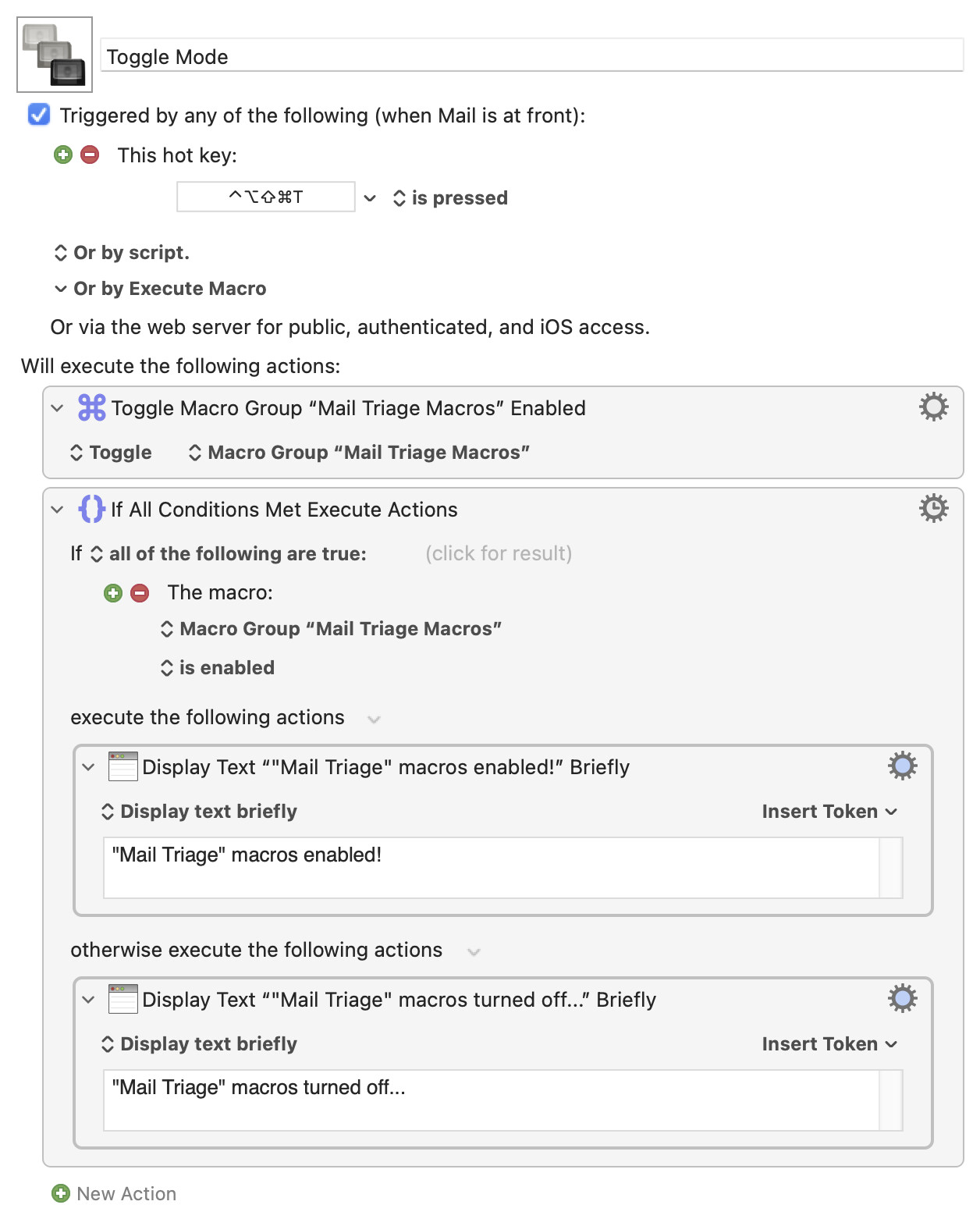
Or manually switch between "triage" and "writing" modes with a macro that toggles the Macro Group's enabled status:

When you control availability like that the keystrokes only get swallowed/processed by KM in the context you want them to be hot keys -- the rest of the time they are just normal keystrokes and you won't have any ordering problems.

Thanks for mentioning that. You are smarter than me.

I use “single key triggers” in two apps. For almost every letter.

The only reliable way (that I've found) to do this is to reverse the keyboard's normal behavior.

That means all letters are typed when the key is released (a quick down/up). Something else (than the letter) is triggered when the key is held down longer.

However, this approach has the drawback of causing a slight delay in normal typing. You can get used to it if you find the benefits of single-key triggers very helpful, since they don’t require any modifiers.

This will still be extremely fragile.

Even with a hot key for every key, Keyboard Maestro has to simulate the keys, which means it disables the hot key when it simulates the key and leaves it disabled for a short time.

So you are likely to still get failures when multiple identical characters are pressed. For example if you map x to y and y to z, and you type "x, y" both go into the queue, then the 'x' macro fires and it typed 'y', but it disables the second macro to ensure the 'y' gets through, so now the event queue is "y, y", and then neither of them trigger the second macro.

The Semaphore Lock action will not affect this since it does not control, the event queue or the typing.

1 Like

Wow. I did not know that. Sorry. Caveat Emptor. At least I tried to come up with some ideas.

1 Like

just a quick note to say thanks to all who continued to contribute. i am continuing to try out various things, mostly because i want to learn. the semaphore lock actually works quite well but there are some lingering interactions to resolve. if i manage to have total success i’ll report back and if not, i’ll move to a safer method. BTW one of the issues with the widow title check (which was overall a nice tip, is that it works great for the general app vs compose or reply windows but not when using global search in the main window - perhaps i can check that focus state too somehow).

edit: with search results the title is results instead of messages but i guess i can find a more generic regex for this case.

I think (limited testing) it will always be "Found " then one or more numbers then " results". So the regex would be something like:

(\d+ messages|Found \d+ results)

The window title contains (one or more numbers followed by a space followed by 'messages') OR ('Found' followed by a space followed by one or more numbers followed by a space followed by 'results')