I tried using KM Typed String Triggers in the past and eventually decided to drop the idea. If the typed string trigger is followed by a delete, the outcome can potentially be disastrous. After a few mishaps, I tried typed string triggers without the delete key, and had problems with inserting the typed string trigger in whatever text I was working in at the time.
With Mac OS Tahoe, it’s possible to use so called quick keys (typing a series of letters, like "sem" for send email). If you open Spotlight, ⌘ Spacebar→ press ⌘3, you are in the action category which allows you to trigger any Mac OS Shortcut configured as a quick key in the Shortcut’s settings. The Mac OS shortcut triggers a KM macro by using a single action: a shell script as follows
osascript -e 'tell application "Keyboard Maestro Engine" to do script "0EBFBB01-D28F-4414-B776-FC3F7719BD58"'
It sounds confusing and tedious but that because I lack good writing skills.
Basically, you write a KM macro →copy the UUID →create a Mac OS Shortcut containing a single action (the script above) → replace the UUID in the shell script→ configure the shortcut (click on "i") by checking the quick action box→ in spotlight assign a quick keys of any number of letters to that Spotlight action.
Now I can trigger any KM macro by simply opening Spotlight → typing the sequence of letters corresponding to the quick key →the KM macro triggers.
Obivously the macro must be enabled and active.
An alternative which @peternlewis could perhaps consider is creating another type of typed string trigger which only triggers within a search box like box.
If you want to avoid problems caused by deleting characters, something like this might help.
Am I mistaken, or do you also use BTT? If so, BTT recognizes the field where the cursor is located. This means that triggers can be set up to only work if the condition “cursor in field x” is met.
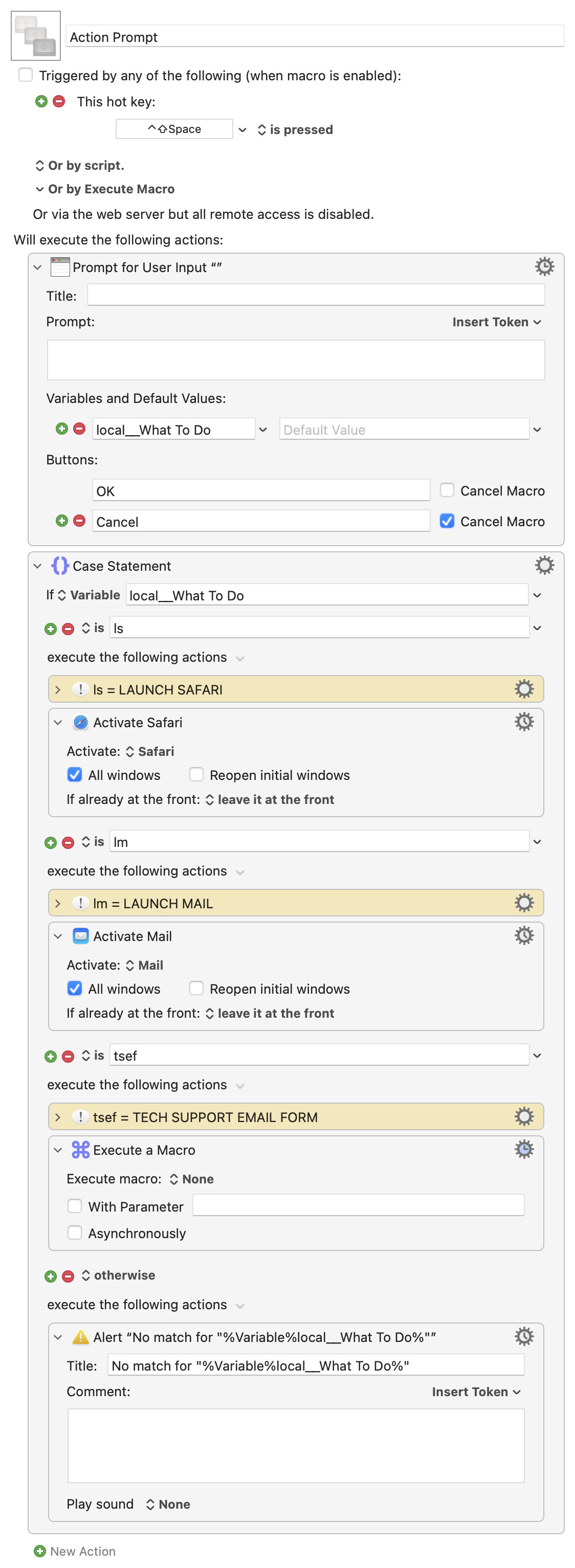
I still don't understand why a Prompt for User Input couldn't work, if the intent is to type something and have that typed something launch a macro. Is that the intent, or am I misunderstanding?
Because it seems much simpler to me to do this…
Press a defined hot key to launch a macro
Type some letters and hit Enter
Have the chosen macro or action execute
…instead of "open Spotlight, ⌘ Spacebar→ press ⌘3," which then also has to tie to a created Shortcut that you can't create until you have the macro and the macro UUID at hand.
I figure I must be missing something, though. But if I'm not, wouldn't a simple macro like this do whatever you want?
Macros are always disabled when imported into the Keyboard Maestro Editor.
The user must ensure the macro is enabled.
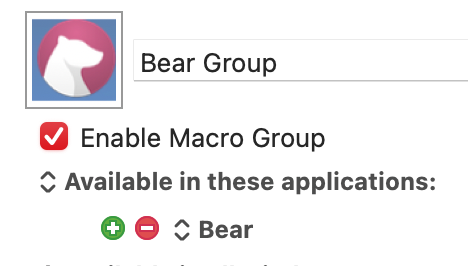
The user must also ensure the macro's parent macro-group is enabled.
System information
macOS 15.7.3
Keyboard Maestro v11.0.4
It still involves an activation hot key (which I set to Shift-Control-Space for the test macro), so it's just like using Spotlight in that regard. But you don't need two hot keys, and you don't need any Shortcuts, etc.
Want a new abbreviation, just add a Case condition with the string of text you want to type, and then the actions to take or macro to call.
I think I'm definitely misunderstanding your needs, though, because this seems like too simple of a solution.
Thank you @peternlewis@griffman@Frankb for your replies. I looked into each of your solutions and ended up finding a completely unexpected solution which leaves me dumbfounded and will change the way I trigger KM macros.
I tried many times using KM string triggers with Stickies or Antnotes but found it tedious (having to open / close the stickie or antnote) and the number of times I forget to open a stickie and end up with the usual typed string trigger problems.
Using Better Touch Tool with the cursor field is also fraught with problems, and in addition there is the issue I discuss below .
@griffman thank you for your macro.The principle is interesting, but is seems too complex to manage in a single macro as the list of triggers/macros increases.
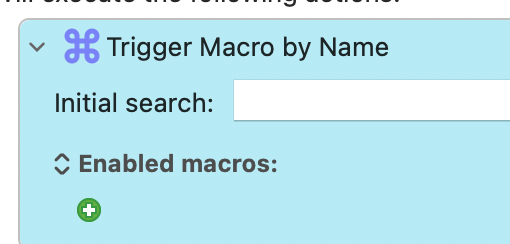
@peternlewis I use trigger macro by name all the time and did not discuss it here simply because I often end up with too many macros in my search results and have to scroll through them to find the one of interest.
My new idea which works is simply to use a standard keyword proceeded by the prefix "$" in the macro name. It works perfectly. I have a macro called "create bear note. I added $cbm (create bear note) in the macro name. If I type $cbn, trigger macro by name finds it immediately which is exactly what I want. In other words using a unique keyword in the macro name has all the advantages of both Spotlight Quick Keys and KM Typed String Triggers without the disadvantages.
What I discovered and why I fell off my chair.
Probably the biggest problem I have had with KM over the years if I can’t trigger a macro which is not globally active / not enabled (limited to an app or located in some nested palette which I have a lot of) using the shell script above or an AppleScript or a URL (in Better Touch Tool or other apps). Because the macro is not globally active / enabled it’s not possible to trigger it.
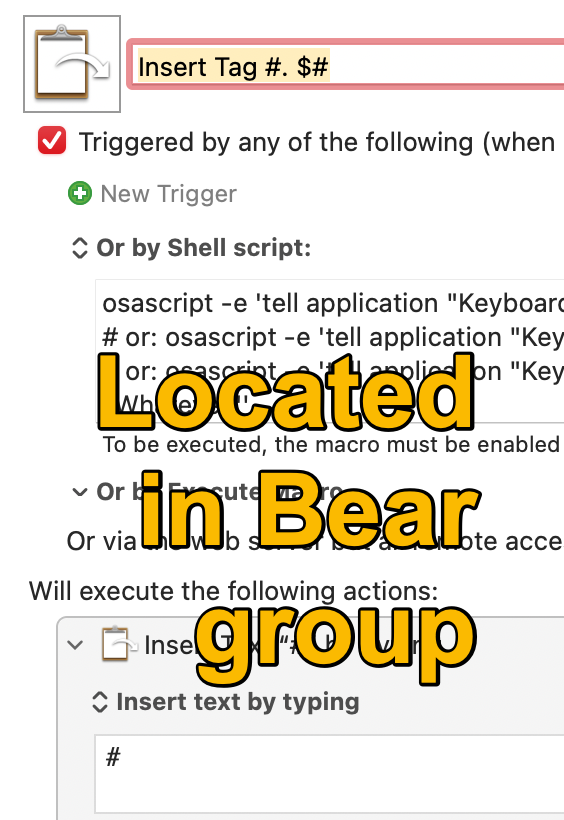
Simple example: a macro in my Bear Notes group which simply types "#" , used to insert a tag. With that macro I can’t insert a tag in an Apple Note for example because the macro group only makes macros available when the Bear app is at the front. To use that macro, I have to create an alias in the global macro group, something I have ended up doing very often.
I discovered that if I trigger a macro using trigger macro by name (enabled macros) using my quick keyword in macro name method, the macro will trigger anywhere even when it is theoretically not enabled which absolutely fantastic.
@ronald I'm glad you found a solution that works for you
Just a note: Have you evaluted the BTT block/unblock keyboard action? It also lets you trigger your KM macros.
If you don't need to see what you're typing, it's ingeniously simple, secure and flexible. Nothing you type is passed on to another app. That means there's nothing to delete. But every character string you type can trigger what you want. If you type something wrong, nothing happens. Nothing is typed, nothing is triggered.
You don't need a prefix either. For example, cbm is sufficient. Or even shorter, cb can trigger something and cbm something else. This allows you to create “hierarchical” string triggers.
Okay, I'll stop now. I just wanted to mention this briefly