Apologies for the delay, the day job got it the way over the last few days.
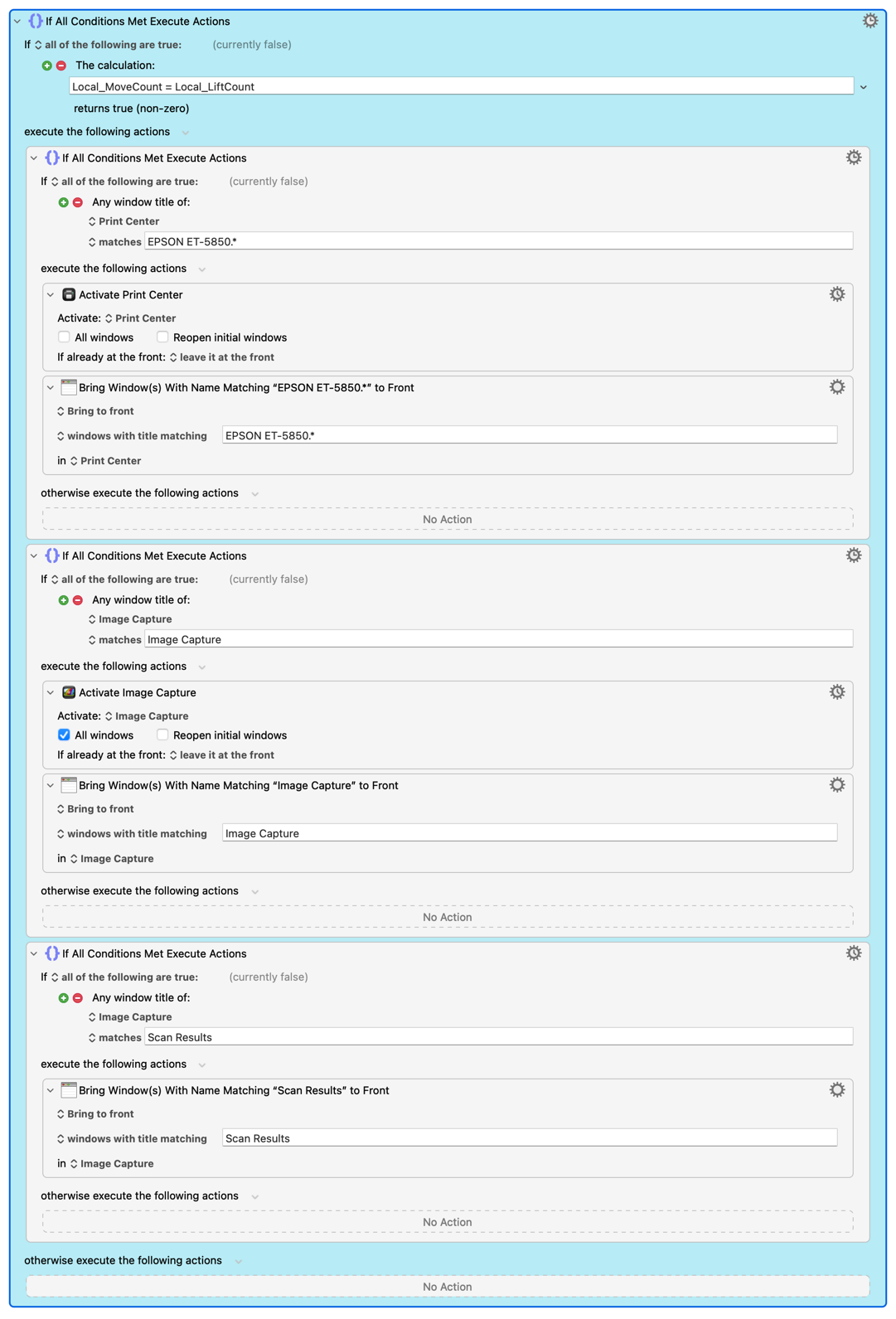
As a start, the macro is as follows:
Macro Image
Position Scan Windows.kmmacros (131.4 KB)
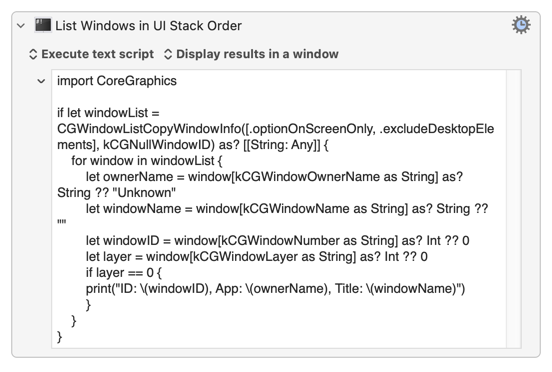
The swift code used in the macro is as follows:
Swift Code
import Foundation
import CoreGraphics

/// Print the answer and a diagnostic, then stop.
func emit(_ startAt: Int, _ why: String) -> Never {
    print(startAt)
    FileHandle.standardError.write("\(startAt): \(why)\n".data(using: .utf8)!)
    exit(0)
}

/// The three windows, in intended order, top first. Index + 1 is the position
/// number this program prints.
enum Scanner: Int, CaseIterable {
    case scanResults = 0, imageCapture = 1, epson = 2
    var position: Int { rawValue + 1 }
    var label: String {
        switch self {
        case .scanResults:  return "SCANRESULTS"
        case .imageCapture: return "IMAGECAPTURE"
        case .epson:        return "EPSON"
        }
    }
}

let existStart = Int(ProcessInfo.processInfo.environment["KMVAR_Local_ExistStart"] ?? "") ?? -1

let options = CGWindowListOption([.optionOnScreenOnly, .excludeDesktopElements])
guard let list = CGWindowListCopyWindowInfo(options, kCGNullWindowID) as? [[String: Any]] else {
    emit(3, "window list unavailable, falling back to raising everything")
}

// Ordinary application windows only, front to back. Layer 25 is menu bar items,
// layer 20 the Dock, and so on; only layer 0 is a real application window.
// Each entry is the window's own id, plus which scanner window it is, if any.
var stack: [(id: Int, which: Scanner?, frame: CGRect)] = []
var titlesSeen = false

for w in list {
    guard (w[kCGWindowLayer as String] as? Int) == 0 else { continue }
    let id    = w[kCGWindowNumber as String] as? Int ?? -1
    let owner = w[kCGWindowOwnerName as String] as? String ?? ""
    let title = w[kCGWindowName as String] as? String ?? ""
    if !title.isEmpty { titlesSeen = true }

    var frame = CGRect.zero
    if let b = w[kCGWindowBounds as String] as? NSDictionary {
        CGRectMakeWithDictionaryRepresentation(b, &frame)
    }

    var which: Scanner? = nil
    if owner == "Print Center",  title.hasPrefix("EPSON ET-5850") { which = .epson }
    if owner == "Image Capture", title == "Image Capture"         { which = .imageCapture }
    if owner == "Image Capture", title == "Scan Results"          { which = .scanResults }
    stack.append((id: id, which: which, frame: frame))
}

if !titlesSeen {
    emit(3, "no window titles returned, Screen Recording permission missing, falling back to raising everything")
}

let present = Scanner.allCases.filter { s in stack.contains { $0.which == s } }
let count = present.count

let seen = present.map { s -> String in
    let at = stack.firstIndex { $0.which == s } ?? -1
    return "\(s.label)@\(at)"
}.joined(separator: " ")
let detail = "front-to-back \(seen) count=\(count) existStart=\(existStart)"

if count == 0 { emit(0, "no scanner windows on screen. " + detail) }

// SAFETY CHECK. A window arrived after the move phase, so one of these has
// never been positioned. Raise nothing and let the next run handle it.
if existStart >= 0 && count != existStart {
    emit(0, "a window arrived after the move phase, raising would shuffle an unpositioned window. " + detail)
}

/// True when the scanner windows are in the intended order Scan Results, Image
/// Capture, EPSON, and nothing that overlaps them sits in front of them.
///
/// Overlap, not list position. The window order is one global list spanning
/// every display, so windows on the other screen appear ahead of the stack
/// without being able to obscure any of it. Only an intersecting rectangle
/// counts as an obstruction.
func isCorrect(_ order: [(id: Int, which: Scanner?, frame: CGRect)]) -> Bool {
    let scannerOrder = order.compactMap { $0.which }
    if scannerOrder != present { return false }

    for (i, entry) in order.enumerated() where entry.which == nil {
        for behind in order[(i + 1)...] where behind.which != nil {
            if entry.frame.intersects(behind.frame) { return false }
        }
    }
    return true
}

/// Raising a window removes it from wherever it is and puts it at the front.
func raised(_ order: [(id: Int, which: Scanner?, frame: CGRect)], _ s: Scanner) -> [(id: Int, which: Scanner?, frame: CGRect)] {
    guard let i = order.firstIndex(where: { $0.which == s }) else { return order }
    var copy = order
    let w = copy.remove(at: i)
    copy.insert(w, at: 0)
    return copy
}

// Try the cheapest answer first. Raise everything from `startAt` upwards,
// bottom-first, so the topmost is raised last and finishes on top.
for startAt in 0...3 {
    var simulated = stack
    for s in Scanner.allCases.reversed() where s.position <= startAt {
        simulated = raised(simulated, s)
    }
    if isCorrect(simulated) {
        let what = startAt == 0 ? "nothing needs raising"
                                : "raise from position \(startAt) upwards"
        emit(startAt, what + ". " + detail)
    }
}

emit(3, "simulation found no working answer, which should be impossible. " + detail)
Thanks to all three of you. Reporting back, because the answer turned out to be more interesting than I expected, and because the thread deserves a conclusion.
SHORT VERSION
The flash cannot be removed, exactly as Peter has said elsewhere: there is no send to back, so a pile can only be built by lifting from the bottom up, and lifting makes a window active, which is what flicks the traffic lights. What can be removed is every lift that was not necessary. My macro now produces no flicker at all when the stack is already correct, one flicker when one window has genuinely been dragged out of place, and three only when something like a browser has been dropped across the whole stack. One flicker per window that actually had to move, which I think is the floor on this operating system.
THE THING THAT MADE IT POSSIBLE
CGWindowListCopyWindowInfo is a public Quartz call that returns every on screen window in true front to back order, across all applications, with owner, title, layer and bounds. Keyboard Maestro cannot do this natively, since %WindowName%All% only sees the frontmost application, and my three windows belong to two applications. Reading that list is what lets a macro ask "is this stack actually wrong?" before doing anything about it.
@Nige_S , your correction about window layers turned out to be load bearing. Filtering to layer 0 is what keeps menu bar items, the Dock and various overlays out of the answer. Without it the readings were nonsense.
FOUR THINGS I LEARNED THAT MIGHT SAVE SOMEONE ELSE THE TIME
Moving a window does not raise it. I could not find this documented anywhere and had to test it: a window moved into the pile slid underneath rather than over. That single fact is what lets you split the work into a move phase, where everything is put in its final place and size, and a lift phase afterwards. The flash then happens against a settled layout instead of while a window is still travelling, which makes it far less noticeable.
Compile the Swift, do not use Execute a Swift Script. The action recompiles on every run and cost me about 0.9 seconds. The same code compiled once with swiftc -O and called from Execute a Shell Script runs in about 0.03 seconds.
Window titles need Screen Recording permission for the calling process. Owner names do not. Keyboard Maestro has it, so this works fine from a shell script action, but it is worth knowing that the program will see the windows and not their names if that permission is ever missing.
Judge obstruction by overlapping rectangles, not by position in the list. The window order is one global list spanning every display, so windows on your second screen sit ahead of the stack in that list while being completely unable to obscure it. My first version required the stack to be the frontmost entries outright, and the result was that every click on the stack after using the other screen re-raised all three windows for nothing.
ONE KEYBOARD MAESTRO SPECIFIC TRAP, UNRELATED TO STACKING, BUT IT COST ME MOST OF A DAY
The macro uses a Semaphore Lock so it cannot trigger itself, which means any window that opens while a run is in progress has its own trigger event turned away and thrown away. It never comes back, and that window is simply never positioned. I had patched this with a special case at the end that looked for one window by name, which rescued that one window and no other.
The general fix is to put the working part of the macro inside a Repeat, count the relevant windows at the start of each pass and again at the end, break out when the two counts agree, and go round again when they do not. It mentions no window names in its logic, so it cannot be right for one window and wrong for another, and it costs nothing on a normal run because it breaks on the first pass.
THE MACRO
Attached above. It is heavily commented, more or less an essay per action, including everything that was tried and rejected, so it should be readable even though it is specific to an Epson multi-function printer that is being used as scanner. It calls a small compiled Swift helper, which appears in the macro as
"$KMVAR_Global_Code/Scan/bin/get_window_order"
That is the CGWindowListCopyWindowInfo program described above. It is a separate file and is also attached.
Thanks again. I would not have got to the Swift route without the nudge.