That sounds like a good idea. But I'm afraid “load script” conflicts with Foundation.
My solution is probably more complicated than necessary:
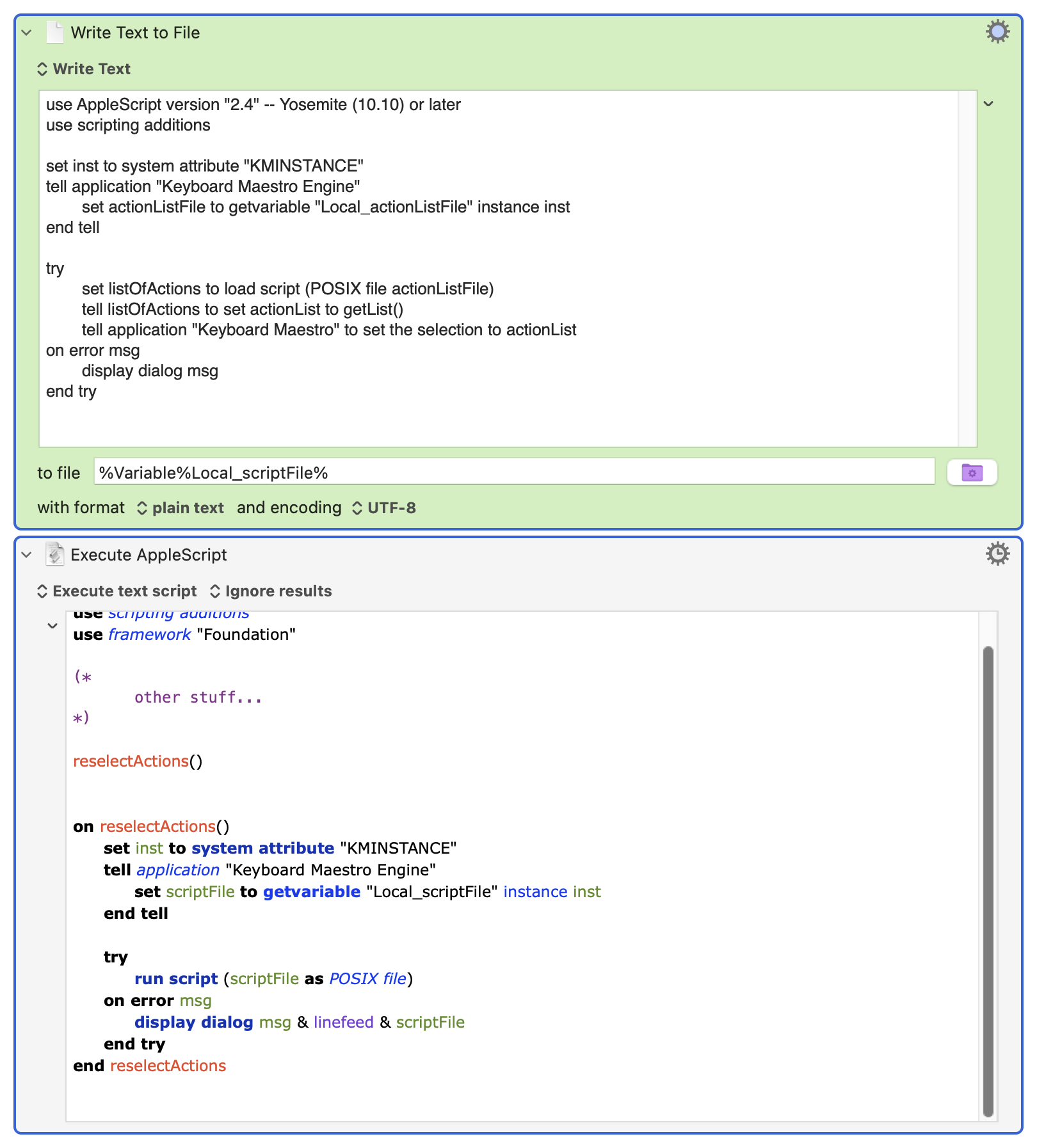
I use your first script (v3) to save the selection. I write a new script with your second one as its content.
In my macro, I call this script using “run script.” This also works with the ‘Foundation’ framework, unlike “load script.”
In any case, thank you very much!
Each action list is its own focus element, so the selection is only ever within a single action list.
Actions can be selected but not within the focus.
For example:
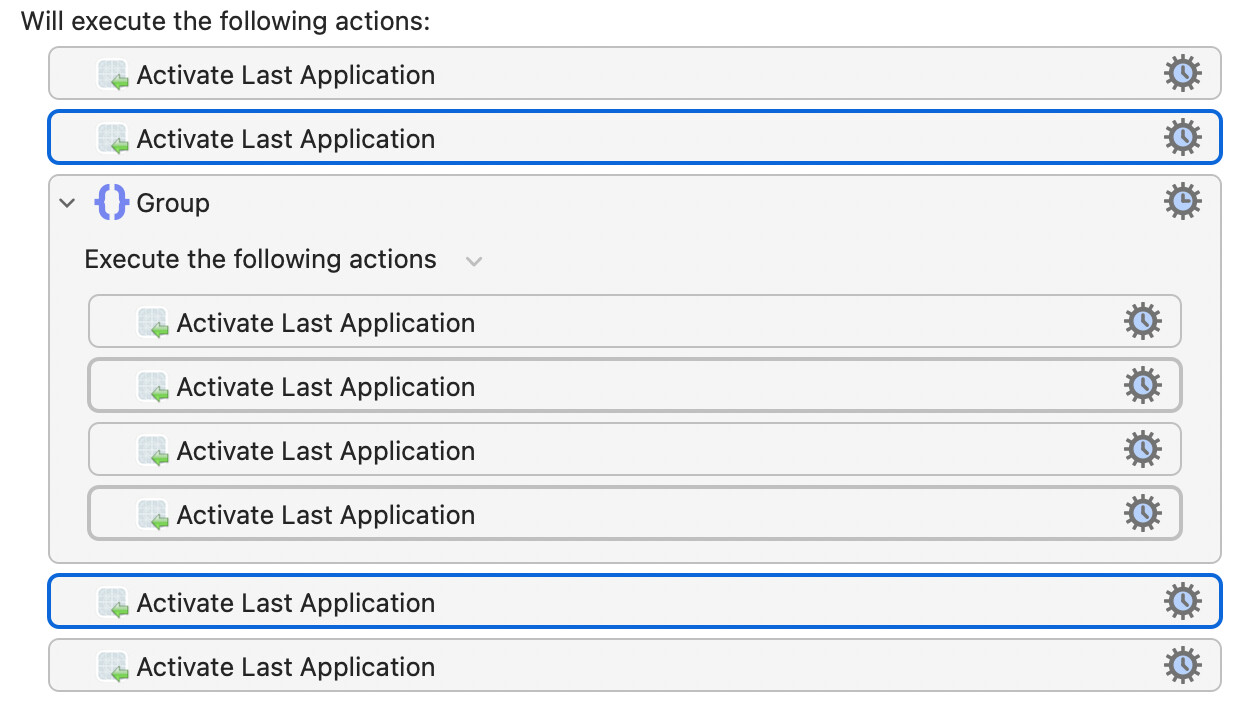
You can see that (from top to bottom of the Activate actions), actions 2, 4, 6 and 7 are selected. But only actions 2 and 7 are in the focussed selection.
My point was that you could do one KM AS Action without "Foundation" to reload your selection, then immediately follow it with another AS Action with "Foundation" that does your clever stuff (or, of course, in the reverse order).
But putting the set selection into the object as well and then using run script is a sweet solution. Kudos!
Annoyingly, I think my attempt needed just one small tweak to make it work -- changing the line
set listOfActions to load script (POSIX file actionListFile)
to
set listOfActions to (load script actionListFile)
I do like AS, but my surface-only knowledge makes it rather frustrating at times...
Anyway, tested-and-working-for-me restore selection script in full:
use framework "Foundation"
use scripting additions

set inst to system attribute "KMINSTANCE"
tell application "Keyboard Maestro Engine"
	set actionListFile to getvariable "Local_actionListFile" instance inst
end tell

set listOfActions to (load script actionListFile)
tell listOfActions to set actionList to getList()

tell application "Keyboard Maestro" to set the selection to actionList
Thanks again.
While your version works well with actions in the same macro, mine also selects them again in other macros. (I was talking nonsense about “load” and “run”...)
1 Like
Yes, deliberately...
That's partly to avoid conflicts (since the object is effectively a Local KM variable) or generating loads of cruft while building/testing, but mainly because if you are going to use the object for global persistent storage you'll probably need to some method of access control -- and how you do that will very much depend on the workflows you are envisaging.
It was a fun diversion into the world of AS script objects -- so thanks for that!
FWIW, It sounds like what might be nice is something like the text that Script Editor shows in its results window.
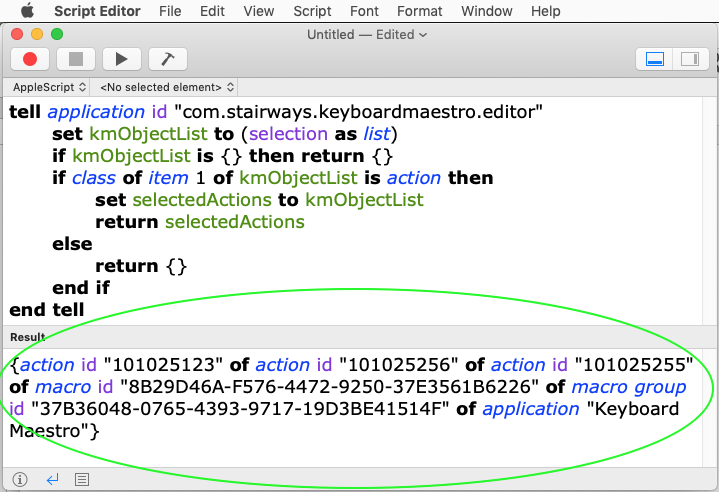
Tantalizing.
Bummer that you can't get that text independent of the Script Editor, because it looks ideal for storing in variables and using in run script to produce usable actions.
Actually, you can.
The OSAKit framework provides programmatic access to osascript and can output the results of an executed script to formatted text, exactly as you see in the screenshot. (RTF no less, if you like.)
Put this at the top of your script.
use framework "OSAKit
Set a variable to a runtime source script (double quotes and backslashes need escaping for AppleScript) like this:
set scriptSource to "
		tell application id \"com.stairways.keyboardmaestro.editor\"
			set kmObjectList to (selection as list)
			if kmObjectList is {} then return {}
			if class of item 1 of kmObjectList is action then
				set selectedActions to kmObjectList
				return selectedActions
			else
				return {}
			end if
		end tell"
Initialize an in-memory OSAScript object with the scriptSource variable like this:
set theScript to current application's OSAScript's alloc()'s initWithSource:scriptSource
Compile it:
set {didCompile, compileError} to theScript's compileAndReturnError:(reference)
Execute and capture the display value like this:
set {theDescriptor, theDisplayValue, theError} to theScript's executeAndReturnDisplayValue:(reference) |error|:(reference)
Get the plain text from the rtf output like this:
set pathList to theDisplayValue's |string|() as text
The variable, pathList, now contains the same literal run-script-usable AppleScript list of action paths produced by Script Editor in the image above:
{action id "101025123" of action id "101025256" of action id "101025255" of macro id "8B29D46A-F576-4472-9250-37E3561B6226" of macro group id "37B36048-0765-4393-9717-19D3BE41514F" of application "Keyboard Maestro"}
To get actions from it, do this:
	set tellEditorScriptSource to "tell application id \"com.stairways.keyboardmaestro.editor\"
" & thePathList & "
end tell"
And then this:
	tell application id "com.stairways.keyboardmaestro.editor"
		set usableActions to run script tellEditorScriptSource
	end tell
(*
The outer tell block re-gets the action references returned by run script.
This forces those references to resolve as usable Keyboard Maestro action objects in the caller's current context.
*)
The variable, usableActions, now contains actions that can be used in a Keyboard Maestro "tell application" block as usual.
Nice.
You've just round-tripped from "serializing" actions into plain text and then "deserializing" the plain text into actions.
Interestingly, there's actually no need for the run script "deserialization" if in the same script. You can just coerce the theDescriptors variable directly--which contains the Objective-C form of the action--to usable actions. It is the same statement that coerces many Foundation types to AppleScript:
set theActions to theDescriptor as list
But plain-text is probably the form most convenient for storing in variables where they can be shared between scripts running in separate Execute an AppleScript actions.
Handlers in the demo below wrap the above snippets into a few handy AppleScript handlers.
AppleScript handlers
To "serialize" selected actions use:
use framework "OSAKit"
-- >> returns selected actions as displayed in Script Editor results window
-- or {} if no actions are selected.
set thePathList to pathListOfSelectedActions()
on pathListOfSelectedActions()
	set scriptSource to "
		tell application id \"com.stairways.keyboardmaestro.editor\"
			set kmObjectList to (selection as list)
			if kmObjectList is {} then return {}
			if class of item 1 of kmObjectList is action then
				set selectedActtions to kmObjectList
				return selectedActtions
			else
				return {}
			end if
		end tell"
	return displayStringFromScriptSource(scriptSource)
end pathListOfSelectedActions
-- >> returns the results of source script as displayed in Script Editor results window
on displayStringFromScriptSource(scriptSource)
	set theScript to current application's OSAScript's alloc()'s initWithSource:scriptSource
	set {didCompile, compileError} to theScript's compileAndReturnError:(reference)
	if didCompile is false then error (compileError's localizedDescription() as text)
	set {theDescriptor, theDisplayValue, theError} to theScript's executeAndReturnDisplayValue:(reference) |error|:(reference)

	if theDescriptor is missing value then error (theError's |description|()) as text
	if theDisplayValue is missing value then return missing value

	return theDisplayValue's |string|() as text
end displayStringFromScriptSource
To "deserialize" the literal path text in the thePathList variable, use:
resolvedActionsFromPathList(thePathList)
---- restore snapshotted paths as usable action objects
on resolvedActionsFromPathList(thePathList)
	set tellEditorScriptSource to "tell application id \"com.stairways.keyboardmaestro.editor\"
" & thePathList & "
end tell"
	set resolvedActions to {}
	tell application id "com.stairways.keyboardmaestro.editor"
		try
			set resolvedActions to run script tellEditorScriptSource
		on error errorMessage number errorNumber
			error errorMessage
		end try
		return resolvedActions
	end tell
	-- The outer tell block re-gets the action references returned by run script.
	-- This forces those references to resolve as usable Keyboard Maestro action objects
	-- in the caller's current context.
end resolvedActionsFromPathList
Demo usage:
Enable the macro and click run.
An AppleScript will color red, enable and select two nested comment actions: Nested action 1 and Nested action 2. It will then "serialize" the selection to a variable, localSavedActionPaths.
A prompt for user input ,"Click some other action", appears.
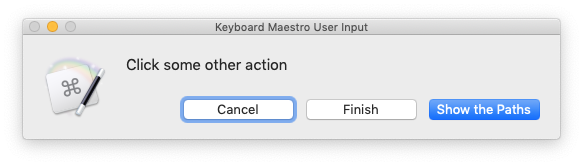
While it is showing you can navigate to and click other actions in other macros
To see the path of your other selected actions, click to the button, Show the Path.
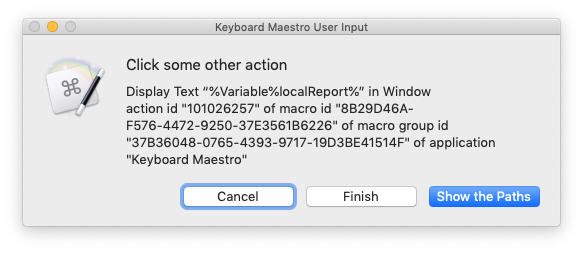
To proceed to the end of the macro, click the Finish button. The Cancel button aborts the macro.
The last AppleScript, sets the color of the initial actions to green, disables them and reselects them using the "serialized" action paths.
A final Display Text in Window shows the number, 2, of "serialized" actions, their names and the original output of the OSAScript's "executeAndReturnDisplayValue:"
(The top group action and its nested actions must remain in their top positions or the macro will fail to select them.)
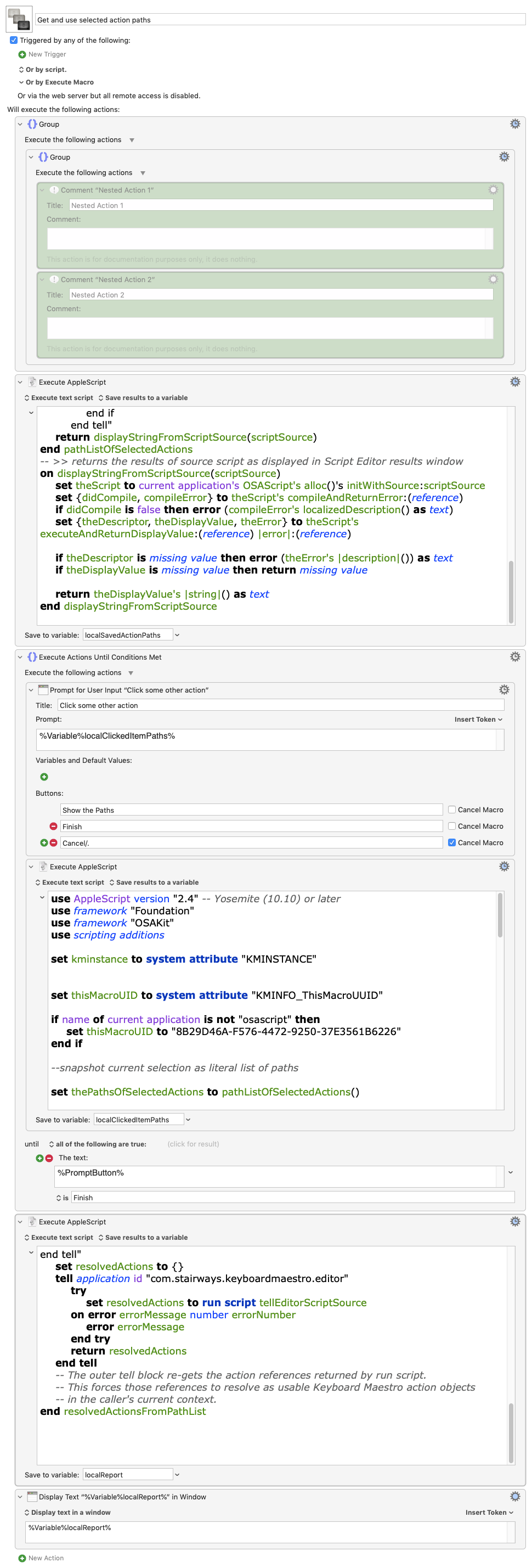
Get and use selected action paths.kmmacros (15.4 KB)
* I didn't clearly understand the problem of not being able to use Foundation, but you may find some information on inheritance in script objects that might be of interest, if not of use, here:
Declaring Cocoa classes as properties not merely a convenience but a necessity
1 Like
Perhaps at the command line:
osascript -e 'tell application "Keyboard Maestro" to selection as list' -s s > ref.txt
?
(the -s s switch specifies a recompilable output format)
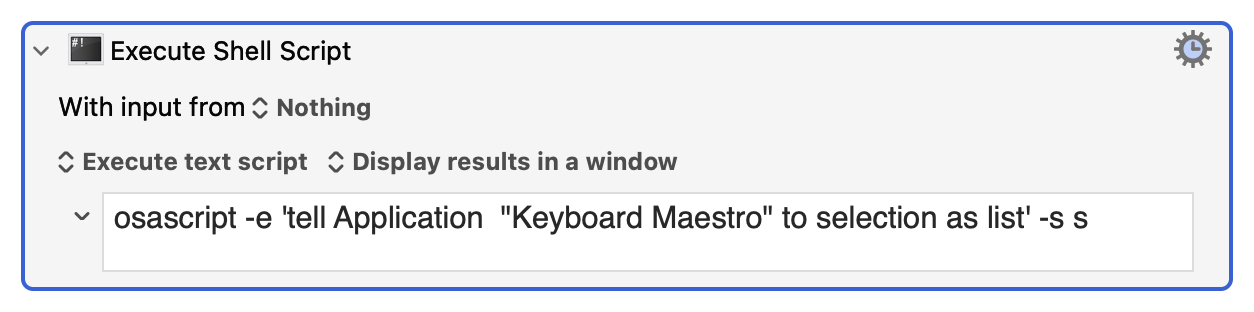
or (my personal preference)
osascript -l JavaScript -e 'Application("Keyboard Maestro").selection()' -s s
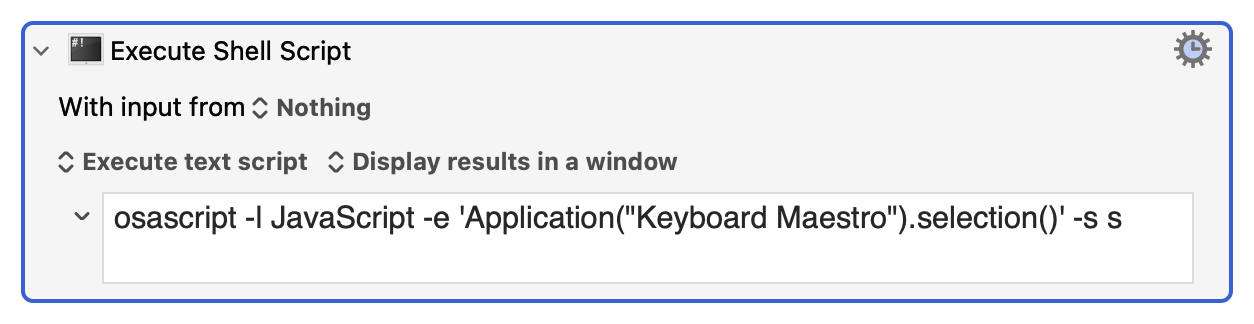
Thank you.
We have two ways of getting script-ready script results outside Script Editor: scripting and command-line.
The command-line works for getting plain-text results with minimal scripting.
If one is already in a script I would suggest using the fuller OSAScript object, or the AppleScript focused NSAppleScript object, to avoid the cost of launching an extra shell/osascript process with do shell script.
On the receiving end, one option would be to consume the path list in a source script and run it with run script or the osascript command-line tool.
Another way, that I demoed, is to "rehydrate" the plain-text path list runtime to actual usable actions. This allows a main script to use the actions normally, integrating them with handlers or parts that expect actions.
I demoed how to use a simple source script with the familiar run script command return usable application objects, ie., KM actions.
I'd like to mention yet another way.
By executing the same source script via an OSAScript object, you can coerce descripotor results to actions directly.
Unlike the run script text route, this returns the Keyboard Maestro objects without an outer tell KM block.
It works because OSAScript preserves the application reference needed for the bridge.
An NSAppleScript result descriptor seems not to.
(FWIW the descriptor can be put into Foundation dictionaries and arrays. Not so with actions.)
Here is the resolvedActionsFromPathList(thePathList) handler again. Here, it converts path list to actions using OSAScript instead of run script and is called actionsFromPathListUsingDescriptor(thePathList)
use AppleScript version "2.4"
use framework "Foundation"
use framework "OSAKit"
use scripting additions

set scriptSource to "tell application id \"com.stairways.keyboardmaestro.editor\"
	return selection as list
end tell"
set thePathList to displayStringFromScriptSource(scriptSource)
set theActions to actionsFromPathListUsingDescriptor(thePathList)
tell application id "com.stairways.keyboardmaestro.editor"
	id of (item 1 of theActions)
end tell

on displayStringFromScriptSource(scriptSource)
	--make the script object
	set theScript to current application's OSAScript's alloc()'s initWithSource:scriptSource
	--compile
	set {didCompile, compileError} to theScript's compileAndReturnError:(reference)
	if didCompile is false then error (compileError's localizedDescription() as text)
	--execute
	set {theDescriptor, theDisplayValue, theError} to theScript's executeAndReturnDisplayValue:(reference) |error|:(reference)
	if theDescriptor is missing value then error (theError's |description|()) as text
	if theDisplayValue is missing value then return missing value
	--convert NSAttributedString to text
	return theDisplayValue's |string|() as text
end displayStringFromScriptSource

on actionsFromPathListUsingDescriptor(thePathList)
	set tellEditorScriptSource to "" & ¬
		"tell application id \"com.stairways.keyboardmaestro.editor\"
         	return " & thePathList & "
		 end tell"

	set theScript to current application's OSAScript's alloc()'s initWithSource:tellEditorScriptSource

	set {didCompile, compileError} to theScript's compileAndReturnError:(reference)
	if didCompile is false then error (compileError as text)

	set {theDescriptor, executeError} to theScript's executeAndReturnError:(reference)
	if theDescriptor is missing value then error (executeError as text)

	try
		-- Coerce the OSAScript result descriptor to a list of application objects.
		set usableActions to theDescriptor as list
		-- Unlike the run script text route, this directly returns usable Keyboard Maestro objects.
		-- This works because OSAScript preserves the application reference needed for the bridge.
		-- An NSAppleScript result descriptor may not.
	on error errorMessage number errorNumber
		error errorMessage number errorNumber
	end try
	return usableActions
end actionsFromPathListUsingDescriptor