I want to save the selection of actions in a macro to use it later.
For now I save the UIDs of the selected actions in a variable via AppleScript. So it is possible to use them later to reselect them.
But AppleScript seems to allow only one action to select via “selectAction”. However, I need to work with the complete selection in another AppleScript of another macro.
A macro allows the user to modify certain actions, such as the color. A dialog box prompts the user to select a color. The changes are then applied. This works fine, unless the user selects other actions while the dialog box is displayed. (This isn't just a theoretical scenario...)
tell application "Keyboard Maestro"
	-- save the current selection
	set theSelection to the selection

	-- do other stuff, including changing the selected Actions

	-- restore your saved selection
	set the selection to theSelection
end tell
To answer that specific example, why not use a palette of colors instead of a dialog box? Then the palette can sit onscreen, the user can select and deselect at will, and the colors are applied based on typed characters?
That's how I solved it in this color-setting macro:
But can you maybe explain in more detail what it is you need to do? I know you said "capture the selection," but why would a user be changing a selection while a given macro is running? "Don't do that!," as they say. Just curious as to why there's interaction going on if a macro is onscreen and actively asking for input.
Ah -- your OP said you had saved them, just couldn't reselect them.
If you want to save them for use later on in your KM macro you'll need to "export" the "Action references" as text then, later on in your other AS, "import" that text and convert it to "Action references".
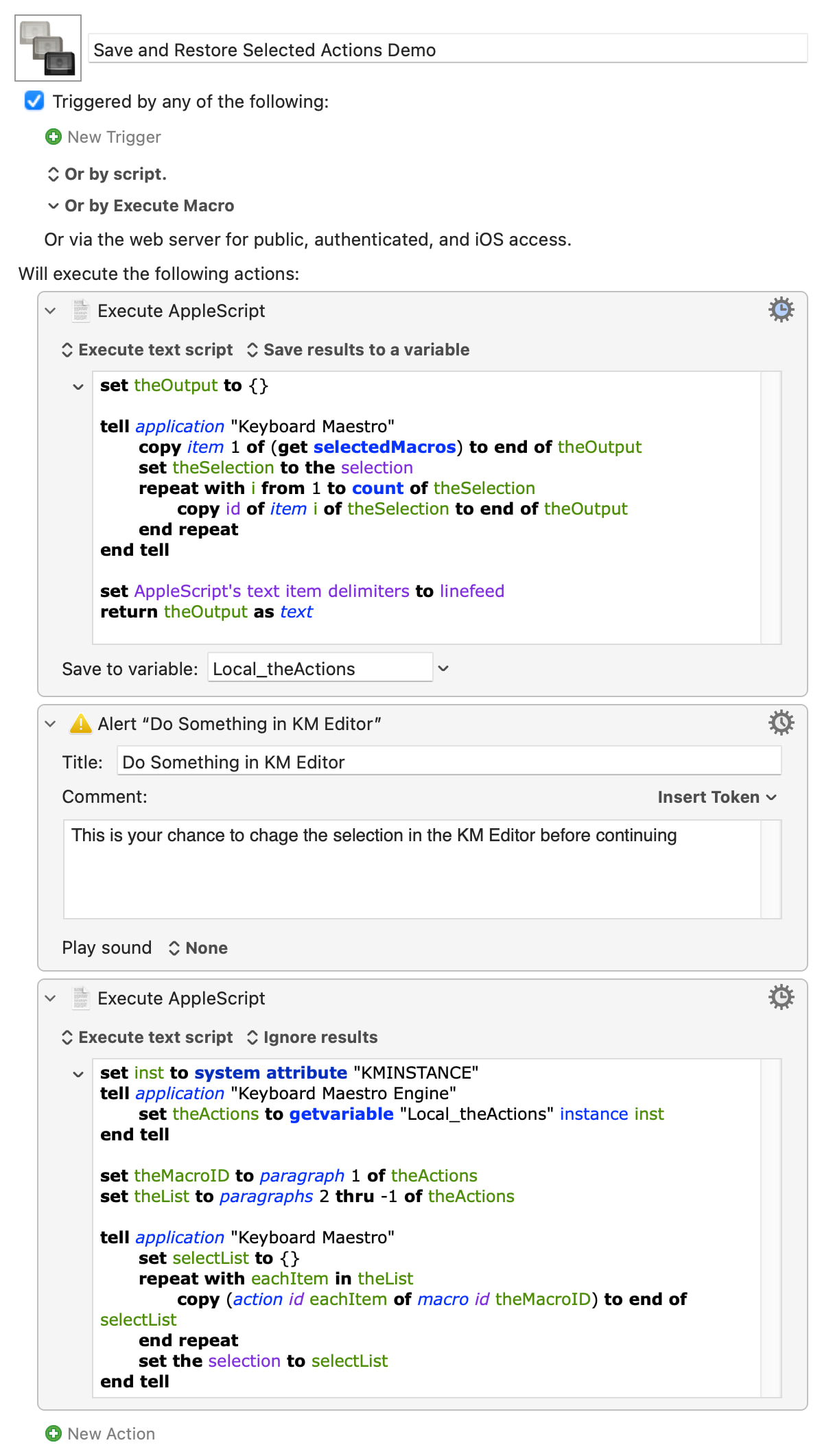
All you need to reference an Action is its UUID and the UUID of the macro that contains it. So the easy way is to write out a return-delimited list where the first item is the macro ID and the other lines are the Action IDs:
set theOutput to {}

tell application "Keyboard Maestro"
	copy item 1 of (get selectedMacros) to end of theOutput
	set theSelection to the selection
	repeat with i from 1 to count of theSelection
		copy id of item i of theSelection to end of theOutput
	end repeat
end tell

set AppleScript's text item delimiters to linefeed
return theOutput as text
...and you can save that text in a KM variable, eg Local_theActions that might now contain:
Your other AS can read that variable in, convert it into a list of references, and select everything in the list:
set inst to system attribute "KMINSTANCE"
tell application "Keyboard Maestro Engine"
	set theActions to getvariable "Local_theActions" instance inst
end tell

set theMacroID to paragraph 1 of theActions
set theList to paragraphs 2 thru -1 of theActions

tell application "Keyboard Maestro"
	set selectList to {}
	repeat with eachItem in theList
		copy (action id eachItem of macro id theMacroID) to end of selectList
	end repeat
	set the selection to selectList
end tell
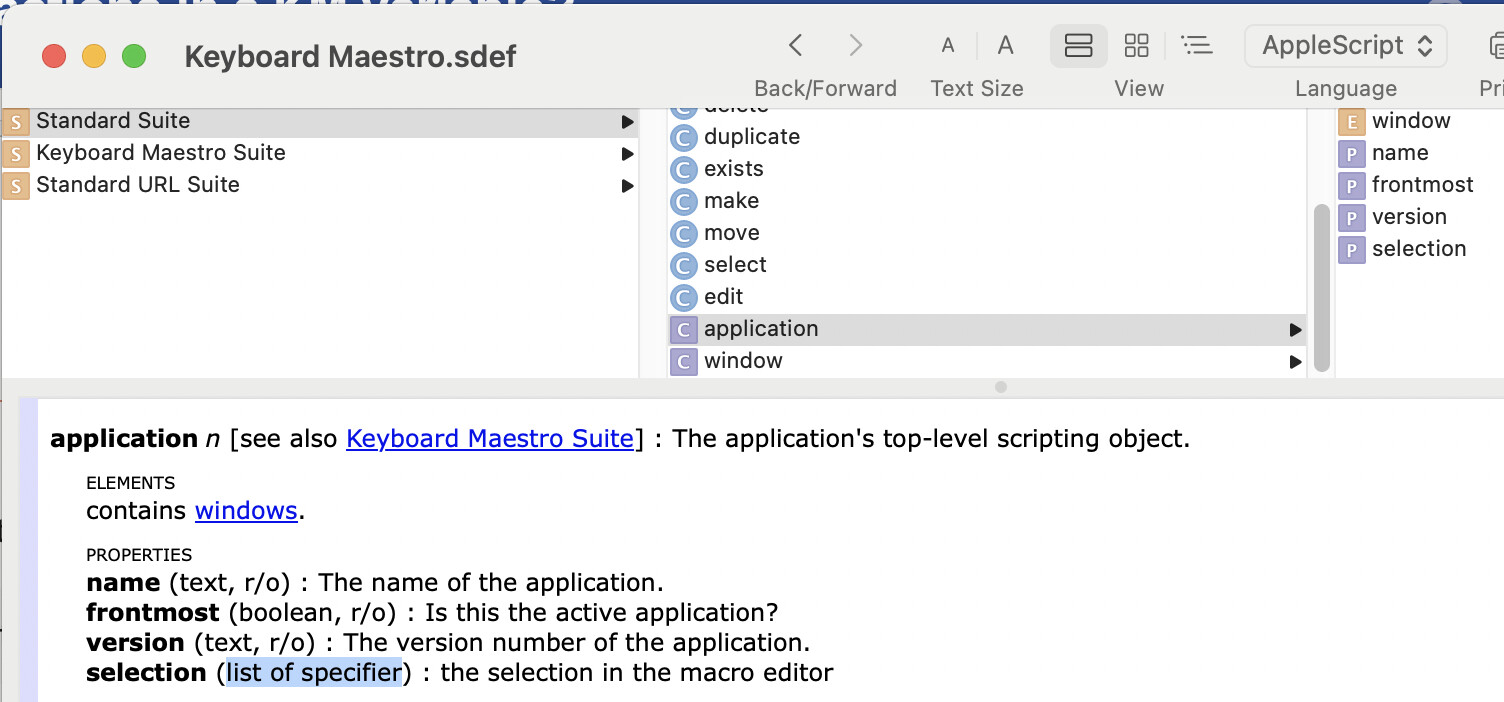
The trick is that your object(s) -- your Actions -- have to be presented as an AppleScript list, which is what the repeat loop in the second macro builds.
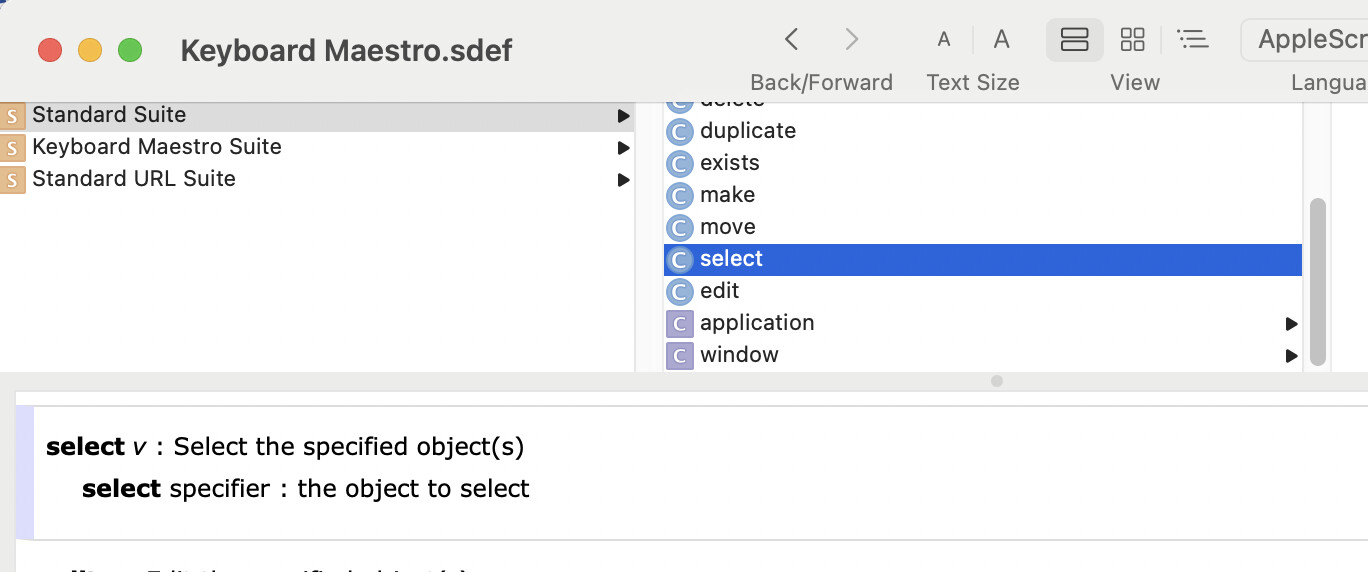
How do we know it has to be a list? We look at the "getter" for the current selection:
This is intended behavior as it is not possible to select Actions which are nested at the same time as their parent ones.
However if you select an action that has multiple nested Actions in it - if only one level of nesting or more, the full XML is saved for your purpose.
Hopefully Peter will allow in a future Version of KM to select Nested Actions at the same time as their Parent ones or other ones which aren’t nested or belong to other parent Actions.
But who knows if this is ever going to happen.
He has to decide whether or not. Peter (@peternlewis), please consider this as a feature request. It would be a great feature for KM.
Yes, that was rather silly of me. Sorry about that...
To be clear -- that wasn't the problem. My script was unable to reselect even a single nested Action, because nested Action references are of the form
action id uuid1 of action id of uuid2...
...and my script only passed in uuid1.
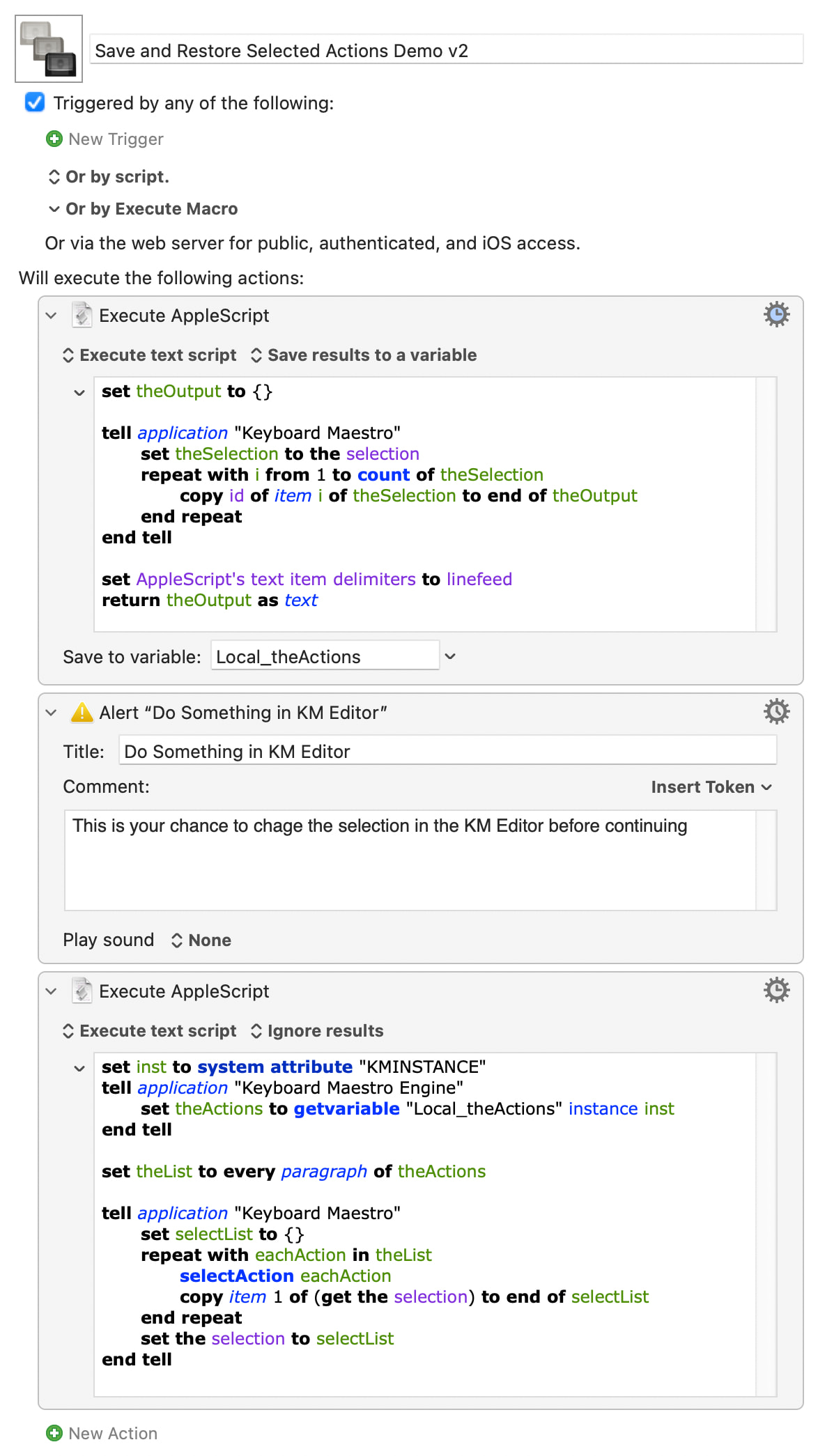
But there's a workround! selectAction only requires an ID, so our restore can select then copy the reference to each Action in turn, adding each to a list, then restore the entire list as the selection. And this time we don't need to grab the macro UUID.
It's a bit clunky, but it does work in my (more complete than before!) testing. I'm sure there's a better way, probably using script objects -- but I never have been able to get my head round those...
Of course you’re right about the issues with your Macro, especially the scripting side of it.
But - and that’s the fact (even though you’ve put a Bette solution together, which is great work as always), references are always able to be created - but until Peter hasn’t implemented the kind of selection @ArturAs is asking for - there will never be the possibility to reflect this selection of multiple levels nesting at the same time - with or without having multiple parent Actions that are capable for nesting selected. Especially when intended to show what’s added after a modification of a Macro.
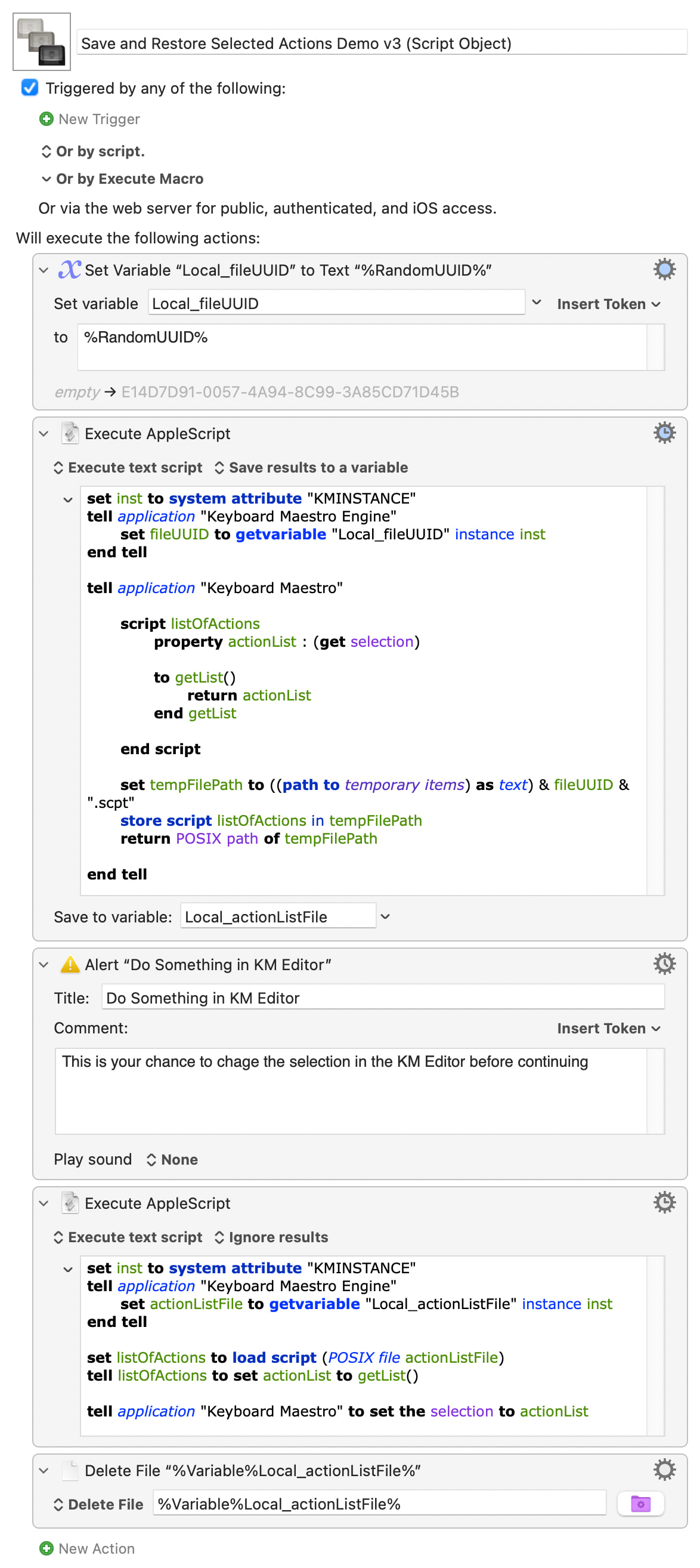
Well, that was a fun little diversion! I'm sure I'll have forgotten all this by the next time it crops up, but here's a macro that will save the list of selected Actions into a script object then later restore that same selection. In this case it tidies up by deleting the script object file, but there's nothing to stop you from using persistent storage so you can carry AS objects across macros...
I think everything's clear -- AS is very readable even if you can't write it -- but if there are any questions I'll do my best (with my limited knowledge!) to explain.
I don't think that's an issue here. As I understand it (and absent a demo showing the problem), @ArturAs wants to restore the currently-selected Actions later on, in case the user changes the selection mid-macro. That implies that the original selection followed KM's "rules", so there can't be selected Actions with different levels of nesting.
Your use case is different, and I agree that it would be nice to do but can't currently be done.
I had no use cases in mind … my intention here was to make it absolutely clear what KMs native capabilities are and what not in terms of selection.
I then used that to make a feature request for even more powerful usage capability in future KM versions.
Of course there is a complex and very hacky way to handle multiple nesting situations at once, that implies also leaving some nested actions out or even manipulating them on the fly & having to make the use of KM‘s native selection capabilities - but that wasn’t my point.
Again - you’ve done a great job as always … maybe I’m not as good as you in scripting - but it’s always a pleasure to learn new scripting skills from guys like you.
I need a little more help, since I'm not an AppleScript expert.
My script needs to use the “Foundation” framework. In this case, your great script generates the error “current application kann nicht in Typ file umgewandelt werden” (Denglish...) when it calls “set listOfActions toload script (POSIX fileactionListFile)”.
If your script uses the Foundation framework you also have to explicitly use scripting additions if you want to use load script, path to temporary items and similar bits from the Scripting Additions OSAX (it's implicitly available in "normal" scripts).
Basically, any time you use Foundation you should start your AS with
use framework "Foundation"
use scripting additions

-- script body starts here
In fact, it appears that using Foundation breaks quite a lot of stuff to do with script objects. See if you can make more sense than me of this thread, which might contain some fixes. I'll try and have a go later (or tomorrow).
Is it only the second part, the reading-back-in, that uses "Foundation"? Can you split that into two scripts, one (without "Foundation") to restore the selection and the other to do whatever?