Suggestion for a new flag on the Set Variable actions

This is a suggestion for a new feature in the Set Variable actions (both the Calculation and Text versions.)

I would enjoy seeing (and use!) a new flag on the Set Variable actions (both the calculation and string versions) which looks like this:

:check_box_with_check:/ :cross_mark_button: Trigger an error if the variable does not change

Of course, it would be disabled (:cross_mark_button:) by default, for compatibility with current code. With this new feature, I could write some code like this: (this is a simple example)
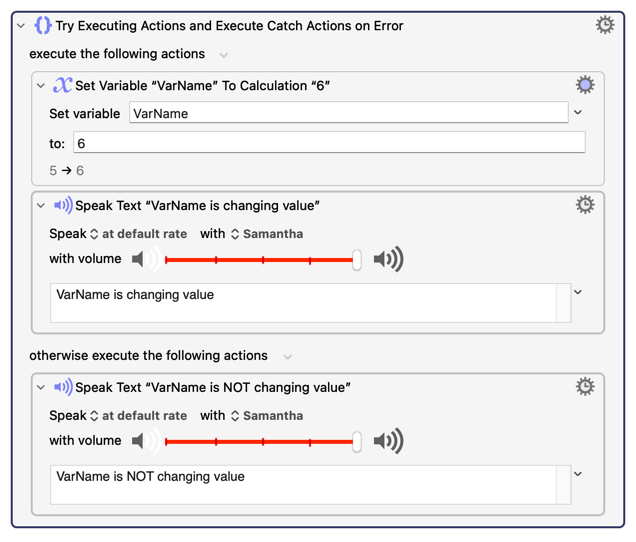
This would be extremely useful to me because I often need to know when a variable actually changes its value (I have a lot of variables that monitor things.) If I had this feature, I wouldn’t need to “store the previous value” and compare the previous value to the new value to detect if there is a change. That’s a lot of work. I would like my code to be cleaner, and this feature would help.

In most real-world cases that I face, I wouldn’t care if the variable is NOT changing value. I only care if the variable IS changing values, at which point I would notify the user through audio or visual feedback, like spoken text or a pop-up (using the Try Block, as shown above.)

Actually, I need this feature so often that I have a very useful macro that does this for me, but who likes to call a macro just to do a simple variable assignment? Not me.

SIDENOTE: In theory, one could also design this feature to trigger an error when the variable DOES change, rather than when it doesn’t. While this would be useful too, and I would still be happy with it, it seems simpler the way I’m recommending.

P.S. I’m not sure why the checkmark emoji came out a difference size from the X. Sorry.

Consider the following pseudo code:

set x to 6 # statement 1
set x to 6 # statement 2

In most (all?) systems, statement 2 has changed the variable, albeit to the same value as it held after statement 1. C will overwrite that memory address, python will update the pointer, the Angular framework will trigger any assignment code, an SQLite table will fire the UPDATE trigger...

So you actually want "trigger an error if the value held by the variable has not changed after assignment". That's quite a change to the low-level Engine code to get something you can easily do yourself with Actions, in the way you describe.

Especially since, for consistency, the option should be applied to any Action that can set a variable -- Execute shell/AS/JXA, Find Image, OCR, Prompt for User Input (every variable or options for each?), and so on.

And remember that KM macros are not compiled. So every Action that could have that checkmark checked will have that option evaluated, taking a little bit longer to execute. For every executing instance. For every macro.

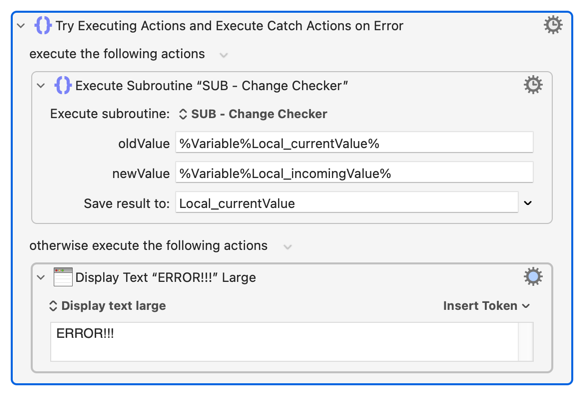
Is it? Here's a subroutine that does what I think you want:

And here's an example of calling it:

...and you'll see that Local_currentValue is updated to the value of Local_incomingValue if the new value is different, otherwise "ERROR!!!" is displayed and Local_currentValue remains unchanged.

And you can make the pre-built "Try/Catch" Action, complete with contents, a "Favorite Action" so it is easy to add to any macro.

SUB - Change Checker.kmmacros (2.8 KB)
Change Checker Test.kmmacros (4.5 KB)

Let’s agree to clarify that - the only check that must be made is to check the flag on the action whether a comparison is needed, not the comparison itself. I mean, there are already TWO flags (actually THREE flags) on every variable set action, which the Engine has to check every time the action is executed. I’m not sure if a fourth check adds much additional delay.

If the performance hit for a single check was really bad on performance, KM could include multiple copies of the same action, one which has the checks and one which doesn’t. Of course, sometimes performance is less important than functionality/consistency, and that’s what I suspect is the case here. But I’m not the one who has to implement it.

I have subroutines like that already. My subroutines are even fancier than that, such as letting the user choose which kind of notification should be made, and doing the modification inside the subroutine itself. I would prefer that it be built in, because this is a lot of extra code for me.

That’s a fair point. But it’s not an argument against my idea. It’s an argument to expand my idea to other actions.

I think your main argument is that it would impact performance. But many KM actions already have multiple flags that impact performance. For example, the Group action, which many people use a lot, has a flag that lets users set a maximum time for that Group to execute. But I doubt that more than 1% of KM programmers have EVER used that option, even once, and yet it has to check either the flag or the time used between each and every internal action.

I don’t really expect any of my ideas to be implemented. But the name of this forum is “Questions and Suggestions” so I’m making a suggestion. Maybe the Suggestions part of this forum could be spun off into a separate topic. That’s another suggestion.

The point is that it would that delay to every Action that sets a variable, in every executing instance, for every macro, for every user.

You and I may think that's worthwhile. But even a 1% slowdown (and increase in resources) for most macro executions for the 99.99% of people who'd never use this feature may be too much of a cost just to make us smile :wink:

Yes, I'm pulling numbers out of the air. And I think this feature would be cool. But I'm not the one who has to do the cost/benefit analysis...

The Forum used to have a Stickied post that included the advice

Show, don't tell

I put up a simple sub in case you hadn't considered such. If you've got something better already then please, please, post it! I for one would love to see what you're doing, and how.

And if there's one thing that always helps your case for a feature enhancement to any software it's showing something cool that can benefit many people but that currently takes too much work for most to implement.

This is unlikely to be implemented.

If it is a common pattern for you, I suggest you create a subroutine that takes the variable name and the new value and behaves as you desire.

1 Like