Swap the front windows of screen 1 and screen 2

Okay here’s something similar to what I posted a few months back.

I need a macro to swap:

Front window of screen 1
and
Front window of screen 2

They can be any application, and both windows can be maximized after swapping. I tried making one myself, but my Keyboard Maestro configuration skills has gotten rusty after months of not setting up anything, and just using the macros. :sweat_smile:

The challenge with this seemingly-simple suggestion is that window ordering across apps isn't easily available in Keyboard Maestro (as far as I know) or AppleScript. Keyboard Maestro can get an ordered list of windows in the current app, but not an ordered list across all apps.

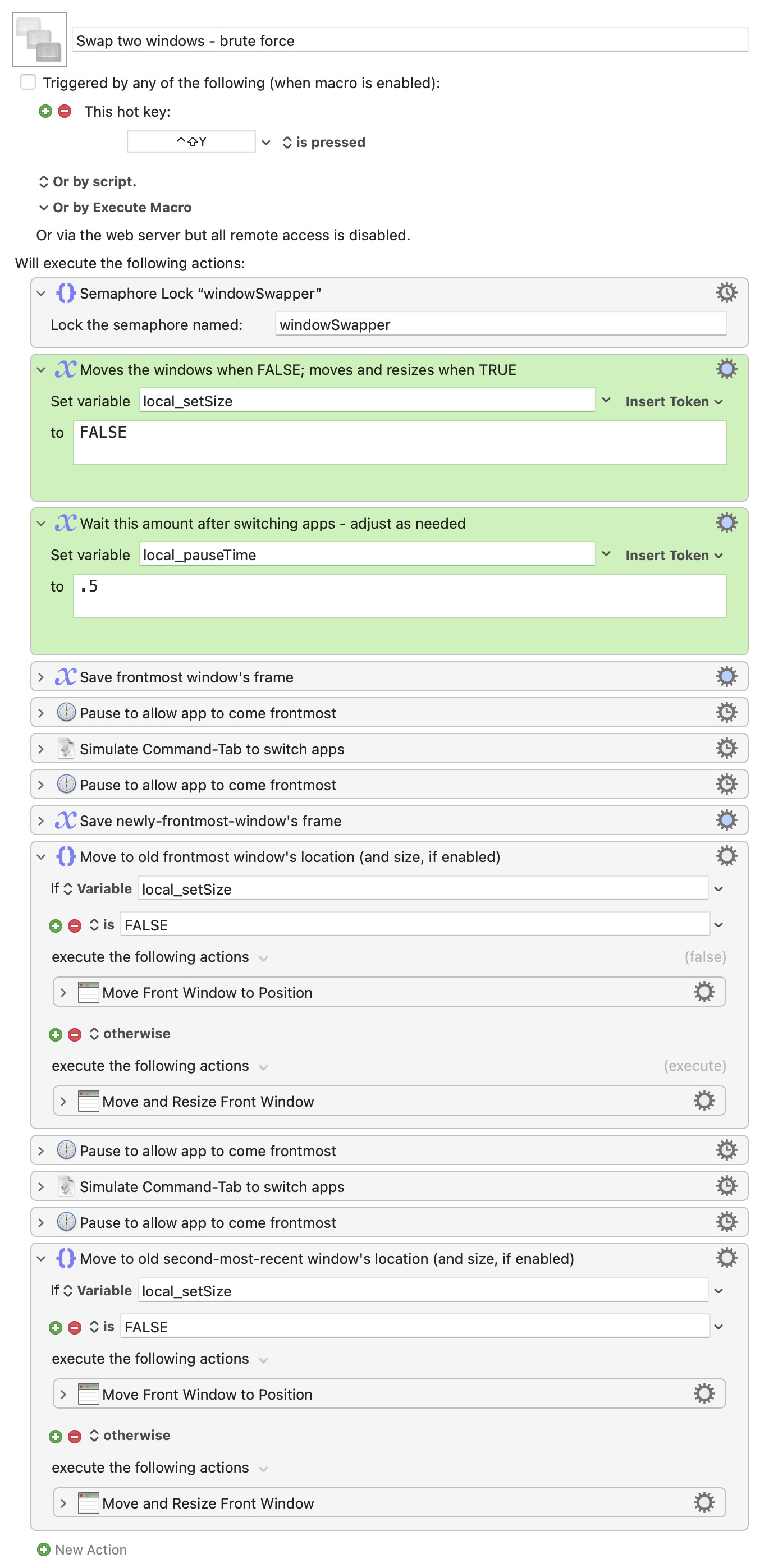
After working with Claude, you can get the data from Swift, so a fancy solution is possible, and I may post that later. But lacking the window ordering level, here's a "brute force" switcher that uses Command-Tab to flip between the two most-recently-used apps.

Download Macro(s): Swap two windows - brute force.kmmacros (12 KB)

Macro screenshot

Macro notes
  • Macros are always disabled when imported into the Keyboard Maestro Editor.
    • The user must ensure the macro is enabled.
    • The user must also ensure the macro's parent macro-group is enabled.
System information
  • macOS 15.7.5
  • Keyboard Maestro v11.0.4

It first saves the current window's frame information, then switches to the last-used app. It saves that window's frame info, then applies the previously-saved frame info to the window. Another Command-Tab is sent, and then the once-again first app's window is set to the second window's frame info.

There are two variables in the macro. The first, local_setSize, tells the macro whether to simply swap the windows' locations (the default), or two also swap their sizes (set to TRUE).

The second, local_pauseTime, is a delay you may need to modify—the delay is to give the system enough time to switch apps, and for Keyboard Maestro to have updated its window information tokens before storing the values. If you find that windows aren't swapping as expected, try increasing the delay.

(Oddly, I found I had to surround the Command-Tab keystroke simulation with pauses, otherwise it was pretty flakey.)

This is not an elegant solution, but it does seem to work in my testing.

-rob.

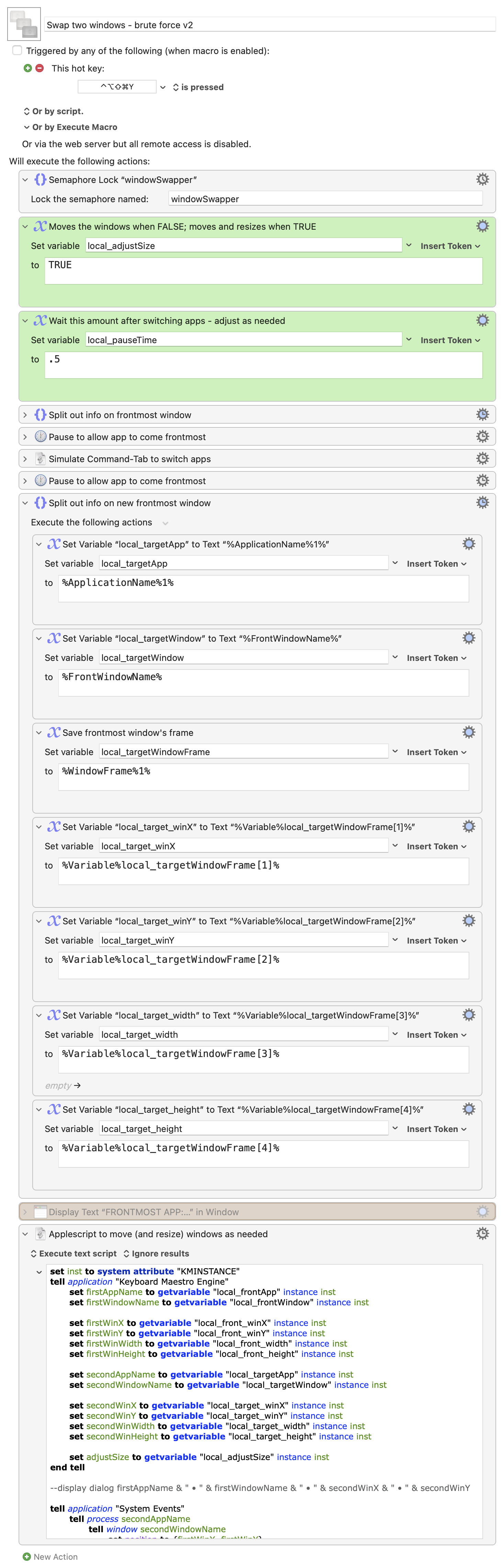
Here's a better version of the brute force macro; this one does all the moving and resizing in AppleScript, which means it skips the animations that occur when you use Keyboard Maestro's built-in move/resize feature.

Download Macro(s): Swap two windows - brute force v2.kmmacros (14 KB)

Macro screenshot

Macro notes
  • Macros are always disabled when imported into the Keyboard Maestro Editor.
    • The user must ensure the macro is enabled.
    • The user must also ensure the macro's parent macro-group is enabled.
System information
  • macOS 15.7.5
  • Keyboard Maestro v11.0.4

As before, you may have to play around with the delay setting in the green box.

-rob.

Hello and thank you so much for this. I need to clarify something about swapping between screen 1 and 2:
I have a 2 monitor setup, and I want the front most window of monitor 1 to swap with the front most window of monitor 2. Does this still work?

I have yet to try it.

I've been trying to describe the issue with your request, but maybe I'm not doing it well:

What is "the frontmost window of monitor 2?" Let's say your app used order, from most recent first, is this:

#1: App 1 • Window 1 • Display 1
#2: App 1 • Window 2 •ㅤ Display 1
#3: App 2 • Window 1 • Display 2
#4: App 3 •ㅤ Window 1 • Display 1
#5: App 4 • Window 1 • Display 2
etc...

I assume you want to toggle between #1 and #3, right? That's the problem I'm trying to describe: It's tricky to figure out that #3 is the window you want. Keyboard Maestro has a %Screen% token that can return dimensions of screens. For my setup, two horizontal displays, I get this:

Main:   0,0,2560,1440
Second: 2560,0,2560,1440

But if my screens were vertical, those values would be:

Main:   0,0,2560,1440
Second: 0,-1440,2560,1440

And if I have one half-overlapped vertically, then it's:

Main:   0,0,2560,1440
Second: 1396,-1440,2560,1440

To switch to the "most recent" window on display 2, you have to get the list of all windows on all displays, in order of use, and then determine which of them is the frontmost one on the second display.

It would have to do that by checking the frame of each window against the frames of your displays, and then checking values. And as you can see above, with different layouts, it's going to get messy figuring out where the second display starts for a given window. (Maybe for others it's clear, but I'm somewhat math-challenged.)

Then once you have that, you need the full frame for both the window on the main display, and the window on the second display, so you can swap them.

But the biggest issue is getting the list of open windows and locations, in order of most recent use. You cannot, to my knowledge, get that list with Keyboard Maestro. I believe you can get it with AppleScript, at least to some degree. And I know you can get it with Swift, as I have a few examples I've built that do just that.

Using that list, and then doing some fancy math that's beyond me, it's probably feasible to write your switcher.

But that's not what's here. What I posted is the only kind of switcher I thought I could write with native Keyboard Maestro actions: It just switches the position (and optionally the size) of the last two used windows, regardless of which displays they're on.

I'll be posting a few other examples in the days to come, one of which lets you pick which window to switch with (by picking it with the mouse); that's probably the closest I'll come to providing a macro that exactly matches what you're looking for. EDIT: But if I make a breakthrough on the display math, maybe I can do better.

-rob.

I thought this might be a fun challenge, so I spent a fair bit of time on it last night, and ... eventually I succeeded! It's, by far, the most complex window/display macro I've ever written—and that's even with Claude writing the Swift to create the window list. However, it does seem to work. Here's the macro, but read on before downloading and running...

The Swift code in these macros is 100% AI-generated. Use at your own risk.

Download Macro(s): Swap with frontmost window on other display.kmmacros (50 KB)

There are maybe 50 actions in that macro, and it was very confusing (for me) to write. And it works, so I'm pretty happy about that!

But here's the read on part: I wouldn't use that macro. It does work, but it is really complicated, and could probably break pretty easily. Once I got done with the macro, I turned to Claude again.

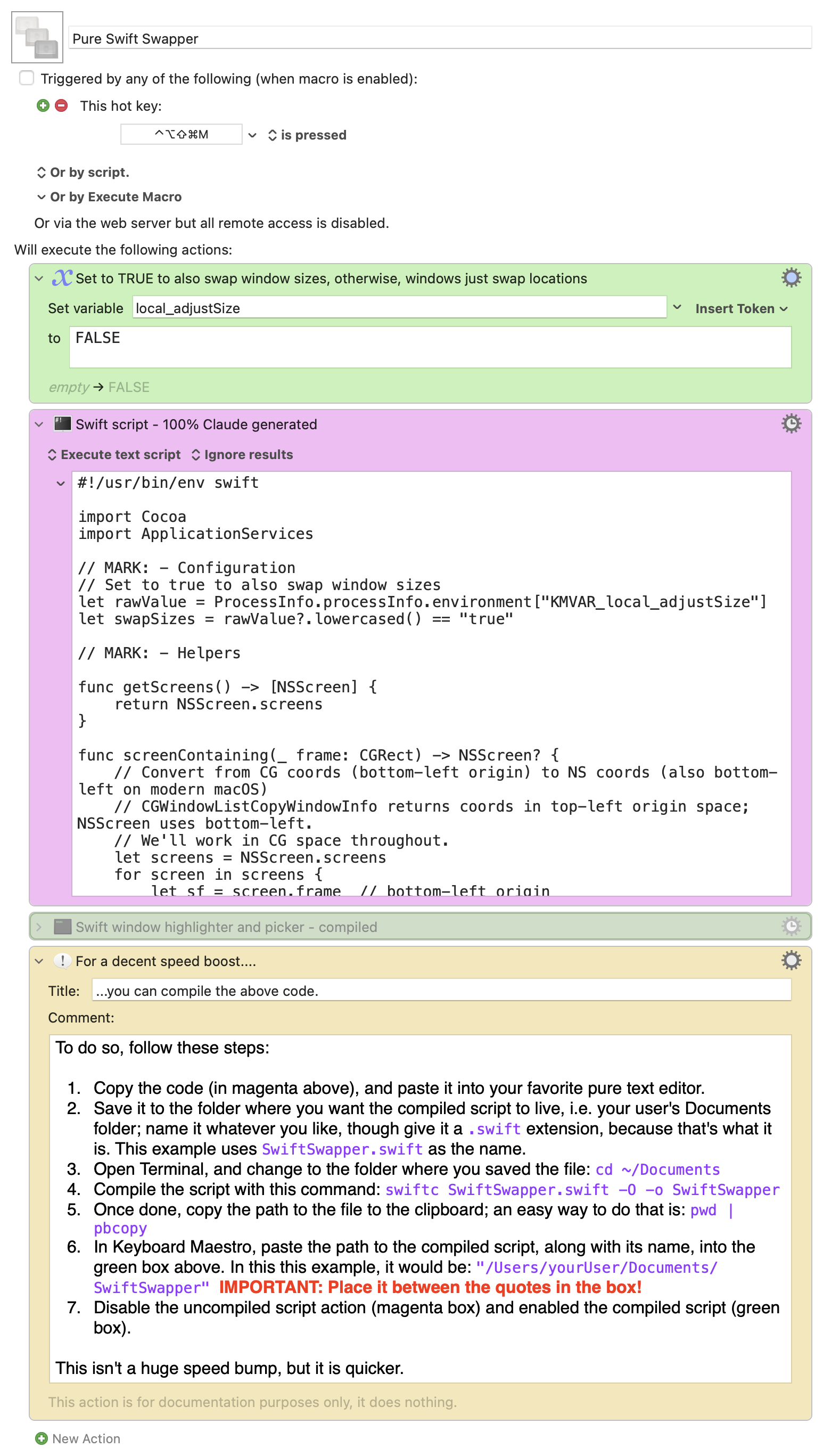
This time, though, I just asked it to write something in Swift that achieved your objectives: Swap the location (and optionally the size) of the frontmost window on two displays. It came up with a single do-it-all Swift script that just works.

Here's that macro, which is a total of four actions (one of which is disabled, and one is a comment):

Download Macro(s): Pure Swift Swapper.kmmacros (17 KB)

Macro screenshot

Macro notes
  • Macros are always disabled when imported into the Keyboard Maestro Editor.
    • The user must ensure the macro is enabled.
    • The user must also ensure the macro's parent macro-group is enabled.
System information
  • macOS 15.7.5
  • Keyboard Maestro v11.0.4

While I understand how my macro works—at least, after the script that gets the window list—I cannot debug this one at all, as it's all Swift. But it works, and it works well, notably quicker than my macro (especially if you compile the script; instructions for doing so are in the macro).

There's one variable you can set, which determines if windows swap just locations (the default) or locations and sizes.

-rob.

1 Like

Oh wow that worked wonderfully. I haven’t compiled it yet, but the original macro works without a hitch.

I just wanted to change one thing though. I actually have four monitors, and I wanted it to swap between screen index 0 and screen index 2. I just uploaded the whole Swift script to Claude and checked if I only needed to change this one line (based on my understanding of the whole script). It confirmed, and then I changed it, and it worked flawlessly.

// Identify display 1 (main/primary, index 0) and display 2 (index 1)
// NSScreen.screens[0] is always the primary screen (with menu bar)
let screen1 = screens[0]
let screen2 = screens[2] ← This line here
let cgScreen1 = nsToCG(screen1.frame)
let cgScreen2 = nsToCG(screen2.frame)

For the information of anyone who wants to use the macro in the future.

But anyway, thanks so much griffman, that was wonderful and so useful for me.

1 Like

Glad it's working for you!

-rob.

This is going to be very handy for me too. Many thanks!

Right? And I thought it would be simple to build, but after Rob explained the technicalities behind it, I realized why I couldn’t build it myself.

There would be so many more useful utilities around if Apple would be willing to provide a simple ordered list of open windows and tabs across all apps, displays, and Spaces, and make it available in an official API.

They probably don't do this for security and privacy reasons, which makes it tough to do seemingly simple things :).

-rob.