Is it possible to automatically change Tabulation to (defined) number of spaces in code editor in KM
I’ve checked settings in wiki, even changed fonts to my preferred Iosevka, but when I create simple code in python (not using external editor) it will be nice to press Tab key and get f.ex. 4 spaces (to configure in preferences or by console settings).
At the risk of stating the obvious -- you've got Keyboard Maestro! Have you tried writing a macro that, in the right context, is hot key-triggered by ⇥ and types 4 spaces?
But faster I will create macro, which will mark all text, transfer to BBEdit and on finish transfer it again to KM.
BTW
Does KM hot key macro works during edition in KM editor? I didn’t think of this because I remember, that something can’t be done by KM when I am in KM.
After short reflection I have to say that your proposal is not enough for my needs. Setting the macro triggered by Tab key means change behaviour in KM in all circumstances, not only in editor window (of course). For person like me, mostly using keyboard to move between parts of UI, this is not acceptable. So - sorry - it should be feature of the editor window (Tabsv s Spaces), macro don’t resolve the problem. Of course it is unimportant for most of the KM users I don’t suspect such change in KM in nearest future.
I did say "...that, in the right context...". Don't limit that to the triggering of the macro -- you can also test context within the macro to decide whether to execute a Tab or four spaces.
Hint: What menu items are, and aren't, available when a KM text field is active?
Then use another method! This way will be more reliable anyway...
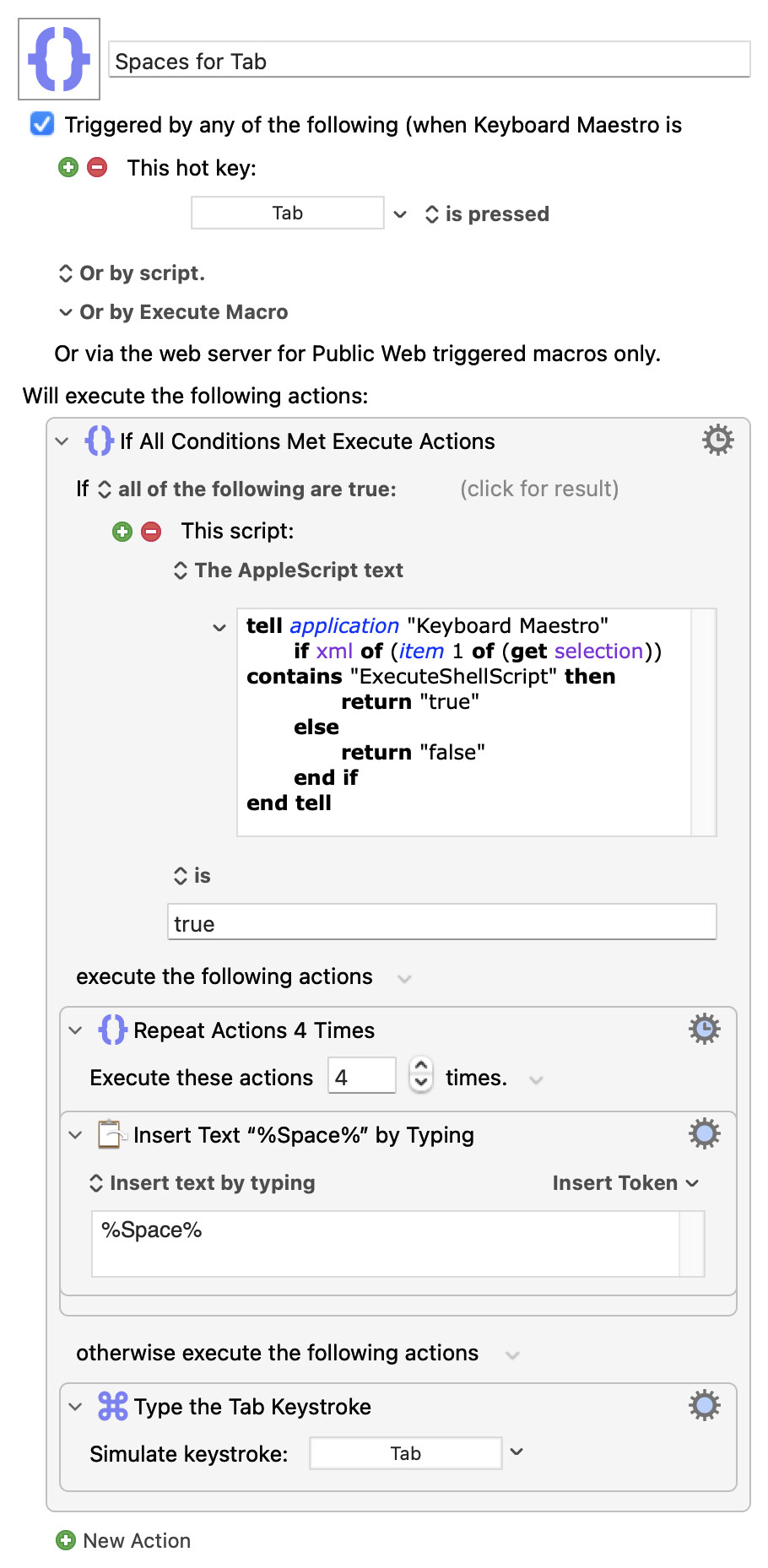
If you are typing in an Action's field that Action will be selected. You can use AppleScript to get the XML of the currently-selected Action. And you can use AppleScript as an "If" Action's condition:
...and will insert 4 spaces rather than a Tab when you are editing an "Execute a Shell Script" Action.
TBH, I really wouldn't bother though! There's been "round trip" macros posted on the Forum for BBEdit and other editors, and for anything more than a one-liner I'd go to an external editor and take advantage of all its features. If you also want to do quick edits within KM then include a search-and-replace in your round-trip macros to change tabs for spaces.
Select All when insertion point is in script text field
Copy
Write System Clipboard to /tmp/temp.py
Open file /tmp/temp.py in BBEdit
(Writing to a temp file with a .py extension lets BBEdit treat it as a python document wrt to syntax highlighting etc)
"Inbound" macro
Select All in the BBEdit document
Copy
Switch to KM
Paste (all the text in the Action's field will still be selected from the "Outbound" macro so will be replaced with the System Clipboard contents)
But the world's your oyster here, given both BBEdit's and KM's extensive AppleScript support -- if you don't like temporary files, for example, you can replace steps 3 and 4 of "Outbound" with:
tell application "BBEdit" to make new text document with properties {source language:"Python", contents:(get the clipboard)}
Notice how that explicitly sets the text document's source language -- you could, instead, use "Unix Shell Script", "JavaScript", "HTML" (handy for Custom HTML Prompts), and so on.