When you deal with that many files you have to have a really good understanding of the pitfalls of the various methods...
Here's how to do it with Keyboard Maestro.
Download: Tag RAF Files in Accordance with JPG Files v1.00.kmmacros (11 KB)
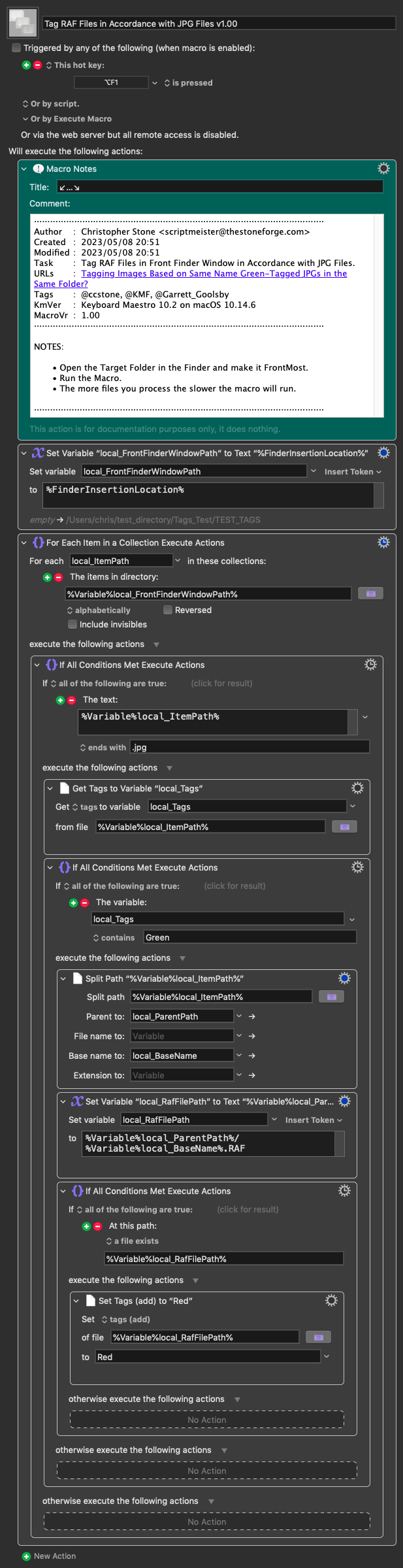
Macro-Notes
- Macros are always disabled when imported into the Keyboard Maestro Editor.
- The user must ensure the macro is enabled.
- The user must also ensure the macro's parent macro-group is enabled.
System Information
- macOS 10.14.6
- Keyboard Maestro v10.2
This took about 20 seconds to tag 1000 files on my old 2012 i7 MacBook Air. That's not bad for this hardware running Mojave.
- Download the macro.
- Double-Click it in the Finder to import into Keyboard Maestro.
- NOTE – You MUST make sure the macro and the parent macro-group are ENABLED after importing.
- The macro currently has a hotkey trigger of Opt-F1.
NOTE – I had some trouble with files that were labelled Green and not Tagged Green. I used the Finder's Tags UI in the File menu to TAG the files Green, and the macro worked flawlessly after that.