Often I get 15, 20 or more active Safari windows, and I'm not the only one.
For exiting these windows, they have to be clicked on and then if they should be kept or not and then partly deactivated.
I want to simplify the process of determining if they should be exited, by first tiling them on the screen so that they share the space equally.
It doesn't appear someone has already done this, and Safari will not allow pages to be visible at the same time.
In GraphicConverter app this tiling can be done with images and it's very useful.
To do this every active Safari window would have to be brought to front.
The number of active windows has to be calculated regarding the widths and height of the screen so that they all will fit in the available space. (The number of active Safari Windows should of course not be too high.)
I wonder if you might find an adequate solution in just using the standard MacOS key command for cycling through windows of the current application: ⌘-` (command-backtick).
Keep in mind that every app has a minimum window size—for Safari, that appears to be 575x275.
On my 27" 2560x1440 display, you'll only be able to fit four windows across the width of the display, and five down, so you'll be able to fit, at most, 20 Safari windows.
On my laptop, with its 1512x982 resolution, it's much worse—just two windows across and three down, or six total. If you're using a laptop and have that many Safari windows open, the macro probably won't help much.
Just keep that in mind before you invest a ton of hours writing something that really doesn't solve the problem. Instead, perhaps use @kevinb's suggestion, along with a waterfall style structure, which would let you fit 26 windows in one diagonal even on the small laptop screen.
Yes @kevinb's suggestion is simple and very practical,
However, AFAIK, a waterfall/ cascade style structure cannot be called forth from existing windows,
except if one opens one Safari window after another from different links outside the app itself.
/okn
You can do it via AppleScript, which you can run from Keyboard Maestro. I asked an AI to help with this one, as I couldn't figure out the window ordering, but this seems to work as I'd expect it to.
tell application "Safari"
	activate

	-- Starting position for the first window
	set startX to 50
	set startY to 50
	set offsetIncrement to 30

	-- Get all Safari windows
	set windowCount to count of windows

	-- Loop through each window and position it (in reverse order)
	repeat with i from 1 to windowCount
		set currentWindow to window i

		-- Calculate position for this window (reversed)
		set xPos to startX + ((windowCount - i) * offsetIncrement)
		set yPos to startY + ((windowCount - i) * offsetIncrement)

		-- Set the window bounds
		set bounds of currentWindow to {xPos, yPos, xPos + 1200, yPos + 800}
	end repeat

end tell
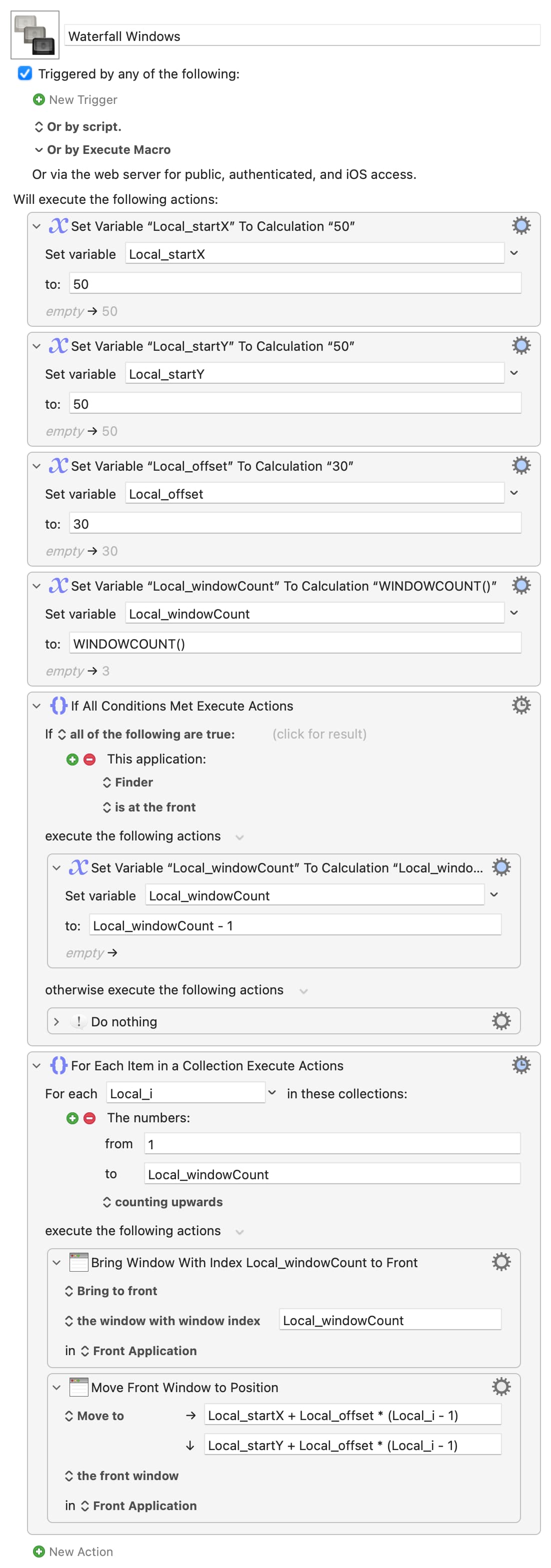
Or even with Keyboard Maestro, for a more generic solution. The trick is to always bring the back-most window to the front and then position it, so you don't fall foul of changing window indexes. And remember that Finder's Desktop window is always its back-most window and allow for that, subtracting 1 from WINDOWCOUNT().
This should work for most apps -- I daren't test in Safari, too many windows to shuffle!
Working "back-to-front" also means that window order is maintained, with the previously-frontmost window still frontmost and at the "bottom" of the waterfall.