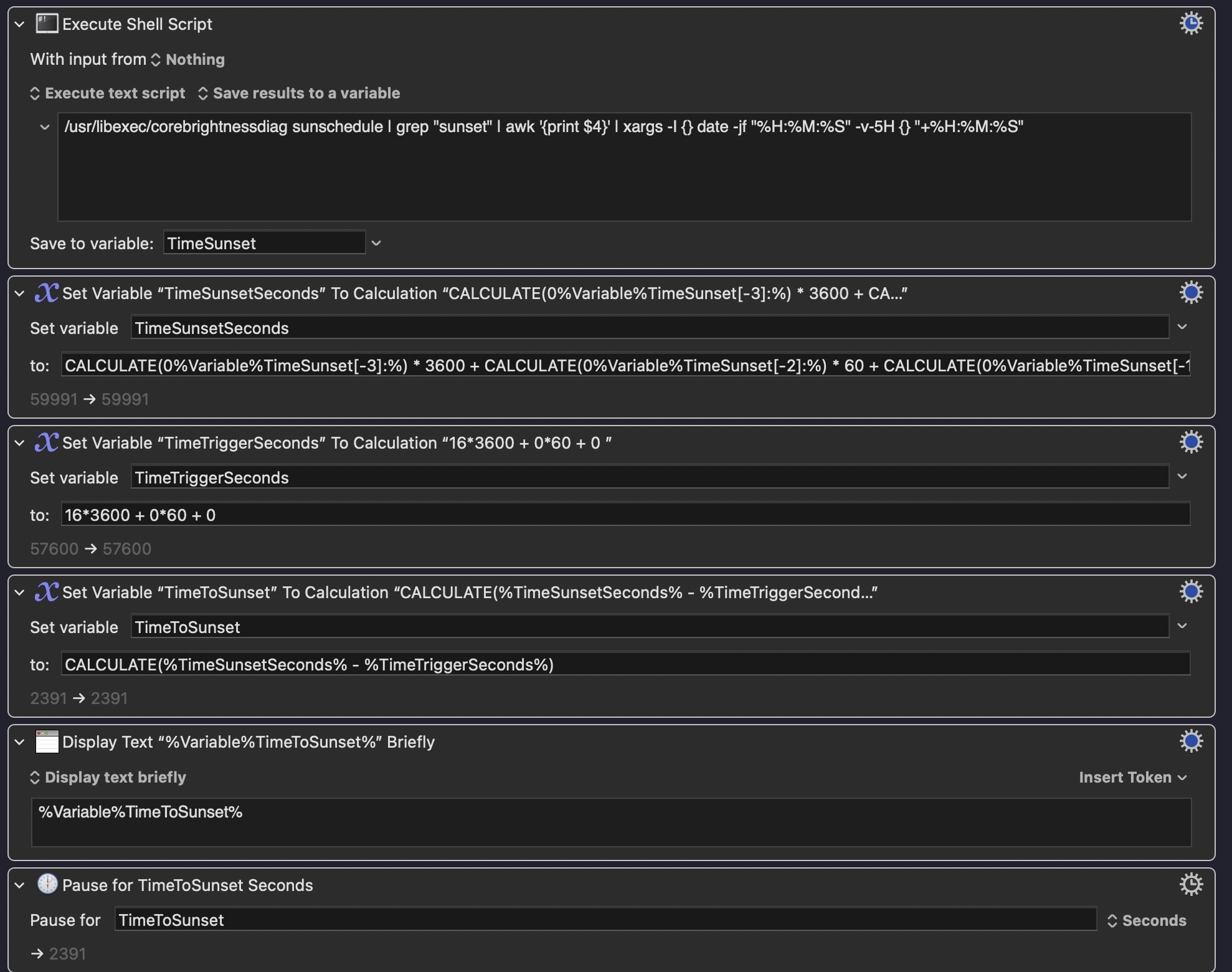
I created the following sequence of actions but would like to replace the variable TimeTriggerSeconds with the time the trigger is scheduled to run but I cannot find its value / name.
I am using a CRON Trigger but can easily change to a Time of Day Trigger should that be better.
Would appreciated being pointed in the right direction.
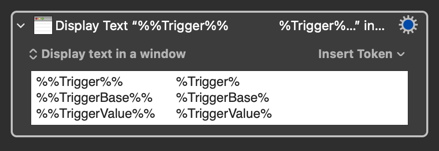
If by this you mean to set the variable to the time value from the triggering Cron trigger, I am sure you can find useful information from one of the trigger tokens. Try the action below to see what token that returns the information most useful for you:
The trigger tokens will, however, only return the value from the triggering trigger; therefore, the time information would just be the same as the current time. It could just as easily, and probably more directly useful for you, be set up with a calculation like (HOUR() * 3600) + (MINUTE() * 60) + SECOND(), calculating the current seconds of the day (at the time of triggering / running the calculation).
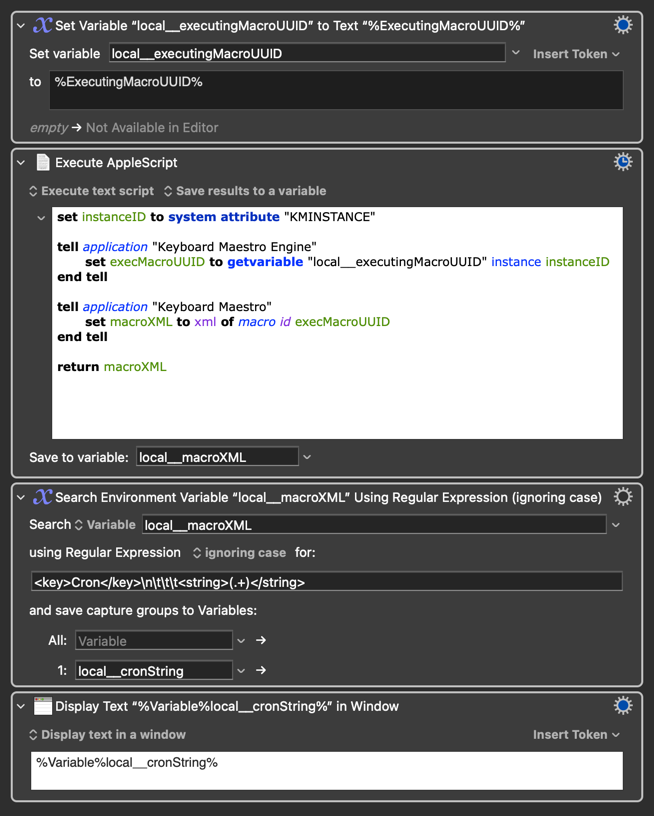
You could also be read as wanting to read off the string the Cron trigger is set up with, ahead of time. This would be a bit trickier, although possible with some AppleScripting and Regex filtering of the macro XML, something along the lines of what I've done below:
The absolute easiest way to do this, if you've upgraded to Tahoe, is to create a Shortcut that runs your KM macro (use the "Open URLs" action and the macro's "Or by URL" trigger string). Then make a new "Time of day" Automation in Shortcuts and set that to "Sunset", "Repeat Daily" and "Run Immediately", and finish by selecting the Shortcut you made earlier.
But for the question you're actually asking -- you could parse the %Trigger% token and work out the time from the cron string, but it's a lot easier to just get the current time as the first action of the macro.
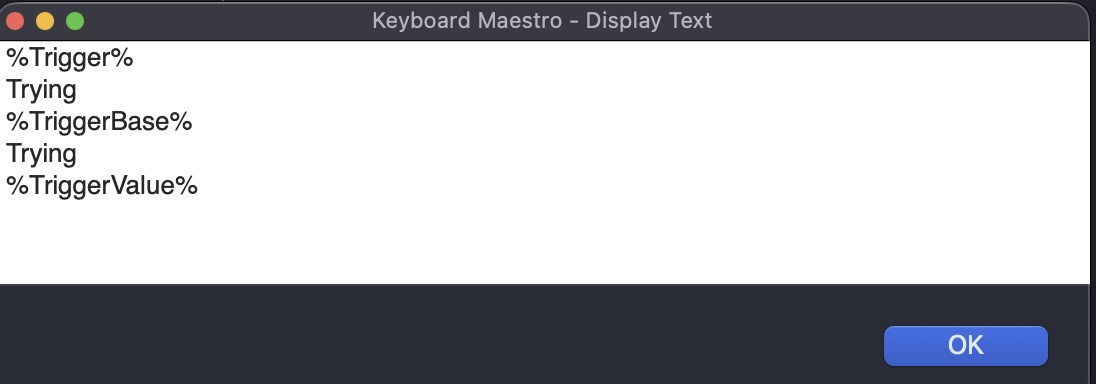
In the event that the action is correct *which I think it is), none of the suggested tokens provided any time!
Is there something that I did wrong? Wha should I try next?
Hmmm, excellent suggestion as i) it provides the same result and saves having the parse the tone. That said, I would like to learn / know what the correct token is.
Correct, I was hoping to find a token that would represent the time the action will trigger rather than the current time but, as you have noted, the trigger time and actual time will be close so we have a workaround.
Very much appreciate the AS suggestion but will use that as a last resort. Trying to stick to KM as much as possible to learn it ins and outs.
If you can derive "execution hour and minutes" directly from the trigger it'll be because you entered specific hours and minutes -- in which case you might as well hard-code them in your variable! (Obvious exception -- if you wanted to differentiate between multiple cron triggers.)
But you don't need to know when the macro triggered because you know when it started to execute, which'll only be a couple of milliseconds later -- get the time at that point instead:
The counterargument to that, of course, is that finding out about the various ways you can trigger KM macros from outside of KM is part of your KM learning
I need to execute the Cron trigger for %Trigger% to have any value! Stupid me! (
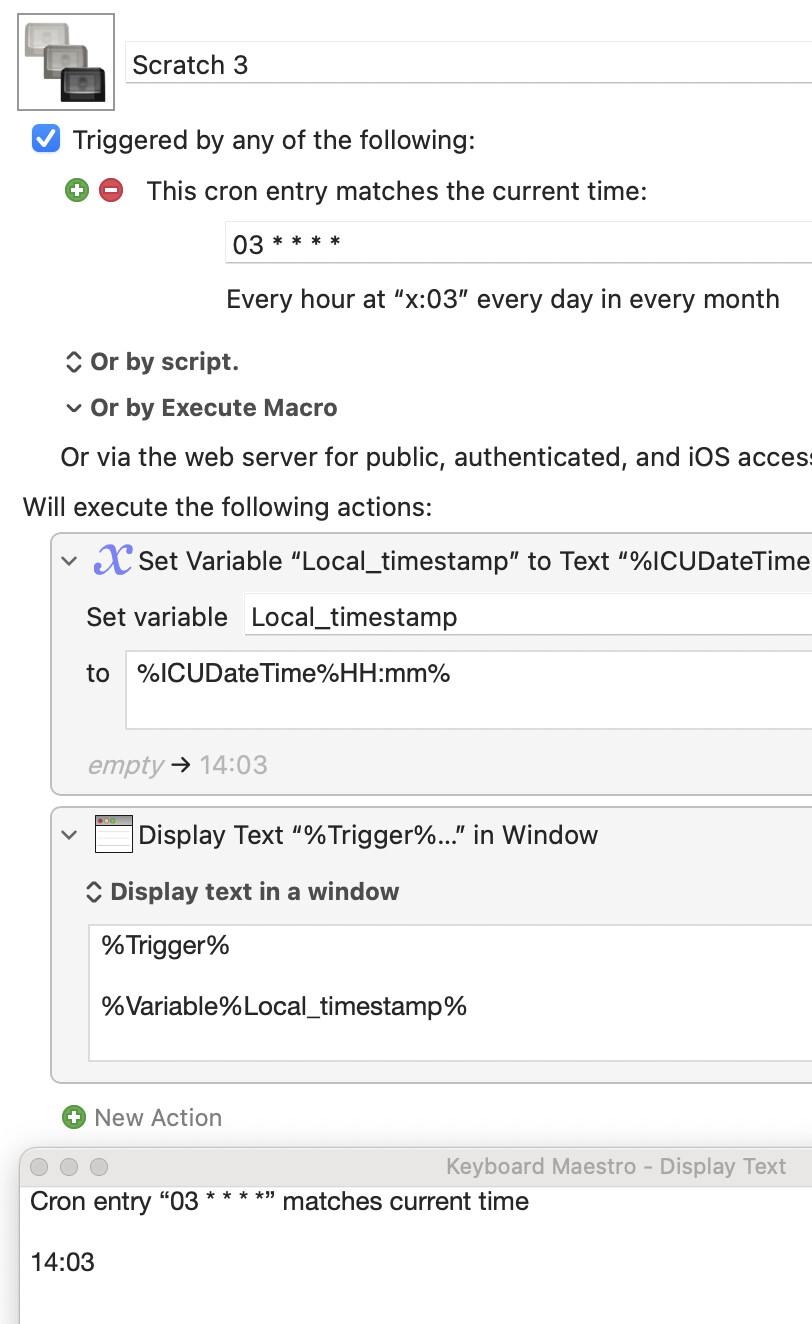
If I were have done that it would have simply reported the current time (plus a few seconds)
Agree and understood as noted above.
Agreed and understood. I did something similar but simpler in the a version I actually got to work!!
Again, I could not agree more but in this case I wanted the added challenge for finding a way to get sunrise / sunset to work within KM as it was more difficult. I will also build a version that works via Shortcuts calling the KM macro
PS. Huge that for the help and invested time, It and you have been wonderful.
I could have explained this more clearly in my last post, but what I tried to denote with that italicization is that the trigger token only return information about the triggering trigger, or triggering event/action. And I might not doing a better jobb at explaining it this time around, but I'll give it a try, and I am sure someone else will fill me inn where my language and explanation have shortcomings:
"Trying" indicates that you selected one ore more actions and selected "Try"/"View". What this does is running the selected action(s) in isolation, without the macro running in full, from the top. Under normal operation, outside operation from the editor (as in selecting "Try" or "View" or, or pressing "Run"), a macro always starts with trigger. A macro can be sett up with a great number of triggers, but it is always one, and only one trigger that initiates one instance of a macro execution. A macro can be triggered from the same, or another, trigger at virtually the same time, leading to several executions of the same macro "at the same time" — but each execution have a single triggering event, leading to a single execution. Within this execution the trigger tokens holds information about the trigger having initiated the execution, and many times also information about the triggering event, having lead to the trigger being triggered. However, these token do not know anything about any of the other triggers being set up — they only know about the single trigger and triggering event leading to this execution of the macro in question.
Therefore, had your macro been triggered by the Cron trigger, the three trigger tokens would have hold information about this trigger and the triggering event. Try setting a Cron trigger to two minutes into the future, and see what the trigger tokens hold after the two minutes have passed.
Now seeing that @Nige_S have given you a thorough reply, I am sure you are well on top of this, but I'll still post my above explanation as a supplement to this topic.
@Alexander appreciate teh added explanation and it is very clear. In short, I need to actually trigger the macro for the %Trigger% and other tokens to have a value!
Assuming it is poor educate to place teh sam post in two threads I will avoid doing so while note that the below linked thread contains a working macro that:
Addresses the firing at sunrise and sunset issues (shout out to @Nige_S and @Alexander ); and
Changes the presets on the Studio display monitor.
List the few refinements that are need and a little help will be required.
That said, thrilled that we have something that works!
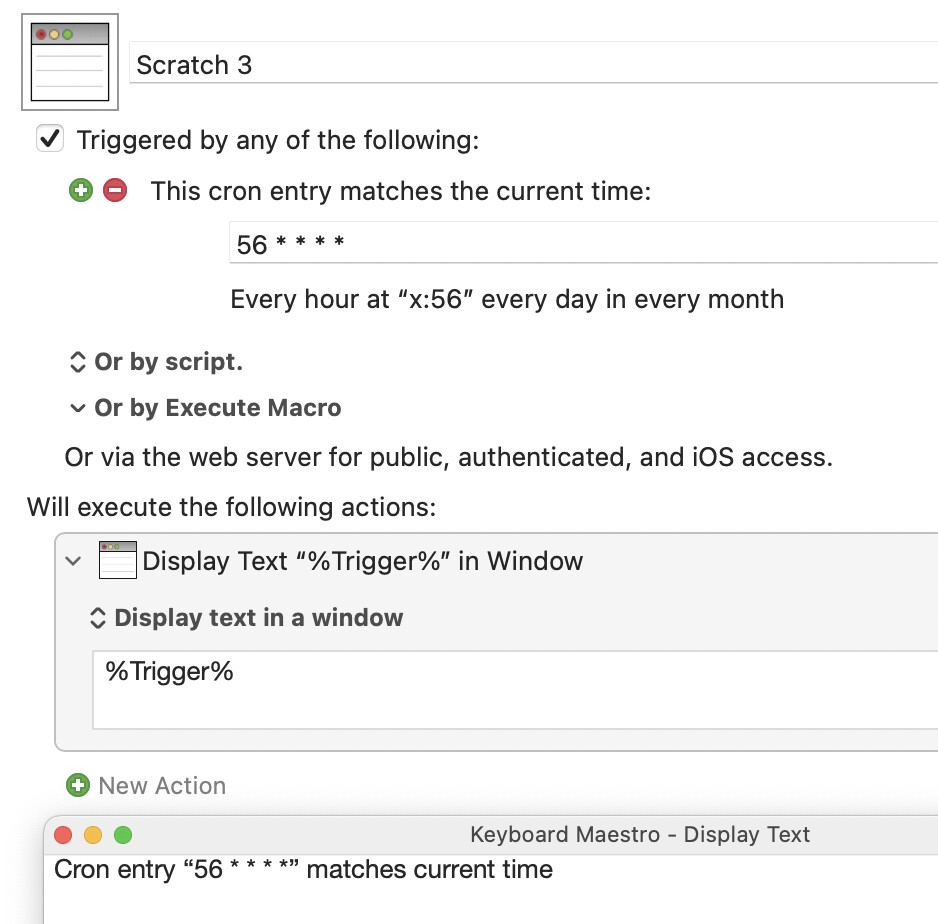
No. %Trigger%had a value -- the string "Trying". If you had used the Editor's "Run" button or "Run Macro" menu item it would be the string "Editor".
But yes, for the cron trigger to be in %Trigger% the macro needs to be triggered by the cron trigger.
Again, no. It would have reported the trigger -- the cron rule whose match caused the macro to execute. It would not have reported the actual time the cron rule matched against. You can see that in my screenshots.
If I had parsed the %Trigger% as you suggested, it would parsed to the "Cron time" / time the trigger was launched which is / would have been a few seconds earlier that the HOUR(), MINUTE(), SECOND() approach that I used because "CRON time" would have been the exact time the trigger launched whereas the HOUR() approach will be a few seconds later.
You can only derive the time from the cron rule if the rule states a single specific time. You can't derive the time from either of
0 * * * *
* 4 * * *
...since the first is at the top of the hour but you don't know the hour, the second is in the fourth hour but you don't know the minute.
You can get the time from
0 4 * * *
...but why bother? You already know the time -- it's 04:00, else the macro wouldn't have triggered!
That's not to say you shouldn't get the time by token at execution time rather than hard-coding it -- indeed, that's often the best method. But be clear in your own mind about why you are doing it that way.
It is on my to do list to further my skillset. That said, before doing so I may change back to a Time Based Trigger (i.e., 8:30 AM) and parse that. The only reason I initially switched to Cron tigger was the hope that it would have a sunrise / sunset option but at last, it does not.




 (
(