Tip: Highlight Location—not just for finding the mouse pointer (Logic Pro example)

As its wiki page implies, Highlight location can be used for other purposes than finding the mouse pointer:

The Highlight Location action highlights a location on screen. This can be specially useful for finding the mouse pointer.

Here is an example that gives a visual reminder while saving in Apple’s Logic Pro audio software. If you don’t want to read all this (and I wouldn’t blame you; I didn’t want to write it all!) the key point is: you can use Highlight location to draw boxes (or ovals) around screen elements that you might want to be reminded of.

When saving a Logic Pro project, I always want it to include copies of audio files that have been imported, so that everything is safely gathered in one place. Upon loading a project, I don’t want any audio files to be missing due to, say having reorganised or weeded out files that might not even be on the same drive! My standard practice is to save copies of such files with the project—but Logic Pro does not always make that as easy as it should be.

There is no setting/preference that can be set such that audio files are always saved. The appropriate setting is shown in the Save dialog box and it is up to the user to make sure that that setting is checked.

Workarounds include saving a template that has the setting on, but I have found that to be unreliable at best and usually completely ineffective. Discussions in online forums suggest that one’s version of Logic Pro is just one of many possible factors that mean one should never assume that imported audio will be saved.

It would be quite possible to create a macro to fully automate the checking (in both senses) of the relevant box, if only by using image detection (if you have a better idea, feel free to share it, of course), but all I really needed was a visual reminder. That’s where Highlight location was useful.

This is just an extract from a macro, to serve as an illustration. The macro is part of a set of macros that depend on the trigger The focused window title changes.
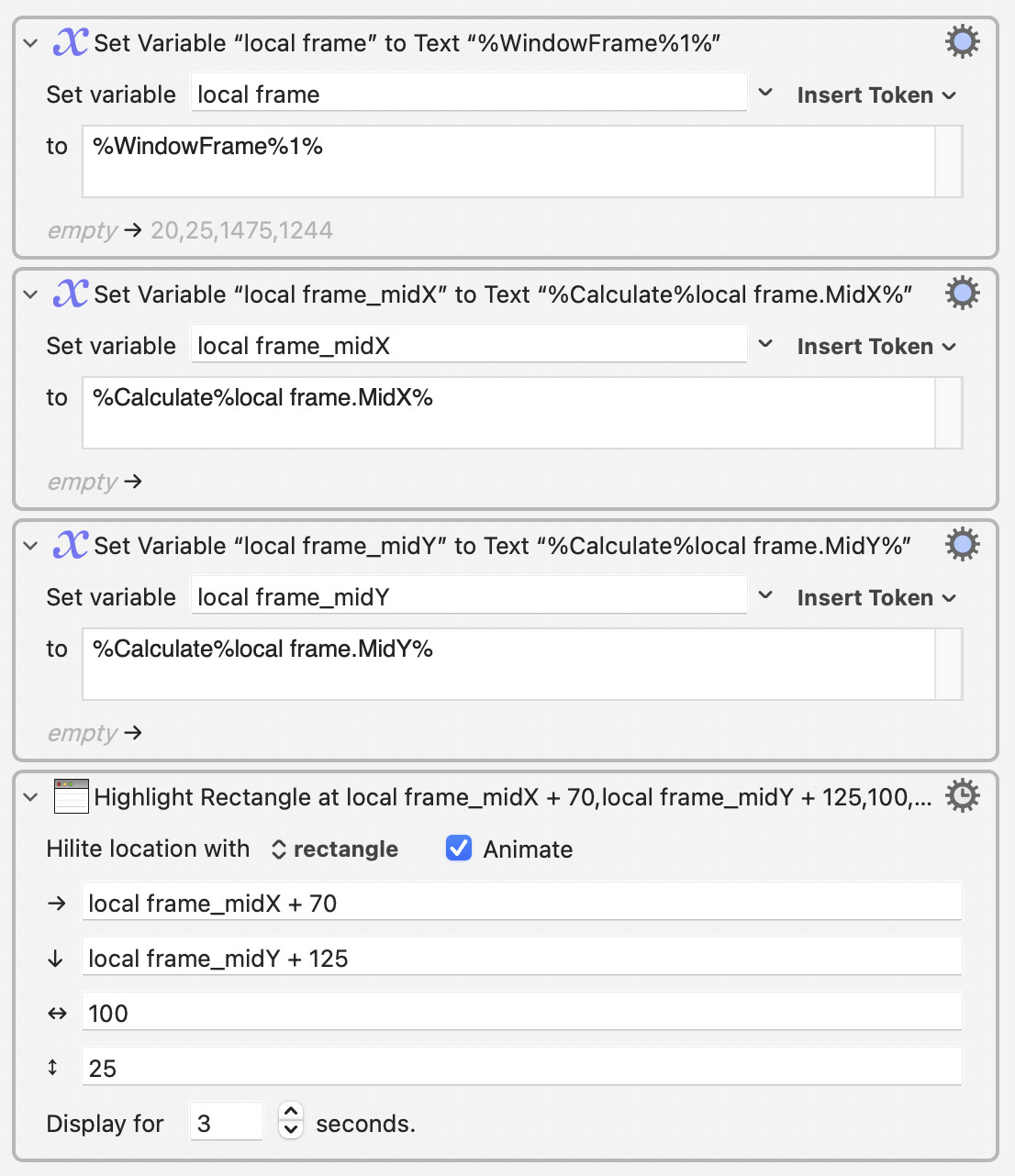
A box is now drawn around “:check_box_with_check: Audio files” whenever the Save/Save as dialog appears.

It’s probably needless to say that, since I started using this macro set of actions, Logic Pro has never presented me with an unexpectedly unchecked setting. Typical! :wink:

3 Likes

Image detection is an amazing technology, but OCR detection is equally amazing. The problem with OCR, in my experience, is that it doesn’t recognize a checkbox or an empty box or a bullet (or any emoji) as a “character.” (I’ve tried.) I’m really sad about this, as it limits OCR’s usefulness. From a human perspective, a checkbox, whether empty or checked, is a “character.” I’ve tried using OCR to accomplish something similar to what you are doing, but the only “symbols” OCR can recognize are the standard keyboard symbols, like: !@#$%^&*. When OCR is upgraded to support the detection of emojis, it will be a thrilling day for me, and I will be able to help you solve this problem without image detection.

1 Like

I think it is true to say that OCR systems that we usually encounter do not cover a range that is much greater than the ASCII character set. Emojis that are incorporated in the Unicode tables would be the obvious target, but there are so many character sets that are arguably more deserving of attention when it comes to improving OCR software. For example, Greek is not yet supported by any OCR software on the Mac, despite the importance of its characters in many disciplines.

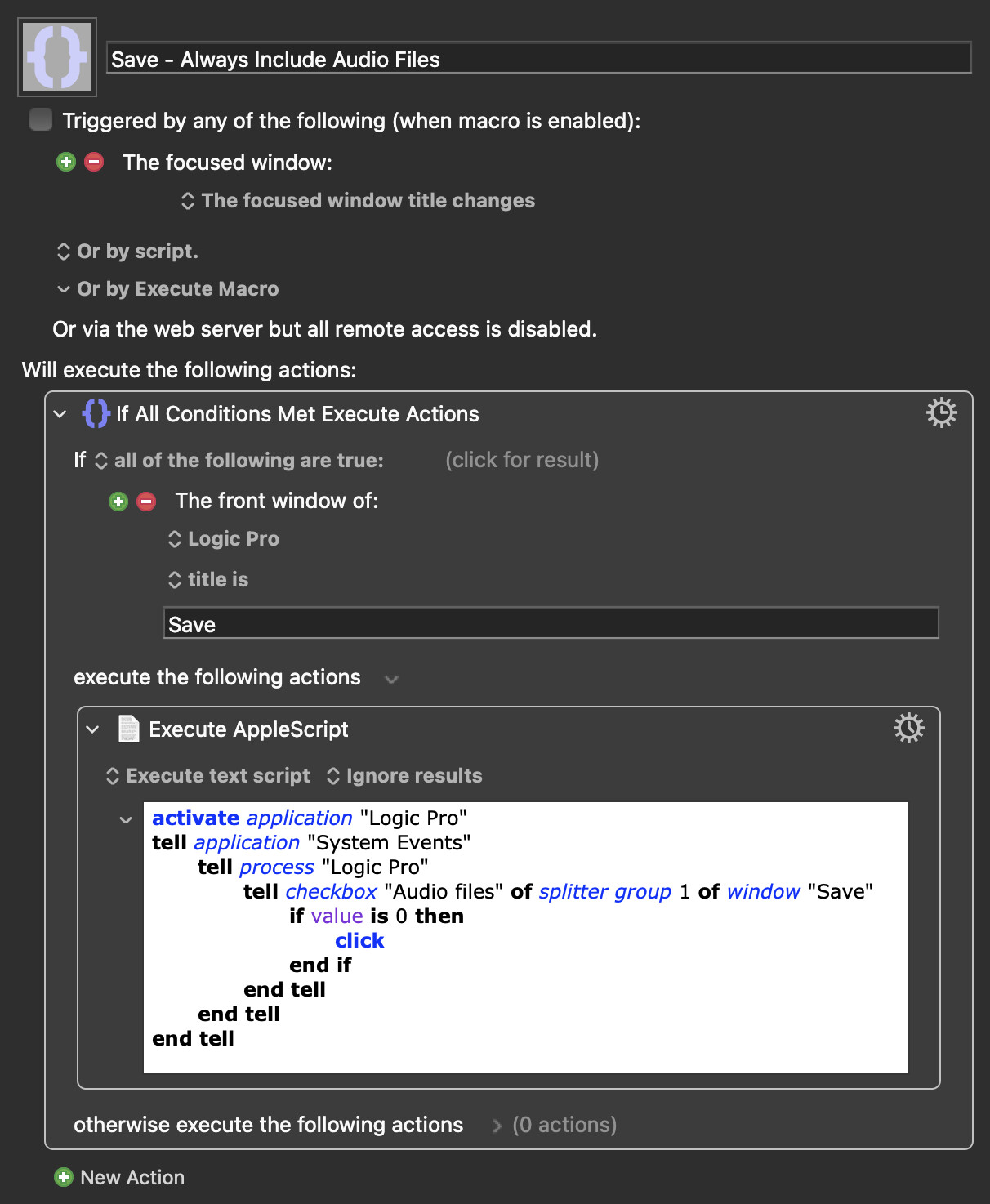
Here's another way to do that:

Save - Always Include Audio Files.kmmacros (28 KB)

Macro screenshot

1 Like

Thanks very much. I’ll go and experiment with incorporating that into my system now!

Although I did want to share how one apparently specialised action could have wider uses, I was of course also hopeful that someone would have just such an automation solution as this… and yes, I guessed that that person might be you. :grinning_face_with_smiling_eyes:

The script fails inside KM and when run from Script Editor with this error message:

System Events got an error: Can't get checkbox "Audio files" of splitter group 1 of window "Save" of process "Logic Pro".

That’s under Logic Pro 12.2 and MacOS 15.7.8 (Sequoia).

I'm on Tahoe. Maybe something's changed?

Try using this macro to get the correct AppleScript UI element reference on your system:

I hadn’t yet got around to trying your UI Browser Lite macro but I just did so and it gave me the answer. Many thanks.

Removing “of splitter group 1” was the solution:

tell checkbox "Audio files" of splitter group 1 of window "Save"

		tell checkbox "Audio files" of window "Save"

I guess so! As I mentioned above:

… and it makes sense that the MacOS version would be among those other possible factors.

I have integrated the Applescript into my system but as a precaution against any further changes to Logic Pro or the OS, I am keeping the highlighting too! :wink:

1 Like