Update, ver 1.0.2 (2016-10-06)
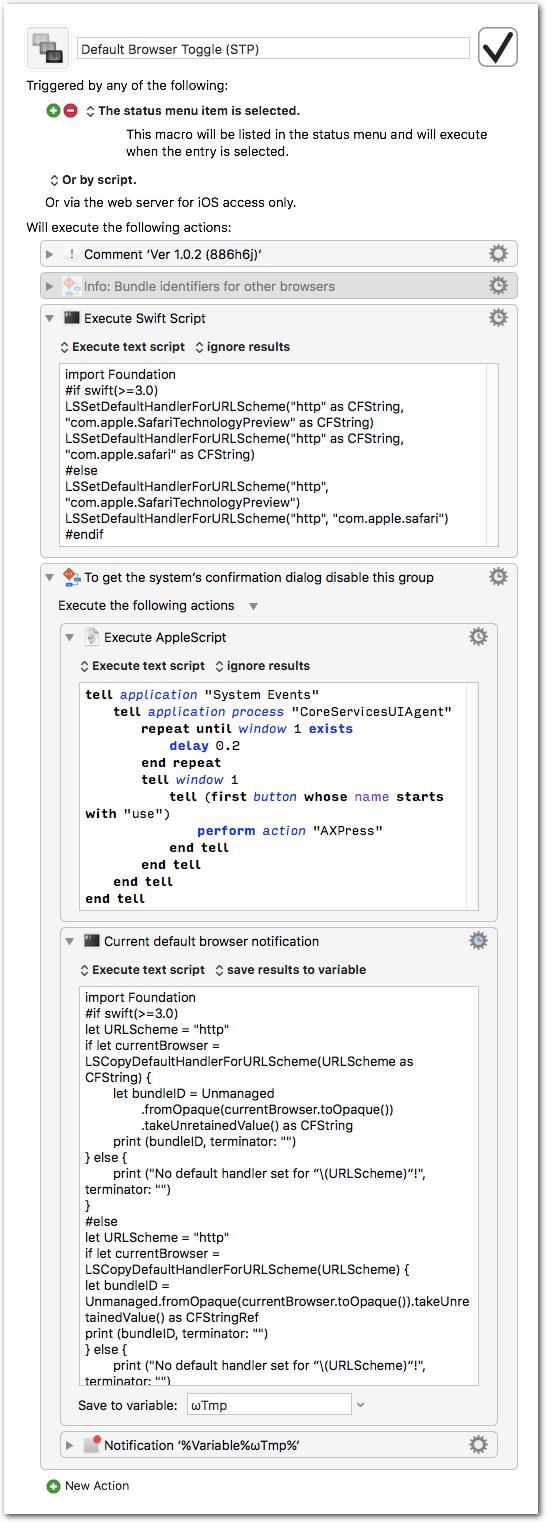
- The AppleScript now performs a direct button press instead of setting focus and pressing Space
- Added a wait (repeat) loop, since the preceding Swift script may take a couple of seconds to launch.
- Added timeout to the AppleScript.
Default Browser Toggle (STP).kmmacros (7.0 KB)
You can use the script to toggle between other browsers, too. For example, to toggle between Safari and Firefox replace com.apple.SafariTechnologyPreview in the Swift script with org.mozilla.firefox.
Update, ver 1.0.1 (2016-08-27):
The script now tests for the installed Swift version, und thus should run fine with any of these versions:
- Swift 2.2 (current release version, Xcode 7 / macOS El Capitan)
- Swift 2.3 (next release version, Xcode 8 / macOS Sierra)
- Swift 3.0 (current beta version, Xcode 8)
Other changes:
- Prettified the output of the available-http-handlers test script.
- Prettified the notification.
Default Browser Toggle (STP).kmmacros (7.3 KB) — 2016-08-27
Update (2016-08-10):
Compatibility with Swift 3:
Default Browser Toggle (STP) [Swift 3].kmmacros (7.1 KB)