I have this action

But it's not moving to the trash, it's deleting it completely. I tried with both file and folder.
Restarted the computer just in case.
The file/folder is just gone.
I have this action
But it's not moving to the trash, it's deleting it completely. I tried with both file and folder.
Restarted the computer just in case.
The file/folder is just gone.
The documentation for that action explains when the file may be deleted. Do you meet those conditions?
if you mean this:
moves a file or folder to the Trash (on remote volumes, the system may immediately delete the file), then no, this file is on my normal internal disk, where the OS is installed.
I believe there's some kind of bug here @peternlewis
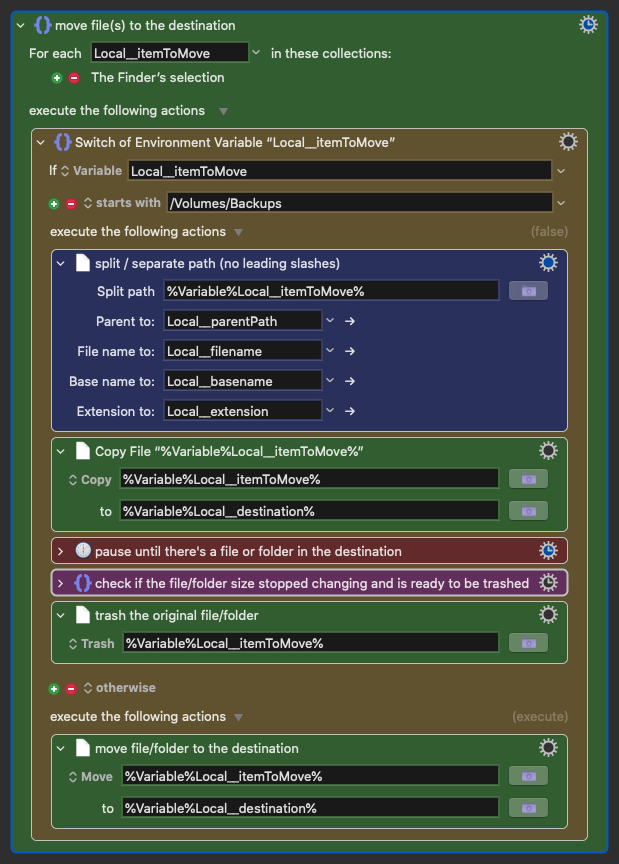
Test 1: My macro copies a file (IMG_1698 copy 2.png) to another internal disk (/Volumes/Backups) I have (without the OS), and after that, trashes the original file (IMG_1698 copy 2.png on my main disk, not /Volumes/Backups). This does not work.
Test 2: My macro is a single "Trash" action, trashing the exact same file IMG_1698 copy 2.png. This works and it trashes the file 
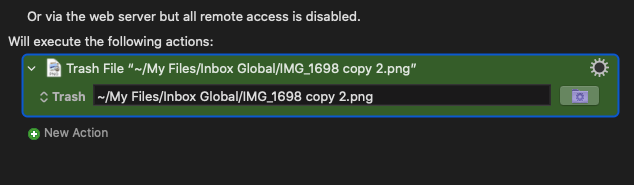
Same file, same location, same action.
The only difference is that I previously copy the file to /Volumes/Backups, but I don't see how that would make any difference unless it's a bug.
Never mind... I was checking the wrong thing.
I should be checking the destination in the Switch action, and I was checking the original file, so that wouldn't match my criteria and was actually running the "otherwise" section, not the "starts with"... 
Does it?
I may be misreading your screenshot (as always, troubleshooting is more difficult without an actual macro) but it seems to say
"If itemToMove is in /Volumes/Backups then copy it somewhere then delete the original. If it isn't, move it to somewhere."
So if your selected item(s) aren't in /Volumes/Backups won't they be moved, i.e. the original copy is no longer there -- and isn't in Trash either!
Read my previous message... 
Read the timestamps -- I guessed at the same time as you replied.
Great minds think alike?
I guess so 