I have a couple of different macro groups that get their own status menu. For each of these status menus, I have two custom icons — one for Light Mode and one for Dark Mode.
I swap these menu icons using a macro that uses a System Appearance Trigger. Whenever the system appearance changes, KM checks to see whether we're in Light Mode or Dark Mode and loads the appropriate icon into the relevant Named Clipboard. This works great!
But! When an application is in Full Screen mode, the menubar changes to black. At this point I would want those status menus to switch to use the Dark Mode icons. But switching to Full Screen mode doesn't set off the System Appearance Trigger.
Can you think of a way to trigger a macro whenever the frontmost application goes into Full Screen mode?
You could try something like this, but it's not going to be automatic.
-Chris
--------------------------------------------------------
# Auth: Christopher Stone
# dCre: 2022/10/18 11:47
# dMod: 2022/10/18 11:47
# Appl: System Events
# Task: Test to see if the front application is full-screen.
# Libs: None
# Osax: None
# Tags: @Applescript, @Script, @System_Events, @Full-Screen
--------------------------------------------------------

tell application "System Events"
   tell (first application process whose frontmost is true)
      set appName to its name
      tell windows
         if true is in (get value of attribute "AXFullScreen") then
            return "Application " & appName & " is Full Screen"
         else
            return "Application " & appName & " is NOT Full Screen"
         end if
      end tell
   end tell
end tell

--------------------------------------------------------
Thanks Chris. Yes, I'd found another script of yours on the same principle, which is helpful for testing whether the current front window is in full-screen mode. But I can't see a way to trigger it — switching into full-screen mode doesn't always coincide with a change of active application, or of window title, or anything else that I can think of that triggers a macro.
If an app is in Full Screen mode, then a menu item named Exit Full Screen becomes available, and I think that might successfully be used as a trigger with the If Then Else action.
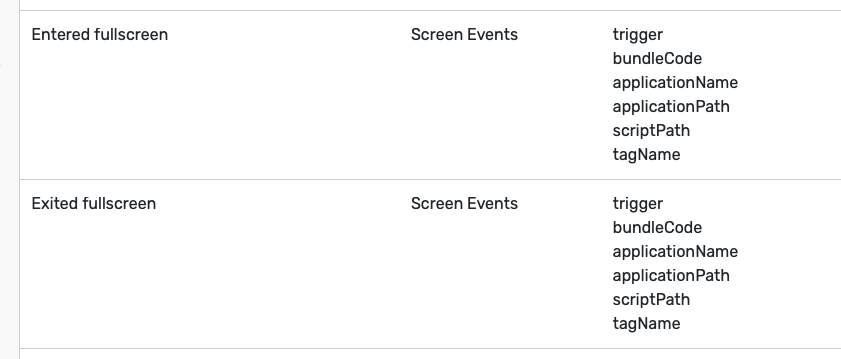
Well @gabrielroth a third-party app called EventScripts might be of use to you. It notices "things" happening on your Mac and then sets off a trigger that can run a KM macro.
A couple of the many events it can detect include ones relating to full screen. Here's an extract from the manual:
I'm not understanding why checking for an Exit Full Screen menu item can't be used as a trigger. That's kind of the point of the If Then Else action that KM offers. The image I showed includes no ensuing action (under Execute The Following Actions), but that doesn't preclude you from setting a macro up with your desired action. Or am I missing something?
What you’re suggesting is a condition—it could be evaluated within a macro that’s already running. What I’m looking for is a trigger, the equivalent of a hot key trigger or a typed string trigger, that would cause a macro to run whenever the frontmost window enters full-screen mode.
Are you entering Full Screen mode using the built-in keyboard shortcut (Command-Control-F)? That, of course, could be the initial trigger for a macro that enters Full Screen mode and also initiates the other actions you want, though I don't know if any other way of entering Full Screen mode could be used as a trigger.
Use a periodic trigger (e.g. every x seconds) that runs Macro A. Macro A checks for the "If in Full Screen Mode" as NaOH suggested, and if found, runs your Macro B that you are trying to trigger
Are you entering Full Screen mode using the built-in keyboard shortcut (Command-Control-F)? That, of course, could be the initial trigger for a macro that enters Full Screen mode and also initiates the other actions you want, though I don't know if any other way of entering Full Screen mode could be used as a trigger.
Sometimes I'm using that shortcut; sometimes I'm using a different shortcut, sometimes I'm using Command-Tab to switch into an app that is already in full-screen mode. So a trigger that's tied to a particular keyboard shortcut wouldn't work. (Also note that I'll also need a trigger for switching from full-screen mode to a regular window layout, to change the menubar icons back.)
Yes, that would work. I generally hate having macros firing every few seconds — I'd rather pay $8 US for EventScripts. I'm sure it wouldn't cause any problems but it would bother me, and this whole menubar thing is about aesthetics anyway.
A trigger in Keyboard Maestro needs to be highly efficient, especially when it is not triggering. Detecting a menu state or a menu existence, can only be done by very expensive scanning of the menu structure, and only by continuously doing that could you detect a change. So you can detect the state once the macro is running, but there is no way I know of to be informed of the change to full screen and thus know to trigger the macro.
Polling regularly (eg every second), scanning the menu structure would likely be a significant drain on your battery, and given how expensive the inter-app communication to scan the menus are would quite possibly be a noticeable hit on performance.
@tiffle I'm very glad to know about EventScripts! It works very well for this purpose and has other features that are giving me ideas for other macros.