Trigger a macro with a shortcut that only works in a specific website

Hi everyone,

I would like to create a keyboard shortcut (Shift + B) that perform a specific action on YouTube in a google chrome browser. I want this shortcut (Shift + B) to only work on YouTube and not any other webpage in google chrome or other applications.

Problem 1:

I have attempted to create such macro as shown in the screenshot below. For the trigger, I used application trigger ( Google chrome). For the actions, i first setted a variable that stores the Chrome URL using the token %ChromeURL%. I then set up a “If then else” action where IF the Chrome URL contains the word “youtube” and IF i pressed the letter “b” and IF i pressed the modifier “Shift” (→ together as Shift + B), it will perform an action on YouTube. But it did perform any actions when I pressed “Shift + B” on YouTube. Any suggestions on how I could modify this macro to make it work?

Problem 2

If it worked as expected, I would like to add a if condition where IF i’m typing within the search engine on YouTube, i do not want it perform the action when i press “Shift + B” (so that when i press Shift + B on the search engine, the captalized “B” letter can appear on it as normal). What kind of condition should I add to the “if then else” action to make this happen?

Thank you for your help in advance.

Before even attempting to get this working my first bit of advice would be not to use B as your hotkey. Why? Because B in normal use types a capital B and in order to try and work around that you will have to jump through so many hoops.

I find the the Option Key is a better choice for hotkey triggers. I would suggest you use B

Coming back to the construction of your Macro. Don't use "Chrome Activates" as the Macro Trigger. That will just fire the Macro once when Chrome starts. Use "Hotkey" and the hotkey of your choice to trigger the Macro. Also put the Macro in a Group that is only active when Google Chrome is the front app:

Then you could add a condition in the Macro that checks if you are on YouTube in Chrome:

3 Likes

Thank you for your advice. I should have mentioned that the reason I constructed the macro this way (putting the shortcut within the “If” action instead of making it into a hotkey trigger) is because I would like to use the same shortcut for different websites/applications (i.e. the same shortcut will perform different actions on different websites/applications). Therefore, “putting the macro in a group that is only active when google chrome is in the front app” does not make sense for my purpose.

I am aware that I could still use hotkeys instead of application trigger to achieve what I just said, but the problem is I want to use triggers like “Shift + B” or even just “B”. The problem with that as you have mentioned is it's a letter and it will interfere with normal typing.

I have a workaround to this where I first trigger a hotkey to bring up a palette that only works for one action, then I press a single letter hotkey (e.g. B) that can perform different actions on different sites. But I want it to work like I said (e.g. the hotkey ”Shift B” / “B” trigger different actions on different sites but can still type small letter “b” and big letter “B” when in the search field). i want this partly because i have exhausted almost all straightforward keyboard shortcuts (most of the option / control / command + letter) and its nice to just press a single letter to trigger an action, similar to how on youtube you can press ‘C’ to bring up subtitle or ’Shift + Left arrow key’ to speed up video while not affecting any typing you do when in search field.

I understand this won’t be easy but do you have any clues as to what kind of stuff I would need to learn to start building a macro like this? Or what would it involve?

I'm not 100% positive I understand the objective, but I think I have the basics down: You want one activation key to work in many apps, and you want to use the same simple keyboard shortcuts for those actions, regardless of which app (or site) might be active when you trigger the macro.

If that's what you're trying to do, I'm not sure of the best way to do it, but here's how I would personally do it:

I'd create a macro group for all the shortcuts I want to use, and that macro group would be active in all applications. I'd set up that group to show a palette of macros when triggered by some hot key (not a typable key combo). This prevents you losing actual typed characters at any point.

For example, here's the macro group I use to present a list HTML snippets I use often in my day job:

When I press the hot key, I see the palette:

image

I press A through E, and the text is inserted and the palette vanishes. This works because each macro in the group is assigned a single-letter hot key, and those keys only work when the palette is onscreen.

In your case, you want to have multiple entries for many of the letters. You could create duplicate macros, all assigned to the same letter, which would then force a conflict palette to appear when you typed that letter.

For example, I added a new "A" shortcut to my palette, and activated the palette:

image

If I press A now, the conflict palette appears:

image

I'd then have to type more characters until the right macro is chosen, and that's a pain. So instead, what I would do, is build logic into each of the single-letter macros. That logic would use the rules you've defined above to determine which actions to take.

Say you have an "A" action, and you want it to do one thing when in YouTube in Chrome, and something completely different when in Mail. In the A macro, build logic around whatever you can uniquely identify about each use case. In pseudo-code, something like this would happen after you trigger "A" on the palette:

"A" macro launches
    Within "A" macro
        Case [frontmost app is Mail]
            Run YouTube-specific macro to handle multiple possible tasks
        Case [frontmost app is Chrome]
            Run Chrome-specific macro to handle multiple possible tasks
        Case etc...
End "A" macro

You could, of course, have the actions themselves within the "A" macro (instead of launching other macros), but it might get very messy and crowded if you have lots of actions with lots of conditions with lots of apps, all buried in one macro.

For troubleshooting and easy updating, I prefer to keep the modules short and sweet. That way, if you have 15 tasks assigned to "A," and you want to edit the Chrome tasks, you don't have to find Chrome's section in your massive macro, you just edit the called Chrome macro.

Does that make sense?

-rob.

1 Like

Thank you for explaining all of this! I understand everything you are saying and I am actually already using pretty much the same method as you described. However, what im striving for here is to find a way to not even trigger the palette in the first place and use the same single character hotkey (e.g. B) to trigger different actions at different sites/applications. PLUS (importantly), I need the single character hotkey to not be triggered when I’m typing in the search field or anywhere that requires the user’s input (e.g. comment section). (As a real life example: When you are on any youtube video, you can press the character “C” to bring up subtitle, but when you type something involving the letter “C” (e.g. carrot) in the search engine at the top of the video, the letter “C” can be typed as normal, so can when typing in the comment section). I think to pull something like this off will require some programming skills which I have none but I’m willing to learn about it. So if anybody has any ideas of where to start, I'm all ears! Thx

This will be essentially impossible to do well.

Trapping typed characters means your macro will then have to deal with them, and because you want this to work in any app, you'll have to account for any spot where a typed character might be expected. Search boxes, input fields, dialog boxes, forms, etc.

And there's no easy was on macOS to tell where the input cursor (as opposed to the mouse) is located, so you can't even tell you're in such a field unless you can find a related item that's findable—a menu that's only active when the input field is active, for instance. But you'd have to find those for all possible situations.

In the end, you might come up with a system that works, sorta ... but it'l be fragile, subject to timing disparities, and probably frustrating to use.

Using single keys as triggers is generally a very bad thing to do, for all of the above reasons.

-rob.

1 Like

To pull this off, you'd essentially have to write a Mac app that's a keyboard trapper. Spyware, in other words. You'd have to trap every typed character, figure out which app is active, which field is active in the app, etc. If you're in such a field, you'd have to pass the typed character to the app to handle; otherwise, you can run your "do these things" code.

Even if you did this, though, you're still trapping every single character typed, and passing it on after checking a bunch of stuff ... so the mere act of typing is going to be slow and laggy, depending on how busy the CPU is, how slow/fast your app is at checking things, etc.

You really want typing to be smooth, fast, and not variable speed based on what some app is doing with your typed keys.

-rob.

1 Like

My goodness! This sounds super complicated, totally out of my depth and unreliable if it even worked. For now I shall stick to my current method then haha. It might be a stupid question but how come some sites like YouTube can let you use single-letter shortcuts without interfering with actual typing when in search engine or comment? (coz they wrote the code??)

A web browser is a very unique environment, where everything onscreen is known to the browser. So it knows about every input field, and the Javascript code that's trapping keys basically has an if/then in it: If in input field, exit, otherwise, do things.

You can do something similar in Keyboard Maestro via its ability to run Javascript in the browser—you could have a macro that runs Javasript that finds all the input elements on a web page, and exits if one of them is active. But that's very specific to web browsers, and maybe very specific to how the page was written (not sure about that; we're getting beyond my expertise).

But you said you wanted this to work in multiple apps, in all sorts of contexts. The Javascript solution would only help very specifically with web browsers.

-rob.

1 Like

OHHHH!!! Good idea! That JavaScript solution looks promising! I am going to learn JavaScript and figure this out one day! Yes I want it to work in multiple apps but I guess that's pretty impossible based on what u said. But even if it only works on a few sites it would be game-changing for me! Thank you my guy! u gave me some good ideas!

@Willis griffman is a respected member of this forum, who has already helped many people. Everything he states is correct (as far as I know.) :slightly_smiling_face:

However, it seems to me that he is referring exclusively to KM. If you are willing to use another app in addition to KM (as many people do), then there is a solution. BetterTouchTool can do what you want to do. I just wanted to mention this for the sake of completeness.

1 Like

Yes, I was referring to Keyboard Maestro itself. But I would expect that even BTT would have trouble letting you type any single key in any possible app and always knowing if it was in an input field or not? If it can do that, color me impressed!

-rob.

1 Like

I am far from using "any possible app". Of course :slightly_smiling_face:

But I can confirm that it works with every app I use.

The default behavior of BTT is to listen to notification that the app actively sends. If the app sends these notifications correctly, the field recognition is immediate. Otherwise, BTT offers options to actively request this information.

KM itself, for example, sends this information in an exemplary manner, as BTT shows me.

1 Like

Thank you both! Let me download BTT and see if I can replicate what Frankb did!

That's a good idea :slight_smile: Use a Conditional Activation Group and set the desired conditions.

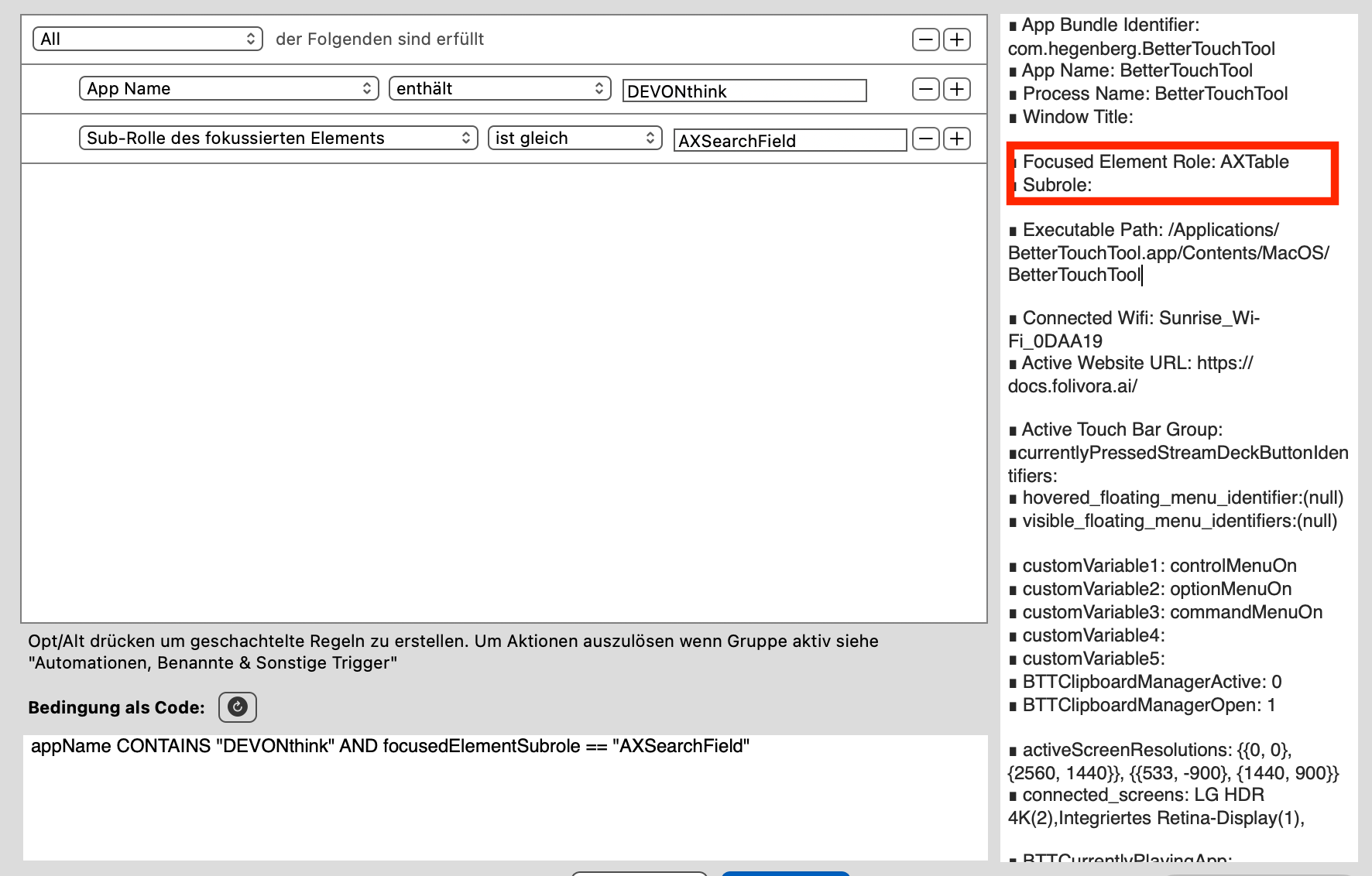
These two criteria are important

Here, for example, something is only triggered if Devonthink is the front app and the cursor is in the “AXSearchField” field. In the viewer on the right-hand side, you can see which field the cursor is currently in. Have fun!

1 Like

Thank you thank you! Conditional Activation Group, got it! Let me first familiarize myself with BBT a bit before moving on to this! I will let you know how it goes!

Instead of trying to get the MACRO to trigger when YouTube is present, create a GROUP specifically for YouTube and your browser of choice. Here's what I use and it works perfectly.

1 Like

Yes this would work. But in addition to only having those hotkeys triggered in a specific sites. I also want to use single-letter or Shift+singleletter hotkeys to trigger actions, but this will interfere with normal typing when you are at the search engine or comment section. So to get around that, it is possible to do so with another app called "better touch tool" (according to Frankb), which I am going to explore later.

This is probably a misunderstanding :slightly_smiling_face:. Usually, “single key triggers” means pressing only one key.

So if you type “a” in a text field, “a” is typed. However, you can press this one key briefly or for a longer period of time. This enables two functions that do not interfere with normal typing. (Unfortunately, this is not entirely true, but I will come back to that later).

In my opinion, short/long press is the best solution to this problem. This allows me to decide for myself whether I want to type the letter “a” in a text field or trigger something else.

If I leave this decision to an app that does one thing in a text field and something else in another field, it interferes with normal typing.

The problem with short/long press is that the macros have to be set up so that the letters are typed when the key is released. However, if one letter is typed when the key is released and the next letter is typed when the key is pressed, letters get mixed up when typing quickly.

There are various solutions to this problem.

1 Like