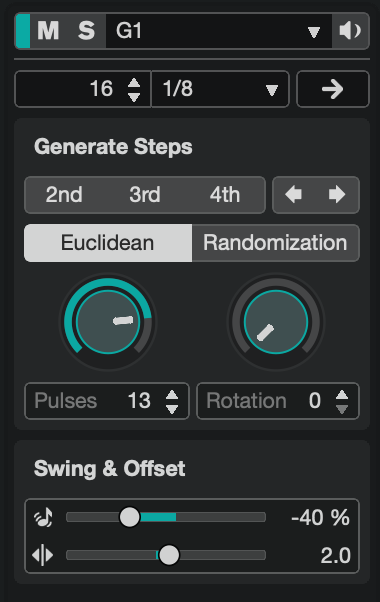
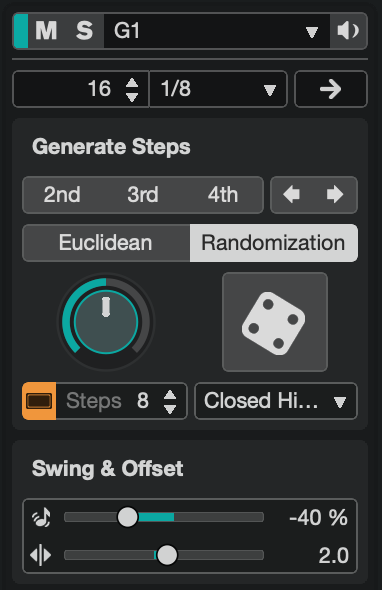
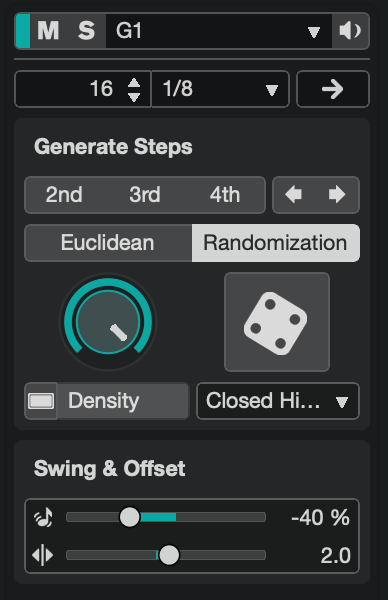
I have a macro that checks for one of three images on screen and switches to the corresponding Metagrid grid accordingly. It currently triggers on focused window changes, which works well, but if I make any manual changes in Cubase using the mouse it can fall out of sync. I'd like the macro to also run on every mouse click while Cubase is the front app, as a way to keep things in sync.
I've tried triggering it via BetterTouchTool using both a kmtrigger:// URL and an AppleScript calling the macro by UUID, but neither approach is working.
My questions:
What's the best way to trigger a macro on every mouse click within a specific app?
Is there a native KM trigger that can listen for mouse clicks within a specific application?
Try using a USB device key trigger. But you may find this is incredibly disruptive, having to check three images onscreen every single time you click the mouse—there's going to get some delays that may aggravate you.
How "in sync" does it need to be? Could you instead use a Periodic trigger and check every second? Even an "every second" check is relatively light weight if you've a small, defined, area of the screen to check -- and it would be worth a look to make sure you can't do this by menu item availability or similar instead.
You could even start your macro with if IDLE() > 2 then cancel this macro so the image detection doesn't run if you haven't interacted with your Mac since the last check.
I tried a USB device key trigger but all I got back was Press and Release. Is my Apple Trackpad supposed to appear? I also seem to be having trouble creating even a simple new macro (show notification) via BTT atm. I can’t get a 3 finger double tap, which isn’t assigned to anything, to do anything.
That thought was behind my question about what causes the images to appear. Immediately after posting my reply, I started to re-edit it to draw attention to the Wiki’s warning about the “XY problem”, but I didn’t want to seem like I was lecturing over an issue that might not have been relevant! But it does look to me as though knowing more about the starting position and the end goal might be useful
When you are asking a question, ensure you are clear what you are actually trying to accomplish, not just the difficulty you are having in a specific attempt at solving the problem. There may be a much better way to solve the actual problem rather than resolving the difficulty with your specific attempt.
Yup good point. Going back and reading the original post the goal is not clearly stated so let me try to do that. And appologies for the Metagrid/Cubase references but whether or not you are familiar with these pieces of software shouldn’t have any effect on the macro I’m trying to design.
The goal is to keep a Metagrid grid in sync with Cubase's Drum Pattern Editor. Cubase’s Drum Pattern Editor has different tabs/section that reveal further editable parameters on click.
I have a KM macro that detects which mode (Euclidean | Randomization: Steps | Randomization: Density) is active (by checking for one of three images on screen) and switches to the corresponding Metagrid grid, which houses buttons for manipulating these newly revealed parameters. It currently triggers on focused window changes, but if I make manual changes in Cubase with the mouse, the grid can fall out of sync. Running the macro on every mouse click would ensure it stays in sync regardless of how I interact with Cubase…at least in my mind but perhaps there’s a more elegant way of achieving this.
So I still wonder if we couldn’t start the macro a little earlier in the workflow.
Would I be right in thinking that the images do not appear for any other reason than that you have selected one of the modes? If so, how do you call up the modes?
If the modes can be summoned using key combinations or menu items, those user actions could be easily automated within your macro.
However, I would guess that a user normally has to click on images to activate/change modes. If that is the case, I then wonder whether the images that one needs to click are always in the same area of the window (the macro could then click at the relevant coordinates without having to look for images). I further wonder whether Metagrid couldn’t be brought into play a little earlier in order to help with that, before it…
I use neither Cubase nor Metagrid, so I hope that my thinking isn’t too wide of the mark. The underlying point is that I suspect that if you think about how the modes are selected, you might be able to integrate your macro and/or Metagrid at that point, before the images appear. The images are a consequence of user actions, and so are not the real starting point.
Ah I see, you’re wondering how I bring the images into view in the first place. Well unfortunately there are many routes to get there ー double-clicking a part in the project (main) window, selecting a part and pressing a key command to open the editor, or swiping to an already-open window, and perhaps even other others that I'm not thinking of at the moment. So intercepting it at that point doesn't seem practical in my mind which is why I have resorted to the image detection approach. But I could be wrong…?
 But it does look to me as though knowing more about the starting position and the end goal might be useful