I have a macro triggered when Google Chrome becomes active, checking if the current tab is on Netflix; and if a specific image is found, then performing an action. However, it only runs when I switch applications to Chrome, not when I switch tabs within Chrome. How can I modify the macro to trigger on tab switches as well as when switching to Chrome from another application?
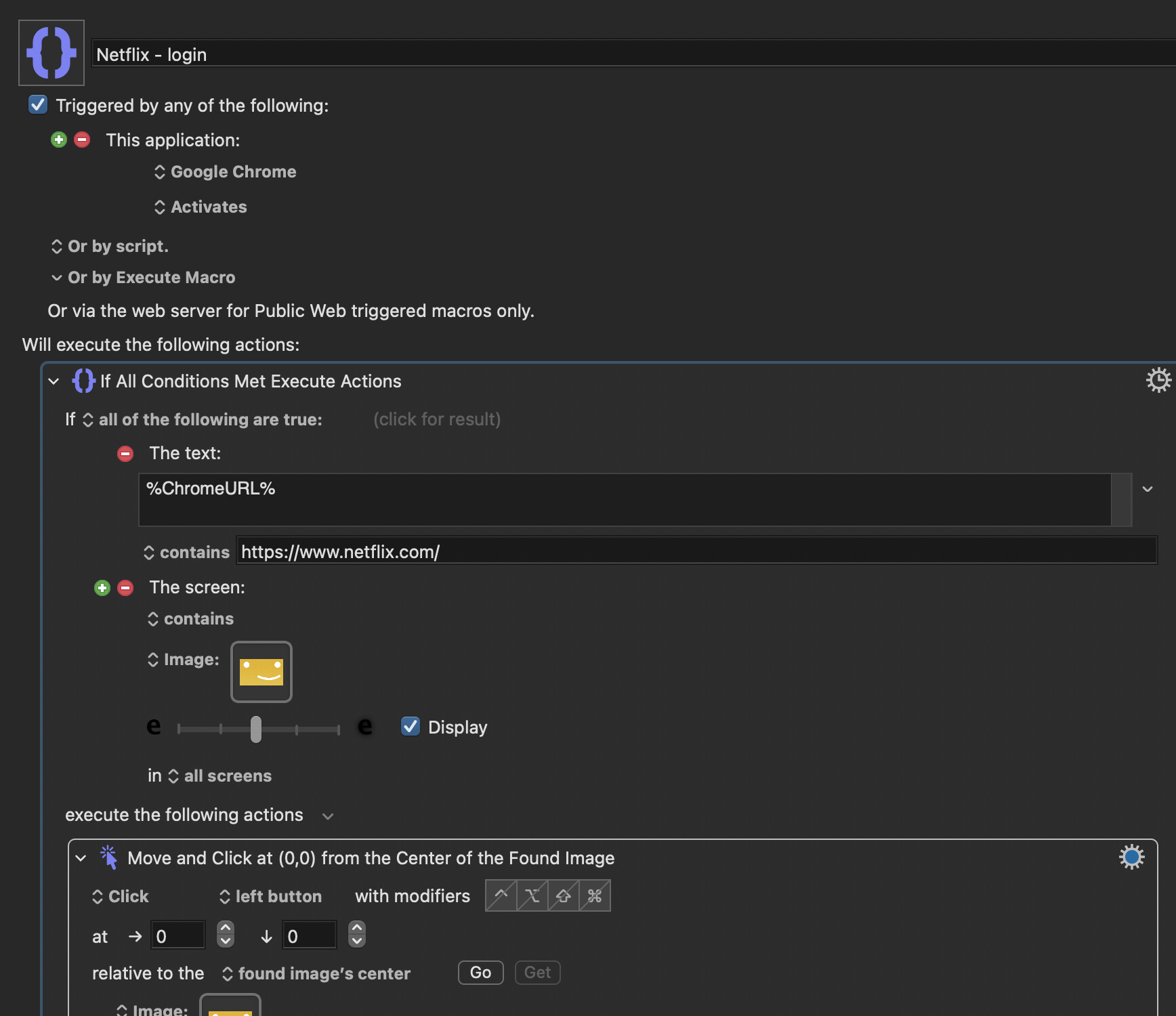
There is no "trigger" for tab changes in Chrome (there might be if Chrome was more AppleScript compatible, but Chrome doesn't link to AppleScript very well.) The only solution is to run a macro in a loop and have it constantly checking if the active tab's title/URL is different from the last check. Are you comfortable with a macro running 24 hours per day (at least when Chrome is frontmost).
I do this sort of thing all the time, with other apps (I hate Chrome.) My macro starts when the app becomes frontmost and my macro ends when the app is no longer frontmost. It's a good compromise. While my app runs, it checks for something and takes action of the conditions are met. Is this an approach that appeals to you?
1 Like
For this sort of thing, I tend to use the Focused Window trigger. I also usually put the macro inside a group restricted only to the appropriate application, though doing so in this case might not trigger the macro when the browser activates.
1 Like
Oh wow, so that works with tabs (in Chrome) as well as windows in other apps? I didn't know that. In that case, there is a trigger for switching tabs in Chrome. I was wrong.
1 Like
The Front Window trigger worked wonderfully for catching tab switches in Chrome as well as when switching application —thanks for the tip! But I just realized it doesn’t fire when opening a new Netflix tab, since no window focus change occurs.
Constantly checking the active tab’s title/URL for changes in a loop sounds like a solution. Are you doing it with the periodic trigger? Would setting it to check every 1 seconds be an overkill and heavily impact CPU or battery life? (I need it to be 1 second or less because if not I might as well use front window trigger since it would be slightly faster that way)
I thought surely this must not be the case, but I just checked and that's because I usually use the The focused window title changes setting for the trigger. That catches the change when opening a website in a new tab.

(I have very many macros checking my tabs for various purposes owing to the fact I'm predominantly a Firefox user and Firefox has zero scripting support  )
)
I too am using the "focused window title changes" setting, but it didn't catch it when I opened Netflix in a new tab?
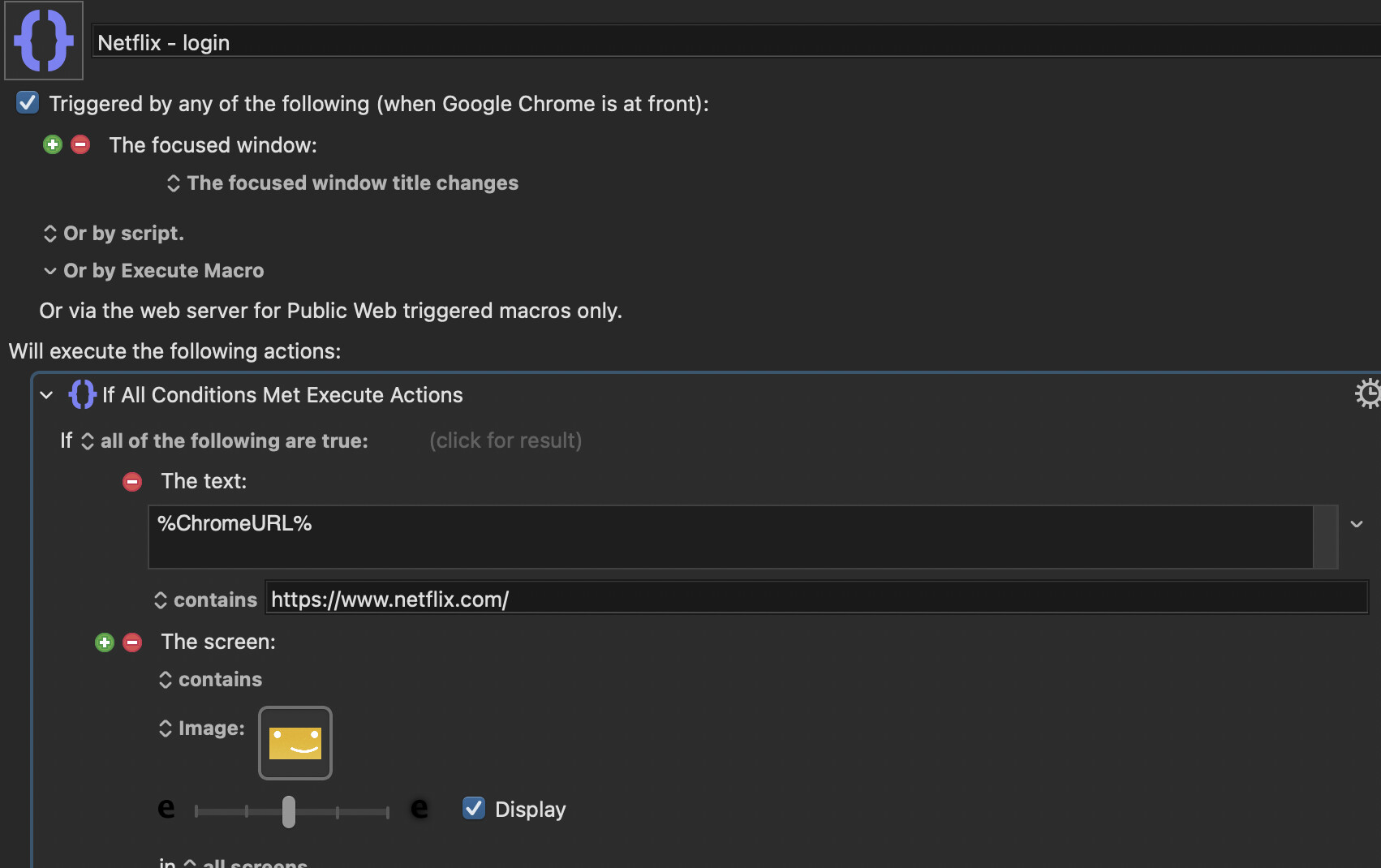


Oh, hm. It works for me in Firefox. I don't use Chrome, so I can't test; have you tried The focused window changes setting instead? That one doesn't work in Firefox for detecting websites in new tabs, but perhaps it will in Chrome?
Yes I did try that one too. In fact i tried all 4 options, none can detect new tabs in Chrome
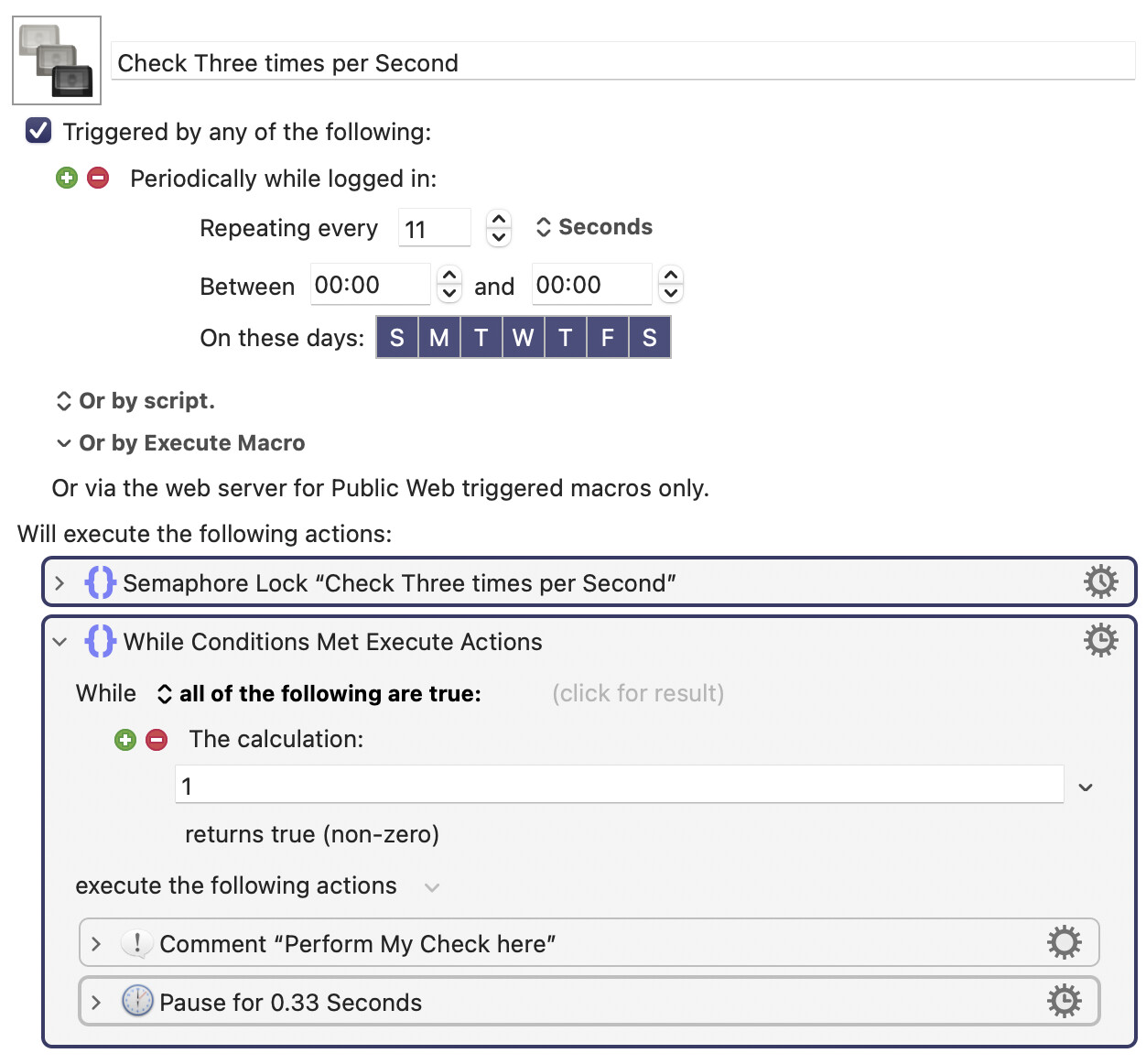
There isn't just one solution that I use. I use many different solutions. I could give you the best solution if I knew what you wanted. It sounds like you want the polling to occur approximately thrice per second. So I'll show you how to do that, below.
People always worry about CPU and battery life for code that runs in a loop. In my experience, that's an unnecessary worry. Our Mac CPUs run billions of instructions per second and the number of instructions to do one check is probably in the vicinity of 1000 instructions. That's 0.00001% of the CPU. Why worry about such a small amount?
Here's how I write code to check something three times per second. Notice how it triggers once every 11 seconds (I chose the number 11 because I wanted to emphasize that it doesn't matter much what number goes there). Then there's a semaphore lock action, with the notification flag disabled. Then there's an infinite loop with a 0.33 second pause in it. The reason we need an infinite loop with a pause is that you want to check more than once per second. The Pause action does not burn a lot of CPU, so it's essentially operating like a periodic trigger with a 0.333 second timer. If you should trigger a macro that "cancels all macros" then this macro will be cancelled but it will be restarted in less than 11 seconds, which is usually what I want. Note how I changed the settings to 00:00 and 00:00 after the word "Between".
Just trying to click on my profile icon and type in my Netflix passcode.
Why worry you ask? because i'm a ameature who don't know any better! 
I'm not so familiar with the semaphore lock action, I read that it basically allows the macro to finish running before it repeats itself again if in a loop. So if I did not add a semaphore lock at the start of the macro, does it mean that if the action takes longer than 0.33s to complete then it won't wait for that action to finish and would start another parallel instance of the loop (making it all weird and stuff)?? And do we have to put a semaphore unlock action at the end of the macro?
Oh no!!! It was working just fine then I wanna test out what you said and trigger "cancels all macro". Now the macro won't run at all!! I tried disabled and enable it again, I also tried make a copy of it and run that. Nothing works!!! What do I do? (other than remake that macro from scratch)
Edit: Scratch that! it works like you said now haha
It doesn't let me change to zero there.
Also I guess because KM is capturing my screen basically 24/7 now, this icon pop up on the menu bar. Is there anyway to hide it?

Yes, there is: Complain to Apple about the ugly intrusive icon, hope enough other users complain as well (we have, though), and then wait five to ten years for design and CEO changes to come into effect that may result in that asinine icon's removal.
</sarcasm>
-rob.

I found a band-aid solution online! YellowDot - Hide the macOS yellow recording dot
It's free!!! Basically, It makes the icon dim, especially helpful for the bright orange microphone icon!

Sadly, it's not helpful if you're trying to create a clean screen recording—the dim icon is just as distracting to a viewer (well, it is to me anyway) as is the ugly purple icon. The only real solution is allowing users to be in charge of when it shows up, but sadly, I don't think that's in our future.
-rob.
Good question. The answer is No, because all semaphores that are locked in a macro are automatically unlocked at the end.
Yes, I think you understand what a semaphore does.
That's odd. Try clicking on the existing digits with the mouse, then typing 0. I'm not sure what you are doing when you say "it doesn't let me."
I've never noticed that! Now you've made me conscious about it! Now I'm going to worry about it! You've ruined everything!  Actually, I don't think that shows up when I'm running an app in full screen mode.
OKOK! Gotcha!
YAYYYY
Yeah, that's exactly how I tried to change it to 0. It changes to 0, then as soon as I move my cursor away it changes back to non-zero digits. I set it to 5:00 am-4:49 am, so that's only 1minute and I'be sleeping anyway! so no fret!

At least there's that 
Anyway, thank you very much! Because of what you taught me here, I will never have to lift one finger to log in to anything if I so choose, not even a hotkey trigger is needed!. That's a pretty good feeling!! 
1 Like
This is an unrelated problem, so you should start a new thread if it's still an issue.
okok!