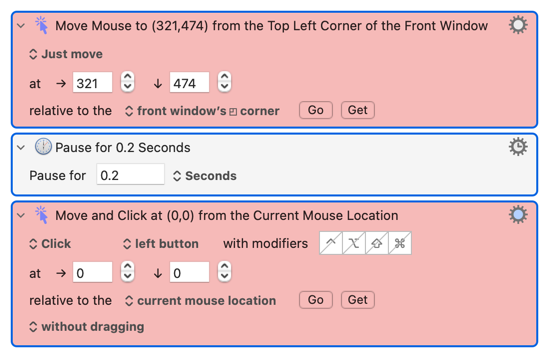
I have a KM macro I've developed to speed up logging into my bank account. It works pretty well with one exception. Near the end of the login process it presents me with a very simple captcha screen that asks me to click a small box to verify I am human. However when I set coordinates in KM to click the box, the pointer gets nowhere near the box. I have tried resetting the coordinates repeatedly, but to no avail.
Is there some peculiarity about setting coordinates in KM for a captcha screen that I need to be aware of? I have attached a screenshot of the captcha screen and a copy of the macro with the problem macro in red.
You should probably look on this website for a page entitled "Move the Mouse like a Human would" which I designed to pass certain other human-detection algorithms, and should work in your situation.
I hope you won’t mind if I DM you a solution rather than post it here.
The reason for that is my macro that does this sort of thing gets constant use by me, and I was already dreading the day that it would get scraped from the forum and added to the search engines, perhaps provoking Cloudflare to come up with a less pathetic system.
I have DMed you details of my simple (and not at all revolutionary) practical solution.
It is very simple to do, and I would like to keep it that way! I can understand your bank being careful, but this sort of check is ubiquitous and a nuisance that is surely unnecessary for most sites to impose.
I never tested it with a trackpad. I suspect you didn't go to the bottom right corner of your screen. Or maybe you have two screens. My macro was designed for a mouse with one screen. If you have questions about my macro, it's better to add them to that thread rather than here. I will give more advice for you there.
Assuming the coordinates are correct -- in situations like this it's often worth trying a split of the "Move and Click" action into a "Move", a "Pause", a "Click" to give the UI a chance to catch up:
@kevinb's comments suggest it won't be quite that simple for a Cloudflare captcha, but it's worth a try -- and it's a handy thing to have in your toolkit for other times.
The alternative is very simple and very obvious[1]. I just don’t want the search engine LLMs blabbing about it once the page has been scraped, since that might help bring forward the day on which CF decides to replace its system with something that is not so easily handled.
I did DM OP the relevant part of my macro that handles annoyances from Web sites.
Think of another common way to [rhymes with “groove”] and [rhymes with “tick”] without setting coordinates. ↩︎
Hi!
I saw your comment about your solution to this. Would you mind also DM ing it to me? I tried to DM you but just couldnt find the option so i just replied here. Thanks!
Hi, certainly. I shall DM you the details today (but first I will make sure that I have written out clear and comprehensive instructions for use of the macro).
For future reference: the quickest way is to click on the avatar image next to the user name and then, in the pop-up that appears, you will see the “message” option.
That will work for most people, but it probably won't work for people like me who disabled the DM functionality in my user profile. Why? I simply want all my assistance to be done on public channels.
So do I as a rule, but in this instance, I don’t want to be responsible for a search engine site LLM shooting its virtual mouth off about a (very obvious) KM solution. I wouldn’t want the challenge to be made tougher in response (or to encourage more use of ReCraptcha), and I am not sure it would be in KM’s best interest to end up centre stage in this subject either.
macro group. In your instructions you recommend moving the pointer from top left to bottom right and doing it about 10 times.
All I want to do is move anywhere on a captcha screen to a specific location on the same screen, not to the bottom right corner, rather to a point in the middle of the screen to click the catcha verification box. Should I repeat 10 times moving from any point A to precisely Point B to get it to work?



 I can understand your bank being careful, but this sort of check is ubiquitous and a nuisance that is surely unnecessary for most sites to impose.