This is my first time creating a macro and so far I am very impressed and I think very close to success. I have searched the forums but have not found exactly the tip I need. I am having trouble getting my macro to paste multiple screen captures into a single file without overwriting what I assume was pasted from the previous run of the repeat. The current result is a file with only the last image in it.
Context: I am building this for my wife who has asked (by lawyers for a court case) to submit a PDF of a large book that is to be used in the upcoming case. They refuse to use any reader and insist it must be PDF. And because of DRM the book cannot be converted - it is a fairly old book but there is a kindle version.
Her only option as it stands is to take a screen shot of every page aprox 800 and save to a file and then combine. (What’s more is so far the lawyers have asked her to redo it twice for “legibility reasons” which is getting silly.)
So far I have created a macro that successfully screen captures to a named clipboard the foremost window (safari Kindle reader) and advances to the next page and captures that. I have tried writing the contents of the clipboard to a file both inside the repeat section of the macro and outside ( I assume at the end). Each time I end up with a single file with only the last page captured. I am asking the clipboard to write the file as a png as I thought that would be the most straight forward.
I am hoping that there is a way to have the screen capture go directly to a file rather than the clipboard or failing that have a single file created for each page that we could manually add to a pdf.
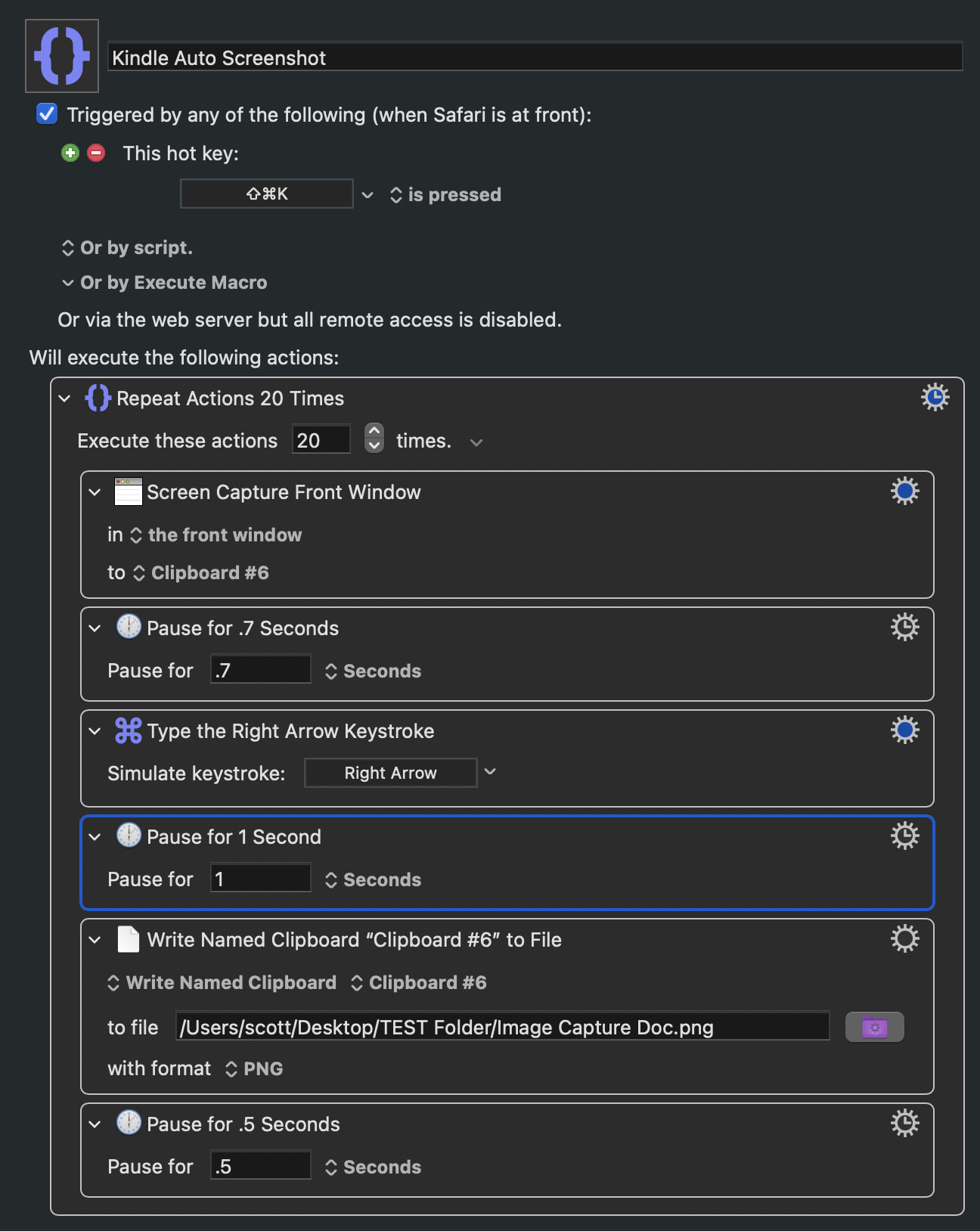
I don’t know how to upload the macro I have created as it stands now but in essence it is as follows:
Execute a repeat action 20 times (for testing)
Screen capture front window to Clipboard #6
Pause .7 seconds
Simulate Right arrow
Pause for 1 second
Write Named Clipboard “clipboard #6” to “location and name”
Pause for .5 seconds
I have had the “Write Named Clipboard” step inside and outside of the repeat section and the result is the same - the file is created and written but with only one image - the final one.
I understand what is happening but don’t know how to build a solution.
I think that easiest way to do this is to use a macro to save your screen shots to files, named in numbered sequence, and then manually in Finder select all those files, right-click, Quick Actions -> Create PDF.
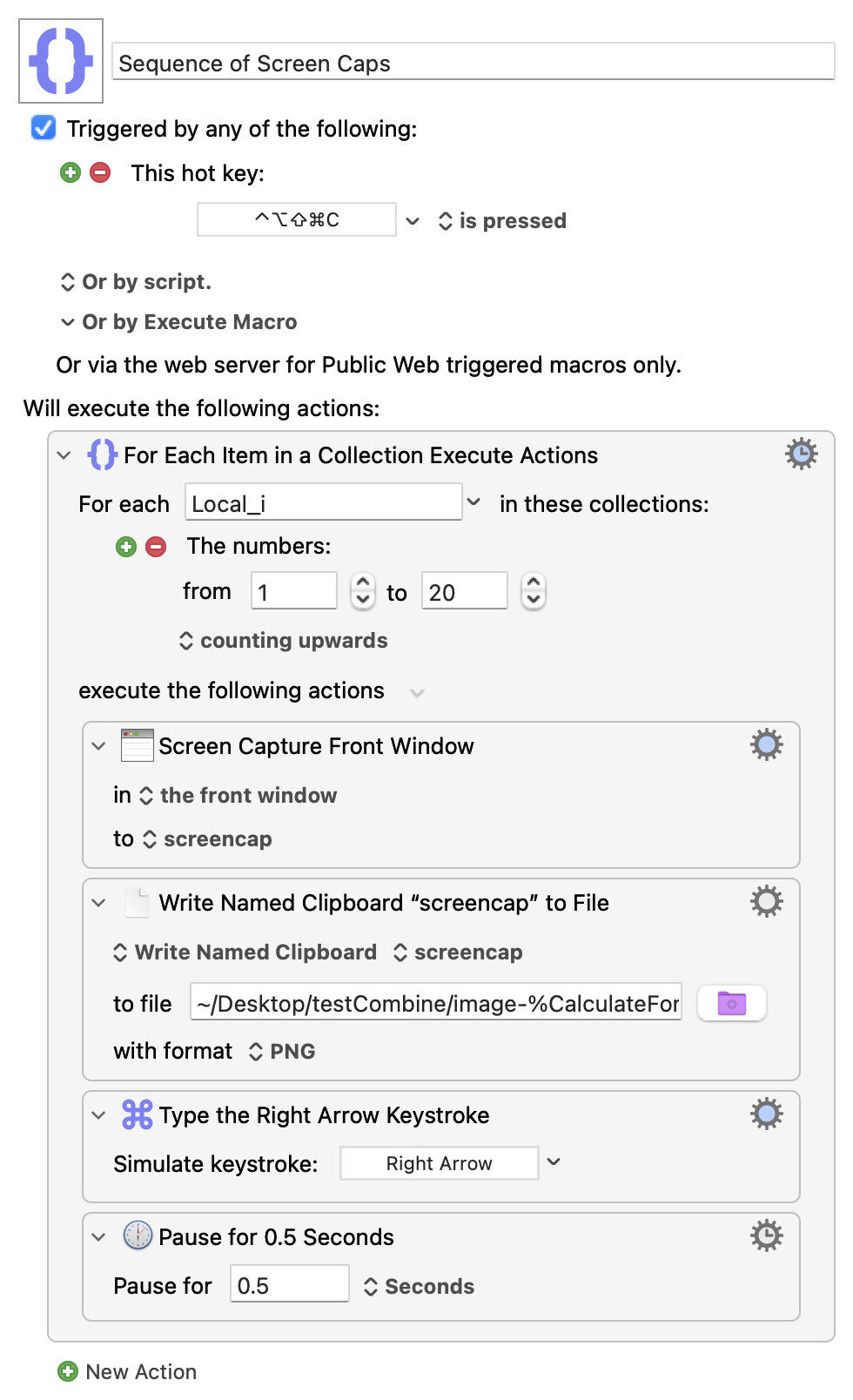
If you make a folder called "testCombine" on your Desktop then something like this should work to create your sequence of screen shots as files image-001.png, image-002.png,..., ready for combining:
Just to confirm will this automatically advance the screen to the next page? Of does this just simplify the step of moving the screen capture to a file?
Should I be combining it with my current macro which looks like:
I am sure you knew this already but that worked perfectly. Thank you so much.
As I noted I am new to Macros and my “repeat action” seemed logical but was clearly not the right starting point. I didn’t recognize that the For Each Item in a Collection - would do what it does in terms of taking repeat Pictures.
The only problem was that you were over-writing the same file every time, which you could have got round by having a counter and including that incrementing number in your file name.
The "For Each" Action does it all in one go. It's the counter -- with Local_i going from 1 to 20 (in the example), increasing by 1 every loop. You're then using that number in the file name via the %CalculateFormat% text token -- an easy way to "zero-pad to 3 digits" with the 000 format code so you have 001, 011, 800 etc.