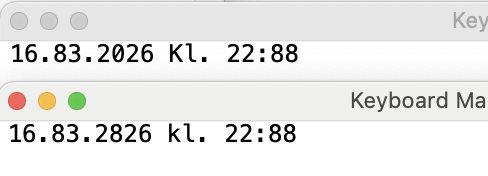
I'm having trouble OCRing images like this. Apple text recognition is capturing the 0s as 8s. Any suggestions?

I'm having trouble OCRing images like this. Apple text recognition is capturing the 0s as 8s. Any suggestions?
I guess that you are using the method that you described on YouTube, which leverages the shell command screencapture -ic, since I just revisited that method and indeed ended up with the same incorrect result for the example that you supplied.
Using my usual macro for the task yields the correct result. It is based on a macro that someone else posted to the forum.* The macro uses KM’s standard OCR image action.
OCR..kmmacros (6.9 KB)
* I apologise to them for the lack of credit, since I did not keep a not of the post’s URL or of how much I had enhanced it for my needs. I would guess though that the additons are the regex at the end of it!
Strange, your macro is giving me the same incorrect result when the text is small. (But when I zoom in, it gets the correct value).
Is it possible that it's version dependent? I am on macOS Tahoe 26.3.1
Mo, I can OCR it no problem and I’m on 26.3.1a.
OCRing small text with limited differentiation between characters will be hit and miss. Lack of context, often the case when OCRing numbers, doesn't help either.
For me (Safari on Intel) OCRing your image above I get (back window Apple text Recognition, front is Tesseract using English):
If this is bitmap (rather than rendered) text then zooming in may not help either.
I have run similarly small text through OCRmyPDF and it worked fairly well.
I might have gotten lucky but OCRmyPDF has a lot of parameters than be tweaked.
Plus it is a CLI Tool so super easy to use!
MacOS 14.8.3 (Sonoma). TextSniper also got it right.
If all else fails, would it be possible for the context (where the image appears) and your needs to zoom into the image or enlarge it before running OCR?
I'll try that, thanks!
Try to ensure that the screen capture captures all the pixels, so ensure Always Nominal Resolution is off if you are using the Screen Capture action). That will likely OCR better at small sizes.
Also, some post-processing is available.
You won't have an 8 at the start of the string or after a ., :, or space character, so any of those can be replaced with 0.
You won't (unless you are dealing with 18xx or 28xx dates) have an 8 as the second character of the year, so any of those can be replaced with 0.
If the day starts with a 3, the month starts with a 1, or the time starts with a 2 then a following 8 can be replaced with a 0.
You could then flag anything that does still contain an 8 for checking, unless that 8 is immediately after a 0 in either the day or month fields.
But it would obviously better to get your OCR working as well as it seems to for everyone except you and me!
I use this macro that seems to do a great job of reading things like this. It activates the screen capture function allowing you to drag around the text you want to OCR then pastes it into Text Edit, which can be changed to any application of your choice. I use cmd-shift-5 to trigger it.