Try (and failing) to create a macro to run a shortcut with a 24 hour cooldown

I have been going in circles with google (AI probably) for several weeks. Google always congratulates me for creating a great macro and it seems to work in testing but never in reality.

What I’m attempting is to create a macro that will run a shortcut to trigger a Time Machine backup if more than 24 hours has elapsed and my laptop is connected to my home wifi network. So far they have failed to trigger the shortcut even though it’s been much more than 24 hours since the last time the laptop was running.

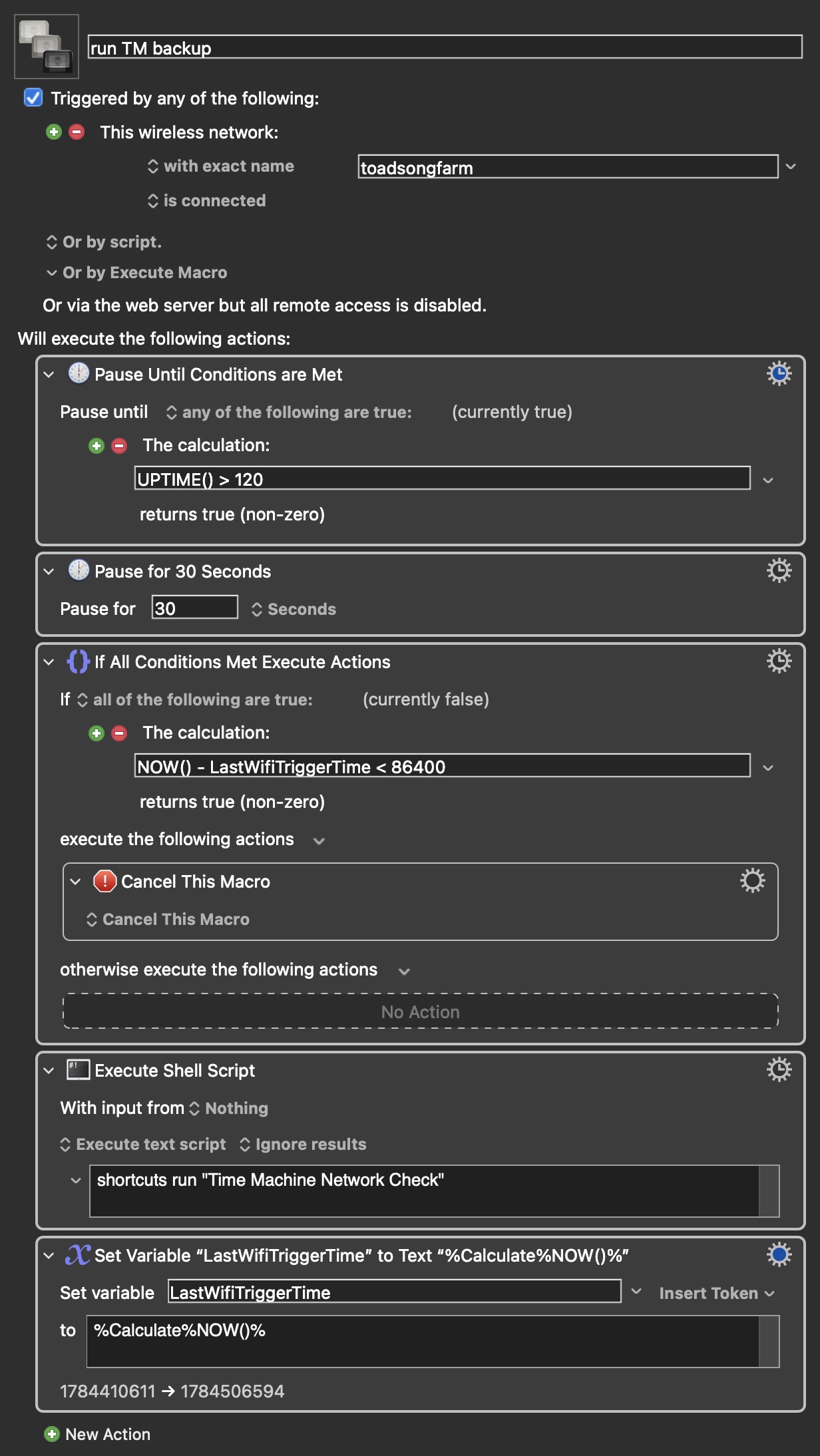
My current macro-

run TM backup
Triggered by any of the following:
	•	Wireless Network “toadsongfarm” is Connected
Will execute the following actions:
	•	Pause Until Any Condition Met
	•	The calculation “UPTIME() > 120 ” returns true (non-zero)
	•	 
	•	Pause for 30 Seconds
	•	Notify on failure.
	•	 
	•	If All Conditions Met
	•	The calculation “NOW() - LastWifiTriggerTime < 86400” returns true (non-zero)
	•	Execute the Following Actions:
	•	Cancel This Macro
	•	 
	•	 
	•	Execute Shell Script
	•	shortcuts run "Time Machine Network Check" Stop macro and notify on failure.
	•	 
	•	Set Variable “LastWifiTriggerTime” to Text
	•	%Calculate%NOW()%  

Each action seems to test fine but if I boot the laptop after several days the macro doesn’t work. Could really use some advice???
Welcome, @wgstarks.

It’s late here, so maybe my ability to give good advice is not at its best, but I wonder if you might be better off using a periodic trigger and then checking the wi-fi status.

Your description is succinct but just to make sure that all the settings in your macro are known, follow the advice in the “forum” page of the KM wiki and post your macro in a reply (I find method #3, “manual upload” to be the most straightforward).

Hopefully I did this right.

run TM backup.kmmacros (4.2 KB)

What I wanted was to automatically trigger a Time Machine backup when the laptop is booted if connected to my home wifi and if it’s been more than 24 hours since the last time this macro has run. The 120 second pause was to allow boot to complete before the macro attempts to run. I think the 30 second delay is just a remnant from a previous version of the macro that serves no purpose but never got deleted. Of course the 3rd action runs the shortcut and the 4th action updates the LastWifiTriggerTime variable after the shortcut is triggered.

Full disclosure, I am brand new to KM and a complete noob at this.:laughing:

Thanks for the help.

2 Likes

I will try to help noting I am not near a computer but here are a few observations:

  1. I don't think you need any of the first two pauses because the macro will not trigger you connect to the WiFi network but as you note they cause no harm. I would test this.

  2. In respect to your third action:

a) I would bracket (NOW() - LastWifiTriggerTime) to make sure it is the difference that is being tested.

b) If it has been less than 24 hours between boots then the macro will fail because i) the test will be < 86400 ii) the macro will cancel and iii) there is nothing to restart / trigger the cancelled macro.

c) If you want to run it every 24 hours then change it to [and sorry I can not give you the actions as I am not at a computer, doin this on my phone]:

Action 1: Pause Until (NOW() - LastWifiTriggerTime) > 86400 which will pause your macro until you first connect to your WiFi and one day has passed since your last backup (i..e, this is not 24 hours after you connect, see 3b below for this setup).

Action 2: Execute Shortcut which is specific action to call and run shortcut by entering the Shortcut name in teh action field (i.e., Time Machine Network Check).

Action 3: Set Variable LastWifiTriggerTime as you have. You could use Set Variable to Calculation instead of to Text which would mean you could just use the token NOW().

  1. Other comments

a) Make sure you first set LastWifiTriggerTime before you first run it because it is never set. Go to Settings > Variables to do so. Also not a bad idea to prefix global variables with "Global".

b) To be clear, this construct will run the macro each time you connect to the network and when 24 hours have since since your last backup, not 24 hours since you have been connected. Should you want 24 hours since you connected then change the Pause Until condition to NOW() + 86400 in which case you do not need LastWifiTriggerTime at all.

As far as asking questions there are a lot of really great, helpful and very knowledgeable people here who are very willing to help. I went through what you are going through about 7 to 8 months ago so I speak with experience, just ask.

And if something is not clear, let us know.

I see a small problem. The way you wrote this macro, you could have two copies running at the same time. (Such as if you manually turn WIFI off and on.) I don’t know what happens if you do that, because I can’t see what your macOS shortcut does, but you might get an error. You can fix this by installing a Semaphore Lock action at the top of your macro, with the settings that you prefer.

A different way to fix this, potentially, is to move your last action before your Execute action. I know why you did it that way, and that makes some sense, but if you move it earlier, you can prevent the problem where two copies of the Execute action are run at the same time. I think this is a valid way to solve the same problem.

A third way to fix this is to install a semaphore lock inside your macOS shortcut using a shell command to perform a lock.

In any case, your script looks like it will do the job. If it works, no need to fix it.

1 Like

I just want to understand, there isn’t a danger that this action could run too soon after a boot and the shortcut not be available yet? That was the reason for the original 120 second pause.

I typically use my laptop for whatever I’m working on (few minutes or a few hours) and then shut it down, so not likely it’ll be booted for 24 hours, but I think your Action 1 recommendation is still a good idea.

1 Like

I agree that avoiding running such a thing right after boot is a good idea.

As noted, you want to include a Semaphore Lock action at the start of the macro so that you don't have two instances of the macro both waiting and then both executing the shortcut.

Other than that it looks like a solid macro.

You could place your actions in the If Then Else action (otherwise section or reverse the condition) so you don't need the Cancel This Macro action.

1 Like

Except it doesn’t work and I don’t understand why?

I may have missed that. If you say it doesn’t work, you have to explain what doesn’t work. Do you mean it doesn’t trigger? Did you check the Engine log file to see if it is triggering? Did you check the same file to see if there is an error?

Perhaps the error is in the macOS shortcut. You would have to show us the contents of the shortcut.

It does not wrk because should 24 hours not have elapsed between starts it gets cancelled with no mechanism to restart it, see my above post.

You could add a second trigger 'At engine launch" then it would not run until both WiFi connected and Keyboard Maestro has started up, would that help? Also this is why I suggested testing it, change the time to 5 minutes and let it run bunch of times.

If you are struggling tomorrow let me know and I will build it for you.

It

I can manually run the macro successfully but it never runs on its own. I don’t see a way to view the logs.

I have waited as much as 3 days between boots and the macro still fails.

Does the order matter for the triggers?

Makes perfect sense look at the macro, once it s cancelled there is nothing to start it so, should you start your laptop and less than 24 hours has passed the macro will cancel and there is nothing to restart it!

You can test this by leaving your laptop on for 24 hours and then manually triggering the macro, it will run!

Found the engine log (not sure how I missed it before) and I’m seeing this repeated-

Last message repeated 116 times
2026-07-12 17:35:10 Numeric condition failed to evaluate “ %Calculation%UPTIME()%”
Last message repeated 133 times
2026-07-12 17:42:55 Numeric condition failed to evaluate “%Calculation%NOW() - LastWifiTriggerTime%”

Guessing there’s something wrong with the condition???

No as long you have it set to all conditions...

Nowhere in the macro shown above does it use the token %Calculation%UPTIME()%.

Also, those are from July 12, which is eight days ago.

OK, lets back up a little.

Your objective is to run the shortcut at most every 24 hours. OK, a sequence like this

  • If NOW() - LastWifiTriggerTime > 86400
    • Run shortcut
    • Set variable LastWifiTriggerTime to calculation NOW()

will do that.

Then you have to decide when it should try to run the shortcut. Currently, it is trying after it connects to the wifi. That's fine, but if that happens very infrequently (eg a desktop that stays permanently connected to the wifi) then you will want to add some other triggers. Perhaps a Periodic trigger.

Also, remember that macros will not execute when the Mac is asleep, and macros may not work properly when the screen is asleep, screen locked or screen saving, as UI cannot happen in those cases.

Also, as noted, add a Semaphore Lock action to the front of the macro so you only have one instance of the macro executing at any time regardless of anything else (and if it runs the shortcut, the other one will refuse to re-run it since less than 24 hours has passed).

Run on its own? It can only run when the trigger activates, which is when the network connects. That might be your problem. You were expecting it to run “on its own” without a trigger?

You said earlier that you wanted “a macro that will run a shortcut to trigger a Time Machine backup if more than 24 hours has elapsed and my laptop is connected to my home wifi network.” But what you implemented was “a macro that triggers ONLY when my network is connected but when it has been at least 24 hours since the last backup.” Do you see the difference? Those are different requirements.

No, the macro never fails. It just doesn’t trigger because your only trigger is when the wifi connects.

There is a menu item to view the logs in the KM Editor, under Help / Open Logs Folder.

1 Like

:star:

Maybe I get one too. :winking_face_with_tongue:

1 Like