I use multiple monitors and prefer to have Finder open in a specific location, the first time it opens. macOS kindly opens the window in random locations, so I decided to try what I do for every other app, which is to use an “Application Launches” trigger. Od course, Finder “launches” without a UI, so this doesn’t work. I also tried “Application Activates”, but this keeps randomly moving new windows, and windows that I’d intentionally moved back to the initial location!
What I’m looking for is a way to say “Application Activates, but only on the initial activation”. How can I do this?
Apps don't have "locations" -- that's a property of windows.
The Finder does launch with an UI, but by default it launches in the state you left it -- if you closed all windows before logging off it'll start with no windows open.
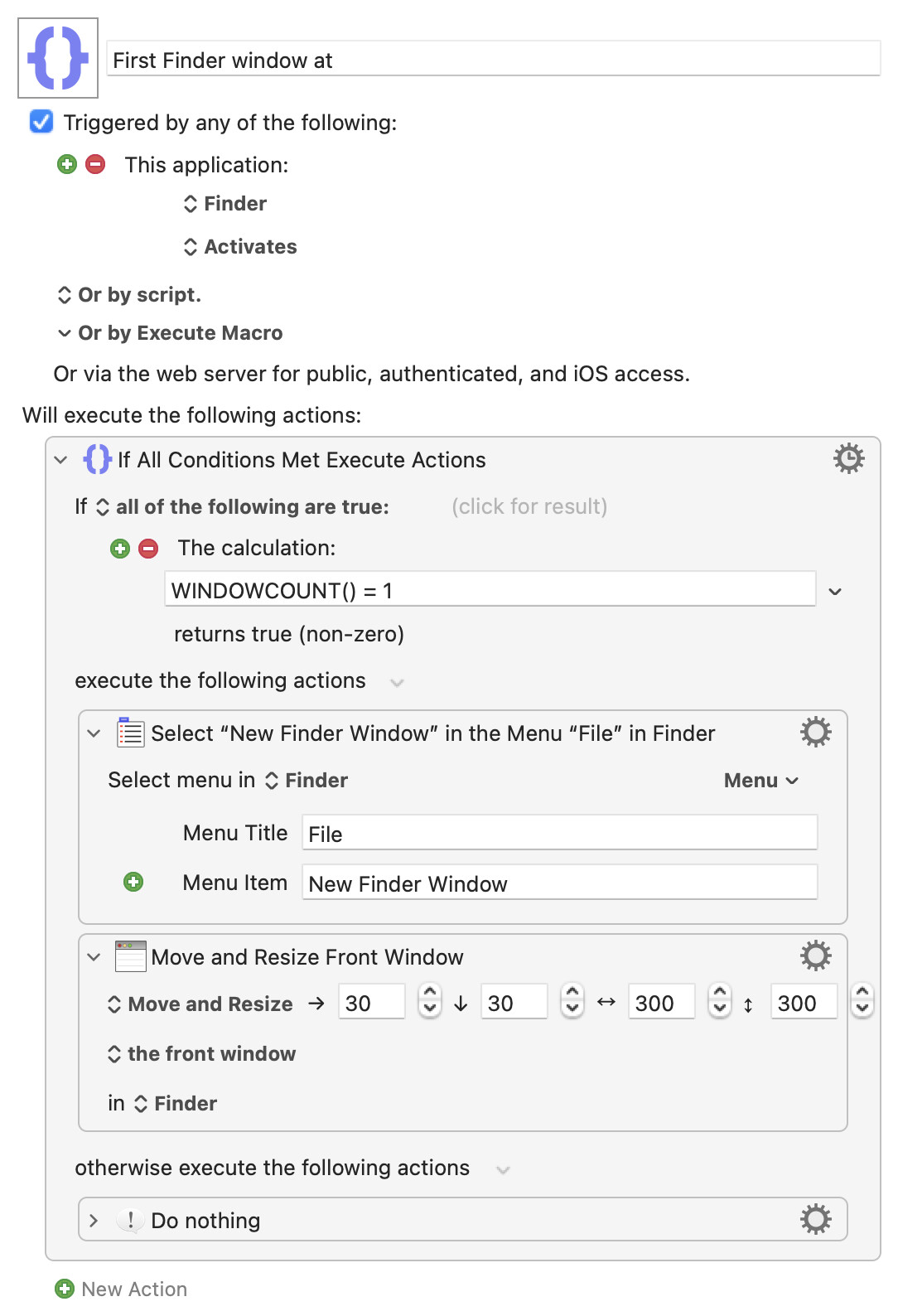
There are many ways of using Finder so you'll have to play around to see what suits your workflow, but I'd start with the "Application Activates" trigger and only open and properly position a window if no windows are already open:
Note the calculation WINDOWCOUNT() = 1 to test that no windows are open -- your Desktop counts as a window, and that's always open.
If that works you could try the same but using the "Finder Launches" trigger -- not tested because I don't have time to save and close everything! Using that instead would let you switch to your already-running, windowless, Finder without spawning a new window.
Actually, no -- it will open the new window at the same position as the last window targeting that same location was closed. Though that's not obvious if you use list view, tabs, and similar a lot.