Tried searching the forums for awhile, so just gonna ask:
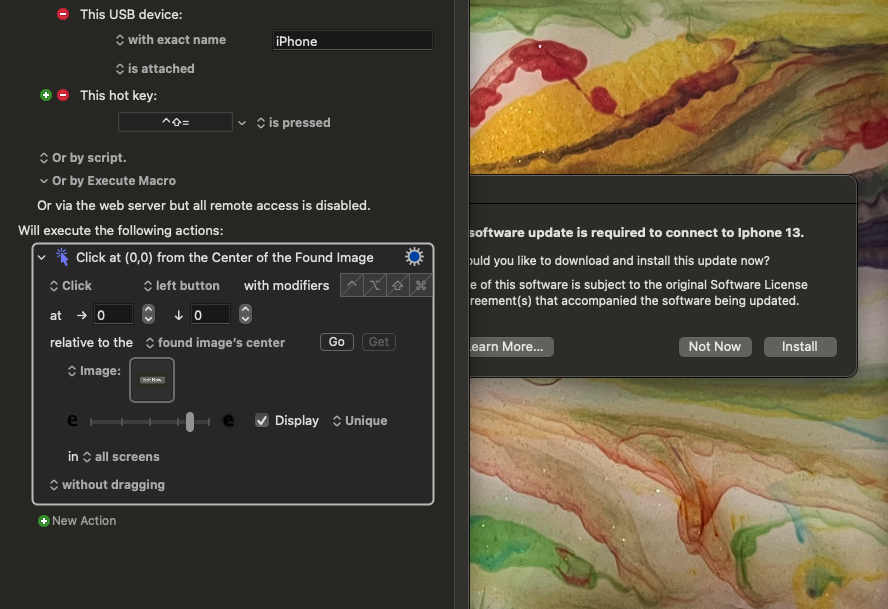
I plug in an older iPhone - (using that handy KM feature of it auto-filling the name of the device in the name field of the trigger, yay!)
I always get an alert window saying a software update is required BUT IT IS NOT REQUIRED. When I hit "Not Now" alert window goes away and I use the phone no problems.
Trying to automatically clicking "Not Now" has proven frustrating. Click on found image; no work. Selecting a window doesn't work, as the window has no title, and seems to be associated with the app "Software Update" which app I can't seem to access via KM menus etc.
Any ideas/what am I missing? Thanks to hive mind in advance.
You don't need Find Image. If all you want to do is click on the button, and if the window appears on the same location each time, just use an action that clicks on a specific coordinate on the screen.
Find Image works extremely well, but there are some things one can do that can cause problems. Since you haven't shown us your settings, or the exact image that you are searching for, and you haven't explained exactly how you got the image into the Find Image actions image well, I can't tell if you are doing anything wrong.
If the image used in the "Found Image" action is correct, try the following:
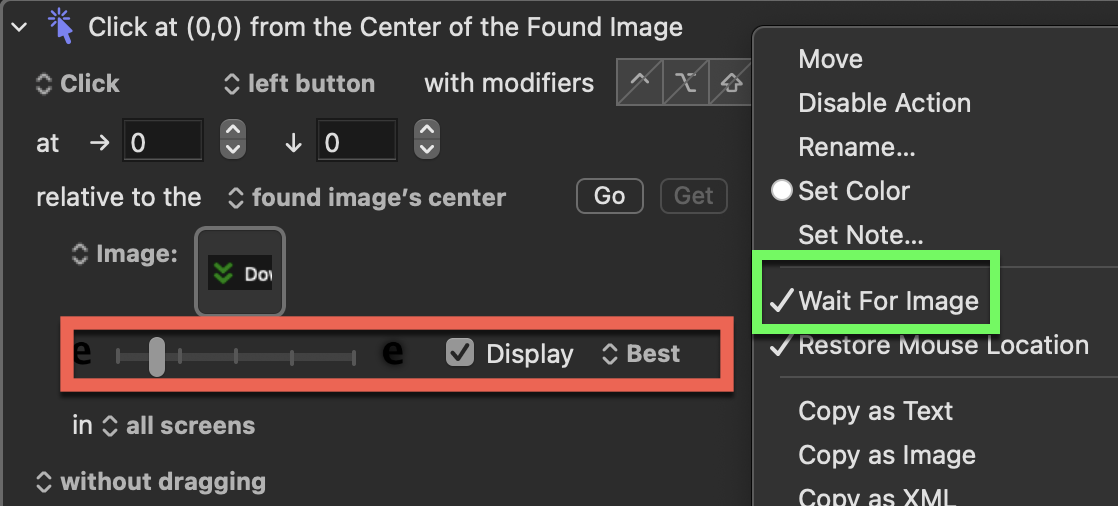
Open the options for your "Found Image" action by right-clicking it.
Enable "WAIT FOR IMAGE ."
Change which image to click to "BEST ."
Enable "DISPLAY " to see which image(s) have been found.
Adjust the fuzziness tolerance. Moving the slider to the right will make the search more forgiving if a segment of the image is not an exact match. Be careful and continue adjusting this until you find the sweet spot where it only detects the image you need, or at least detects the best match.
Yeah - I've pulled my hair out trying so many different approaches. It's a system "error" or "notification" that can't be disabled; the window has no title, "window inspectors" or terminal "processes" yield nothing. And found image on If/Then shows "True" but click on Found Image doesn't work with trying all options that I can think of.
Click on screen position doesn't help because sometimes it pops up at the front and sometimes it pops up behind other windows...
And more...
I'm giving up unless someone has a new idea.
But again, I appreciate the above efforts to assist.
use AppleScript version "2.4" -- Yosemite (10.10) or later
use scripting additions


tell application id "com.apple.systemevents" to tell application process "MobileDeviceUpdater"
	set its frontmost to true
	delay .2
	tell window "Software Update"'s button "Not Now" to perform action "AXPress"
end tell
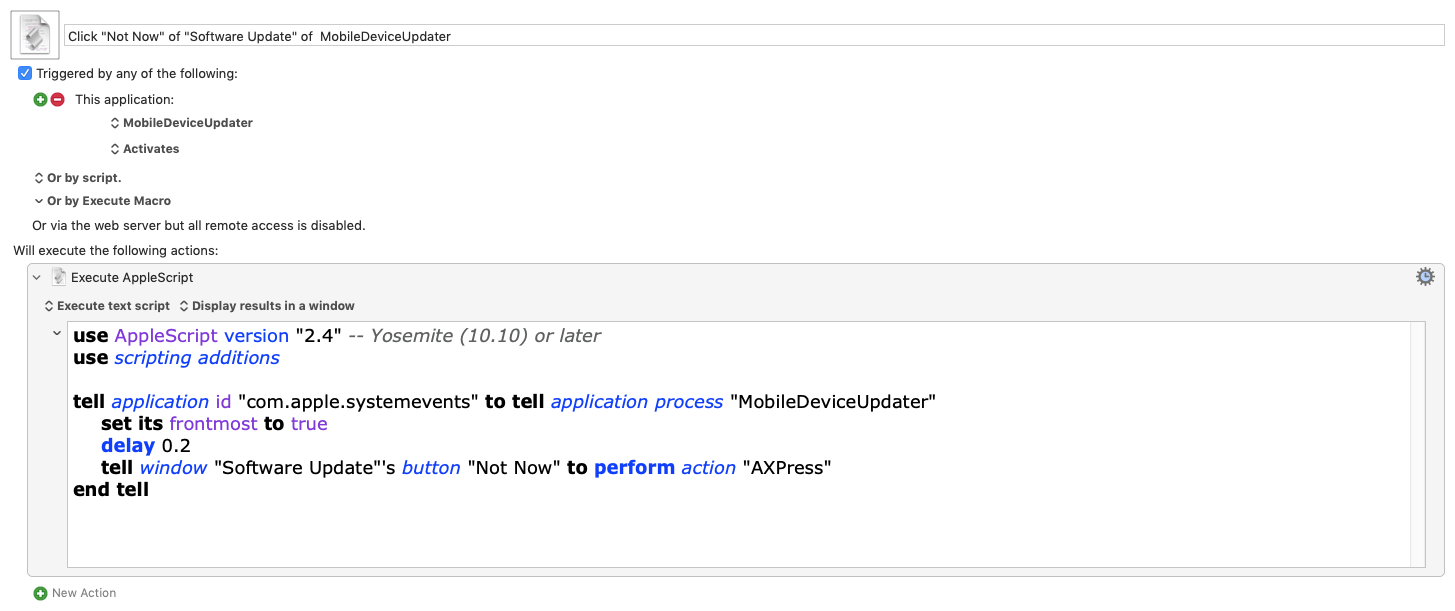
Here is a macro set to run this when the MobileDeviceUpdater application activates.
This makes complete sense - I DL'ed and installed your macro above.
I don't need to understand how it found "MobileDeviceUpdater" as an application because I can't find that anywhere (#noobproblems).
REGARDLESS, I am running Sonoma because of legacy hardware compatibility, so perhaps THAT is why it's not working? I tried it with and without the "POSIX path of (path to application "MobileDeviceUpdater")" line added.
But it looks right to my untrained eyes and understanding.
Just a reminder, I suggest you Change which image to click to "BEST", your current macro is setup with a fuzziness tolerance that would "detect" almost anything grey in your screen and because there is more than 1 match (NOT unique), it will NOT click anything.
Also, the fuzziness tolerance should almost ALWAYS be in the first segment from the left:
Sorry, I'm not sure if the script will work on Sonoma.
While you are seeing the "Software Update" window, you might try:
use AppleScript version "2.4" -- Yosemite (10.10) or later
use framework "AppKit"
use scripting additions
use framework "Foundation"

tell application id "com.apple.systemevents"
	set paths to (POSIX path of file of processes whose name contains "updater")
	set bid to bundle identifier of processes whose name contains "updater"
end tell
set AppleScript's text item delimiters to {linefeed}
return (paths as text) & linefeed & linefeed & bid as text
If it turns up nothing, I'm guessing the script won't work.
Having said that:
That you have a "toftware Update" window makes me think it is GUI scriptable.
The macro in the link in the first reply is designed to help with that and works well.