Wake Screen Actions and Passwords

Apologies for the naive and simple question.

I have macro that failed because the computer screen was sleeping. I know I have the option for teh specific action to fail and continue withe balance of the macro but that takes away from what I am trying to accomplish.

I read the Wiki on the Wake Screen Action but it is a little thin:

  • If a screen is displaying a screen saver presumably this will stop the screen saver from being displayed, is this correct?

  • If a screen requires a p/w for either i) coming out of the screen saver or ii) waking from sleep is there a way of entering one or am I stuck with no way of waking teh screen in either instance?

Much thanks.

Would using a wake from sleep action stop a screen saver? Yes. And I think it’s true to say that that action cannot do anything more sophisticated than if you had “hit any key” to wake the Mac from sleep.

If you would like to upload a macro that illustrates the problem, along with all relevant information, someone might be able to help with whatever the underlying aim of your macro is.

I have a fairly involved macro for which one of the early / first steps is a call to Moom to save and replace an existing window layout (across both displays).

I have determined that the display can be successfully woken by the following:

The problem is that the display's screen saver is what is visible (rather than the desktop) and it is locked which results in Moon not being able to save and replace the layout.

With a little more digging I found that the display can be woken and the desktop displayed by the following shell script:

#!/bin/bash

# 1. Wake the display immediately
caffeinate -u -t 1

# Wait briefly for the login screen to become active
sleep 2

# 2. Issue password via AppleScript
osascript -e 'tell application "System Events"
    keystroke "YOUR_PASSWORD"
    delay 0.5
    keystroke return
end tell'

# 3. Optional: Show desktop by hiding all windows (Command+F3 shortcut)
osascript -e 'tell application "System Events" to key code 160'

While this works I learnt / read that it is bad and a security risk to have your password in script similar to the above.

Would someone please provide a secure and reliable solution to this.

Thank you.

There is no secure solution to unlocking your machine when you aren't present, since the very act is insecure! If you want security, be there and type your password in (pause your macro until that's done) -- if you don't, why not turn screen lock off?

OK, that's somewhat hyperbolic, but hopefully it makes you think more about what you're asking for -- a secure way to reduce your security :wink:

Now, why do you want to do this? What's the point of a Moom-set layout if you aren't there to use it? If it is so your windows are ready for when you start work, might it be better all round to use the "Unlock" trigger for your macro?

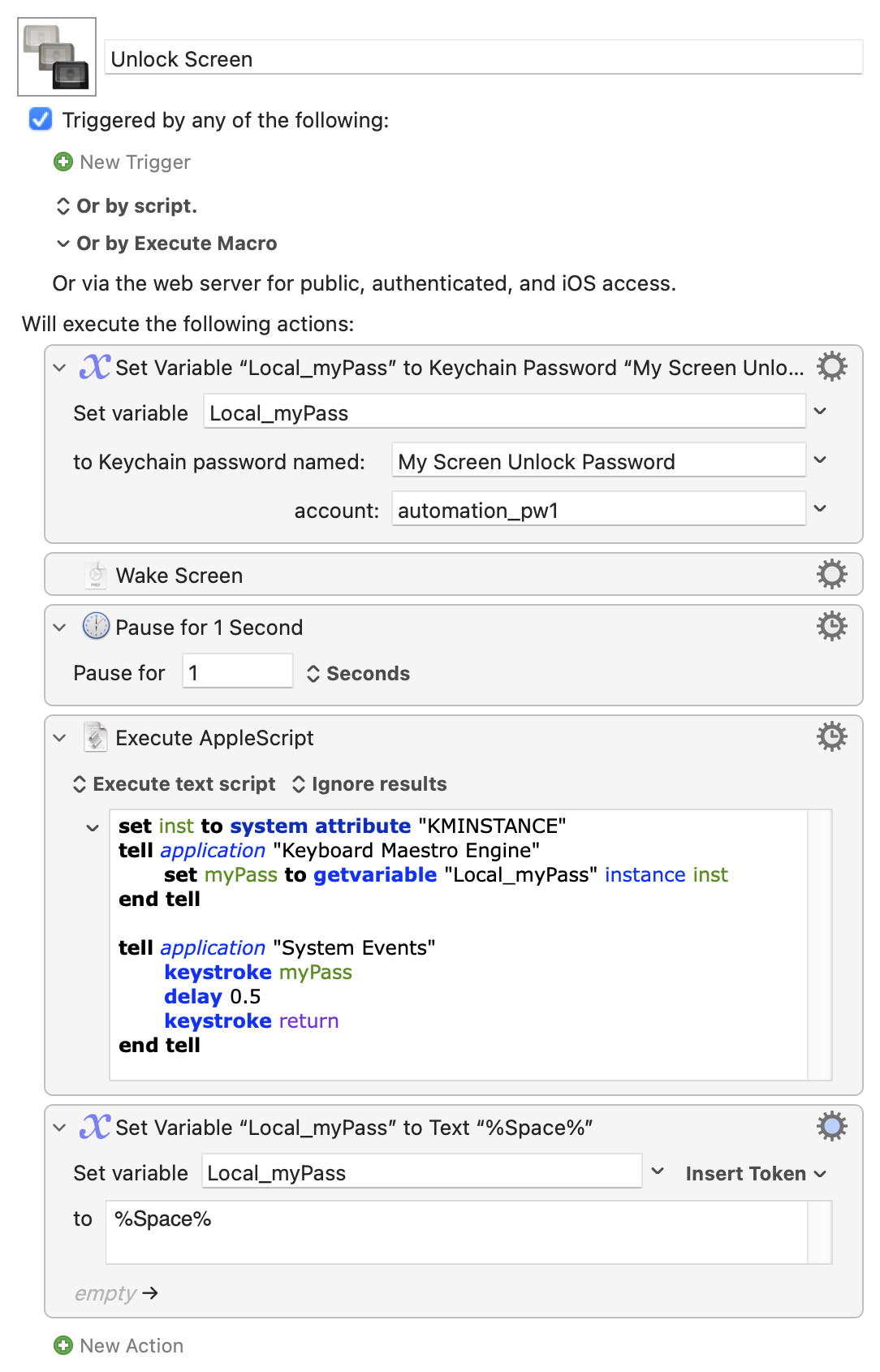
With all those caveats given -- if you still want to do this then take a look at the "Set Variable to Keychain Password" Action.

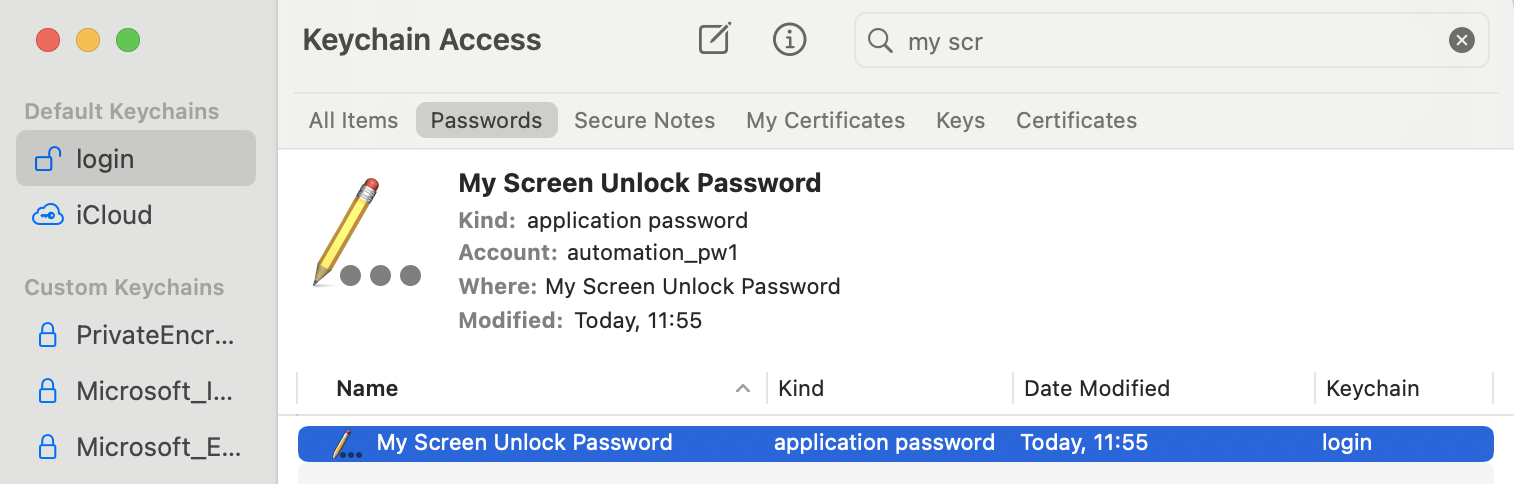
Use Keychain Access to create a new login item in your login keychain -- set the "Name" to something sensible, the "Account" to whatever you want (it does not need to be your computer account name), and the password to the password for the account you are unlocking with:

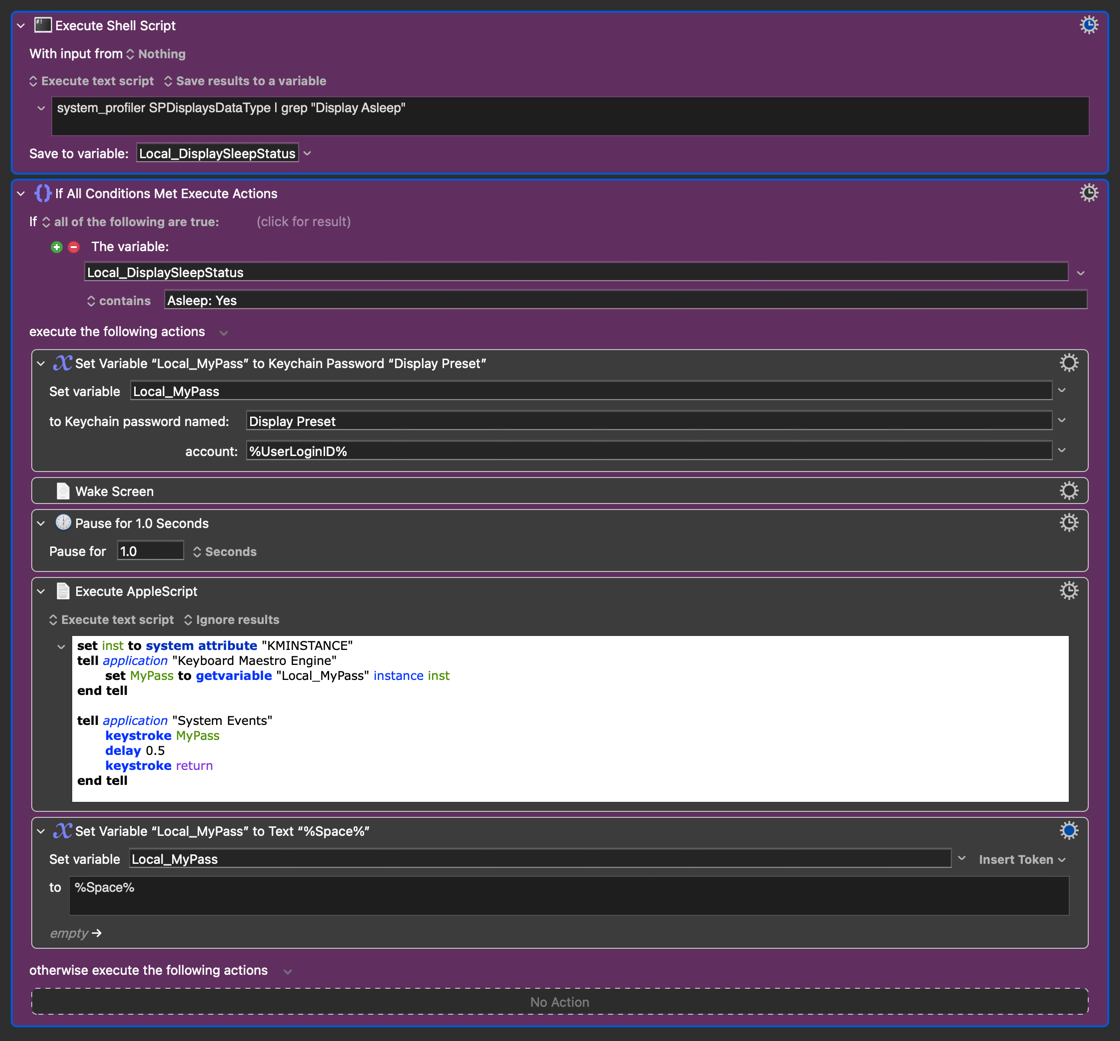
You can then use the Action mentioned above to feed the password into your AppleScript, so the (unencrypted) password itself is only briefly in memory rather than being stored in plain text on your drive. The final "set myPass variable to a space character" Action isn't necessary for the demo -- as a Local variable it will be deleted at the end of the macro anyway -- but would be good practice if this was a small part of a longer macro.

Unlock Screen.kmmacros (3.1 KB)

As to the rationale, it is so Moom can take and restore the layout after changing the display preset which causes i) the display to disconnect and ii) which in turn causes the Parallels' windows to scramble.

The idea was to allow the enable the preset to change (ay sunrise / sunset) should I not be present and immediately lock the computer thereafter, all of which has been figured out other than getting past the locked screensaver.

Excellent, love the idea of adding the "Unlock" trigger but I do not want Macro 2 to execute every time the computer is unlocked but only when locked and the Macro 1 is calling Macro 2.

I hear you loud and clear and will look for other solutions (i.e., triggers, variables, combination thereof, etc.)

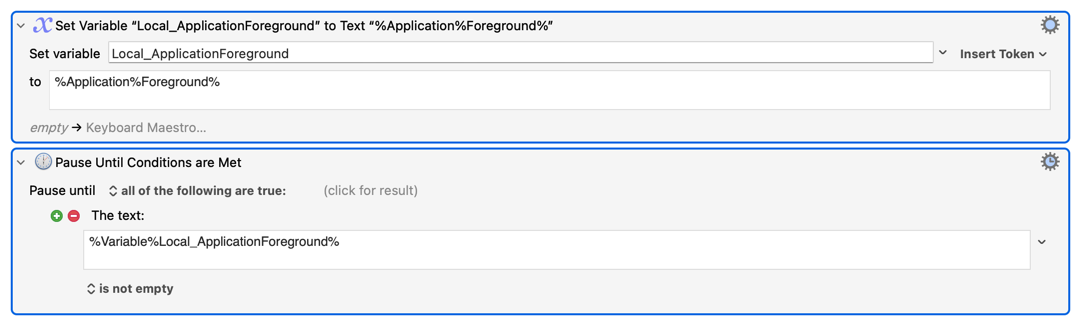
One idea, could I cause Macro 2 until foreground winds count > 0, would that work (assuming Keyboard Maestro cannot see / count the number of foreground windows when locked, in the same way that Moom cannot see them)? Something like this:

What other ideas might you have?

Thank you.

So this is building on your previous "Periodic". Certainly the easiest way (without rehashing all the logic behind that!) would be to unlock the screen when required, using the Keychain-based macro above. But you could also "Pause" Macro 1 until the screen is unlocked manually (see the SCREENSAVER() Function) manually, then do the window moves etc.

I'd start by reviewing my security stance. Why is the screen being locked (and, from other comments, after such a short period of inactivity)?

Security digression

The "proper" way to secure your computer is to manually lock it as you make to leave your machine unattended for even the shortest period -- the time-based lock is a back-stop for when you forget, not a replacement for doing it yourself.

Asking because if this is a compliance requirement then your CompSec people will have something to say about your computer auto-magically unlocking itself when you're not around...

If it's a personal decision rather than a requirement then you'll also know if it is OK to have your machine unlock itself unattended -- you could even get cute and use the %NetworkLocation% Token to decide where you are, auto-unlocking only at home or work and pausing for a manual unlock anywhere else.

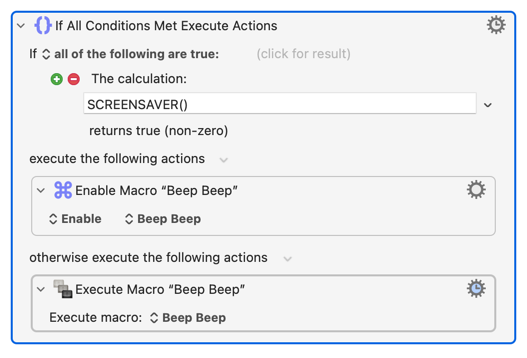
Another way to do this sort of thing is using the "Set Macro or Group Enable" Action. You requirements (in part, at least) could be:

Run a particular macro at time n run or at the first, and only the first, unlock event after n

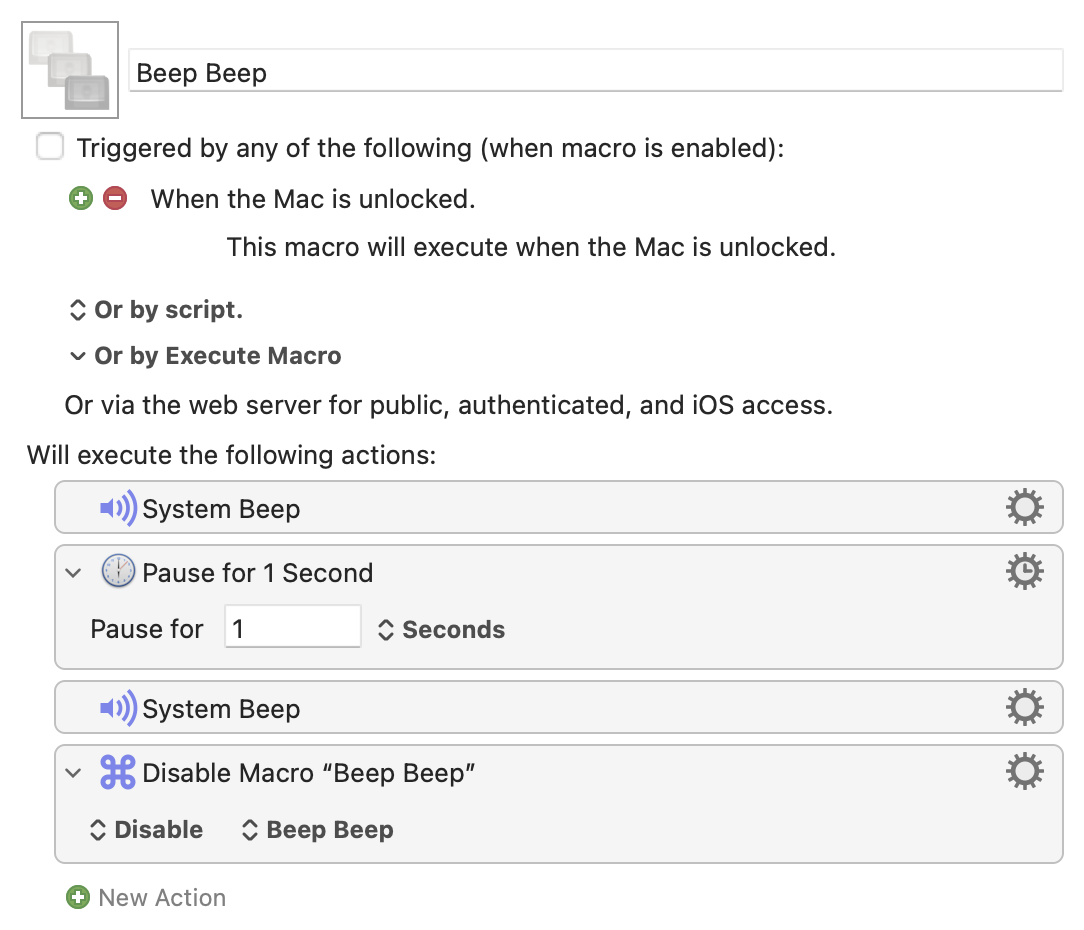
So you'd set the "particular macro" up like so (beeps and pause standing in for "real" Actions):

Note that it is disabled but has an "unlock" trigger and, importantly, its final Action is to disable itself.

Your "controller" macro would then include something like:

Have a play with your own versions of the above and see for yourself how (and why!) it works. The "controller" need be nothing more complicated than a 10 second "Pause" followed by the above "If" Action -- run it manually, make sure the beeps "beep"; then run it again and immediately lock your screen, wait 30 seconds, then unlock it.

Appreciated, will take a look.

Excellent suggestion and this is in fact what I do!

The short period is for the once-a-week or so that I am the office (as opposed to WFH) and think a short period is ideal as it rarely kicks in when I am WFH (i.e., I am alway on the computer)!

I like the idea o using the %NetworkLocation% but it is not needed as I have a condition on being connected to the Apple Studio Display which means I am at home.

I will both test it out and report back. Much thanks, as always!!!

@Nige_S

Apologies but I can't figure out what is wrong here as I have the following and the p/w is not being entered into the screen saver despite travelling through that section of the macro based on Display Text actions I used.

Thank you.

I did some additional testing and the problems is that Keyboard Maestro Engine is not getting the password from the keychain (i.e. the variable is blank, has no value when I use a display tr t notification).

What do I have wrong as everything looks good to me.

Thanks.

Apart from you ignoring the instruction to add the credentials to your login keychain in Keychain Access, and using the Passwords app instead.

Also, why are you spending CPU cycles on using a shell script to see if the display is asleep? What are you actually trying to determine? What will happen with that Action when the display is not asleep?

We can't answer that last question because you haven't uploaded your macro or a cut-down demo that illustrates the problem, nor shown what Action options you have set. But think about grep's return codes in different situations and how KM responds to them.

Wow, do I ever feel stupid! I should have read it more closely!

Changed over to keychain and all is good.

Apologies, macro now included (see below).

I am testing whether the display is asleep or not (or, put another, whether I am or am not at the computer), because should I be at the computer then:

  1. There is no need to wake the computer but, more importantly,
  2. Put the computer back to sleep at the end of the macro (Step 11 of the macro).

In addition, I did test the SCREENSAVER() function in Macro 1 and do very much like that approach as well as i) it is more secure and ii) it prevents the macro from failing to change presets. Huge thank you for both methods / suggestions.

Interested, as always, in any suggestions that you have.

Summary

Load Sunrise Preset When Connected (100 Nits → 300 Nits) .kmmacros (272.3 KB)

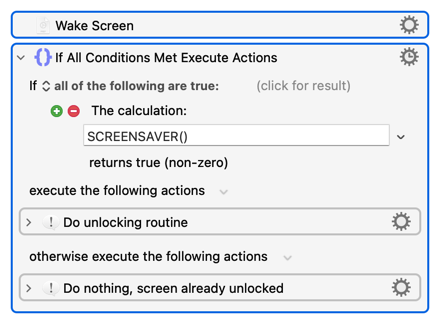
It's also "cheaper" than a system_profiler shell script and covers more cases than your script -- your routine will only "unlock" if the display is asleep, so will fail if the screen is awake but locked or is running the screen saver.

There's no penalty (apart from a 1 millisecond delay!) for waking an already-awake display, so this might be more robust:

Agreed.

I saw you post from earlier in the day before you edited it. I noticed that during the testing proposed in your response before the edits! Huge thanks and very interesting.

Great idea, I added the Wake Screen command!