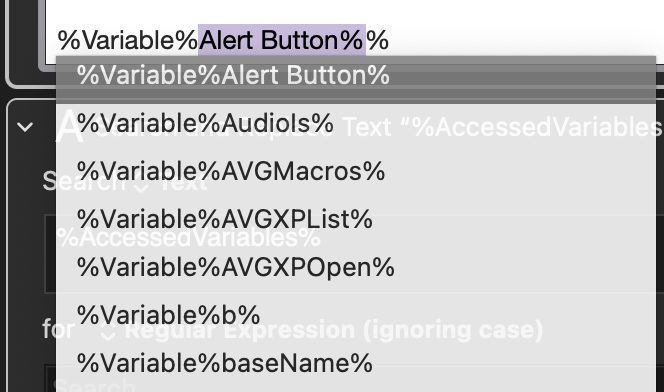
I think I managed to figure out how I was opening it. After inserting the variable token, I move the cursor one step back in order to ⇧⌥LeftArrow to select VarName and open the variable selector to search all variables by name, which is what this menu seems to be as well, but in-line. It appears that with the cursor next to the second % inside the variable token or any letter thereafter, this menu drops down allowing for scrolling with mouse or keyboard. Typing any characters will filter the list down accordingly.
I don't know what I did the first time, presumably the same thing I did when reproducing this dropdown, but muscle memory was doing almost all of the work and I have no recollection of doing anything different. My first thought was another macro somewhere, but I haven't installed any new, outside macros for quite some time and I've never seen this before. Even earlier today working with variables and variable tokens, it never appeared.
I kind of feel like I'm losing my mind here somewhat. Is this native functionality that's been there the whole time and I just somehow never noticed? Or is it in fact a macro that suddenly woke up/was inadvertently enabled sometime between this morning and this evening without my ever noticing?