When the focused window changes, is it possible to tell the difference between selecting a new window and closing the front window?

I think the title identifies the core of the issue I'm asking about. I've recently (finally) upgraded from Monterey to Ventura. On Monterey, whenever I switched desktops, when I returned to a previous desktop the windows were stacked in the order in which I left them. But on Ventura, when I return, a different window or windows are in front of the window that I had been using, sometimes the window I that had just been foremost is not even visible to select. It's a very repetitious annoyance.

If this is fixed in later OSes, I'd love to know, but initial research with Google AI suggests that it has not. I put my first paragraph above in as a prompt and got this:

The window layer shuffling you are experiencing when switching Desktops (Spaces) is a known macOS focus-routing bug that worsened significantly with Ventura's redesigned window management architecture. [1, 2]

Is it fixed in later OS versions?

No, it is not completely fixed. While Apple has tweaked the window manager in macOS Sonoma and macOS Sequoia, users across various communities still heavily report "phantom focus" errors and background windows randomly jumping to the front when transitioning back to a Space.

Meanwhile, I'm working on the the idea of setting a Dictionary variable every time the foremost window changes to record the identity of the newly frontmost window. The Dictionary key is the ID of the current desktop. When I leave a
desktop, the Dictionary entry for that desktop is whatever had bee foremost previously and when I return, I bring that app forward. I'm back to where I had been and I'm happy (that's the plan).

A complication is when I drag a window from one desktop to another. The one that had been foremost is now in another desktop. So if I initiate a drag, I want to save the second window instead. That means my dictionary needs to save two window IDs in a push-down stack so that window #2 can be saved instead because window #1 is being dragged away.

The foremost window in a desktop can also change when the foremost window is deleted. The Focused Window Trigger can save the new window as window #1, but I can't simply save the previously frontmost window as the second in the pushdown stack because it's gone.

Hence my question:
When the focused window changes, is it possible to tell the difference between a change cause by selecting a new window and a change caused by closing the front window?

I would like to be able to handle those two situations differently.
1 Like

Despite the bug you mentioned, I can think of a way that might help you, but it only works when the method you use to select a new window or close a window is accomplished by using the mouse to click somewhere on the top of the window. So is that what you meant when you wrote your question, or did you also intend for a solution to handle other cases, like using CMD-TAB to switch apps (and thereby, windows.)

I have an even better idea. If your mouse is a smart mouse (eg, Logi Options+) you can have your mouse simultaneously send a click to macOS and also send an event to trigger a KM macro using the mouse’s Smart Actions. (This is called dual-triggering.) I wasn’t aware that this was possible until I examined your question carefully. This approach could mean NO POLLING is required in any KM macro. Using this approach, KM can detect a primary mouse button click without polling. So, do you own a smart mouse that supports dual-triggering?

Minor warning: if you redefine the primary mouse button, and you mess up, you may not be able to use that mouse again to fix the problem, since it has been redefined, without doing a factory reset on the mouse. This happened to me once a long time ago.

This is the first time I have ever heard of dual triggering, but now that I know about it, I really want to try it out. I think it could fix a lot of problems, and KM would be able to do a lot with it.

1 Like

Hi Doc,

I used to use one; it's in storage now. For the past four years I've been pretty much track-pad only. I rarely have an actual desk space to use, which is pretty much a prerequisite for effective use of a mouse. Once upon a time I had a mouse that was designed to be used on couch cushions, but that only really works well if you are doing nothing but mousing; swapping frequently between mouse down at your side and the keyboard in front turns that into a very long reach.

Yes, I meant using the mouse to select a different window or clicking the window's red button to close it. However, in the present situation, on those occasions when the window I want is hidding, or only partially visible and I don't recognize which one it is, then I often have to swipe up to get Mission Control to expose all the window -- then I pick one. I don't know if that would work with your idea, but it's a frequent enough occurrence.

I'm still not sure where you're going with your ideas.

My current thread is to have a list (within a dictionary of one key for each desktop space) of the top two windows and push a new entry onto the top whenever I change windows. But I'm stumbling over how to update that when the change is closing a window not picking a new one.

I started with a simple variable keeping track of the current front window. But I realized that if I drag the front window to another desktop, a common occurrence, then in the previous desktop I won't be able to know what the identity is of the new frontmost, unless I'm keeping track of window #2 too. So the list has two items.

It's a pretty simply algorithm for a widow change, but doing something different when a window is closed requires being able to tell which event is which, and the Focused Window Change Trigger does not provide that info.

Maybe what I need to do is something like this:

  • The steady state is that there is a dictionary entry for the current desktop that lists the top two windows.
  • When I change windows, the Focused Window Change Trigger initiates the Update macro that saves the new window ID in the first position in that list and moves the former first one to the second position.
  • However, before it pushes the new first window onto the top of the list, it checks to be sure the former first window, soon to be the second widow under most circumstances, still exists.
  • If, at the Focused Window Change, when the new front window is ready to be put first on the list of windows, and ready to push the former first to second place, if at that point the the former first window does not exist, then the window change must be because the former first window has just been closed. In addition, at this point, the former second place value shouid match the current foremost value, confirming that the front window has just been deleted.

At this point, knowing the front window has just been closed, I can use @CJK 's JXA script to list all the widows of the current desktop and I can save the top two. I don't need to run JXA at every window change or at every Desktop change, I'll be running it at ever window closing only.

I need to work through the logic a few more times, but I think that may be it.

If you've followed me so far, let me know. And if you have any questions let me know. The more times I explain it, the more clearly I'll understand it.

1 Like

Yes, that’s because I was just sitting on the germ of an idea, waiting to hear certain additional details before I proposed it.

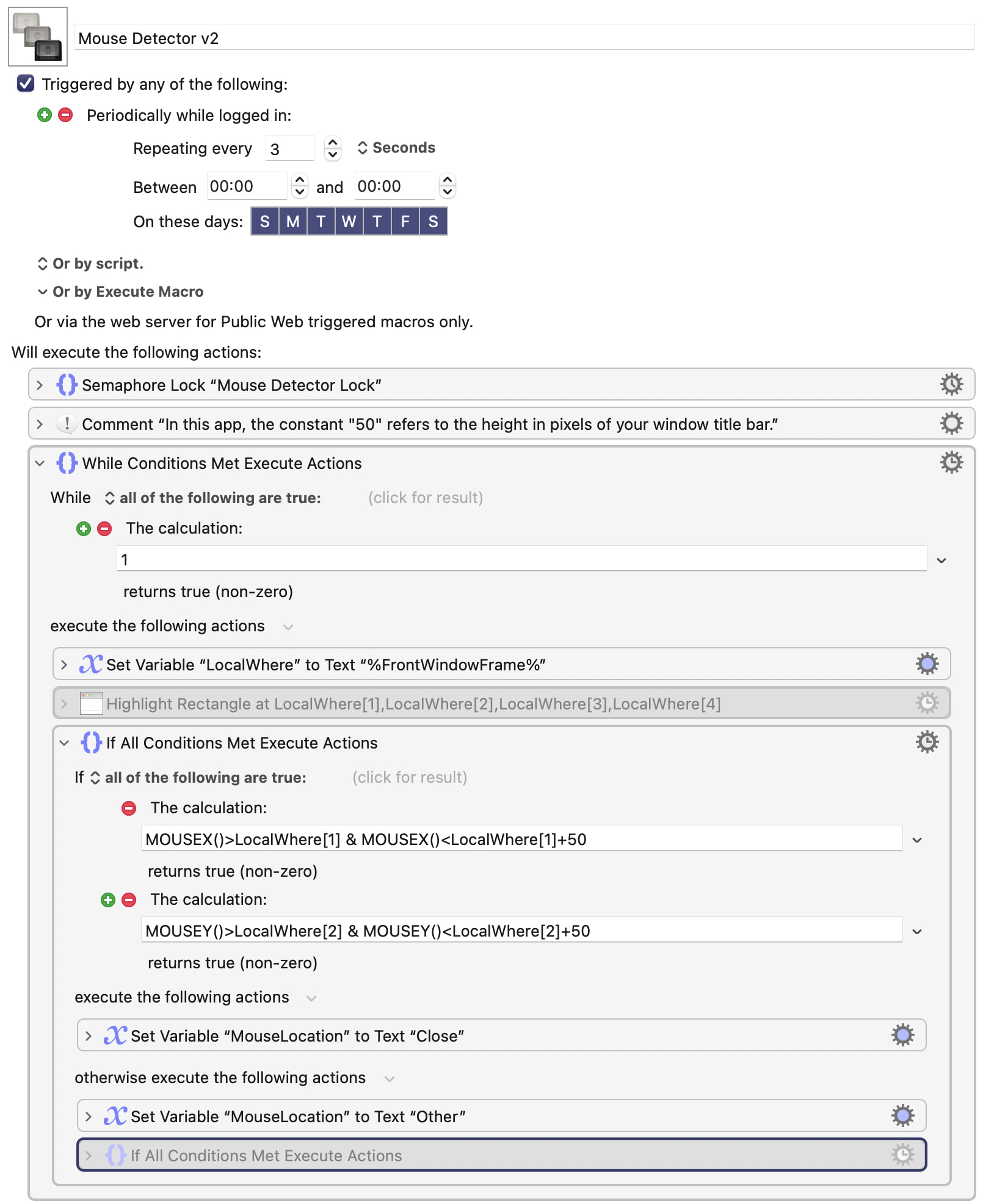
My idea is to, first, create a KM macro that constantly records (polls) whether the mouse is at the top of the frontmost window, or even on the upper left corner of that window. There would be second macro that triggers when the active focussed window changes. When the second macro triggers, the second macro would check the position of the mouse in the frontmost window PRIOR to the trigger. This is possible because both macros could share a semaphore to that the first macro doesn’t record anything when the second macro is operating. If the second macro calculates that the mouse was in the upper 50 pixels of the window, but not in the leftmost 50 pixels, then it had clicked in the upper frame of the window. If it was in the top left 50,50 pixels, then it must have clicked on the red button.

That’s not how my method works. My method infers the type of event by constantly looking at the position of the mouse inside the frontmost window. I think my method should work, and it’s short enough that I’ll write it anyway, for the challenge, and let you know.

EDIT: I got the first macro working fine. The trick to the second macro appears to be that the first macro runs so fast, I have to have a record of the mouse’s location relative to the frontmost window back in time about 0.01 seconds. I thought semaphores would fix that, but KM runs so fast that I have to fetch an older value. Give me a little more time.

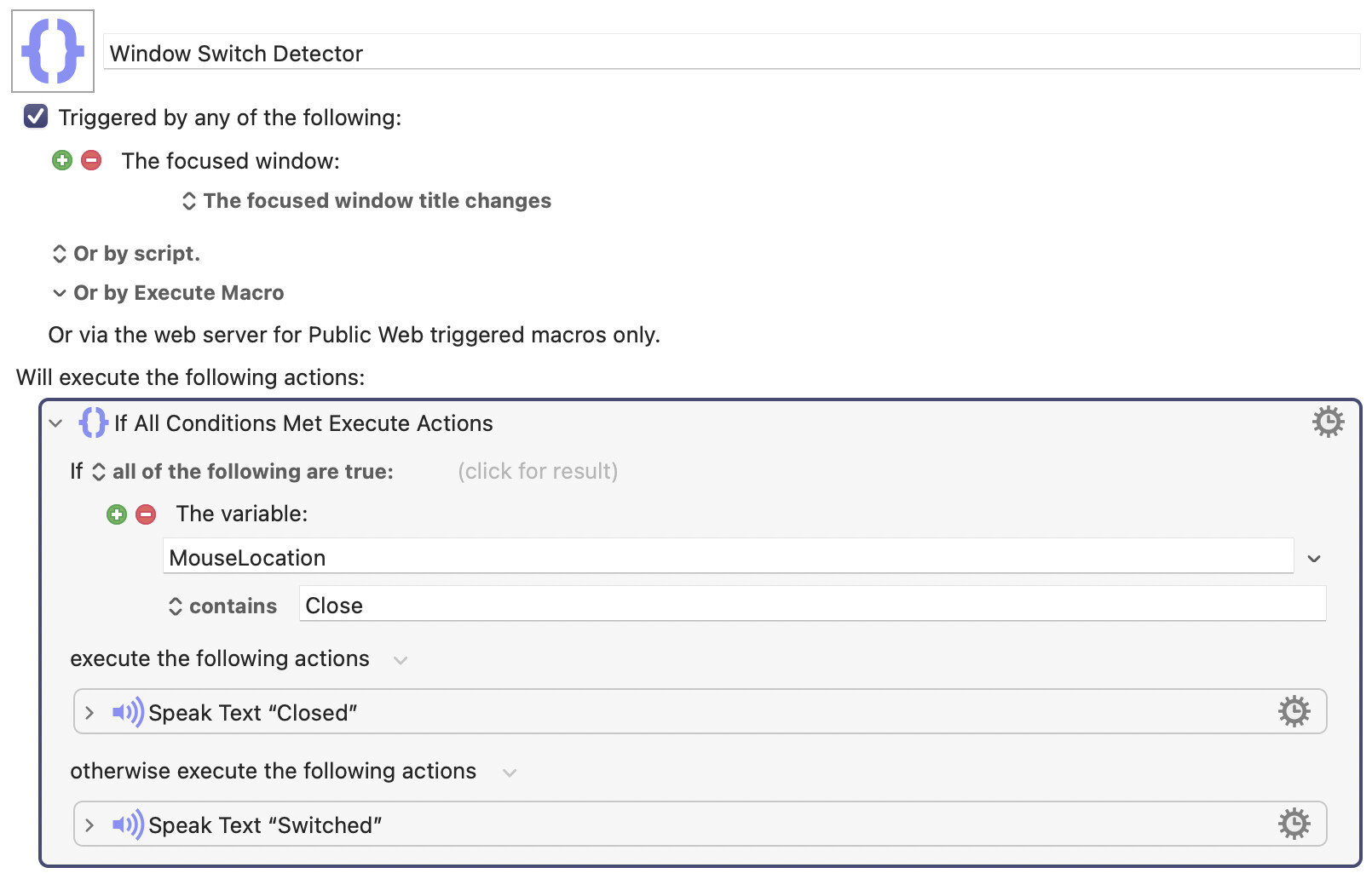
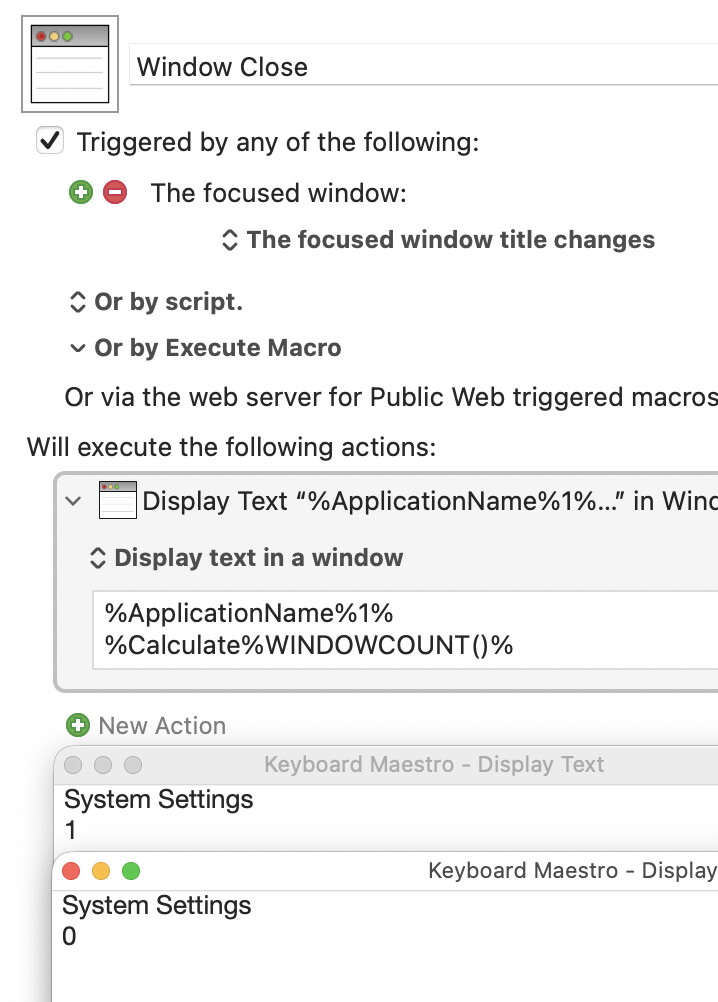
EDIT: Okay, I got it working, and it was simpler than I expected. But I see a problem, not with my macro, but with macOS. In many apps, including Apple apps like Notes, when you click on the red button, the window closes, but the app itself doesn’t quit. When that happens, there is no focussed window at all, and the KM token %FrontWindowFrame% returns 0,0,0,0. Since so many apps do this, I suspect my solution won’t work for you. Sorry about this. In case you want to see what I did, here are two screenshots of my macros:

and………….

They do work in some cases, but only in cases where an app actually closes when the red button is pressed. That may or may not be good enough for you, but it’s not good enough for me.

Can you also log WINDOWCOUNT()? If it goes down, you've closed a window!

That should work if he is closing windows within an app, but I don’t think that will work if he presses the red button to close an app, because then the frontmost app changes and the window count becomes irrelevant, since it’s a different app.

Not a Spaces user, but if I close a window by clicking the red button then the app remains active and the next window back is frontmost (even with interleaved windows).

Not if it's App Store, Maps, Photos…and any of an ever-increasing number of apps, both Apple and third parties. Don't get me started.

-rob.

1 Like

IF it's the last window, in any Space, of the app, some apps close, some apps stay open even if they have no windows. It even varies among standard, preinstalled, Apple apps. I think that's what @griffman is talking about. As @DocOck says, if the app closes because it's the last window of the app, then the count will be for another app.

If WINDOWCOUNT() counted all the windows on any specific Desktop Workspace, that would be a whole 'nother thing.

Have either of you tried this?

For me "focused window title changes" fires before the app is Quit and WINDOWCOUNT() is the expected 0:

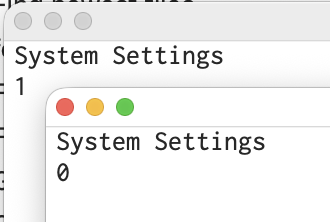
Dialogs show switching to already-running System Settings (window count: 1) then closing the window (window count: 0).

Of course, that may be limited to the few apps I've tested -- or maybe my machine is slow enough that the automatic quit takes longer than the macro.

I didn't try it, as I was just replying to "if I close a window by clicking the red button then the app remains active…" I thought you were just commenting on the app state (which i did think a bit odd, as I was fairly certain you knew those apps quit).

Testing your macro on my Mac Studio, I see the same results as you—so the macro is triggering before the app itself has left the scene.

-rob.

I'll admit I had forgotten -- I can't remember the last time I closed the last window on one of those apps instead of Quitting them (I always have something else open in Preview, for example, and always Quit System Settings when done).

I thought people were referring to the situation where apps A and B have interleaved windows, or maybe that when you closed an app A's last window in a particular Space then app B would be active in that Space (don't use them, wouldn't know).

Regardless, we now know that even if it is the last window of an app that auto-Quits we can get a window count before it goes so we can tell if we closed a window. We will, of course, have to check that we're not just switching apps!

But I'm not sure it matters...

@August -- you can't rely on the previously-recorded frontmost window of an app still being there, whatever you do with KM window triggers, because you can close windows without foregrounding the app.

Without Spaces, I'd keep an array/list of windows in stack order. When switching back to an app the macro would work through the list, trying to front each in turn until successful -- each failure would indicate that window was no longer present and you could delete it from the list, though I think I'd just replace the contents of the array with the new window list.

You could even work the list in reverse to fully restore the window ordering, not just the front window.

Whether that would work in Spaces is another matter...

Foo. I don't, usually.

You cannot close a window using the red button without foregrounding it, right? The red button isn't red until the window is in the foreground.

AND yes, I can have Preview windows in several Spaces, in some of them it can be the foreground app, and I can Quit Preview completely in some other Space. That would mess up my algorithm of foregrounding Preview when I return to that space. Foregrounding whatever I had saved as WIndow #2 would work — sometimes — as long as, for instance, Preview had not also been the second window in that Space.

It's beginning to look like the only completely reliable way to do it covering dragging windows to new Spaces, closing any number of apps in the current Space, closing an app while in some other Space, or any number of other unforseen circumstances, is to keep an updated list of all windows in the space (a task the OS should be doing, somewhere), update the list with @CJK's JXA script at every single Focused Window Change, and then on every Space Change, examine the list that formerly described the new space when I left it, and attempt to bring to the foreground whatever the first app is on the list that is still open.

What a HUGE amount of overhead! Can my battery stand the strain? Will the delays at every window change become more annoying than I can stand?

Upgrade, Shmupgrade! I would simply like Apple to stop breaking things, but I guess they think that sells more hardware.

My system worked on Catalina. It worked on Monterey. It's broken on Ventura and from Google searching, it's still broken on the latest release. And the workaround is a resource suck.
</rant off>

OK, if I have to run JXA at every Focused Window Change, I'll try it.

I've been thinking the real overhead is having to reinstantiate JXA every single time. Could there be a way of having JXA running in the background and just query it when the Focussed Window changes? Maybe I could have JXA watching and waiting for a flag to be set, the FWC macro sets the flag, JXA sees that and updates a system variable, than the next macro queries that variable to get the Current Ordered Window List.

Being always active, there would very little overhead to using JXA to update the windows lists. Any ideas on how to make this work?

I'll get started, as a Proof of Principle, on The Colossal Waste Method of running JXA at every change and checking for possible missing windows or apps when I'm restoring the frontmost when returning to a Space. Once that is actually running and doing what I want, even if it's slow, then I can look at logical heuristics that might allow me to not have to run JXA every time.

Right now, seeing the wrong app frontmost, not even seeing the app I'm looking for because it's buried, is a frustrating annoyance at every Space change and making me regret upgrading away from Monterey to Ventura. And I had it working just a week ago!

Foo!

Wrong, actually :). Hold down the Command key, and the window won't come to the foreground—this doesn't just apply to window chrome, either. You can move and resize windows without having them ever come to the foreground.

-rob.

1 Like

Whoa! What an amazing bit of knowledge.

Yeah, I just tried it. Even without the Command key, when the mouse is over a red button, even on a lower window, the button becomes active and you can close that window. I haven't tested whether any of this trips a Focused Window Change trigger.

And, given that this is after all the KM Forum:

Also no window-change trigger.

Ouch. OK, it looks like the whole strategy of window change triggers is not a reliabie way to differentiate changing TO a window compared to closing one window and having another come to the front.

Which is why I'm thinking it's better to deal with orphaned references when you try to switch to them -- but that does keeping the full window list, in stack order, of each app, and updating it on every front window change.

Trivial on a single Desktop/Space setup, maybe problematic for you.

You may not have to update every app's list on every change -- I think you can get away with only the frontmost app.

With AS you'd include handlers like getWindows(), save the script as a stay-open application, open the app, then interact with those handlers as with any other app:

tell application "MyStayOpenApp"
   getWindows()
end

...and I'm sure you can do the same with JXA.

Of course, that's not much help since you still have to instantiate AS/JXA to make the IPC call to your stay-open app :frowning:

Ouch. I didn't think of that. Could KBM set an "I need an update" flag that the stay-open app would watch for, and when found, unset that flag and update the window-list system variable, which KBM could then read to get the updated list? That might be slower than reinstantiating AS/JXA, I don't know. Polling for the flag on both ends could not be instantaneous, so how does that timing compare with loading/unloading/loading/unloading either AS or JXA? Could either of those be tagged to stay in memory even if they're not running? Inquiring minds don't have answers and don't know how to test.