I just learned that the copy to clipboard command is unfortunately broken in KM 9 at least in some apps. I'm unable to use it in Mail and Filemaker Pro.
So attempting a temporary workaround without the clipboard. I can easily bold text (easy part) but changing text color is more difficult.
In Filemaker, there isn't a way to reference the text color directly. It's a color grid that cannot be communicated to KM as far as i can tell. All suggestions appreciated!
I'm not sure if this counts as a suggestion, but in another thread here on this site the person who makes KM said a patch would be coming soon for this.
If you can be patient for a day or so, KM 9.0.1 is in beta, and should be released shortly.
I just tested copy in Apple Notes and Pages, and it worked fine.
Did you chat with Peter and get his fix recommendations? Are you getting the error message that the copy command timed out?
I was similarly frustrated with this for some time until I dug deep into the system settings and messed with them to get them set correctly for the latest KM.
29/04/2020. I have been having problems today with copying to Clipboard today, and do not know whether it is me or something else. However, I seem to be having more success with Copy and Paste to/from a NAMED clipboard.
Cannot see why this is not working.
Capture screen and create png file in RetinaCapturePics folder
KM should then trigger copy to system clipboard
and
I should be able to see it ClipboardHistory switcher.
Very occasionally this macro seems to work.
As the file is being created, I do not think RetinaCapture is the problem.
Earlier on, the copy action was timing out, so I increased it to 30 seconds. That means the trigger was working, so it must be in the Copy action ??
What are you actually Copying here? The screenshot hits the watched folder, the macro fires and (if the added file ends with "png") the "Copy" action copies the current active selection. What is selected? What do you want to copy -- file path, the image captured, whatever text you happen to have selected in the frontmost app?
Note that I don't have RetinaCapture so, for all I know, it might automatically open and "Select All" the screenshot for you. In which case you'll need to make it the frontmost app -- currently you are only activating it if it isn't running.
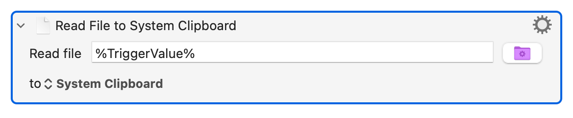
The you're either going to have open the file in eg Preview then Select All and Copy -- or, and probably better here, use the "Read File" action. Try replacing the "Copy" with:
 RetinaCapture Generic
  Macros.kmmacros|attachment