This is a suggestion for a new feature in KM for macOS 27. I’m sure Peter N. Lewis is already considering these ideas, so this post isn’t for him to read, but I am just creating this post to voice my support for it, and to ask others on this forum to confirm (or deny) that they would like to see some support in KM for Apple Intelligence.
MacOS 27 has new support for Apple Intelligence (and macOS 27 was just released in beta yesterday.) I wouldn’t expect Keyboard Maestro to provide massive new support for it, such as support that would allow users to say, “Create a new Keyboard Maestro Macro with hotkey Control F1 that runs only when Pages is active that moves the text cursor to the location of the first occurrence of the word Tiger in the current document.” This would require too much work, and would be impossible for some actions like “Execute Shell Script,” since the contents of the text box in that action allows for all unix commands.
But I would like to see some support for simpler things like “Hey Siri, tell keyboard maestro to run the macro named Tiger.” There are two ways that KM could achieve this: (1) Use the AppShortcut protocol, which requires the app’s name to be part of the user’s voice trigger; or (2a) KM declares its macros as App Entities, which allows users to omit the “Keyboard Maestro app name” and simply say, “Hey Siri, trigger Tiger,” or (2b) “conforming” the macro’s App Entity with IndexedEntity which allows spotlight to look through the macro’s name (or contents?) for matching words.
As I said above, I don’t expect KM to expose KM’s actions to the Apple Intelligence framework as App Entities. There are hundreds of KM actions, many of which have very complex options. I’m not opposed to this sort of support, I’m just saying that I would probably refer using my mouse, keyboard and eyes to create macros in KM. Voice activated programming feels too slow (although I’ve never tried it.) However it’s worth noting that Apple went to a lot of similar work to get its own Shortcuts App in macOS 27 to allow users to create detailed macros by speaking, so it is possible.
P.S. Apple Intelligence allows apps to have alternate names (“the developer adds the INAlternativeAppNames array to their app's main bundle settings.“), so that the user doesn’t have to say the full name of the app. I recommend that “Maestro” be an alternate name for “Keyboard Maestro.” There are at least three other apps for macOS that include the word “Maestro” in its name (eg, “Apogee Maestro”) so it’s best to get in there fast, so that other developers don’t also try to use the word “Maestro” as an alternate name. (E.g., the developers of “Apogee Maestro” could decide to use the alt-name “Apogee” if “Maestro” is already in use.)
On the list of things I want to do, "talk to my computer" is near the bottom of the list. Also, I'm pretty sure you can activate Shortcuts via voice, and Shortcuts can execute Keyboard Maestro macros, so you can already launch a macro via voice.
As for the other AI stuff, if there were support for AI-created macros, that strikes me as a recipe for a huge support burden when they don't work as expected.
For me, I don't see much benefit to bringing AI directly into Keyboard Maestro.
That’s true, but have you ever tried it? I have, and Siri has so many “reserved words” that any time I want to trigger a shortcut by name it ignores my macro and uses its own logic to process the words you use. So I end up having to name my shortcuts “Rhinocerous” instead of “Display Weather” because Siri’s internal vocabulary always trumps macro names.
That isn’t a new problem. That problem already exists with the KM Web Interface. And KM has a solution for that. So you can’t use that logic against KM support for AI.
I'm not. I'm asking you, since you've obviously thought about this, what you think would be a good solution -- particularly if we're going voice-activation mode. It would also help with the current situation -- perhaps we could have a single Shortcut that asked for the name of the macro to run, avoiding the "internal vocabulary" problem.
I don't have any ideas coz all of my "not done within KM" triggers use macro UUIDs, since I consider macro names to be more aide-mémoire than unique identifier.
makes it so easy for me to understand things like what you wrote. I just selected your sentence, “Whatever works, but nullius in verba.” and then pressed CMD-C, and instantly my macro explained the meaning of your sentence. It’s really amazing.
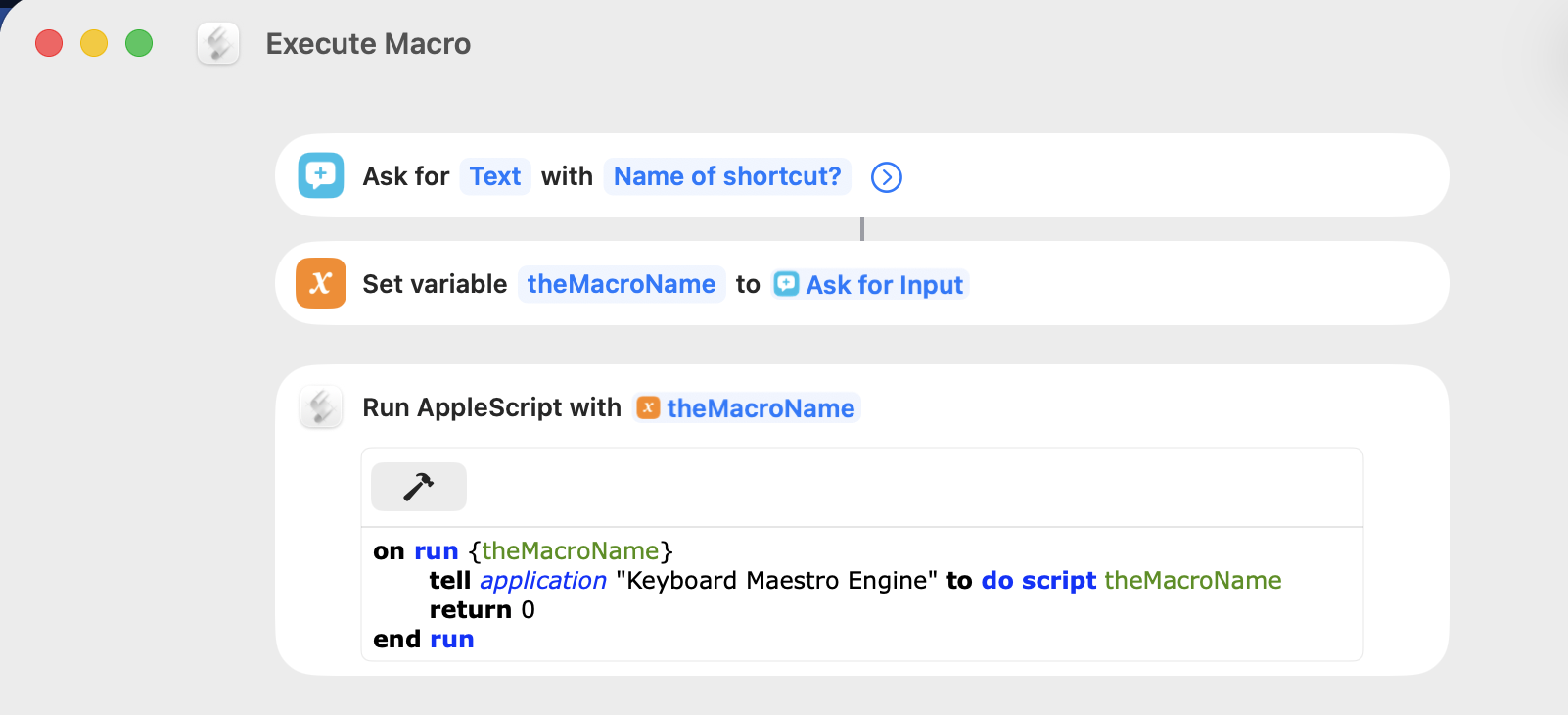
OK, I'm no Shortcuts guru but this is already (Tahoe) do-able. Make a Shortcut that asks for input then runs an AppleScript using that input to execute a macro by name.
Me: Hey Siri... Siri: Uh-huh... Me: Execute macro Siri: Name of shortcut? Me: Scratch
And the KM macro "Scratch" executes (assuming active, and a unique name).
For me the "Name of shortcut?" prompt is displayed on screen, but I can still speak to respond. What I've seen online suggests you can get Siri to speak the prompt instead, but I may have turned off so much of Siri and speech that I can't find the right switch
Google's AI overview also suggests you can say the Shortcut name and the data (the macro name) in one go:
State the Command: Say "Run [Shortcut Name] [Data]..."
...but I can't get that to work. Probably a fail by me.
So you can do at least some of what you want -- no need to wait! It'll be interesting to hear how you get on...
That’s an excellent improvement to my method, which I never thought of. Thanks. Currently, I have a macro called Broom which I trigger (using Siri) about 10 times per day. I had to use the phoney word “Broom” because the words that I wanted to use (which are health related, so I don’t want to reveal my exact medical condition) were reserved words by Siri.
Interesting -- it's usually the other way round, with Shortcuts names overriding built-ins:
Note: If the shortcut’s name is the same as a standard Siri command (“What time is it?”, for example), Siri runs the shortcut instead of the standard command. Apple web page
Perhaps that's just on the phone, or maybe some reserved words are more reserved than others!
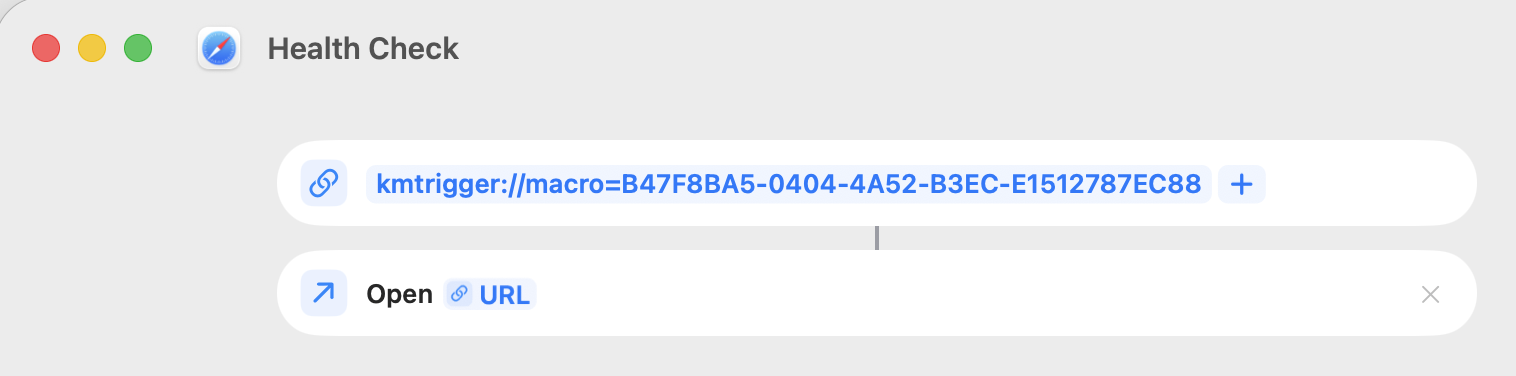
If you've only got the one macro you want to run like this I'd just hard-code the URL in the Shortcut, using the macro's UUID to avoid conflicts:
 Arguments are two a penny. Isn't the trick to improve the questions ?