I need to capture the time that the macro triggers in a Global Variable so that I can use it elsewhere.
Is there a way to calculate / get the time that a macro trigger fires in seconds of the day other than hard coding the seconds so that any changes in the trigger time will be accounted for?
Worth mentioning, I looked at the TRIGGERTIME() function but it is the seconds back to 1.1.70 based on GMT. Is there a way to convert TRIGGERTIME that also account for timezones?
After some poking around in this forum I was able to find
I used your question and the post above to help me learn how this function works. I am still learning a LOT about KM and its abilities so I am sure there are others would will have more insights into other ways this could be accomplished.
Also, I am also not certain I understand what you are trying to accomplish. My hope is that this post helps gives you more ideas on how you can achieve your goals.
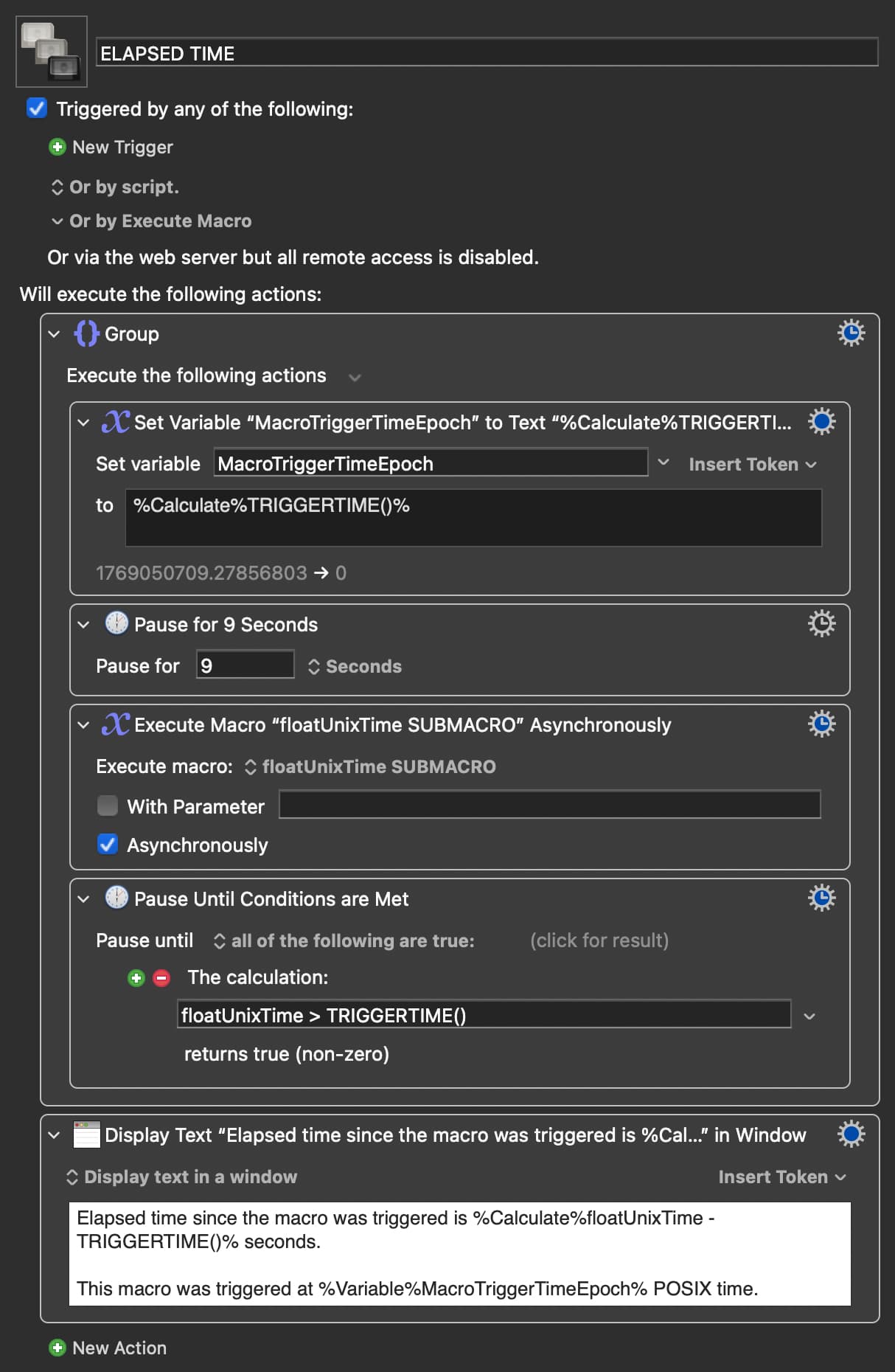
My macro defines a global variable - MacroTriggerTimeEpoch which stores the TRIGGERTIME() value.
I added a pause for 9 seconds for grins.
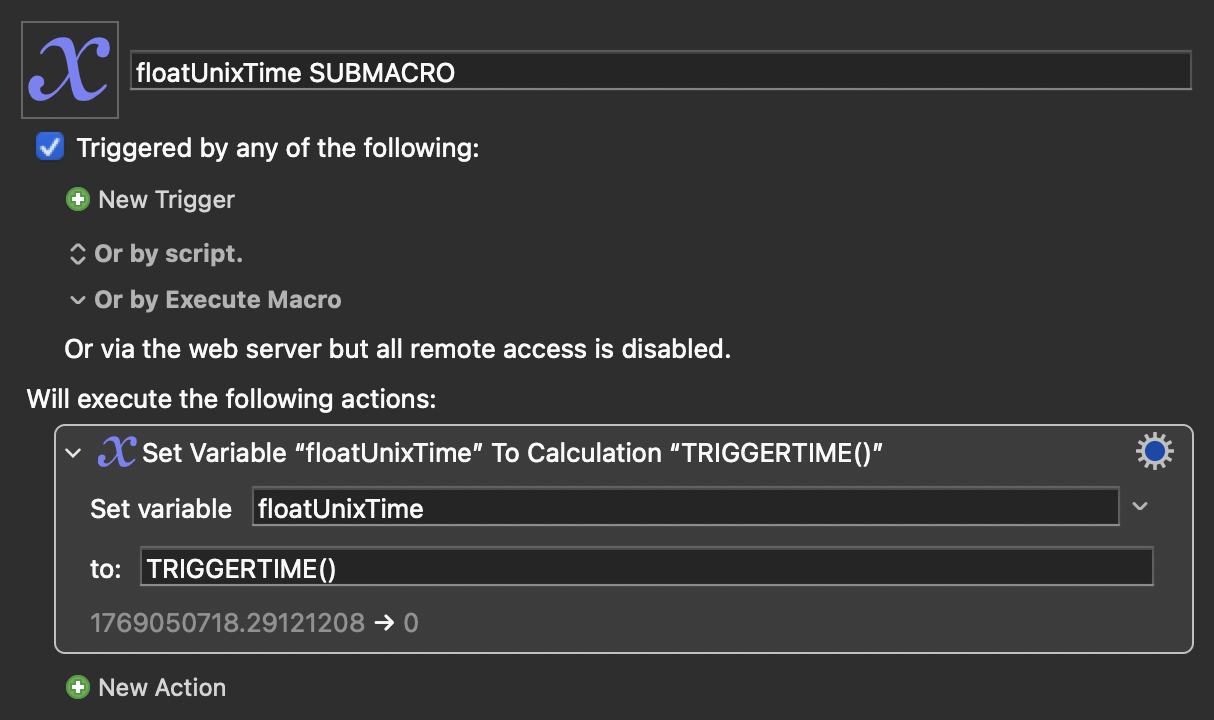
I then call the other macro as shown in the post I referenced above.
I then use the global variable floatUnixTime and the TRIGGERTIME() function to calculate the time in seconds since the macro was started and the action is run.
I believe this calculation will give you seconds into the current day of when you triggered it:
(TRIGGERTIME() - TIME(YEAR(),MONTH(),DAY(),0,0,0) + GMTOFFSET() + 2*24*3600) MOD (24*3600)
The TRIGGERTIME function is a unixtime value, as is the TIME function, which will give you midnight GMT on the current day. Add your GMTOFFSET to get the right time locally, and then add a couple days and mod it to ensure the number is a positive number of seconds from midnight.
I have two macros in the macro group that use "At Time" triggers.
When I create a Set Variable action using your formula in the macro with the earlier trigger time the action / formula works (i.e., the action reports the correct trigger time in seconds).
When I create a Set Variable action using your formula in the macro with the later trigger time the action / formula does not works as it reports the trigger time of the earlier / first macro.
Would appreciate your assistance in fixing this and yes, I did triple check the variables to make sure I have everything right.
It's a bit Route One, but why not just get the localised time of day in seconds as the first Action in your macro?
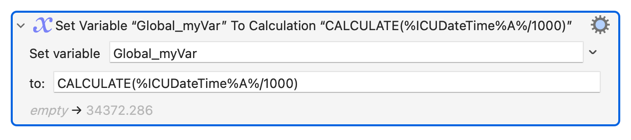
There isn't a format code for "seconds in the day" for %ICUDateTime% Token, but there is one for milliseconds -- and seconds is only that divided by 1000...
I thought of that by what seems to be happening is that when I reference the Global_myVar at a later point in the day its value has shifted because additional time has passed.
I need something that is static as in it will always be the same time (ie., 5:00 AM).
Then you've got something else that is also changing Global_myVar -- maybe a "future" execution of this same macro -- and that won't be solved by using a different method to calculate it!
After the Action above is executed Global_myVar holds a number, not a time, and that number won't change just because time has passed. This sounds more like a logic problem -- you may have to use the "save time to a Local variable, compare the Local to the Global, update the Global to the value in Local if appropriate" pattern we've discussed before.
I will try to explain without getting too deep into the weeds.
In addition to computers being a hobby I also spend time with audio / video which has its pluses and minuses. One of the minuses is that I am very cognizant and sensitive to properly calibrated displays (of all types). The result of which is that I have calibrated my monitor with two different presets; 1 for sunrise to sunset, and 1 for (you guessed it) sunset to sunrise.
One of the macros I built automatically switches the presets at sunrise and sunset based on a "At time" trigger as Keyboard Maestro does not have sunrise / sunset triggers. The macro has evolved and now also includes checking and, if appropriate, changing the preset when the laptop is connected to the display (think coming home from a meeting, my work office, etc.).
One of the needs for the "preset check and change" functionality to work is to deal with the edge cases when -- for example -- I return home i) after the sunset trigger would have fired (i.e., 4:30PM) but did not (as my monitor was not connected) and ii) before sunset (i.e., 5:15 PM). In this situation the trigger will never fire → the preset will not change.
To address this situation I have added actions / logic to the macro that should the edge case occur (i.e., trigger time < display connection time < sunset) then fire / start the sunset trigger. This is why I need the "trigger time" (i.e., the lower boundary).
Yes, I am thinking of doing away with the complication in at least two ways one of which is changing the trigger to the actual sunrise / sunset time using macOS Shortcuts as the trigger which does have sunrise / sunset times.
I hope this helps but, if not, just ask away (happy to share the macros, all 5 of them should anyone want).
Triggered by:
1) time, or
2) when I connect to my display

if NOW() >= sunrise AND NOW() < sunset then
   if display is in night mode then
      set display to day mode
   end if
else
   if display is in day mode then
      set display to night mode
   end if
end
If directly testing display mode is too disruptive then maintain a Global that is updated when your macro changes display mode, and (try to) only change display mode with that macro.
Separate the functionality from the triggers. That way you can have a single display-setting routine as above, executed by any trigger appropriate to the situation. You can always include trigger-dependent logic in the macro, letting you delay the display change until the appropriate time for your time-based trigger but do it immediately for the connection trigger.
Nigel, as always, greatly appreciated and very insightful.
I believe that is essentially what I have done (i..e, the two triggers) noting:
The two triggers are split over two macros (i.e., "when connected" which is based on the At Time trigger and "on connection" which is based on the "USB Device" trigger).
While I know this is different than having everything in 1 macro the rationale for splitting them out includes:
a) Every time the display preset changes the display disconnects and reconnects. I found it easiest (at least for me) to avoid the endless looping / triggering that was resulting by i) splitting them in two and ii) using a semaphore lock, It was also easier for me to control certain edge cases (similar to what I described above).
b) It was the first Keyboard Maestro macro I ever built (which was likely far too ambitious of a starting point) and it became very long (i.e., there are many steps to changing a preset) to manage. Were I to start all over again (which is possible) I would likely have everything in one main macro and use subroutines to control repetitive steps, etc.
c) Addendum / edit Having since taken a closer and more recent look at the "On Connection" macro and the "Set Load Time" macros, I may just bite the bullet and break the On Connection macro into 3 subroutines of the "Set Load Time" macros as I think this would be an elegant solution in that i) 1 macro that controls the triggers ii) repeated use of the subroutines in both triggering macros (much easier to maintain) and ii) 1 macro that implements the change. Comments / thoughts?
Macros attached as well as the colour coding convention I use.
Apologies, @Joel -- I missed your exact wording in this earlier post. But it does tie in with my question to @mill-twice-0w
In brief:
TRIGGERTIME() is the time when the currently executing Instance was triggered
A "submacro" called synchronously with the "Execute a Macro" Action is part of the "parent's" executing Instance (shares Instance variables and so on) and so has the same TRIGGERTIME() as the "parent"
A "submacro" called asynchronously with the "Execute a Macro" Action is not part of the "parent's" executing Instance (cannot access Instance variables) and has a differentTRIGGERTIME()
The last is why @mill-twice-0w's demo works and doesn't get stuck in an endless pause.
I suspect you're calling the submacro synchronously, hence the shared TRIGGERTIME(). Use %ICUDateTime% in an early Action instead, at least in the submacro, to get round that.
Appreciated noting I have a few related follow ups (hope you don't mind, using my words):
If Macro A calls Macro B Synchronously then the TRIGGERTIME() for Macro B will be Macro A's TRIGGERTIME(). In addition, Keyboard Maestro's Menu will show Macro A as a running macro because it will not complete until Macro B completes (and possibly later depending on whether Macro A has subsequent actions after calling Macro B). Will it also show Macro B as a running macro?
If Macro A calls Macro B Asynchronously then the TRIGGERTIME() for Macro B will its own TRIGGERTIME() because Macro A and Macro B will be running independently (and Macro A will terminate). In this situation, Keyboard Maestro's Menu will show Macro A and Macro B as running macros until each terminates independently. Is this correct?
Confirming the synchronous call and the use of %ICUDateTime%.