I'm afraid you are giving me more credit than is due. This may be a case of dumb luck.
I'll do my best to explain my example to the best of my ability. All the usual caveats apply.
First, my understanding from @Joel initial / originating post was that he was looking for a global variable to store the trigger time so that he could use it elsewhere. I did some searching around in the forum and found this post.
I use the example provided almost exactly. If you need a more thorough description of it, I recommend going back to that post and reading about it.
What I have attempted to demonstrate is how to create a global variable and store the trigger time of the macro.
Here goes...
created "global" variable MacroTriggerTimeEpoch to store the trigger time of this macro.
Pause for 9 seconds.
called submacro asynchronously (here is the dumb luck, I was dogmatically following the example provided in the other post on TRIGGERTIME() which had asynchronously selected). This submacro stored its trigger time in a "global" variable floatUnixTime. This trigger time will be approximately 9 seconds later than the current macro's due to step 2.
the Pause Until Conditions are Met compares the time differences between floatUnixTime (i.e., the trigger time of the submacro delayed by 9 seconds) and the trigger time of this macro. "Aside" -- I probably should have used the "global" variable MacroTriggerTimeEpoch to show its use. The value of these two are the same (MacroTriggerTimeEpoch is the TRIGGERTIME() of this macro). floatUnixTime is larger than MacroTriggerTimeEpoch due to the Pause for 9 seconds in step 2. In retrospect, I don't think my demo macro even needs this step 4. More of me just following the dogma from the previous example.
Displayed the calculated values demonstrating the use of "global" variable.
I hope this helps. I am still quite new to Keyboard Maestro and I do not have experience as a software developer or the like. I am finding this work intriguing to the point where I am questioning my career decisions from 30 years ago. But alas, that ship has sailed.
What's never mentioned in that thread is why the example works at all -- try it with the ELAPSED TIME" macro's "Execute Macro 'floatUnixTime SUBMACRO' " Action set to "Synchronously" and it will never complete...
Have your "Kill All Macros" ready, or use "Cancel All Macros" from the KM menu bar item!
Try them and find out? This really is a case of it taking less time to test it yourself than to type out your questions!
Spoiler
Since the "Cancel" sub-menu shows the names of running instances, it will show Macro A but not Macro B in your first case and both Macro A and Macro B in your second (assuming A is still running by the time you get to the menu item!).
I guess I don't understand what you're asking for. To be honest, I thought your post did a really good job of explaining why it works. I learned about asynchronous and synchronous calls from your post.
And also @Joel response to your post calls out the differences of synchronous and asynchronous quite well.
I don't think I could do a better job describing it.
The following tries using the values returned by running my example macros which returns the unixtime or POSIX formatted time.
Using an asynchronous call to the sub-macro:
Elapsed Time Macro TRIGGERTIME() value is 1769198942.63963413
Global VAR MacroTriggerTimeEpoch value is 1769198942.63963413
The above two are from the "parent" macro.
Submacro TRIGGERTIME() value is 1769198951.65191197
Global VAR floatUnixTime value is 1769198951.65191197
The above two are from the "child" macro.
The value of floatUnixTime - MacroTriggerTimeEpoch is 9.01227736 seconds.
If the call to the submacro (child) was synchronized then the trigger time of the parent macro (Elapsed Time Macro) would be used as the trigger time for the submacro (child), and you would get a difference of zero.
The Pause until check would never be satisfied as these two variables hold the same value.
floatUnixTime > MacroTriggerTimeEpoch will never be reached.
MacroTriggerTimeEpoch == TRIGGERTIME() of parent macro, AND
floatUnixTime == TRIGGERTIME() of parent macro
Asynschronous → Keyboard Maestro menu bar icon > cancel > Macro B instance as running (Macro A terminated as the call to Macro B is the last action in Macro A)
Synchronous → Keyboard Maestro menu bar icon > cancel > Macro A instance as running (Macro B had yet to start as it is on pause until sunset which is a little over 1 hour).
You really, really, don't! Just make a couple of test macros, one of which calls the other, and see what happens. Whack in a couple of "Display text" Actions so you can easily see what's happening.
When investigating things it's much easier if you cut things down to a minimum -- you can then concentrate on what you're testing instead of worrying about all the other stuff that's going on.
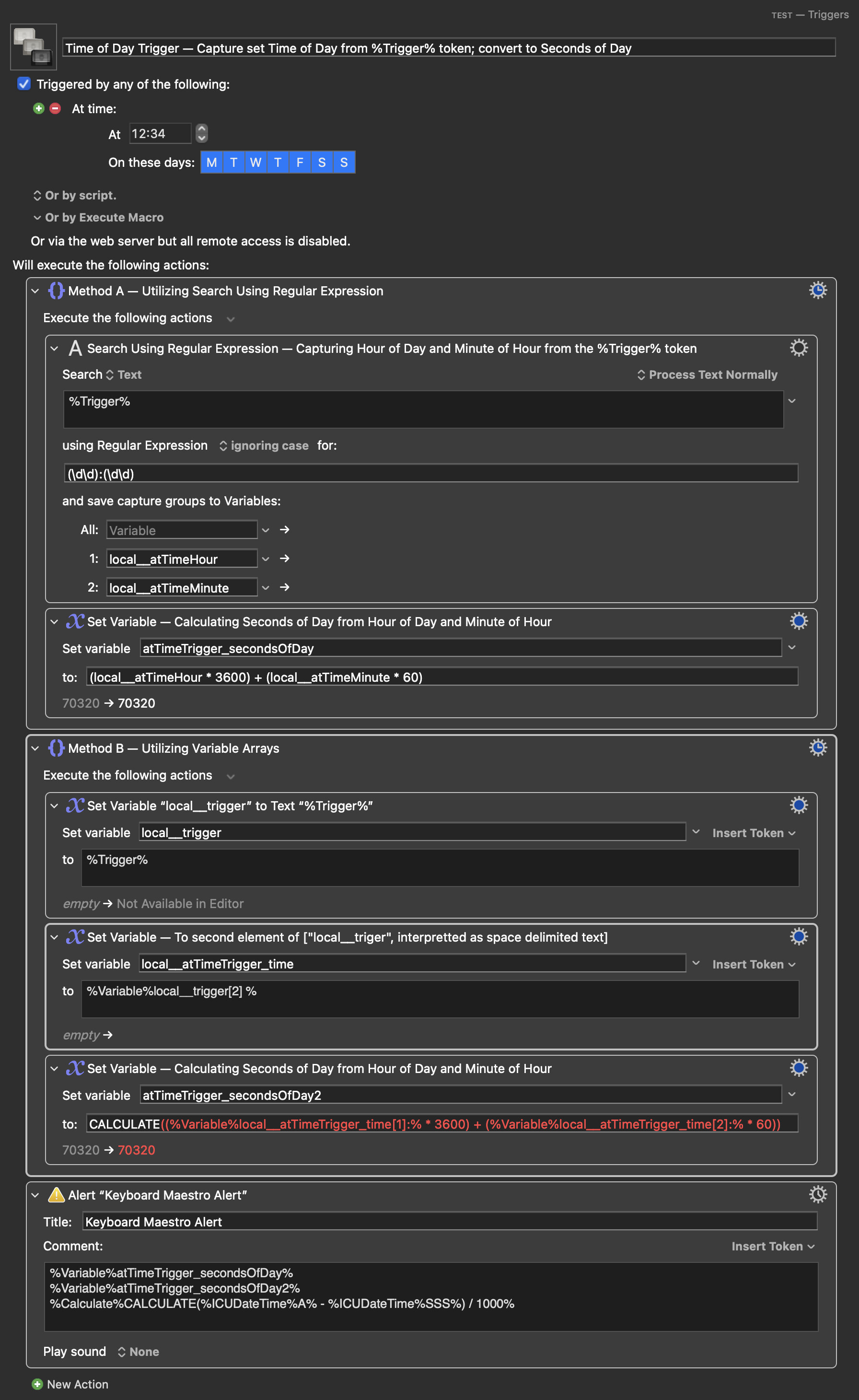
Not really contributing to the larger conversation this thread has evolved into here now. But as an alternative approach to the subject of capturing the time set as the "At time" value of the Time of Day Trigger; I just want to add that this set value is of course captured as part of the %Trigger% token value. For example in the forms of "At 12:34 every day", "At 12:34 on Saturday", "At 12:34 Monday-Friday and Saturday" etc.
From these values, the Time of Day value can easily be extracted with a very simple regex search; or by taking advantage of the fact that this value is always the second element if interpreted as space-delimited text.
As demonstrated by the two approaches in the macro below: