I was thinking if I could build a list that gets updated automatically when I add/delete/disable macros?
In a recent topic I was informed that there's a plist that gets updated when we make changes to macros, and that's why sometimes it may take a few seconds for macros to really work properly. I was wondering if maybe that plist can be accessed to update the list of active macros, along with their UUID?
That way, when I add/delete/disable a macro, it triggers a macro that updates a file (e.g. "KM Active Macros.txt")
The plist is ~/Library/Application Support/Keyboard Maestro/Keyboard Maestro Macros.plist, so I will have to find a way to read it and create a list in the txt file.
It may be possible, but that file does always change between major releases. That's because it's undocumented and not a supported interface. It can change without notice. However I think you can get a list of all active macros using KM's AppleScript dictionary. I tried this code and it worked for me: (it generated a comma-separated list of all macro names)
Of course this is a list of macro names. Macro names in KM are not unique. Are you happy with a list of names that aren't unique? If not you could probably modify this script to return the UUIDs of the macros instead of their names.
It looks like you're trying to get an auto-maintained index of active macros that refreshes whenever the macro plist changes.
If there is an easy way to hook into the plist file changes to know “when to refresh” I'd be interested in learning about it.
Wouldn't you have to monitor the plist file (with something like Hazel for best results) for changes? Even then, you'd somehow have to identify what kind of changes were made so that you know which to respond to and which to ignore. Edits to name or actions, for instance, are going to change the file.
If what you're after is a spotlight like search for macros you want to edit, you can use the ⌃⌘M in Editor as @hemicyon suggested in your previous post. If you're not in the Editor, maybe Trigger By Name. Instead of running the selection, use the option key while making your selection to take you to the macro in the Editor.
There are ways to use a Prompt With List with a source from Keyboard Maestro Editor AppleScript or Engine AppleScript getmacros or gethotkeys command to get a live list of macro groups/macros, but then you're looking at all the fun of parsing and filtering, maybe with AppleScript, maybe with xpath, maybe with Apple predicates--not to mention the load time for the Execute an AppleScript action to run the script.
Parsing the plist you mentioned is probably the slowest and hardest way to get live info.
Yeah, it just occurred to me that at the end of the road you would find that ~/Library/Application Support/Keyboard Maestro/Keyboard Maestro Macros.plist can only give you enabled/disabled status. For a live list of active triggered macros you'd need to use gethotkeys. For a complete list of triggered and non-triggered active macros, then getmacros.
If you ever get the itch to mess with any of the interfaceless above, I can get queries together that would probably save you grief and time. (just not regex; too painful) Just ask.
 and it worked for me: (it generated a comma-separated list of all macro names)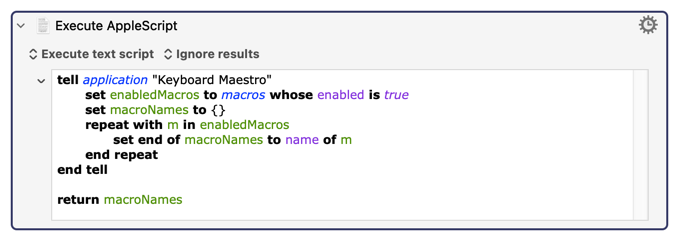
 of parsing and filtering, maybe with AppleScript, maybe with xpath, maybe with Apple predicates--not to mention the load time for the Execute an AppleScript action to run the script.