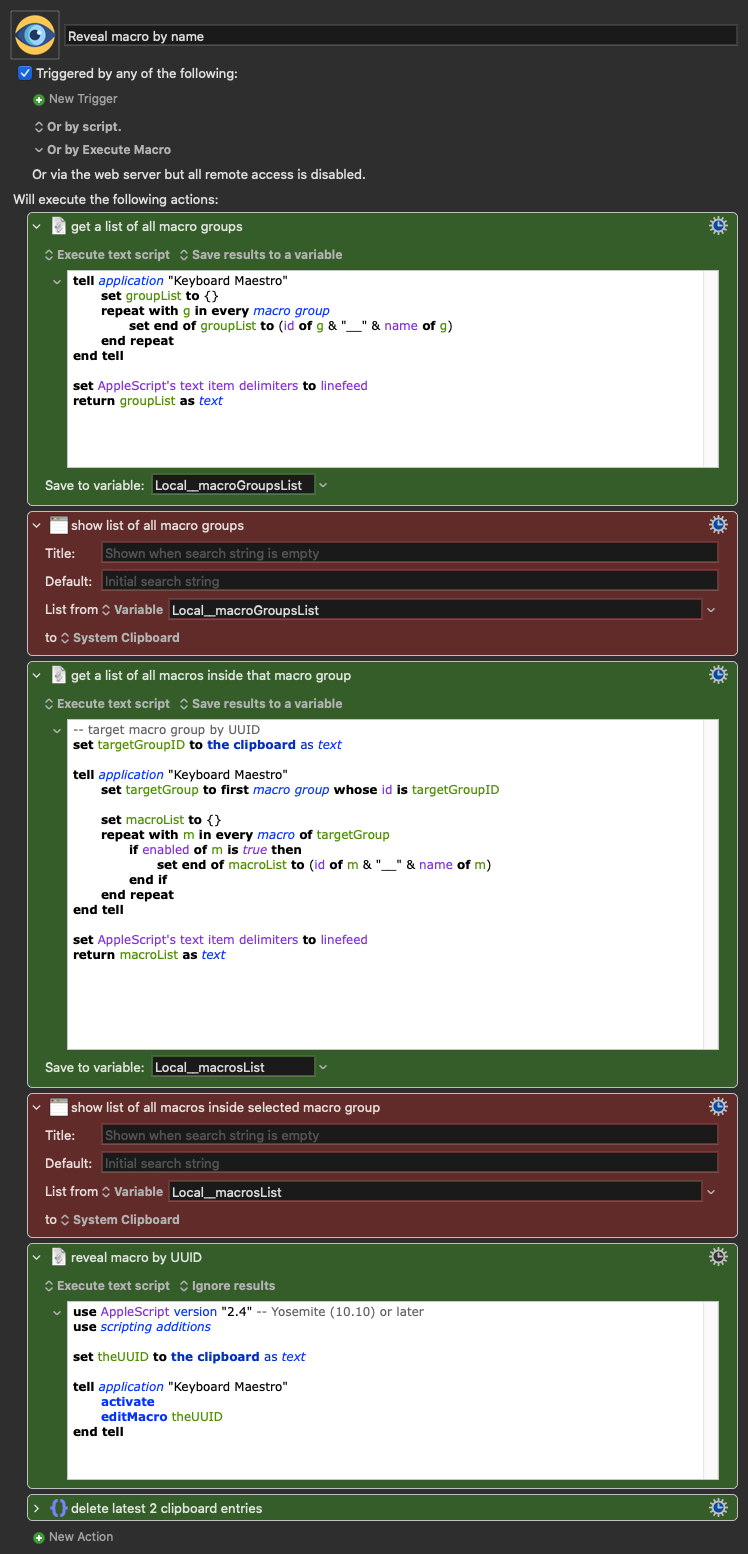
I tried to find something here, but all I found was an option to find a macro by UUID, which I already have. I see myself wanting to find a macro by name, quite often, so I built one:
Creating a list of all active macros was taking too much time (I have 1,100 macros as of today)
When I want to find a macro, I usually want it after using my "spotlight" macro so I am able to see which macro group it is, so it makes it faster to just find the group and then the macros in that group:
I guess that's exactly the difference... I have 1,100 active macros.
I don't know if that's the difference in speed, or if it's my computer that's not that fast.
But I will still try to work on a macro that pulls the information from the plist instead. I just need it to run when the file is changed. Maybe this weekend I will dive into it.
It'll partly be that you (like me) are on a creaky old Intel while @Airy's rocking an M4 (I think it's a 4, anyway).
But it's also your AS code. You'll find it quicker to get all the ids and all the names then combine the two lists than to do it one Group (or macro) at a time. For example:
set outlist to {}
tell application "Keyboard Maestro"
	set idList to id of every macro group
	set nameList to name of every macro group
	repeat with i from 1 to count of idList
		copy (item i of idList) & "__" & (item i of nameList) to end of outlist
	end repeat
end tell
set AppleScript's text item delimiters to linefeed
return outlist as text
You can even combine the two getters, though it makes the combining step more complicated:
set outlist to {}
tell application "Keyboard Maestro"
	set bigList to {id, name} of every macro group
	repeat with i from 1 to count of item 1 of bigList
		copy (item i of item 1 of bigList) & "__" & (item i of item 2 of bigList) to end of outlist
	end repeat
end tell
set AppleScript's text item delimiters to linefeed
return outlist as text
Similarly, you'll save time if you don't work through every macro, asking if it's enabled:
	set idList to id of every macro of macro group id targetGroup whose enabled is true
	set nameList to name of every macro of macro group id targetGroup whose enabled is true
	repeat with i from 1 to count of idList
		copy (item i of idList) & "__" & (item i of nameList) to end of outlist
	end repeat
For a small increase in speed, swap the final AS for an "Open URL" action. Since the macro UUID is on the Clipboard:
A 3 is almost a 4. Sometimes I skip a processor generation. And when a processor is available only in laptops, I'm unlikely to get it. Many computers are "faster" than the last generation but only when multiprocessing is taken into consideration. But most of the code I use (and write) doesn't benefit from multiple processors, so Pro and Ultra chips don't really appeal to me.
Actually, this raises an interesting question... could the KM Engine be using (or be updated to use) multiple CPUs? When I look at my KM debugger, I notice there are usually two or three macros running at the same time. Perhaps if the KM Engine could run macros in separate processors, it could speed things up for me (just a little bit.) I believe KM is written in Objective C and there is an API for Objective C called Grand Central Dispatch which is designed for splitting a program into separate threads, and the KM Engine could potentially render each running macro as a separate thread. [It's not proof, but the Execute Macro action has a flag for "asynchronous execution," and that language is consistent with an implementation of separate threads per process.]
Thanks for explaining the AppleScript issue to him. I sensed it was slower, but couldn't elucidate why,
I changed ⌃⌘M to trigger a custom macro and can’t figure out what the default ⌃⌘M shortcut does that you are referring to. Is it one of the built-in macros?
Most likely...
As a non-expert in AS, asking these questions to ChatGPT or similar, can sometimes end up with something that's not that efficient or fast.
MacBook Pro mid 2012. Does that even qualify as "creaky old"?
Even though I can understand AS a bit more than when I started using KM, your script is still a bit confusing to me, but I appreciate you sharing this.
The shortcut View>Go To Macro>By Name did the trick. I just assigned a different shortcut that makes sense along with my normal "spotlight" shortcut ⌘ Space

 I have 1,100 active macros.