property digitChars : "0123456789"
property letterChars : "ABCDEFGHIJKLMNOPQRSTUVWXYZabcdefghijklmnopqrstuvwxyz"
property searchMenuItem : " Search / Filter Groups..."
property showAllMenuItem : " Show All Groups"
on pad2(n)
set t to n as text
if n < 10 then return "0" & t
return t
end pad2
on pad3(n)
set t to n as text
if n < 10 then return "00" & t
if n < 100 then return "0" & t
return t
end pad3
on toLower(theText)
return do shell script "printf %s " & quoted form of theText & " | tr '[:upper:]' '[:lower:]'"
end toLower
on moveDialogToRight()
do shell script "osascript -e 'delay 0.4' -e 'tell application "System Events"' -e 'repeat 30 times' -e 'set movedIt to false' -e 'repeat with appName in {"Keyboard Maestro Engine", "Keyboard Maestro", "Keyboard Maestro Editor", "Script Editor", "osascript"}' -e 'if exists process appName then' -e 'tell process appName' -e 'repeat with w in windows' -e 'try' -e 'if exists button "Rename Now" of w then' -e 'set position of w to {1180, 360}' -e 'set movedIt to true' -e 'exit repeat' -e 'end if' -e 'end try' -e 'end repeat' -e 'end tell' -e 'end if' -e 'if movedIt then exit repeat' -e 'end repeat' -e 'if movedIt then exit repeat' -e 'delay 0.1' -e 'end repeat' -e 'end tell' >/dev/null 2>&1 &"
end moveDialogToRight
on closePreviewAndQuitTextEditIfEmpty(previewDoc)
tell application "TextEdit"
try
close previewDoc saving no
end try
	try
		if (count of documents) is 0 then quit
	end try
end tell
end closePreviewAndQuitTextEditIfEmpty
on leadingPrefixEndPosition(oldName)
-- Valid prefixes:
-- 01)
-- 1)
-- 04A)
-- 4B)
set nameLen to length of oldName
if nameLen is 0 then return 0

set digitLen to 0

repeat with i from 1 to nameLen
	set ch to character i of oldName
	if digitChars contains ch then
		set digitLen to digitLen + 1
	else
		exit repeat
	end if
end repeat

if digitLen is 0 then return 0

set nextPos to digitLen + 1

if nextPos is greater than nameLen then return 0

set nextChar to character nextPos of oldName

if nextChar is ")" then return nextPos

if letterChars contains nextChar then
	set closePos to nextPos + 1
	if closePos is less than or equal to nameLen then
		if character closePos of oldName is ")" then return closePos
	end if
end if

return 0
end leadingPrefixEndPosition
on nameWithoutLeadingPrefix(oldName)
set prefixEnd to my leadingPrefixEndPosition(oldName)
if prefixEnd is 0 then return oldName

if prefixEnd < (length of oldName) then
	return text (prefixEnd + 1) thru -1 of oldName
else
	return ""
end if
end nameWithoutLeadingPrefix
on joinList(theList, delimiterText)
set oldDelims to AppleScript's text item delimiters
set AppleScript's text item delimiters to delimiterText
set joinedText to theList as text
set AppleScript's text item delimiters to oldDelims
return joinedText
end joinList
on buildGroupMenu(allGroupIDs, allGroupNames, filterText)
set groupIDs to {}
set groupNames to {}
set groupMenu to {}
set groupIndex to 0
set filterTextLower to my toLower(filterText)
copy searchMenuItem to end of groupMenu

if filterText is not "" then
	copy showAllMenuItem to end of groupMenu
end if

repeat with i from 1 to count of allGroupNames
	set thisName to item i of allGroupNames
	set thisID to item i of allGroupIDs

	set shouldInclude to false

	if filterText is "" then
		set shouldInclude to true
	else
		if (my toLower(thisName)) contains filterTextLower then
			set shouldInclude to true
		end if
	end if

	if shouldInclude then
		set groupIndex to groupIndex + 1
		copy thisID to end of groupIDs
		copy thisName to end of groupNames
		copy ((my pad3(groupIndex)) & " - " & thisName) to end of groupMenu
	end if
end repeat

return {groupIDs, groupNames, groupMenu}
end buildGroupMenu
-- Load all Macro Groups once
tell application "Keyboard Maestro"
set allGroupIDs to {}
set allGroupNames to {}
repeat with g in every macro group
	copy (id of g as text) to end of allGroupIDs
	copy (name of g as text) to end of allGroupNames
end repeat
end tell
if (count of allGroupNames) is 0 then
display dialog "No Keyboard Maestro macro groups found." buttons {"OK"} default button "OK"
return
end if
-- Choose Macro Group, with visible list plus search/filter option
set currentFilter to ""
repeat
set builtMenu to my buildGroupMenu(allGroupIDs, allGroupNames, currentFilter)
set groupIDs to item 1 of builtMenu
set groupNames to item 2 of builtMenu
set groupMenu to item 3 of builtMenu
if (count of groupIDs) is 0 and currentFilter is not "" then
	display dialog "No Macro Groups matched:" & return & return & currentFilter & return & return & "Try another search." buttons {"Show All", "Search Again"} default button "Search Again"
	if button returned of result is "Show All" then
		set currentFilter to ""
	else
		set searchDialog to display dialog "Type part of the Macro Group name:" default answer currentFilter buttons {"Cancel", "Search"} default button "Search" cancel button "Cancel" with title "Search Macro Groups"
		set currentFilter to text returned of searchDialog
	end if
else
	set promptText to "Choose the Macro Group you want to renumber:"
	if currentFilter is not "" then
		set promptText to promptText & return & return & "Filtered by: " & currentFilter
	end if

	set chosenGroupList to choose from list groupMenu with title "KM Macro Group Renumber" with prompt promptText OK button name "Choose" cancel button name "Cancel"

	if chosenGroupList is false then return

	set chosenGroupText to item 1 of chosenGroupList

	if chosenGroupText is searchMenuItem then
		set searchDialog to display dialog "Type part of the Macro Group name:" default answer currentFilter buttons {"Cancel", "Search"} default button "Search" cancel button "Cancel" with title "Search Macro Groups"
		set currentFilter to text returned of searchDialog
	else if chosenGroupText is showAllMenuItem then
		set currentFilter to ""
	else
		set chosenIndex to (text 1 thru 3 of chosenGroupText) as integer
		set chosenGroupID to item chosenIndex of groupIDs
		set chosenGroupName to item chosenIndex of groupNames
		exit repeat
	end if
end if
end repeat
-- Collect macros from chosen group in Keyboard Maestro group order
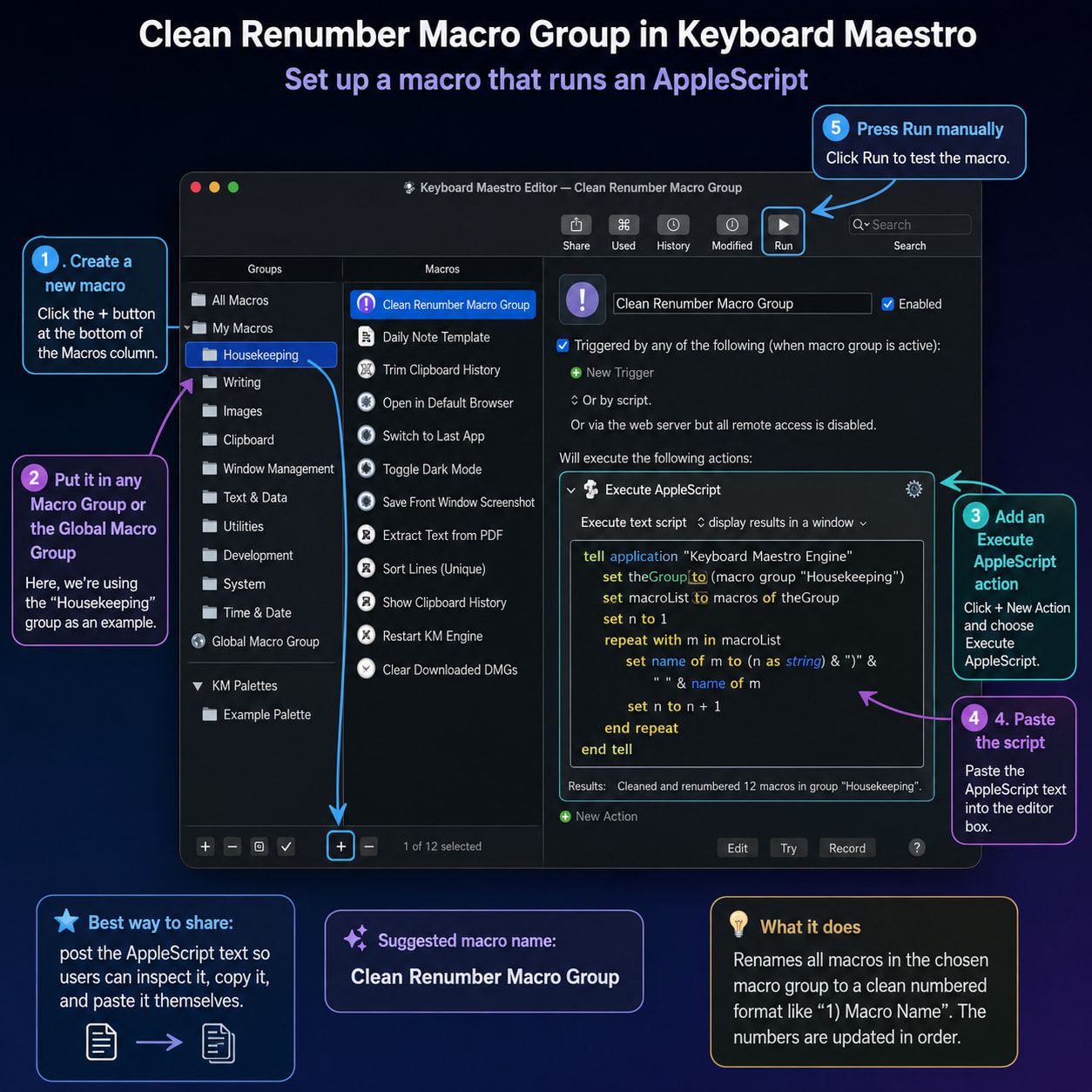
tell application "Keyboard Maestro"
set targetGroup to macro group id chosenGroupID
set macroIDs to {}
set oldNames to {}
set enabledStates to {}

repeat with m in every macro of targetGroup
	set oldName to name of m as text

	set isMacroEnabled to true

	try
		set isMacroEnabled to enabled of m as boolean
	on error
		try
			set isMacroEnabled to not (disabled of m as boolean)
		end try
	end try

	copy (id of m as text) to end of macroIDs
	copy oldName to end of oldNames
	copy isMacroEnabled to end of enabledStates
end repeat
end tell
set macroCount to count of macroIDs
if macroCount is 0 then
display dialog "No macros found inside this group:" & return & return & chosenGroupName buttons {"OK"} default button "OK"
return
end if
-- Build final clean names
-- Enabled macros get numbered.
-- Disabled macros lose their number prefix and are not counted.
set newNames to {}
set finalListLines to {}
set changeListLines to {}
set renameCount to 0
set enabledCounter to 0
set disabledCounter to 0
repeat with i from 1 to macroCount
set oldName to item i of oldNames
set isMacroEnabled to item i of enabledStates
set cleanRest to my nameWithoutLeadingPrefix(oldName)
if isMacroEnabled then
	set enabledCounter to enabledCounter + 1
	set newName to (my pad2(enabledCounter)) & ")" & cleanRest
	copy newName to end of finalListLines
else
	set disabledCounter to disabledCounter + 1
	set newName to cleanRest
	copy ("[disabled] " & newName) to end of finalListLines
end if

copy newName to end of newNames

if oldName is not newName then
	set renameCount to renameCount + 1

	if isMacroEnabled then
		copy (oldName & "  ->  " & newName) to end of changeListLines
	else
		copy (oldName & "  ->  " & newName & "    [disabled: removed from numbering]") to end of changeListLines
	end if
end if
end repeat
if renameCount is 0 then
display dialog "Everything already looks correctly numbered." & return & return & ¬
"Group:" & return & chosenGroupName & return & return & ¬
"Enabled macros numbered: " & (enabledCounter as text) & return & ¬
"Disabled macros skipped: " & (disabledCounter as text) & return & return & ¬
"Nothing was renamed." buttons {"OK"} default button "OK"
return
end if
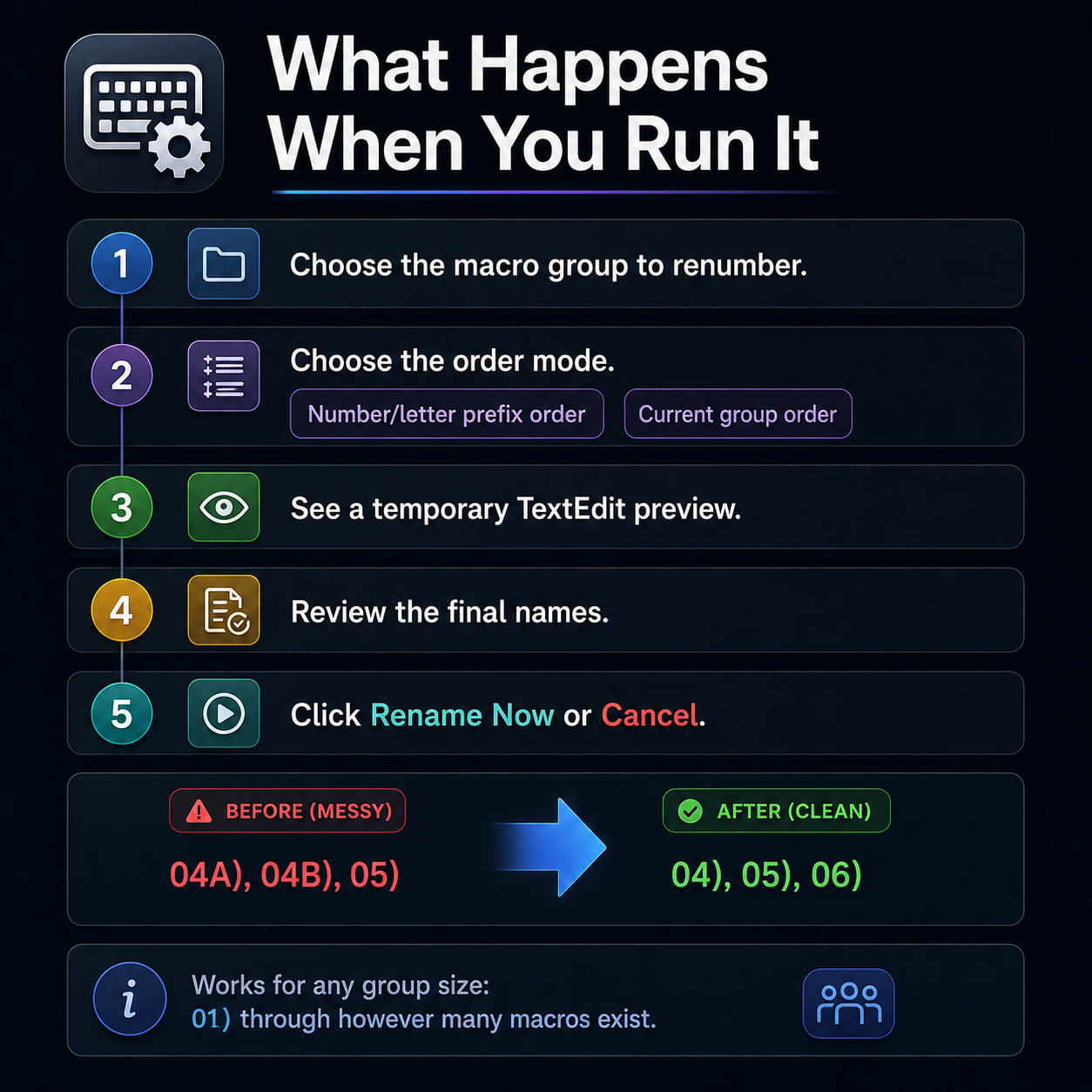
set reportText to "Keyboard Maestro clean renumber preview" & linefeed & ¬
"Group: " & chosenGroupName & linefeed & ¬
"Total macros found: " & (macroCount as text) & linefeed & ¬
"Enabled macros to number: " & (enabledCounter as text) & linefeed & ¬
"Disabled macros skipped from numbering: " & (disabledCounter as text) & linefeed & ¬
"Renames needed: " & (renameCount as text) & linefeed & ¬
"Order mode: Keyboard Maestro group order" & linefeed & ¬
"No file will be saved." & linefeed & linefeed & ¬
"FINAL NAMES AFTER RENAME:" & linefeed & ¬
"Disabled macros are shown with [disabled] in this preview only." & linefeed & linefeed & ¬
my joinList(finalListLines, linefeed) & linefeed & linefeed & ¬
"CHANGES:" & linefeed & linefeed & ¬
my joinList(changeListLines, linefeed)
-- Preview
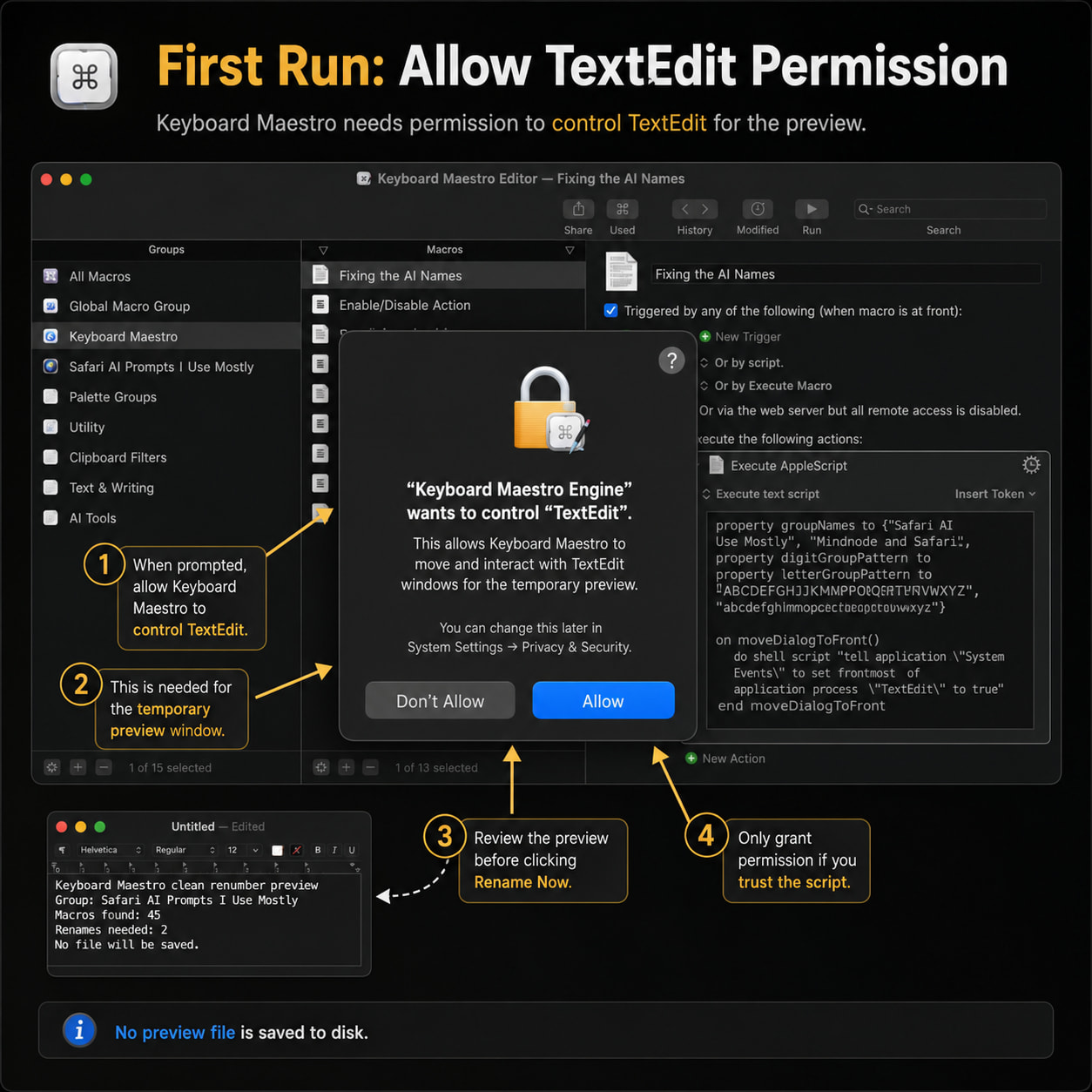
tell application "TextEdit"
activate
set previewDoc to make new document with properties {text:reportText}
try
	set font of text of previewDoc to "Menlo"
	set size of text of previewDoc to 13
end try

try
	set bounds of front window to {0, 40, 1050, 1000}
end try
end tell
try
my moveDialogToRight()
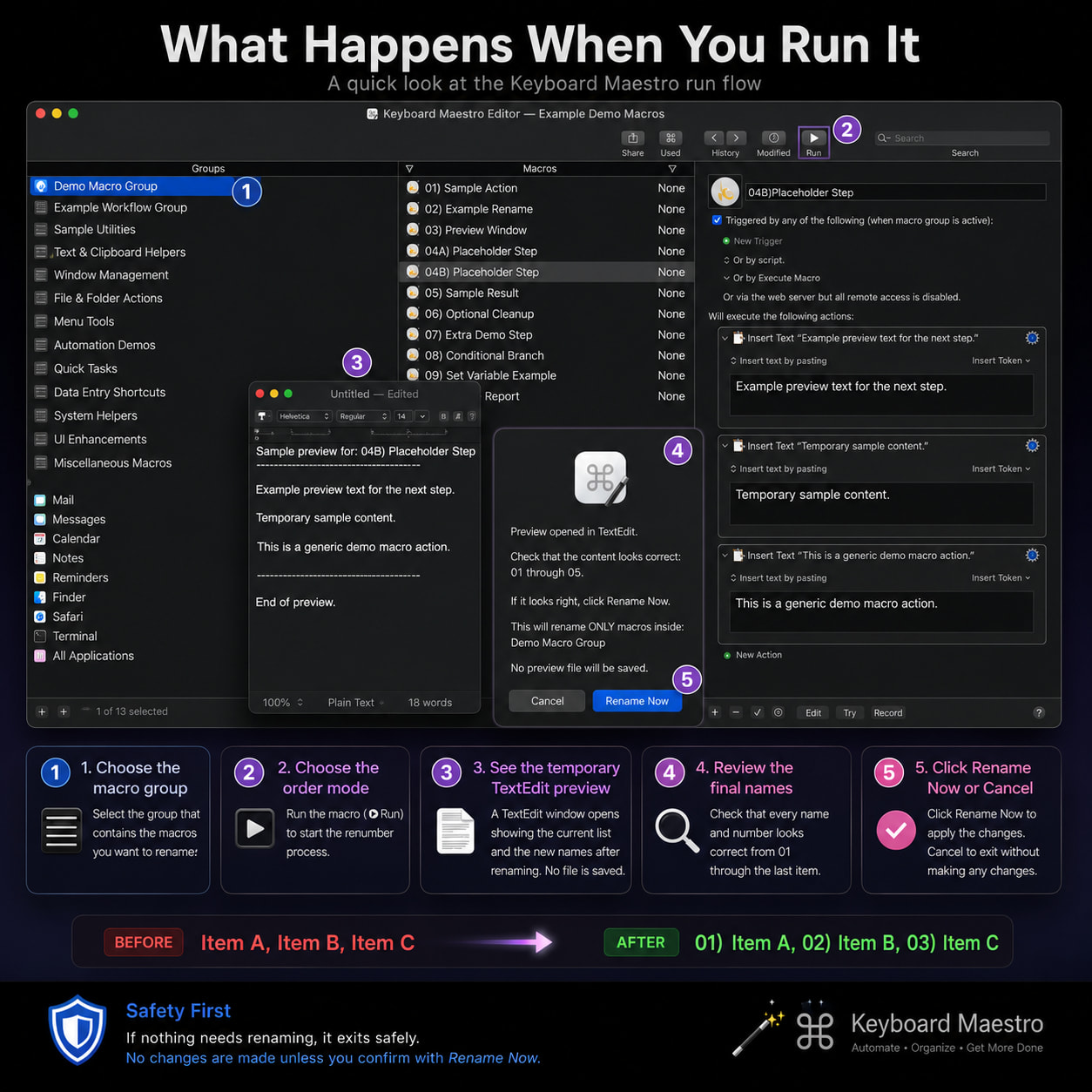
display dialog "Preview opened in TextEdit." & return & return & ¬
	"Check that the final list is correct." & return & return & ¬
	"Selected group:" & return & chosenGroupName & return & return & ¬
	"Enabled macros will be numbered 01 through " & (enabledCounter as text) & "." & return & ¬
	"Disabled macros will not be counted." & return & return & ¬
	"If it looks right, click Rename Now." & return & return & ¬
	"No preview file will be saved." buttons {"Cancel", "Rename Now"} default button "Rename Now" cancel button "Cancel"
on error
my closePreviewAndQuitTextEditIfEmpty(previewDoc)
display dialog "Cancelled. Nothing was renamed. Temporary preview was closed without saving." buttons {"OK"} default button "OK"
return
end try
my closePreviewAndQuitTextEditIfEmpty(previewDoc)
-- Apply rename by UUID
tell application "Keyboard Maestro"
set targetGroup to macro group id chosenGroupID
repeat with i from 1 to macroCount
	set thisID to item i of macroIDs
	set thisNewName to item i of newNames

	set targetMacro to first macro of targetGroup whose id is thisID
	set name of targetMacro to thisNewName
end repeat
end tell
display dialog "Done. Renamed " & (renameCount as text) & " macros." & return & return & ¬
"Group:" & return & chosenGroupName & return & return & ¬
"Enabled macros are now numbered 01 through " & (enabledCounter as text) & "." & return & ¬
"Disabled macros were skipped from numbering." buttons {"OK"} default button "OK"