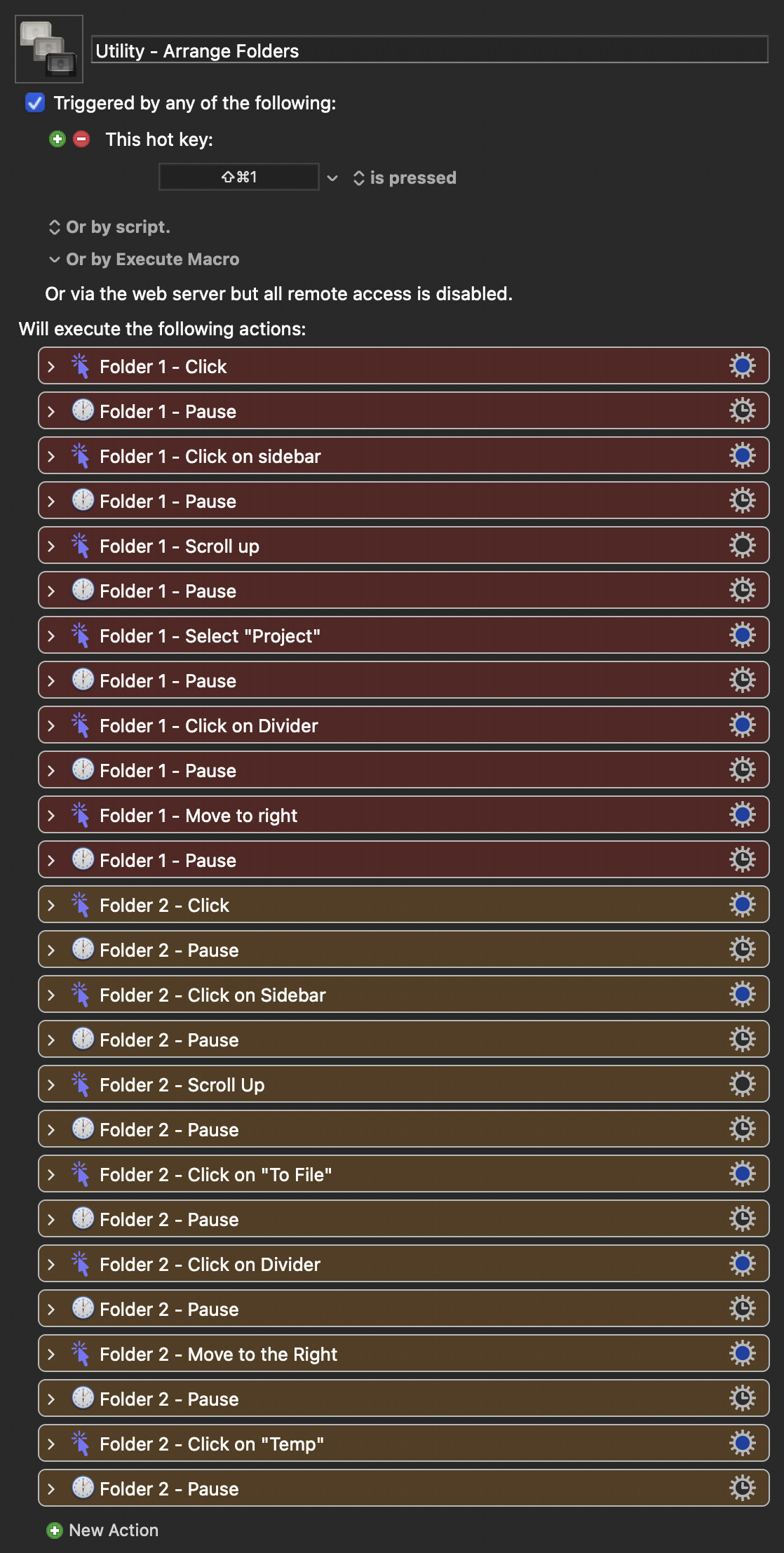
I have a fairly involved (though not complicated) macro that I’ve programmed involving clicking on several different folders, then resizing the divider panes…..want to get them set up exactly how I like them. For the longest time it has worked perfectly. Until now. It just keeps clicking on the same folder, as opposed to clicking on the 2nd folder in the sequence (there are 4 total folders).
The only common denominator that I can think of is that I updated to the newest mac OS (Tahoe 26.5.1).
If it’s helpful, HERE is a screenvid reference to what I’m talking about.
Is anyone else experiencing this as well? Is there a fix?
This section, in particular, of the Troubleshooting page of the Wiki might help:
Otherwise, put together a tiny version of your macro for testing , and post it in a reply.
If all else fails, there will be other ways than clicking to accomplish what you need to do your macro to do, but sorting out the current macro is “Plan A”, since it did use to work.
You'll need to upload your macro (or a cut down demo) for people to be able to work out what's going wrong.
But there are better ways than clicking to activate a Finder window -- exactly which to use will depend on the initial state (Are the windows always open on those targets? Is it always the four leftmost windows? Can you start from a "clean slate" and open four windows on their correct targets, resizing as you go?).
Even if you need to use coordinates or image detection to do the manipulation of the window itself, you can make those bits more robust if they are done with respect to the active window -- restricting the image detection area to the active window's bounds, for example.
Would love to talk with you more about this. Still, shouldn’t it just…..you know…..”work”? I even tried rebuilding the entire macro from the ground up, and I’m still having the same issue, which is concerning.
That depends on how it is "just working". It sounds like something is upsetting the coordinates system, but without seeing the macro it's hard to tell or to suggest changes.
You'll find instructions on how to upload macros to the Forum on this Wiki page. Much better than asking people to download and then try to do something with an XML file on Google Drive.
One shouldn’t have to download anything. It’s an online video file that is supposed to play from the browser. All the same, point taken. I’m just finding the process of uploading something to the forum per the instructions a bit cumbersome. But I’ll do my best.
The question is why it is not doing what you expect.
To answer that, you have to find out exactly where the macro deviates from what you expect it to do.
For a complex macro as you show it's difficult for any of us to determine what is wrong since we would never be able to run the macro with a system identical to yours.
Likely causes of clicks failing are:
Poor timing - macros operating faster than the system can keep up and so clicking (or basing click coordinates) on outdated screen information.
Changes to the positions of what you expect to click on due to changes to the system or application or settings.
Add a Cancel This Macro action after the first action, and then repeatedly move it down the macro until you find out exactly where the macro goes astray. Then look at that action and the screen and the timing to determine why the action is not doing what you expect it to do.
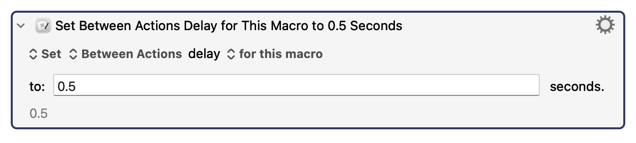
The first thing I noticed is that you have Pause actions between every Click action. Not only is that unnecessary, but it makes it very hard to adjust the timing. So I feel that you should delete all those Pause actions and place this at the top instead:
If that doesn’t fix the problem, then it’s something else. At first glance, it looks like the problem is that your first action that’s coloured in orange is clicking on a pixel that’s relative to the current active window, which is still the top window. In other words, all your actions are “relative to the current active window”, which is always the top window, and at no point in your macro do I see you selecting a different window. If you never select a different window, then all your Click actions will be relative to the first window.
I’m doing my best to help. It’s entirely possible that I’m entirely wrong.
TBH, I don't understand the instructions I linked to either, but assumed that was just me The easy, albeit manual, method is to:
Right-click your macro or Macro Group and "Export Macro" or "Export Macro Group"
Save the export somewhere accessible -- I've a folder on the Desktop called "For KM Forum"
Open that folder in Finder
Drag the exported file from Finder into the Forum's edit pane
I reckon @DocOck's nailed it -- because you are always clicking relative to the frontmost window but never change which window is frontmost the Actions will just keep on interacting with whichever window was active when you execute the macro. You can check that for yourself by selecting the second window down then running it -- the behaviour should be similar to before, but stuck on that window instead.
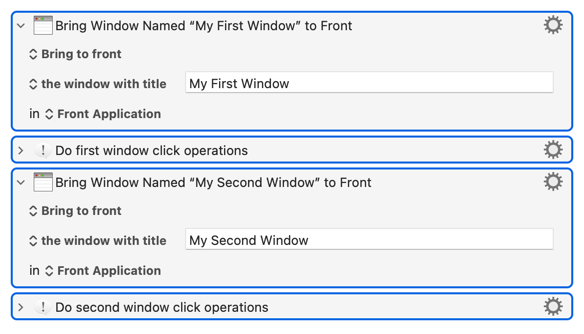
So you need to switch windows between each set of clicks. How you do that will depend on the initial setup -- if they are always stacked in the same order -- 1-4, top to bottom, say -- you'd activate each window in turn by index:
 The easy, albeit manual, method is to: