Create Or Rename Folders based on File or File Name

Hey Gang!

I’m still very new to KBM and macro/automation creation in general. I’ve watched some tutorials and made some very basic open application/folder macros, but still don’t know a lot of the language of how this works.

Background: I work on a lot of shows and have to create and rename folders a lot. The format is relatively the same with some variable changes

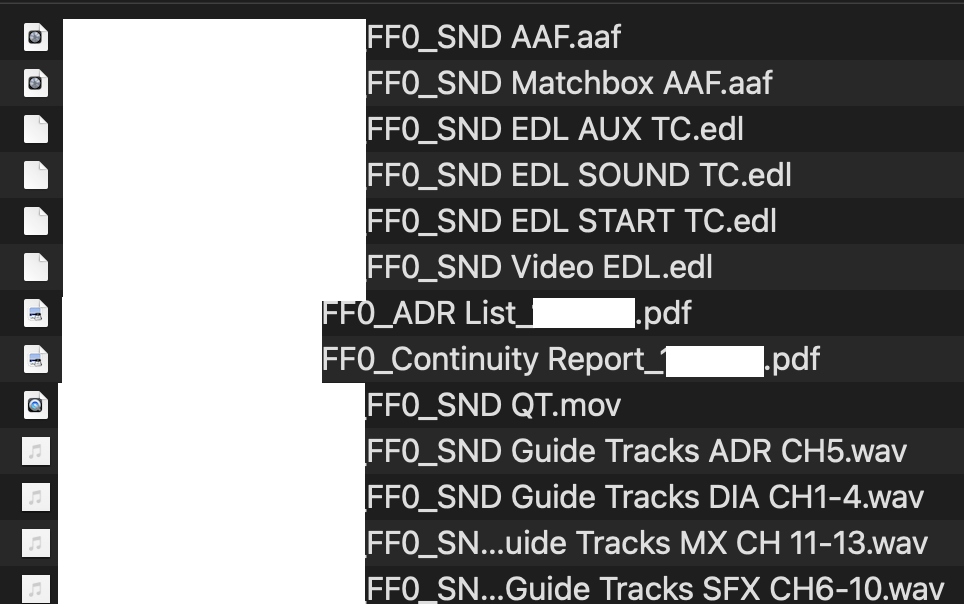
I get 4 main file types of various quanities:

1 Video/picture, 3-5 Audio/WAVs/Guides, 2-4 EDLs.

Sometimes I get continuity, script, and ADR list that are either .txt or .pdf

Step 1

If these files are “loose”/not in folders, I’d like to be able to make a macro that can select by type or name

Step 2

make a folder for those files

Alt Step 2

If files are already in folders, select by folder name

Step 3

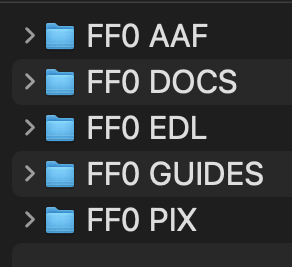
Rename them appropriately. The structure would look like this

FF1 PIX

FF1 AAF

FF1 EDL

FF1 GUIDES

FF1 CONTINUITY

FF1 ADR LIST

FF1 SCRIPT

The only variable that changes is the FF number with each new delivery turnover. FF1 becomes FF2 etc etc. Rarely exceeds FF4 once in a blue moon…So being able to change that number is equally as vital.

How would I even start this? I find KBM both really fcking cool and daunting as hell. Task paralysis engaged. Your insights are very appreciated

KBM v11.0.4

macOS 12.7.6

If there is more information I need to give I’m happy to provide.

Thank you! Have an awesome weekend!

-n00b
By noting exactly what you do and mirroring that behaviour in your actions.

Lets assume you have the files selected in the Finder.

See: Working with the Finder Selection for how to process the files.

You can use the Split Path action to get the extension or the Path condition to determine if it is a folder (or assume files without extensions are folders if you know they will always have an extension otherwise).

You can remember the FF number in a permanently stored variable (a Keyboard Maestro convention is to name variables like that starting with "DND" (do not delete)). eq “DND FF Index”, and you can increment that, or you can check which FF folders exist and use the next one.

What is the parent folder of the FF folders? What happens to the FF folders afterwards (you said there was at most 4, so when do they go away?).

It's pretty easy to create a new folder, create all your sub folders, and rename the selected files into the selected folders based on their extension.

You're a bit vague about what happens to folders - and vague is the enemy of robust macros. You need to be very sure you know exactly what happens when.

However you can build your macro to work with the current case, and then extend it with other cases - use the Assert action or Cancel This Macro action to detect cases you don't handle and that will alert you to problems.

Also - since you are working on files - make sure you have good backups, and ideally that you are working on copies of the files. If anything goes wrong you want to be able to fix things and retry the macro which will be difficult if you don't have a clean copy of the original, and/or a clean copy of the target.

2 Likes

What is the parent folder of the FF folders? What happens to the FF folders afterwards (you said there was at most 4, so when do they go away?).

Hey Peter! Thanks for responding. The parent folders always change per episode and per FF version. Lets say Supernatural 1011 turnover comes in–files/materials > downloaded to a drive > renamed > placed on a server > Supernatural > season 10 > episode 11 > Pix or > Guides etc, if that makes sense. Rinse and repeat for the next episode. Same process for another show like CSI Season 70 Episode 76

I basically manage 4-10 shows at any given time with the same process in different locations

By noting exactly what you do and mirroring that behaviour in your actions.

Totally get that. An issue I have is understanding the language of what trigger to use and which actions to employ. Really appreciate you giving those resources to review

The triggers don't really matter, because you will presumably select the desired files and trigger it manually (or the files will be in the download folder and you'll trigger it manually). So the trigger can be anything you like (I'd lean towards a Status Menu trigger since this feels like a "menu command" sort of thing - but if you do it a lot, then you might want a hot key).

You could use the Folder trigger and detect new files appearing in the Downloads folder, but I'm not sure that would be the best idea for this task.

As far as actions, I'm still not entirely sure on what exactly your input files look like, and what exactly you want your output files to look like, so it's hard to say anything more than general advice.

You can process the selected files in the Finder, or you can process a folder (like the Downloads folder).

You can determine what to do based on the file extensions or path types using:

With the path split, you can manipulate the name and determine where it should go.

You can then use actions like:

To create necessary folders and to move the file to the specified location.

You can remember information (such as the current FF index) in variables, or you can determine it from the source files or or you can use the Prompt for User Input action to ask for required information.

Also remember that you don't necessarily have to automate the entire thing to start getting value.

You could, for example, create a macro that creates your folder structure for a new entry. That alone will save you time.

So it may be better to just implement parts of the task with multiple simpler macros and leave you in control of the higher functions/decisions, and then automate it further later.

1 Like

Thank you! I’ll explore these options and come back with any questions or results.

Are these screens shots helpful?

BEFORE:

and AFTER:

Definitely.

That's relatively easy.

Something like that.