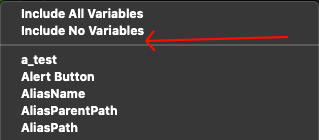
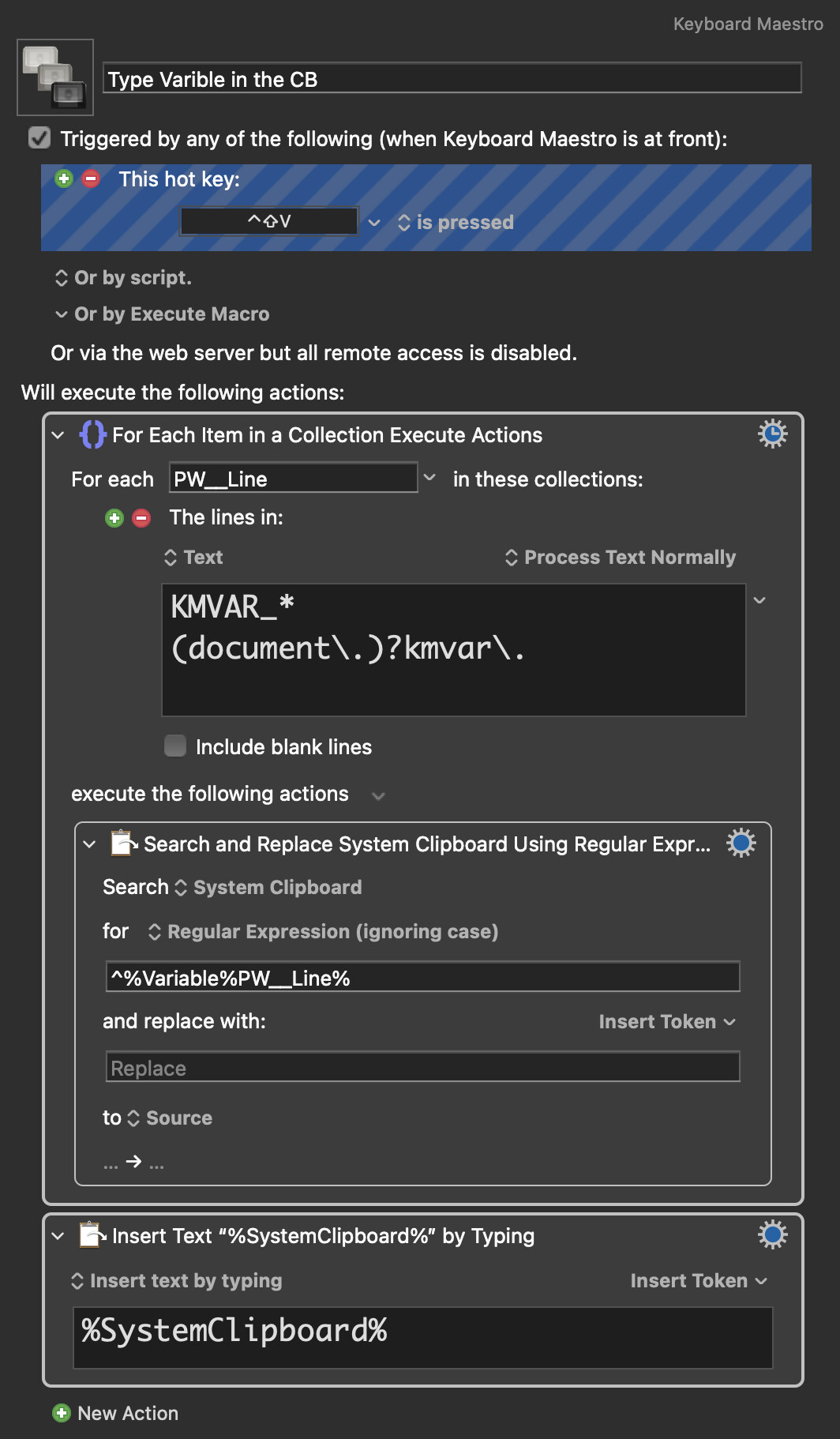
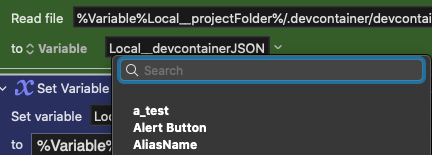
Meanwhile, just like a regular/context menu, you can start typing to find the option you need. Plus, you can easily automate this process with a macro:
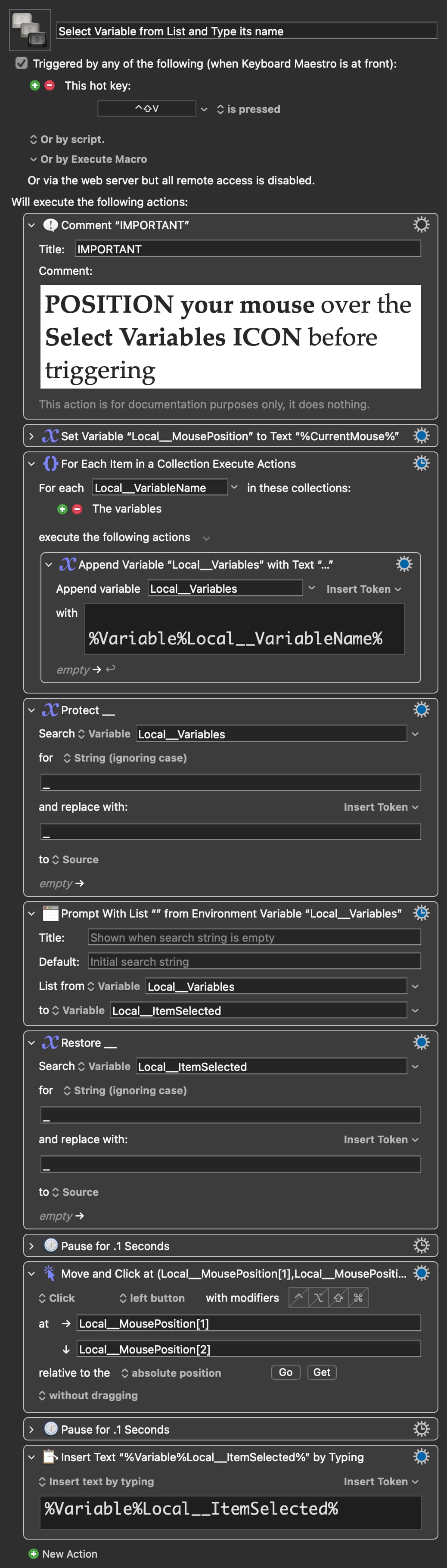
The macro I shared earlier works if you have a variable name already on your clipboard. If you would rather search for and select a variable from a list, use this macro instead:
Unfortunately, that doesn't work as expected, because with a list of hundreds of Local__ variables, I would still have to type Local__ instead of the name I would be looking for: parentPath, for example, for Local__parentPath.
Also, even if I try to type Local__, I would have to be SUPER fast to type the name of the whole variable, which is impossible. If I type Local__ and then stop for a second, the moment I try to type parent it jumps to whatever variable starts with p.
And sometimes the goal is not the find a specific variable, but to find all variables using the same keyword such as path.
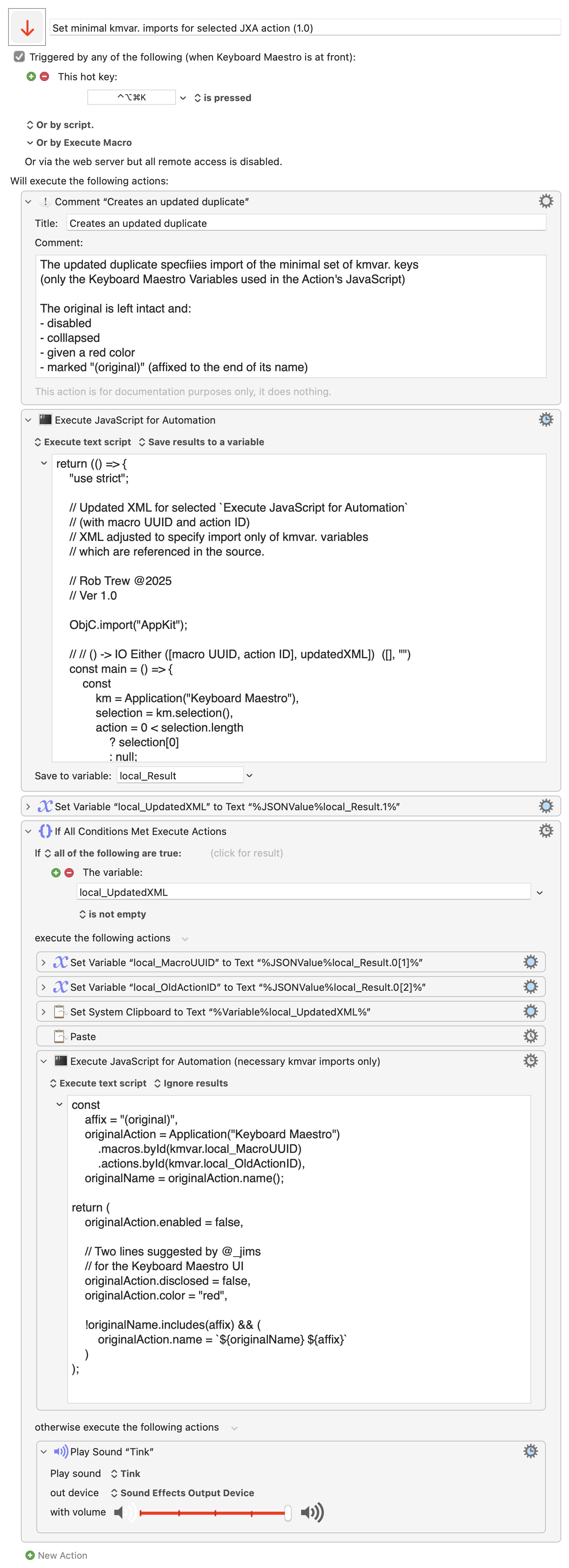
Now detects .getvariable("MyVar") and .setvariable("MyVar").
Handles complex arguments like {instance: kmInst} by isolating the variable name first.
Catches unquoted variable references (e.g., .getvariable(MyVar)), ensuring they are added to the list (NOTE: the JS variable name must match the KM variable name for this to work automatically).
return (() => {
    "use strict";

    // Updated XML for selected `Execute JavaScript for Automation`
    // (with macro UUID and action ID)
    // XML adjusted to specify import only of kmvar. variables
    // which are referenced in the source.

    // Original by Rob Trew @2025
    // Modified by JuanWayri @2026
    // Ver 1.1 - Added support for .getvariable() and .setvariable() and unquoted JS variable names (must match the name of the KM variable)

    ObjC.import("AppKit");

    // // () -> IO Either ([macro UUID, action ID], updatedXML])  ([], "")
    const main = () => {
        const
            km = Application("Keyboard Maestro"),
            selection = km.selection(),
            action = 0 < selection.length
                ? selection[0]
                : null;


        return either(
            alertAndEmptyResult
        )(
            macroAndActionIDsWithUpdatedXML(
                km.selectedMacros()[0]
            )(
                action
            )
        )(
            bindLR(
                0 < selection.length
                    ? Right(action)
                    : Left("Nothing selected in Keyboard Maestro.")
            )(
                updatedXMLForKMSelectionLR
            )
        );
    };


    // macroAndActionIDsWithUpdatedXML :: KM Macro ->
    // KM Action -> JSON String
    const macroAndActionIDsWithUpdatedXML = macro =>
        action => updatedXML =>
            JSON.stringify(
                Tuple(
                    [
                        macro,
                        action
                    ].map(x => x.id())
                )(
                    updatedXML
                ),
                null, 2
            );


    // alertAndEmptyResult :: String -> JSON String
    // With alert effect.
    const alertAndEmptyResult = msg => (
        alert("Duplicate JXA action to minimal kmvar version")(msg),
        JSON.stringify(
            Tuple([])("")
        )
    );


    // updatedXMLForKMSelectionLR :: KM Object ->
    //      Either String (XML String)
    const updatedXMLForKMSelectionLR = selectedItem => {
        const
            selnType = selectedItem.properties().pcls,
            optionalAffixForUpdatedAction = "";

        return bindLR(
            "action" === selnType
                ? Right(selectedItem.xml())
                : Left(`Selection is ${selnType} – expected JXA action.`)
        )(
            jxaActionXMLUpdatedLR(optionalAffixForUpdatedAction)
        );
    };


    // jxaActionXMLUpdatedLR :: String ->
    // XML String -> Either String (XML String)
    const jxaActionXMLUpdatedLR = optionalAffix =>
        xml => bindLR(
            jsoFromPlistStringLR(xml)
        )(
            dict => {


                const
                    expectedActionType = "ExecuteJavaScriptForAutomation",
                    actionType = dict.MacroActionType,
                    actionName = (dict.ActionName || "")
                        .split("(original)")
                        .join("") || (
                            "Execute JavaScript for Automation"
                        ),
                    includedVariables = kmvarsInSource(dict.Text);

                return "ActionUID" in dict && (
                    actionType === expectedActionType
                )
                    ? plistFromJSOLR([
                        Object.assign(
                            dict,
                            {
                                ActionName: actionName
                                    .includes(optionalAffix)
                                    ? actionName
                                    : [actionName, optionalAffix].join(" "),
                                IncludedVariables: 0 < includedVariables.length
                                    ? includedVariables
                                    : []
                            }
                        )
                    ])
                    : Left(`Expected "${expectedActionType}". Saw "${actionType}".`);
            }
        );

    //  ---------------------------------------------------------
    //  MODIFIED by JuanWayri: Replaced string splitting with Regex to support .getvariable/.setvariable
    //  ---------------------------------------------------------
    //  kmvarsInSource :: String -> [String]
    const kmvarsInSource = source => {
        const found = new Set();

        // 1. Match Modern Syntax: kmvar.MyVar
        const reModern = /kmvar\.(\w+)/g;
        let m;
        while ((m = reModern.exec(source)) !== null) {
            found.add(m[1]);
        }

        // 2. Match Standard Syntax: .getvariable / .setvariable
        // Supports both quoted strings and unquoted variable names.
        // Group 2: Quoted content
        // Group 3: Unquoted variable name (alphanumeric/underscore only)
        const reStandard = /\.[gs]etvariable\s*\(\s*(?:(["'])(.*?)\1|(\w+))/g;

        while ((m = reStandard.exec(source)) !== null) {
            // m[2] is the quoted string (e.g., "MyVar")
            // m[3] is the unquoted variable name (e.g., myJsVar)
            const captured = m[2] || m[3];
            if (captured) found.add(captured);
        }

        return Array.from(found);
    };


    // ----------------------- JXA -----------------------

    // Tuple (,) :: a -> b -> (a, b)
    const Tuple = a =>
        // A pair of values, possibly of
        // different types.
        b => ({
            type: "Tuple",
            "0": a,
            "1": b,
            length: 2,
            *[Symbol.iterator]() {
                for (const k in this) {
                    if (!isNaN(k)) {
                        yield this[k];
                    }
                }
            }
        });


    // alert :: String => String -> IO String
    const alert = title =>
        s => {
            const sa = Object.assign(
                Application("System Events"), {
                includeStandardAdditions: true
            });

            return (
                sa.activate(),
                sa.displayDialog(s, {
                    withTitle: title,
                    buttons: ["OK"],
                    defaultButton: "OK"
                }),
                s
            );
        };


    // jsoFromPlistStringLR :: XML String -> Either String Dict
    const jsoFromPlistStringLR = xml => {
        // Either an explanatory message, or a
        // JS dictionary parsed from the plist XML
        const
            e = $(),
            nsDict = $.NSPropertyListSerialization
                .propertyListWithDataOptionsFormatError(
                    $(xml).dataUsingEncoding(
                        $.NSUTF8StringEncoding
                    ),
                    0, 0, e
                );

        return nsDict.isNil()
            ? Left(
                ObjC.unwrap(
                    e.localizedDescription
                )
            )
            : Right(ObjC.deepUnwrap(nsDict));
    };


    // plistFromJSOLR :: JS Object -> Either String XML
    const plistFromJSOLR = jso => {
        const
            e = $(),
            nsXML = $.NSString.alloc.initWithDataEncoding(
                $.NSPropertyListSerialization
                    .dataWithPropertyListFormatOptionsError(
                        $(jso),
                        $.NSPropertyListXMLFormat_v1_0, 0,
                        e
                    ),
                $.NSUTF8StringEncoding
            );

        return nsXML.isNil()
            ? Left(e.localizedDescription)
            : Right(
                ObjC.unwrap(nsXML)
            );
    };

    // --------------------- GENERIC ---------------------

    // Left :: a -> Either a b
    const Left = x => ({
        type: "Either",
        Left: x
    });


    // Right :: b -> Either a b
    const Right = x => ({
        type: "Either",
        Right: x
    });


    // bindLR (>>=) :: Either a ->
    // (a -> Either b) -> Either b
    const bindLR = lr =>
        // Bind operator for the Either option type.
        // If lr has a Left value then lr unchanged,
        // otherwise the function mf applied to the
        // Right value in lr.
        mf => "Left" in lr
            ? lr
            : mf(lr.Right);


    // either :: (a -> c) -> (b -> c) -> Either a b -> c
    const either = fl =>
        // Application of the function fl to the
        // contents of any Left value in e, or
        // the application of fr to its Right value.
        fr => e => "Left" in e
            ? fl(e.Left)
            : fr(e.Right);

    // showLog :: a -> IO ()
    const showLog = (...args) =>
        // eslint-disable-next-line no-console
        console.log(
            args
                .map(JSON.stringify)
                .join(" -> ")
        );

    // MAIN ---
    return main();
})();
My main goal is to make everything easier and faster. For example, it's not the first time that I can't make a macro to work to then realize that the issue was that I forgot to include a new variable to the list. Or I renamed a variable and forgot to select it.
By clicking the list and seeing which ones are being used at the top, would not only make it easier to see which ones are being used, but also just click them to remove them.
Regarding the Search field, I see that the Read File, for example, has that feature so I would assume that can "easily" be implemented in the Execute a XYZ script actions:
This issue started happening a long time ago, when I was having some issue (I can't remember what it was) and someone suggested that I started including only the variables needed for the script to work. As much as that seemed to make the issue go away, it introduced this other issue where I forget to add the variables.
So my question is: what's really the point of not including all variables, when does it make sense to include all, etc? Should I just go back to including all variables?
The main reason to avoid including all variables is resource management and predictability. While it’s tempting to 'include all' for convenience, here is why scoping matters:
Performance: Every variable you pass or include consumes memory. If you’re working with lightweight variables, the impact is negligible. However, if your macro processes "heavy" objects (like large datasets, complex arrays, or long strings), including them unnecessarily can significantly increase execution time and memory overhead. Namespace Pollution & Bugs: If you include everything, you risk "collision". You might accidentally overwrite a variable inside the macro that was meant to stay local, or vice versa. Limiting variables ensures that the macro only interacts with what it explicitly needs. Security & Data Integrity: Following the "Principle of Least Privilege" is best practice. By only including necessary variables, you ensure the macro can't inadvertently leak or corrupt sensitive data it wasn't supposed to touch.
When does it make sense to INCLUDE ALL?
Only when you are in a rapid prototyping phase or dealing with a very small, controlled set of variables where the overhead of manual selection outweighs the benefit. When you create hundreds of macros or want to share them, it's always better to be explicit and use local/instance variables.
A few people I work with asked for a way to "delete all variables used", so I put together this macro to handle that:
You had enough large variables that you were exceeding the (IIRC) 100kB limit for environment variables, at which point KM starts omitting variables from what it passes, largest first, to get you back under that limit.
I think you were only getting warning messages in the Engine log, but it's quite possible to "Include all variables" yet not have a certain variable available to your shell/AppleScript because it was among the largest and got dropped.
The is incredibly useful, @ComplexPoint and @JuanWayri. I've been enjoying an earlier version that @ComplexPoint shared previously (but I can't seem to locate the original on the forum).