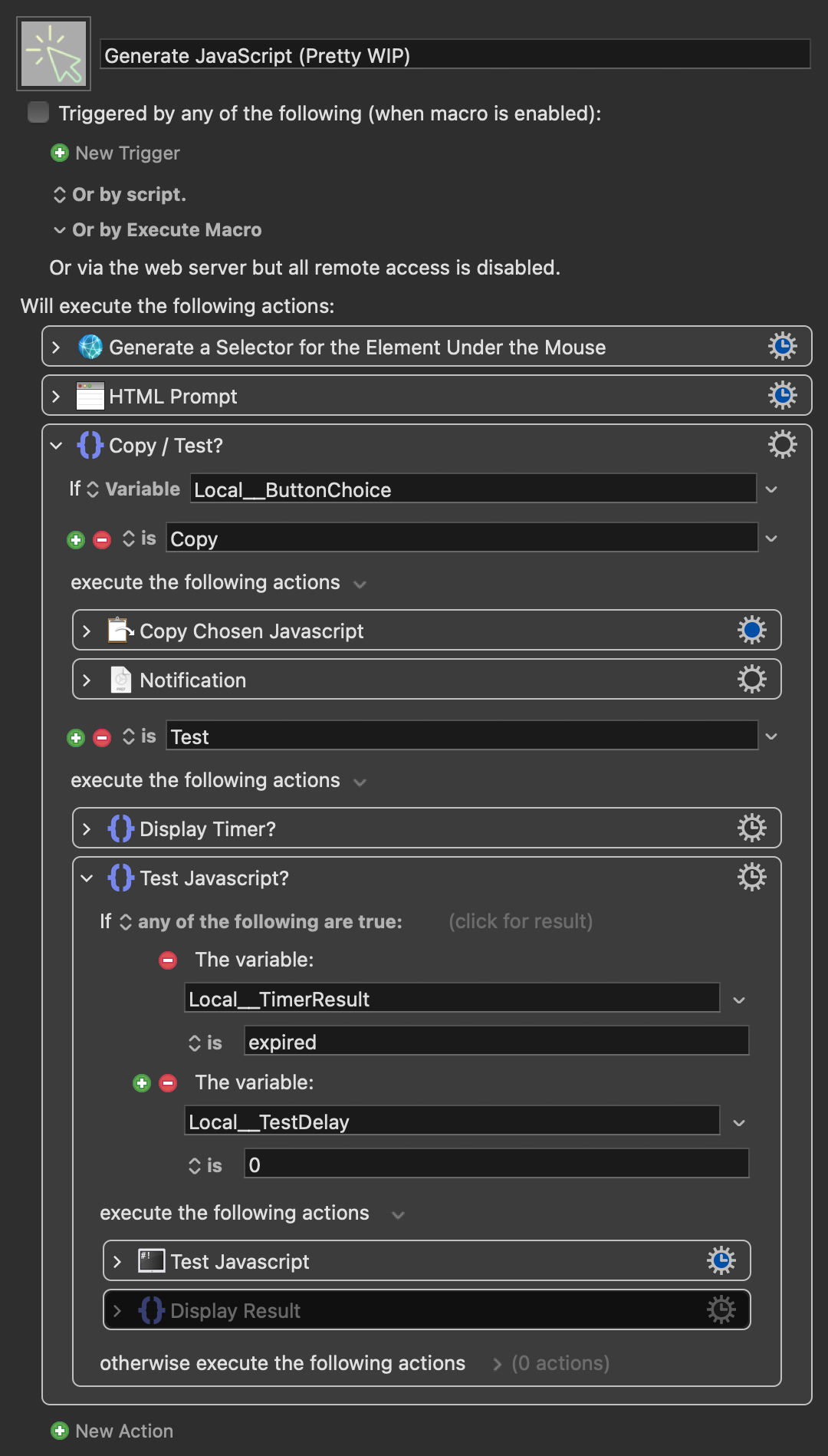
Thanks so much for sharing this macro, @noisneil! I love it!
For anyone else who found this macro helpful, here are some changes I experimented with today (v1.5):
href
href
I updated the JavaScript so that the href attribute matches exactly what’s in the element, ensuring that the protocol, domain, and subdomain aren’t included when it's a relative URL.
From:
return `${selector}[href="${element.href}"]`;
To:
return `${selector}[href="${element.getAttribute('href')}"]`;
:nth-child
:nth-child
I also fixed an issue in the nth-child calculation. It was filtering siblings by tagName AND className, then using that filtered array's index for nth-child. However, nth-child counts ALL child elements regardless of type or class, but only matches if the element at that position matches the selector. It now use Array.from(parent.children) to get ALL child elements and find the element's position among them. This gives the correct nth-child index since nth-child counts all element siblings.
I added 'data-testid' and 'aria-label' as additional unique attributes for matching.
JavaScript with nth-child fix and some extra attributes
(function() {
    function generateUniqueSelector(element) {
        // If element has a unique ID, use it
        if (element.id) {
            return `#${element.id}`;
        }

        let selector = element.tagName.toLowerCase();

        // Add classes if they exist
        if (element.className && typeof element.className === 'string') {
            const classes = element.className.trim().split(/\s+/).filter(cls => cls);
            if (classes.length > 0) {
                selector += '.' + classes.join('.');
            }
        }

        // Add attributes that might make it unique (href, data attributes, etc.)

        // Check other unique attributes
        const uniqueAttrs = ['data-id', 'data-testid', 'aria-label', 'data-attachment-id', 'title', 'alt'];
        for (const attr of uniqueAttrs) {
            if (element.hasAttribute(attr)) {
                return `${selector}[${attr}="${element.getAttribute(attr)}"]`;
            }
        }

        if (element.href) {
            // For links, we can use href attribute
            return `${selector}[href="${element.getAttribute('href')}"]`;
        }


        // If still not unique, use nth-child
        const parent = element.parentElement;
        if (parent) {
            // Get all children of the parent (not filtered by tag or class)
            const allSiblings = Array.from(parent.children);

            // Find the position of this element among ALL siblings
            const nthChildIndex = allSiblings.indexOf(element) + 1;

            // Check if adding nth-child makes it unique
            const selectorWithNthChild = `${selector}:nth-child(${nthChildIndex})`;

            // First check if the current selector alone is unique at this level
            const currentLevelMatches = Array.from(parent.children).filter(child => {
                return child.matches(selector);
            });

            if (currentLevelMatches.length > 1) {
                selector = selectorWithNthChild;
            }

            // If still not unique in the entire document, build path upwards
            if (document.querySelectorAll(selector).length > 1) {
                return generateUniqueSelector(parent) + ' > ' + selector;
            }
        }

        return selector;
    }

    const hoveredElements = document.querySelectorAll(':hover');
    const element = hoveredElements[hoveredElements.length - 1];
    if (element) {
        return generateUniqueSelector(element);
    } else {
        return "No element found under cursor";
    }
})();
Additional Optimizations
The version below is further optimized: it minimizes class and attribute usage and evaluates uniqueness at each step through various selector combinations.
JavaScript with further OPTIMIZATIONS v1.4
/**
 * @author JuanWayri
 * @version 1.4
 * @URL: https://forum.keyboardmaestro.com/t/generate-javascript-to-click-webpage-element-wip/41465/2?u=juanwayri
 */

const preferredAttrs = ['data-testid', 'data-id', 'data-cy', 'aria-label'];
const otherAttrs = ['href','name', 'role', 'title', 'type'];

/**
 * Checks if a selector is unique and points to the correct target element.
 */
function isUnique(selector, targetElement) {
    try {
        const elements = document.querySelectorAll(selector);
        return elements.length === 1 && elements[0] === targetElement;
    } catch (e) {
        return false;
    }
}

/**
 * Generates a list of candidate selectors for a single element, ordered by preference.
 */
function getComponentCandidates(el, options = {}) {
    const tagName = el.tagName.toLowerCase();
    const candidates = [];

    // IDs (unless excluded)
    if (!options.excludeIds && el.id) {
        candidates.push(`#${el.id}`);
        candidates.push(`${tagName}#${el.id}`);
    }

    // Preferred attributes (unless excluded)
    if (!options.excludePreferredAttrs) {
        for (const attr of preferredAttrs) {
            if (el.hasAttribute(attr)) {
                candidates.push(`${tagName}[${attr}="${el.getAttribute(attr)}"]`);
            }
        }
    }

    // Classes
    const classes = Array.from(el.classList).map(cls => `.${cls}`);
    if (classes.length > 0) {
        candidates.push(...classes.map(cls => tagName + cls));
        if (classes.length > 1) {
            candidates.push(tagName + classes.join(''));
        }
    }

    // Other attributes (unless excluded)
    if (!options.excludeOtherAttrs) {
        for (const attr of otherAttrs) {
            if (el.hasAttribute(attr)) {
                candidates.push(`${tagName}[${attr}="${el.getAttribute(attr)}"]`);
            }
        }
    }

    candidates.push(tagName);
    return [...new Set(candidates)];
}

/**
 * Gets a stable, fallback selector for an element, typically using :nth-child.
 */
function getStableComponent(el, excludeNthChild = false) {
    const tagName = el.tagName.toLowerCase();
    const parent = el.parentElement;
    if (!parent) return tagName;

    const siblings = Array.from(parent.children);
    if (siblings.filter(sibling => sibling.tagName === el.tagName).length === 1) return tagName;

    if (excludeNthChild) {
        // Return just the tag name even if it's not unique among siblings
        return tagName;
    }

    return `${tagName}:nth-child(${siblings.indexOf(el) + 1})`;
}

/**
 * Takes a known-unique selector and simplifies it through multiple optimization passes.
 */
function simplifySelector(selector, targetElement) {
    const tokens = selector.split(/( > | )/).filter(Boolean);
    const components = tokens.filter((_, i) => i % 2 === 0);

    // PASS 1: Prune intermediate components
    if (components.length > 2) {
        for (let i = components.length - 2; i > 0; i--) {
            const tempTokens = [...tokens];
            tempTokens.splice(i * 2 - 1, 2);
            const testSelector = tempTokens.join('').replace(/ +/g, ' ');

            if (isUnique(testSelector, targetElement)) {
                return simplifySelector(testSelector, targetElement);
            }
        }
    }

    // PASS 2: Soften combinators from '>' to ' '
    for (let i = 0; i < tokens.length; i++) {
        if (tokens[i] === ' > ') {
            const tempTokens = [...tokens];
            tempTokens[i] = ' ';
            const testSelector = tempTokens.join('').replace(/ +/g, ' ');
            if (isUnique(testSelector, targetElement)) {
                return simplifySelector(testSelector, targetElement);
            }
        }
    }

    // PASS 3: Simplify individual components
    for (let i = 0; i < components.length; i++) {
        const part = components[i];

        // Remove :nth-child
        if (part.includes(':nth-child')) {
            const simplifiedPart = part.replace(/:nth-child\(\d+\)/, '');
            if (simplifiedPart && simplifiedPart !== part) {
                const tempTokens = [...tokens];
                tempTokens[i * 2] = simplifiedPart;
                if (isUnique(tempTokens.join(''), targetElement)) {
                    return simplifySelector(tempTokens.join(''), targetElement);
                }
            }
        }

        // Remove attributes and classes
        const match = part.match(/^([^.\[:]+)?((?:\.[^.\[:]+)*)((?:\[[^\]]+\])*)((?::.*)*)$/);
        if (!match) continue;

        const [, tagName, classStr, attrStr, pseudoStr] = match;
        const classes = classStr.split('.').filter(Boolean);
        const attributes = (attrStr.match(/\[.*?\]/g) || []);

        // Try removing attributes one by one
        if (attributes.length > 0) {
             for (let j = 0; j < attributes.length; j++) {
                 const tempAttrs = [...attributes];
                 tempAttrs.splice(j, 1);
                 const newPart = (tagName || '') + (classes.length > 0 ? '.' + classes.join('.') : '') + tempAttrs.join('') + (pseudoStr || '');
                 const tempTokens = [...tokens];
                 tempTokens[i * 2] = newPart;
                 if (isUnique(tempTokens.join(''), targetElement)) {
                     return simplifySelector(tempTokens.join(''), targetElement);
                 }
             }
        }

        // Try removing classes one by one
        if (classes.length > 1) {
             for (let j = 0; j < classes.length; j++) {
                 const tempClasses = [...classes];
                 tempClasses.splice(j, 1);
                 const newPart = (tagName || '') + '.' + tempClasses.join('.') + (attrStr || '') + (pseudoStr || '');
                 const tempTokens = [...tokens];
                 tempTokens[i * 2] = newPart;
                 if (isUnique(tempTokens.join(''), targetElement)) {
                     return simplifySelector(tempTokens.join(''), targetElement);
                 }
             }
        }
    }

    return selector;
}

// Helper functions from @noisneil
function isClickable(el) {
    if (!el) return false;
    const style = window.getComputedStyle(el);
    return ['A', 'BUTTON', 'LABEL', 'INPUT', 'TEXTAREA', 'SELECT'].includes(el.tagName) ||
        el.hasAttribute('onclick') ||
        el.hasAttribute('href') ||
        style.cursor === 'pointer' ||
        el.getAttribute('role')?.match(/button|link|tab|checkbox|radio/);
}

function isDecorative(el) {
    if (!el) return false;
    const tag = el.tagName.toLowerCase();
    if (['svg', 'path', 'circle', 'rect', 'g', 'i'].includes(tag)) return true;

    const classList = Array.from(el.classList).map(cls => cls.toLowerCase());
    return classList.some(cls =>
        ['icon', 'svg', 'fa', 'material-icons'].some(keyword => cls.includes(keyword))
    );
}

function getClickableTarget(el) {
    if (!el) return null;

    if (isDecorative(el)) {
        const parent = el.closest('a, button, [role="button"], [onclick], [href]');
        if (parent && isClickable(parent)) return parent;
    }

    if (!isClickable(el)) {
        const parent = el.closest('a, button, [role="button"], [onclick], [href]');
        if (parent && isClickable(parent)) return parent;
    }

    return el;
}

/**
 * Generates a unique selector with specific exclusion options.
 */
function generateUniqueSelector(element, options = {}) {
    if (!element || element.nodeType !== Node.ELEMENT_NODE) return null;
    if (element.tagName === 'BODY') return 'body';
    if (element.tagName === 'HTML') return 'html';

    let path = [];
    let current = element;

    while (current && current.parentElement) {
        const candidates = getComponentCandidates(current, options);
        const suffix = path.length > 0 ? ` > ${path.join(' > ')}` : '';

        for (const candidate of candidates) {
            const testSelector = `${candidate}${suffix}`;
            if (isUnique(testSelector, element)) {
                return simplifySelector(testSelector, element);
            }
        }

        const stablePart = getStableComponent(current, options.excludeNthChild);
        path.unshift(stablePart);
        current = current.parentElement;
    }

    return path.join(' > ');
}

/**
 * Generates multiple selector variants and returns them as a comma-separated list.
 */
function generateMultipleSelectors(element) {
  if (!element) {
    return "No element found";
  }

  // Define the different selector generation strategies
  const configurations = [
    {}, // 1. Default selector
    { excludeIds: true }, // 2. Selector excluding IDs
    { excludeOtherAttrs: true }, // 3. Selector excluding "otherAttrs"
    { excludePreferredAttrs: true }, // 4. Selector excluding "preferredAttrs"

  ];

  // Use a Set to automatically handle duplicate selectors
  const uniqueSelectors = new Set();

  // Iterate over each configuration to generate a selector
  for (const options of configurations) {
    const selector = generateUniqueSelector(element, options);
    // Add the selector to the Set only if it's a valid, non-empty string
    if (selector) {
      uniqueSelectors.add(selector);
    }
  }

  // Convert the Set back to an array and join into a single string
  return Array.from(uniqueSelectors).join('\n');
}


// --- Execution ---
const hoveredElements = document.querySelectorAll(':hover');
const element = hoveredElements.length > 0 ? hoveredElements[hoveredElements.length - 1] : null;
const target = getClickableTarget(element);

if (target) {
    return generateMultipleSelectors(target);
} else {
    return "No element found under cursor";
}
Generate JavaScript to Click or Extract Data From the Element Under the Mouse
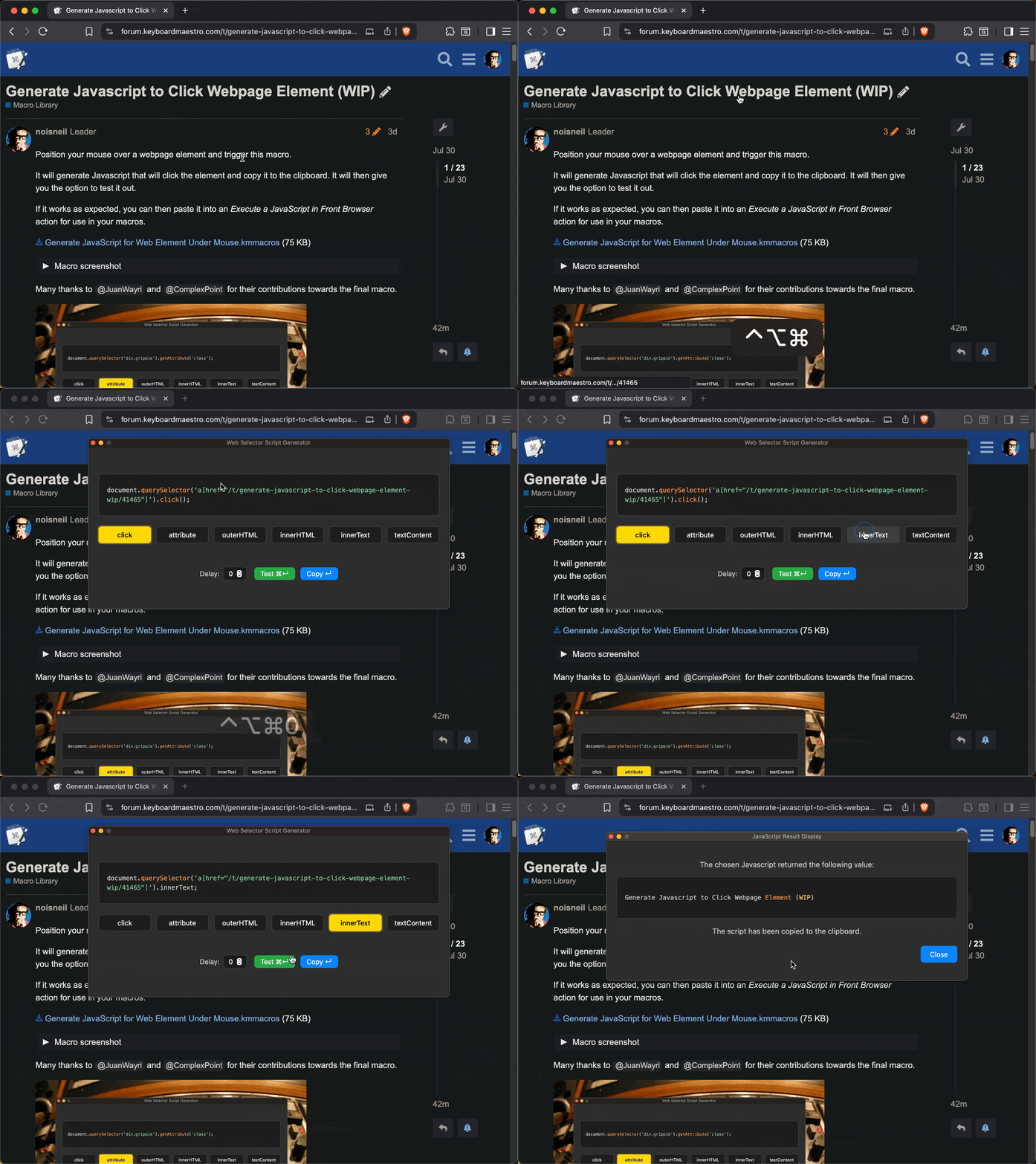
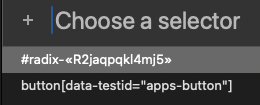
I also added a prompt with a list of unique selectors to choose from, since ID (#) and attribute selectors (like href) aren't always the most convenient option.
Lastly, I added support for additional actions other than "click", such as extracting innerText, getAttribute, and more. This is especially useful when using Keyboard Maestro to gather data from websites for use in other macros and workflows.
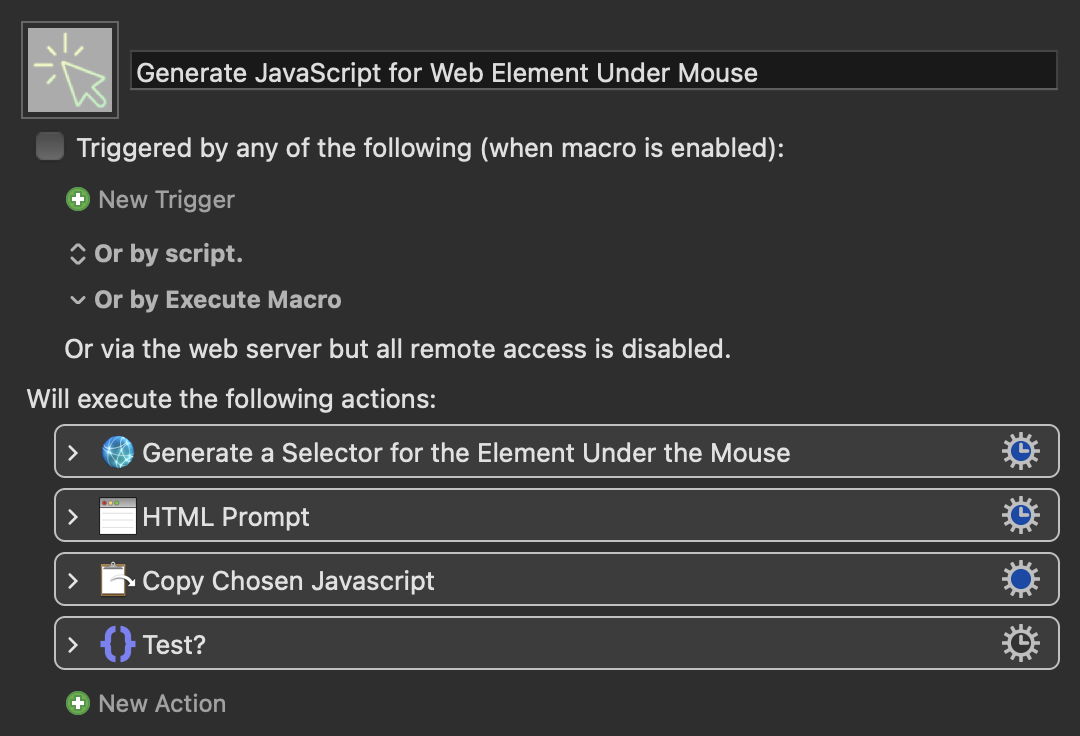
Generate JavaScript to Click or Extract Data From the Element Under the Mouse (v1.5).kmmacros (66.4 KB)
Macro Screenshot