I have a Python script with a simple, textual progress indicator. When I run the script via this action:
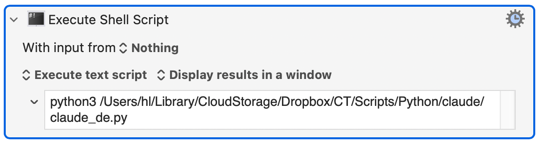
I only see the progress when the script is finished.
Is there a way to display the progress from start to finish?
I have a Python script with a simple, textual progress indicator. When I run the script via this action:
I only see the progress when the script is finished.
Is there a way to display the progress from start to finish?
Is there a way? Yes there is a way. But you might not like it. Instead of using the Execute Shell Script action, open a terminal window and paste the command into that window.
I can see why you might want the Execute Shell Script action to open a window and show the output of your command as it goes along, but that's not how it works. However that is how the Terminal app works. So indeed you could solve your problem that way.
You could use subprocess.run() to call osascript, passing in the AppleScript text to call a KM "Display Progress" dialog. Demo -- save the below into a .py file and run it with python3:
import time
import subprocess

preXML = """
			tell application \"Keyboard Maestro Engine\" to do script \"<dict>
				<key>ActionUID</key>
				<integer>100012857</integer>
				<key>MacroActionType</key>
				<string>DisplayProgress</string>
				<key>Progress</key>
				<string>
"""
postXML = """
</string>
				<key>Title</key>
				<string>Python Script Progress</string>
			</dict>
\"
return
"""

for i in range(0,10):
	subprocess.run(['osascript', '-e', preXML + str((i + 1) * 10) + postXML])
	time.sleep(1)
You'll have to replace the (i + 1) * 10 bit with your "progress value" -- a number from 0 to 100. And remember to end by setting the progress to 100, either in your Python script or with a KM action, so the dialog is closed.
If you don't have an actual, calculable, progress and just want to show "Hey, we're still busy over here!" -- call the progress dialog with a value of -1 to start, again finishing with 100:
import time
import subprocess

preXML = """
			tell application \"Keyboard Maestro Engine\" to do script \"<dict>
				<key>ActionUID</key>
				<integer>100012857</integer>
				<key>MacroActionType</key>
				<string>DisplayProgress</string>
				<key>Progress</key>
				<string>
"""
postXML = """
</string>
				<key>Title</key>
				<string>Python Script Progress</string>
			</dict>
\"
return
"""

subprocess.run(['osascript', '-e', preXML + "-1" + postXML])

for i in range(0,10):
	print(i)
	time.sleep(1)

subprocess.run(['osascript', '-e', preXML + "100" + postXML])
Not a Pythonista, so no laughing at the back 
There's also an applescript module (https://pypi.org/project/applescript/) -- which I know even less about. My goto would be @drdrang ,and if you tag him three times he may appear... While you are waiting, take a look at the relevant articles on his blog with a site search for "from AppleScript import".
I don't know what exactly you need, but maybe my example gives you some new ideas.