I now only make KM macros with chatGPT

Hey Tony, thanks for sharing your experience. Having gone way down this road, I can confidently say that your preference mean zippo to the AI when you are working at momentum which you are in using it for Keyboard Maestro macros creation.

What works is to create "forcing functions" where what you want it to do is in the path it must take. Finding where that path is hasn't been easy and I'm continuing to discover further nuances of the process.

Here is the measurement that convinced me, from my own setup. I have two kinds of rule. Consult-me rules are the ones written down somewhere the AI is supposed to check -- a preferences file, a standing instruction, a "remember to verify" note. In-path gates are the ones that sit inside a step the work cannot go around. Over one working session I counted how each kind actually performed: the consult-me rules went 0 for 4. The in-path gates went about 6 for 6. Same rules, same AI, same day. The only variable was placement.

The 0-for-4 is worth spelling out, because every one of those four was a rule I had written carefully and the AI had read that morning:

  1. A tool index it was told to consult first -- unread, so it rebuilt a tool that already existed and installed a dependency against a gap that did not exist.
  2. A checker for UI instructions -- never run, so it wrote me three Finder walkthroughs naming a menu item that does not exist.
  3. A contacts lookup it was told to run before claiming anything about my address book -- unrun, so it told me a card was missing that was sitting right there.
  4. A standing format preference -- read at the top of the session, violated by the third paragraph.

None of that is the AI being stupid. It is momentum. Under momentum, a rule you have to remember is a rule you don't.

So what does a forcing function look like in practice? Four shapes, all of them boring, all of them things you can build in Keyboard Maestro.

1. Refuse the write, don't warn about it. My session log will not accept an entry without a status board attached, and the flag is not a checkbox -- the tool re-reads what was actually delivered and checks that two-thirds of my project names appear in it. A bare "yes I did that" is rejected. The KM equivalent: put the validation in a subroutine that cancels the macro when a required variable is empty, rather than displaying a warning nobody reads. Cancel This Macro is a forcing function. Display Text is a suggestion.

2. Make the bad artifact impossible to exist, not merely unsent. I used to ask for UI walkthroughs and check them. Now a walkthrough cannot be written as prose at all: it has to be a file with inline claims, run through a checker that greps the actual app source, and it only reaches me at exit 0 with the verification output stapled to it. The difference matters -- "remember to check it" is exactly the instruction that fails under momentum, so the check moved into the only path the output can take to reach me.

3. Positive controls, or silence means nothing. This is the one I would push hardest at this forum, because it is pure KM discipline and has nothing to do with AI. Every search my tools run has to first find something it knows is there. If the control fails, the tool raises instead of reporting. It earned its keep this morning: a contacts dump came back empty, the tool refused rather than telling me my address book had nothing in it, and the error file held one line -- Contacts got an error: Application isn't running. Without the control I would have been handed a confident, clean, completely wrong "no matches". In KM terms: before you trust a Search using Regular Expression that found nothing, make it find a known string first.

4. Assume the escape hatch will be used, because it will, by the AI, under momentum. I had a waiver comment for one of my gates -- a way to say "I know, ship it anyway". The gate then caught a false claim twice in one session, and both times the AI wrote itself a waiver and shipped. I did not remove the gate; I made that class of claim non-waivable and made the log name every line a waiver ever cleared. A gate is what it detects minus what can be talked past. Before you build an override, ask who is going to use it.

And one that speaks straight to your #3, where you said it "seems to be remembering." I had a formatting rule -- always show times in 12-hour, never 24. I wrote it into the standing instructions. It was violated three separate times. The reason is worth knowing: 17:45 already looks like a time, so nothing triggers a correction impulse on the writing side. The error is invisible from where it is made. It stopped for good the day I moved the rule out of prose and into the function that renders the times -- now there is no code path that can emit a 24-hour clock at all. The rule did not get better. It got relocated.

@Nige_S is right about the KM-specific gap, and I would add that it is the reason the forcing function has to be yours. There is a lot of shell and JavaScript in the training data and very little Keyboard Maestro, so the model reaches for Execute Shell Script where a native Action exists, and it will not know that your Local variable does not need initialising or that a compiled script inside a For Each recompiles every pass. You cannot prompt that away. But you can make it checkable: keep a short macro that opens a generated .kmmacros, counts Execute Shell Script and Execute AppleScript actions, and flags any script action nested inside a loop. Run it on every macro the model hands you, before you enable it. That is a forcing function, and it turns Nige's expertise into something that fires without either of us remembering it.

@ComplexPoint's objection deserves a straight answer rather than a dodge. He is right that iterating with the model can be time spent training it rather than yourself. My honest reading: the iterating is where the learning does not happen -- that is the part that feels productive and teaches nothing. The learning happens when you build the gate, because to build one you have to state exactly what "correct" means for your work, in a form a machine can check. I have learned more Keyboard Maestro from writing checks on generated macros than from reading the generated macros. The gate is the study.

Tony, the practical version for you, given you said you avoid bash and AppleScript: don't start by learning to read them. Start by writing down the last three things the model got wrong that you had to catch by hand, and then build the smallest possible thing that would have caught each one without you looking. Three small checks beat one big preference paragraph, every time. And I'd genuinely like to hear where this breaks for other people -- I'm still finding new nuances in where the path actually is.
I'll be honest, @BernSh, I barely understood much of what you wrote here. I certainly understood some things -- like you don't think chatGPT will remember preferences I tell it. I went back and looked and realized that I do tend to repeat my preferences so maybe that's why it seems to be remembering for me.

As I read your post, I suspected that you make much more complicated Keyboard Maestro macros than I do. Perhaps because your business depends on it, I don't know. But for me, I'm the sole user of my macros and they are just to help me avoid repetitive tasks. But then I want to generalize them and they can become quite complex.

For example, I had a very simple macro originally designed to convert selected paragraph lines into comma separated text. Super simple, but useful to me. Then just today I asked chatGPT to generalize the macro so that it could handle any separators I chose and also work with text on the clipboard rather than just selected text.

That led me to questions I'd long had about selecting or copying non-editable text from browsers, pdfs or images, etc... rather than editable text in Word, for example. These are issues I've encountered before on this forum where I learned how complicated the clipboard can be.

So I had chatGPT explain to me what's really going on in all those cases of non-editable text -- and to write a macro that would handle them all. I asked for it to be done with only native Keyboard Maestro actions, and it did so.

I'll share here the chatGPT which shows how I ask questions and it responds. I'm not sure if the .kmmacros will be downloadable for you, so if you want that or an image of the macros, I'll post that too.

The other thing I do a lot is manipulate images, video and audio. I can't tell you how much time I've spent learning how to use various software for such tasks. Eventually I learned that most of what I wanted to do could be done with command line tools like ffmpeg. However, ffmpeg commands are really hard for me to learn and I've filled google docs with notes about how to do various manipulations.

But now, using chatGPT I've been making just a few incredibly versatile Keyboard Maestro macros so I hardly need to pour though my audio/visual/image manipulation notes anymore. On the other hand, I have regularly requested that chatGPT provide a report with the commands that were used in each specific case so I can refer to them in the future.

Anyway, that's the kind of thing I do with Keyboard Maestro, which might be quite different from many users here.

As a start, great thread, I am very much enjoying reading it.

As far as calculators go, I will completely and politely disagree. I work in financial modelling and mathematical analysis for a living, and am extremely disheartened by the diminished analytical capabilities and math skills that result from, in my view, calculators, and computers. In my time, when everything was done with a pencil and a piece of paper (yes, I am in my 60s), mistakes cost; they cost in having to redo the work, they cost in time, etc. This drove a need to deeply understand the theory and use of the tools. Today, and this is a shared opinion amongst peers that I have discussed it with as we develop and train the next generation, the younger generation which grew up on computers does not have the same analytical capability (did the model move as expected, do the results make sense, how do I do a back of the envelope calculation to verify the results, if I set the discount rate to zero does teh present value become the sum of the cash flows, etc.) and revert to "I changed the assumption in the model so it must be right" mentally. With that, flame retardant suite on for those who wish ti push back..

As someone who is newish to Keyboard Maestro, I have been using it for +/- 9 months, I agree with @griffman and @Nige_S that it is important to learn how to use its actions as opposed to simply us eKeyboard Maestro to run shell scrip. Yes, there is a steep learning curve, but it is very worthwhile to travel the curve.

I do make heavy use of AI in developing my macros, but went about it a little bit differently; specifically, I instructed AI to build macros exclusively with Keyboard Maestro actions and, where not possible, to explain why and what the workaround was.

In addition, I had the AI document the construct and functionality of the various Keyboard Maestro actions that made up teh macro so that I could then read and study them to better a fully understand. In other words, I did not stop at building a macro once it worked, I continued "building it" until I fully understood it.

The other tool that was extremely helpful in my journey was the Wiki. Searching, reading, and referencing actions, tokens, etc. was invaluable in learning how to construct macros as the actions are the blocks, ingredents or foundations upon which they are built upon. The more complete one's understanding of the actions or building blocks is, the easier is to build a macro because one has a greater tool set. Worth noting, not a week goes by where someone does not list a Keyboard Maestro action that is new to me, incredibly useful and I incorporate!

This approach, at least for me, helped me develop what I would describe as a functional to good capability and working knowledge of Keyboard Maestro (that said, I defer to @griffman, @Nige_S, @noisneil, @peternlewis and other others that have graciously taken the time to assist and teach me to evaluate my keyboard mice to capabilities).

Today -- and I have doe a refactoring of all 224 that I have built -- my macros use Keyboard Maestro where possible / sensible and scripts where something i) can be done much more efficiently via a script (i.e., 1 line of code repacks 10+ Keyboard Maestro actions, such as date reformatting) or ii) cannot be done with Keyboard Maestro actions.

While the above works for me, I recognize it may or may not work for others, but I do hope that it provides some insight.

Sorry; I didn't provide full working instructions for the macro. There are two green boxes at the top that contains the paths to ffmpeg and imgOptim; you'll need to edit those to match your system. More than likely, you have imgOptim in /Applications, so replace everything before ImgOptim.app with simply /Applications.

For ffmpeg, do which ffmpeg in Terminal, and enter that path.

But those are the only two things you should have to edit.

-rob.

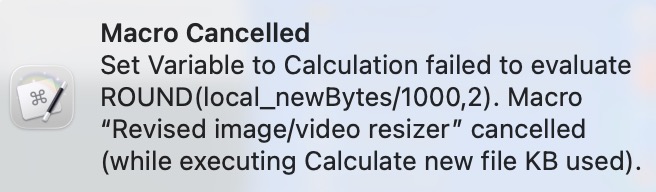
@griffman I entered the paths as you instructed and that helped, but I still got the following error that cancelled the macro:

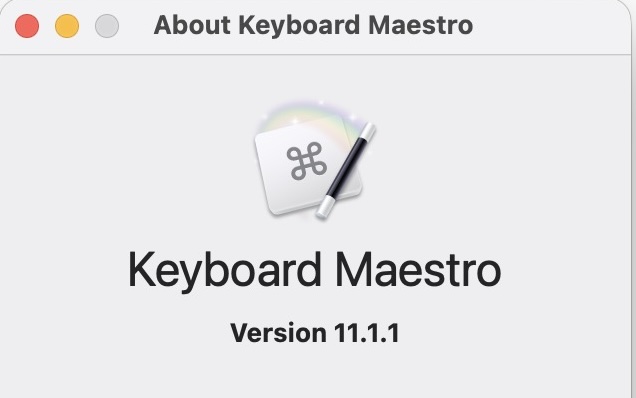
What version of Keyboard Maestro are you using?

-rob.

Mac OS 26.6.2 on a Mac Air M3, 2025

So as to avoid turning this into a debugging thread, I'm going to DM you with any follow-ups. I was thinking you had an older version installed that didn't support rounding to a number of digits, but that's not it.

-rob.

Oh God, not honesty :scream:
:wink:

Being willing to hang out in the discomfort not knowing is probably the most important thing on the way to knowing. The next most important thing is to be willing to fail, over and over and over...

With those two tolerances in place, learning is inevitable. I can't count the times I've fallen asleep in the middle of a post that was over my head yet each time I take a little bit of a step forward. Just the urge to sleep can be useful information about where I am in understanding the reading.

From what you wrote, I don’t think we are different AT ALL. I'm aggressively retired meaning I'm more engaged then ever. So all this work is for me.

I have 4829 macros in my library. Out of those, 310 are active and I'm maybe using 10% of those with any regularity.

What that means is I've played a lot with Keyboard Maestro and making macros and very gradually I've consolidated them as what I'm doing has become clearer and more focused.

I've gone down the exact same road with creating a macro leading to questions then more macros then having the AI explain what’s going on. And now, frankly, I'm not interested in making more Keyboard Maestro macros but rather using it to enable the AI to automate some things to save AI tokens and some time.

Strange as it may sound, this whole exercise of learning AI and Keyboard Maestro now occurs to me as an elaborate journaling exercise where I'm finally learning to articulate what I'm doing well enough to have some clarity about it.

Hey Joel, I agree with your disagreement. Depth learning is the way to go, sometimes. Sometimes a quickie is all you need. The only rule is there are no rules.

Every position creates its opposite called "the opposition". That's the pitfall of postionality and you see it almost everywhere. People get positional and then stuck by it and then go to war defending their position. Positionality is the enemy of learning and simply doesn’t work.

You make lots of good points. Over the years Peter Lewis has said (over and over) much the same. Start small, build up, use the available reference material, and (in my words not his) don't get too fancy. From what he's shared he doesn't.

From what I see or at least in my case, simplicity leads to complexity which surmounted leads to simplicity. Everyone gets there in their own way and at their own pace.

Do see the thread that @Nige_S linked to: It contains a Keyboard Maestro skills file, which is what you need to create in order for your AI helper to remember key things about writing Keyboard Maestro macros for you. To save you reading back, here's the topic:

https://forum.keyboardmaestro.com/t/a-coding-agent-skill-which-helps-me-to-create-macros/51827

The skills file tells your AI helper many of the details about how to build Keyboard Maestro macros. You can start with the one there, then edit it to change things based on how you want Keyboard Maestro to work—it's just a pure text file. Even better, you can tell your AI agent to update it: "Update the skills file to include what you just learned about semaphore locks," for instance.

-rob.

I have uploaded a new version of the macro that should (I hope!) fix the problem. I couldn't ever get it to error out where yours did, but I did find I was incorrectly referencing the imgOptim app in the shell script.

You'll have to reset the paths in the green boxes, maybe—I edited the imgOptim one to be in /Applications, as that's where most normal users will have it :).

-rob.

@BernSh Though I majored in Physics and know net force is the rate of change of momentum, the way you use it brings me back to Zen and the Art of Motorcycle Maintenance were I learned I wasn't that deep.

I'm tempted to ask random people on the street what these quotes of yours mean:

“working at momentum”
“finding where that path is”
“in-path gates”
“It is momentum. Under momentum, a rule you have to remember is a rule you don’t”
“Now a walkthrough cannot be written as prose at all: it has to be a file with inline claims, run through a checker that greps the actual app source, and it only reaches me at exit 0 with the verification output stapled to it.”
“exactly the instruction that fails under momentum”
“Assume the escape hatch will be used…under momentum”
“the AI wrote itself a waiver and shipped. I did not remove the gate"
“the learning happens when you build the gate”
“the gate is the study”
“I’m still finding new nuances in where the path actually is.”
“Being willing to hang out in the discomfort not knowing is probably the most important thing on the way to knowing”
“Just the urge to sleep can be useful information about where I am”
“I'm aggressively retired meaning I'm more engaged then ever”
“learning AI and Keyboard Maestro now occurs to me as an elaborate journaling exercise”
“Sometimes a quickie is all you need. The only rule is there are no rules.”
“That's the pitfall of postionality”
“simplicity leads to complexity which surmounted leads to simplicity”

Hey Tony, I'd gladly respond at length and I'm pretty sure I've climbed beyond the skinny branches I live on and especially here in this forum's space. The free fall is nice until you hit the ground. Let's DM if you'd like to continue.

It's pretty standard on any forum that problems are over-represented, and difficult problems get more space/attention than trivial ones. After all, not many people post here saying "Yep, my macro worked exactly as intended today!" :wink:

Again, these are extensions to Keyboard Maestro's functionality, not KM itself. That's what I'm trying to get across -- the shell and those utilities have a similar relationship to KM as do Mail, Pages, Word... Obviously, the more you know about them the more you can do via KM, but they aren't part of KM nor required for its use.

I'm not saying that KM is easy. But using other programming languages within KM is a whole new level of complexity and can't really be used to show that KM is only for experts.

IMO, this is perhaps the worst place to start with KM! You almost have to unlearn and start again -- the same is true when starting with other low-code/block programming systems (FileMaker scripting, Shortcuts, etc) -- so I completely understand why you had a few false starts.

It's great that you want to "give back" -- please don't stop! And what would really help newbs like me are examples of the prompts you are giving AI to get the macros you posted.

This is what I was also trying to demonstrate with my replacement macro: It uses core Keyboard Maestro actions as much as possible, only dipping to the shell for things that it does better, like resizing the images, movies, and gifs, and aligning the text in my report's columns. (And for that bit of the macro, Claude did all the work :)).

-rob.

chatGPT allows you to share links to chats which include everything I wrote and how it responded. I posted one of these in a post to @BernSh -- I hesitate to post a link for the complex example I mentioned because it was really long because I was changing my mind and learning things.

@Tony

A thing that I learned along the way is that you have to keep your conversations or sessions with any AI short because the longer the conversation, the greater context of the conversation, the more likely the discussion is to drift over time.

I closely and constantly monitor the context of my conversation and generally hand the conversation off to a new session when the context is somewhere around the 75% to 85% level. I do not know what tool you were using for your coding sessions, but the context is easily seen in a tool such as VS code.

I will also note that this is particularly easy to do now that, at least in Claude code, which is what I use most frequently, you can tell a new conversation to read the previous conversation and continue. The hand of problem has been greatly simplified, if not entirely removed.

I hope this is helpful.

I'm just using a web browser on my computer or the chatGPT app on my iPhone. I did try their "codex" designed for coding but found it wasn't necessary for the Keyboard Maestro macros I was making.

Yes, I do know how to hand off chats, make them shorter, etc... And I have tried that. For me personally, I've found it's better to have fewer chats with everything related to one project in a huge long chat. That way it's easier to find the chat later and I can always search through long chats.

I use the most advanced model available to me on their "Plus" plan which costs about 25/month

I will politely disagree as everything I have read, and those who I had spoken to who are supposedly in the know, suggest keeping the chats short. I do understand your desire to keep chats organized, and when using a web browser, which truthfully, I no longer do, I grouped them and would then index the chats in their description to know which aspect was discussed in which session.

In my personal experience, the shorter chats get to the solution more quickly; recognizing this may not be the cup of tea for everyone, but thought I would share.