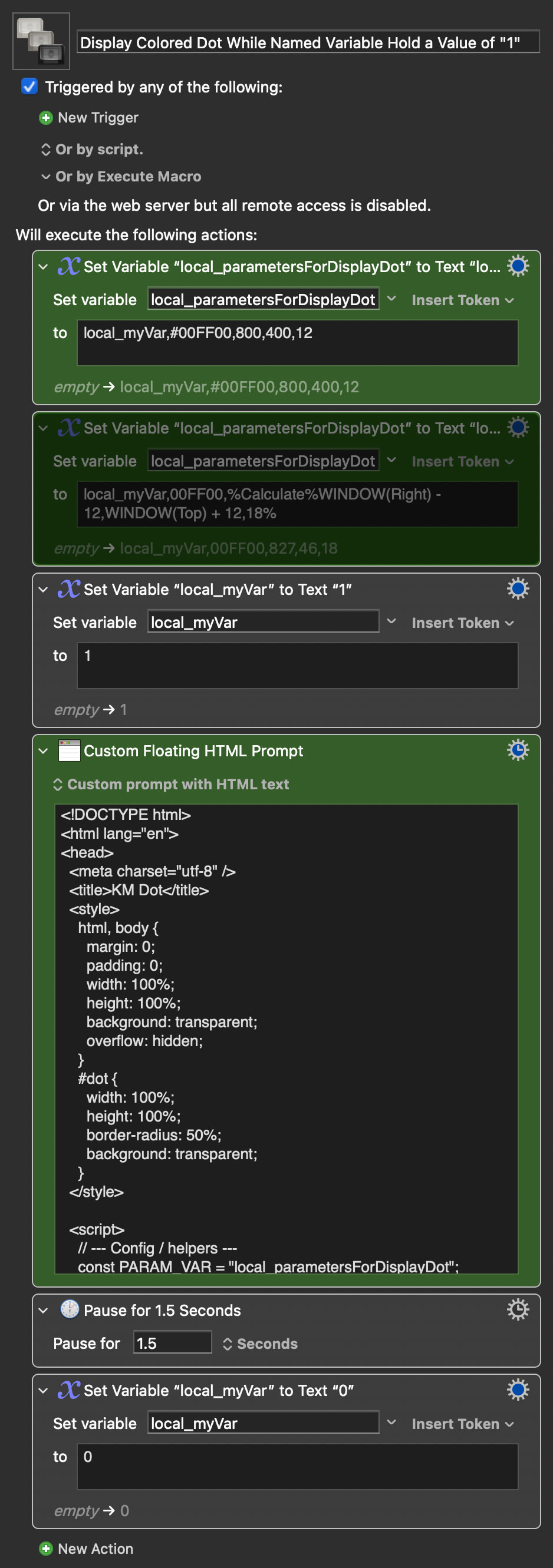
You can at the very least get close with a Custom HTML Prompt.
I suck at HTML, but LLMs are okay at it, so here's a working proof of concept that resembles what you ask for.
The script runs asynchronously (so that the rest of the macro can continue while the script runs in the background). If a named variable starts with a "1", it will display a dot with set color, position, and diameter, and it will display this dot until this variable does not start with a "1" (so basically while the variable starts with a "1").
The HTML reads in five commaseparated parameters from the variable "local_parametersForDisplayDot":
Parameter 1: Name of variable to watch for starting with a "1" or not. This variable can be global, local, or instance.
Parameter 2: Dot Color Hex value. Can be of form #00FF00 or 00FF00
Parameter 3: Dot center X-position
Parameter 4: Dot center Y-position
Parameter 5: Dot diameter
For example: myVar,#00FF00,800,400,12, for displaying a 12 pixel diameter, green dot, centered at screen position 800,400, if the value of global variable "myVar" starts with a "1"
One can also use Functions in the parameters by setting it up something like: local_myVar,00FF00,%Calculate%WINDOW(Right) - 12,WINDOW(Top) + 12,18%, for displaying an 18 pixel diameter, green dot, centered 12 pixels to the left of and below the right corner of the focused window, if the value of local variable "local_myVar" starts with a "1"
Display Colored Dot While Named Variable Hold a Value of "1".kmmacros (KM v11.0.4, 20 KB)
Macro image