I have one macro that is creating 2-3 lines in Engine.log for every single MIDI note I play — hundreds or thousands per day — and it feels a bit weird and messy.
Is there a way to make this particular macro not record anything in the log?
I have one macro that is creating 2-3 lines in Engine.log for every single MIDI note I play — hundreds or thousands per day — and it feels a bit weird and messy.
Is there a way to make this particular macro not record anything in the log?
Peter has addressed this in the past, and I would imagine it's still off the table.
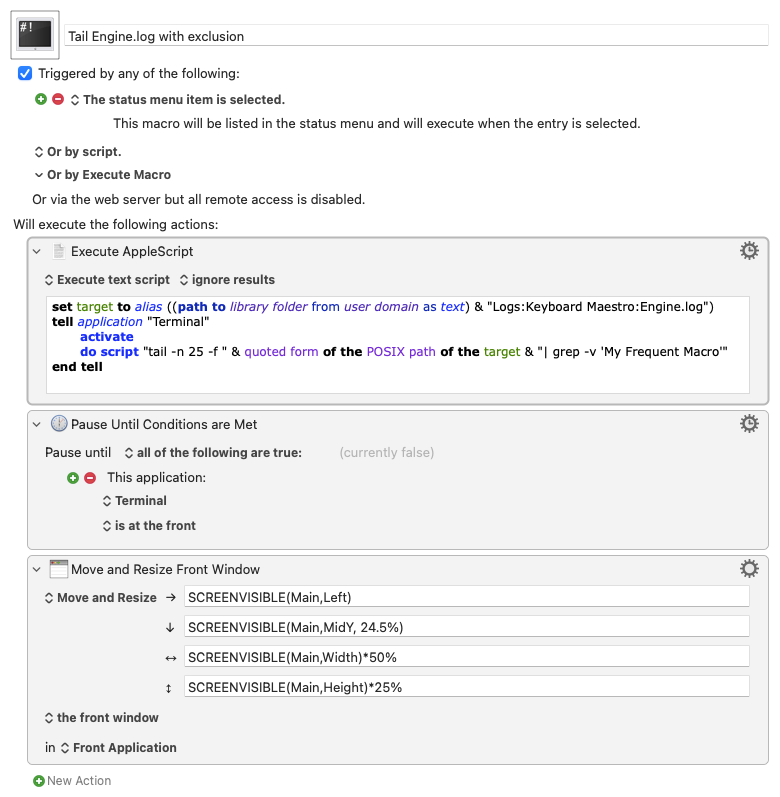
Going off of Peter's suggestion in the post linked above, this macro provides a running display of the log file with "My Frequent Macro" excluded.
Nope. If a macro is triggered, it is recorded in the log file. This is probably the most important thing for the log file to record.
Additionally, you could run a script to reset the log, possibly with a Time of Day trigger every night:
cd /Users/$USER/Library/Logs/Keyboard\ Maestro/
cp Engine.log "$(date +%Y%m%d)-Engine.log" && truncate -s 0 Engine.log
This may come with drawbacks that I'm not aware of, so we might need @peternlewis to confirm that this would be acceptable usage (notwithstanding whether or not it's recommended usage).
Keyboard Maestro rolls the log itself. Any time the Engine or Editor launch the log file will be trimmed down to 7MB if it is over 13MB, so if you really want to roll the log, all you need to do is re-launch the Engine or the Editor.
Hi, @nrightnour. As @peternlewis stated, there's no way to prevent the Engine.log entries, but I've recently shared a macro that can be used to remove such entries: Engine.log Tool
This is impressive! A bit bigger scope than I was thinking, but a nice option to have. Thanks 
But what is so important about this that it must be enabled even if I don't need this noise on every key press and would like to disable it just like other users reporting about this issue?
The primary purpose of the log is to record macros fired so that if anything on your Mac is behaving oddly you can look in the log and verify whether macros are being fired as a possible cause.
There are no plans to change this.
If you really really really want to see the log file without specific things in it, then I suggest you run the log file through a simple filter, eg:
grep -v 'Execute macro “Update” from trigger' Engine.log | tail
And it has served this purpose for my debugging purposes exactly 0 times, that flood is useless, even when I wanted to test the working of a macro I'd have an immediate and visible side effect for that macro only that wouldn't take focus away from macro editing and wouldn't be obscured by all macros being run
I suggest ... grep
that's a bad suggestion, why would I leave the comfort and convenience of my text editor in favor of this command I'd have to keep remembering how to run???
Just to expand on that useful tip a little:
Engine.log is a placeholder for the full path to the log. The path should be wrapped in typewriter ("dumb") quotation marks (either double or single). Here is an example for the account fred:
grep -v 'Execute macro “Update” from trigger' "/Users/fred/Library/Logs/Keyboard Maestro/Engine.log" | tail
The results can be shown in a window, saved to a variable, saved to a file, added to the clipboard…
There are all sorts of ways in which this approach can be refined and tweaked according to the user’s requirements.
One little tip:
tail defaults to showing the last 10 lines of the result. This would show the last 30 lines:
grep -v 'Execute macro “Update” from trigger' "/Users/fred/Library/Logs/Keyboard Maestro/Engine.log" | tail -30
Hi, @nrightnour. As you’ve already heard, no there isn’t. But the following macro can be used to remove such records. If you want to routinely remove the records you could run the reduction step on a schedule.
I gotta agree with @peternlewis : Better that the engine log has too much rather than not enough.
As discussed above, there are several ways to filter that log. I routinely monitor the log in a terminal with `tail -n 25 -F ~/Library/Logs/Keyboard\ Maestro/Engine.log | egrep -v "AWM|change|Auto-hide|took a while"`
That last clause eliminates the stuff I don't want to see. (Dang! I don't even use "AWM" any more!)
One problem with the grep solutions is that they won't work for something like BBEdit used in "Tail Mode" -- a thought prompted by:
So my question for @esv would be: What do you use the Engine log for that gets upset by the logging of some (or all) trigger events?
But you don't have to remember it -- write a macro!