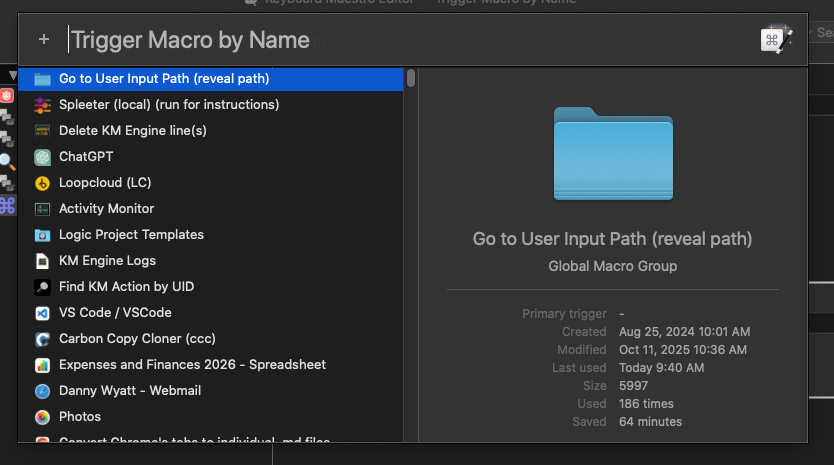
Replace "Trigger Macro by Name"

I've been using this action to show me all active macros, but the fact that the default behavior is to search for other things other than the name, I have to include n: by hand or via a sub macro, which is what I use now, but sometimes if something gets "in the way", the sub macro throws an error.

Has anyone ever created something similar, but only searches the macros' names?
I was doing some research and I think I will be able to do it with the HTML Prompt, but before starting that adventure, I just wanted to make sure that there's nothing out there already.

Something like this?

Prompt with Active Macros.kmmacros (4.8 KB)

The with asstring and get all tells gethotkeys to get all active macros (not just those with hot key or typed string triggers), returning an XML list. The "For Each" and "Search" parses the XML, extracting the UUID and name of each macro, putting them into "friendly list" format for the prompt. The "Prompt with List"... prompts :wink: , and the "Open URL" Action uses the KM URL scheme to run your chosen macro.

1 Like

Thank you for sharing!

There are a few issues with this approach, one of them being that it takes way longer than the current option, which is instantaneous. I was thinking I could prevent that by finding a way to run a script every time the ~/Library/Application Support/Keyboard Maestro/Keyboard Maestro Macros.plist file changes and that would parse it and save all changes to another file, a more stripped down version?

Then the other issue is that I like to see the custom icons, as that is a huge help seeing things right away. I don't know if this is possible via any type of script, though. I see that the plist has some info about the icons, but I'm no expert and would have to check this.

It's such a bummer that KM doesn't have this option to just filter macros by their name only, without having to rely on a "workaround". It could be a toggle in the action itself. The action is called "Trigger Macro by NAME" so I don't see the logic behind searching the content of the macro...? But at least, having something to toggle this on or off, would please all users. Unfortunately, this won't happen.

Couldn't you just put n: in the initial search box? Then you'd just have to hit Right Arrow and start typing.

I must admit, though, that in all my years of Keyboard Maestro usage, I have never used this action, so maybe I'm missing something. It is one extra keystroke, but it seems a lot simpler than submacros or processing XML in real time, etc.

-rob.

I do have that, and I don't need to press the arrow. That's what the SUB macro is doing. But sometimes, if some "glitch" happens, that sub macro isn't triggered, or causes an error, times out, etc.

I just don't like typing unnecessary things over and over again. That's why I think we could at least choose how the action would behave. Search everything in a macro or just search the name.

I use this dozens or maybe hundreds of times a day. It's my main macro where I access files, folders, macros, etc. Even to access this forum, I have a macro for it and I just have to type "kmf". It just makes my life so much easier and faster.

If I can find a way to get the icons, parsing the plist file shouldn't be an issue, because if I have an script file that is triggered every time the plist file changes the modification date, then HTML prompt will automatically read from a file that's always updated.

1 Like

The macro in this thread may be of help:

1 Like

Sounds like the glitch is what you should be investigating. I also use the n: submacro workaround hundreds of times a day and it's failed exactly zero times.

Time taken will very much depend on how many active macros you have when you run it!

How would that help? The plist doesn't update when the list of active macros changes (unlike when you change whether a macro is enabled).

If you're having problems with the "n: and right-arrow" approach, try this AS instead:

tell application "Keyboard Maestro Engine"
	ignoring application responses
		do script "<dict>
		<key>InitialSearch</key>
		<string>n:</string>
		<key>MacroActionType</key>
		<string>TriggerByName</string>
		<key>TimeOutAbortsMacro</key>
		<true/>
	</dict>
"
	end ignoring
	repeat until (exists window "Trigger Macro By Name")
		delay 0.1
	end repeat
end tell

tell application "System Events" to key code 124

That should get you the speed and other benefits of the native KM prompt, but without the need for a subroutine.

3 Likes

I thought that when a new macro was added/deleted/changed, it would trigger that file? The script I was talking about was just to make sure that the list was always updated to read in the HTML Form.

Thank you for sharing this. Maybe it's my machine (probably is), but it's a bit slower than using the sub macro.

I think probably my issue is that I want to always make sure that things are ready to execute, so I had other actions before the action to press the right arrow. Maybe that was not helping.

I removed everything from the sub macro and just have the right arrow keystroke. I will see how that goes.

I still wish that this action had the option to have it search by name by default, regardless.

Thank you for sharing this.
Unfortunately, this has the same issue: no icons. I really like having those.

What I liked about that macro, though, was the option to open the selected macro right from the same window. Countless times that I wish I could do that straight from the Trigger Macro by Name action. I had to create a new macro just for that.

You specifically said active macros:

If you've a Macro Group that is only available when a certain app is frontmost, the list of active macros will be different when you are in or out of that app -- but the plist doesn't change. If you want to list all enabled macros, whether or not they are available/active then yes, you could try your method.

It will be. The sub method (if you're doing what I think) only adds a couple of milliseconds -- the delay until it detects the prompt is up, the 1ms for the keystroke action. The AS method has the AS instantiation time, the interprocess communication time for telling the Engine to run the script, the delay waiting for the prompt, the delay always incurred from using System Events. (The time spent creating the list of macros is the same for both, obviously.)

Agreed -- though it's a tricky UI problem for Peter to solve. A text field spawned with text already in it should have that text highlighted, so how would you allow a default search by name while also allowing reversion to "normal" behaviour?

TBH, it isn't something that bothers me -- I use the Prompt, spawned with n: already in it. If I want to search by name I right-arrow and start typing in the name, for anything else I just start typing. Even if I do that 100 times a day that extra keystroke is nothing compared to the time I waste in other areas!

Yes, I just want all my active macros. Here's my thought process:
Since I was under the impression that the plist contains all macros I have (enabled and disabled) and the file would change when I enable a disabled macro and vice versa, as well as updating when I delete or add a macro, that modification date would trigger a script file that would read it and make an updated list with just the active macros. I saw that the plist also contains information about my favorite actions, which is irrelevant for this case. So, if I were to use the HMTL Form, I would read from that new, shorter, cleaner, "database" (no favorite actions, no disabled macros), to make it faster to read.

Does that make sense?

And yes, for this particular case, it's for all macros, available in all apps. I have another shortcut that I use when certain apps are available with macros that are only useful for those apps. Same shortcut, different list, using the Switch action to check the front app.

The sub macro I have now is really just the right arrow keystroke. Well, at least from now on. I used to have an action to check if the window was visible, to avoid pressing the right arrow, before the window was even visible. Maybe those actions were doing more harm than good. I removed them now and I will see how it goes.

I'm not 100% sure I understand what you mean here?

Basically this would be my "ideal" view of that macro (list of the most recent macros and maybe some others, similar to when we type n:

So, basically, the n: was "embedded" in the macro itself, not visible. We wouldn't have to type anything to filter by name. This would be a toggle in the action itself or maybe even globally for all Trigger Macro by Name actions.

An action that's called "Trigger Macro by NAME" should do that without any workarounds.

I use this macro maybe hundreds of times a day. At some point, having to click an extra key does the opposite of apps like KM are supposed to do: remove unnecessary steps from our workflow.

I agree, but the point here, in my opinion, is not that we should just be "grateful" for the time the app saves us, but how things are named and how they could be implemented to make it even easier. Last case, make a "Trigger Macro by Name" that just trigger by name, and a Trigger Macro by Any Content (or something like that). I don't think this would be smart, having 2, but again, the name of the action implies "Name" not text inside the macro. If my macro is called "ABC" and I search for "XYZ", it will find it, when "XYZ" is for example inside a comment. This, to me, it's not about being grateful, it's about things not being properly named.

Sorry for the (very) long reply... :exploding_head:

No -- because "active" and "enabled" are different things. Pick which you want to list, proceed accordingly.

FWIW, I totally agree. The Action we have should be called "Trigger Macro by Search String":

(Macros I've used in the last minute.)

...but perhaps that would be even more confusing :wink: I, too, would like an Action that only searched by name, with no qualifier needed.

Until then, we have what we have and we must work with it.

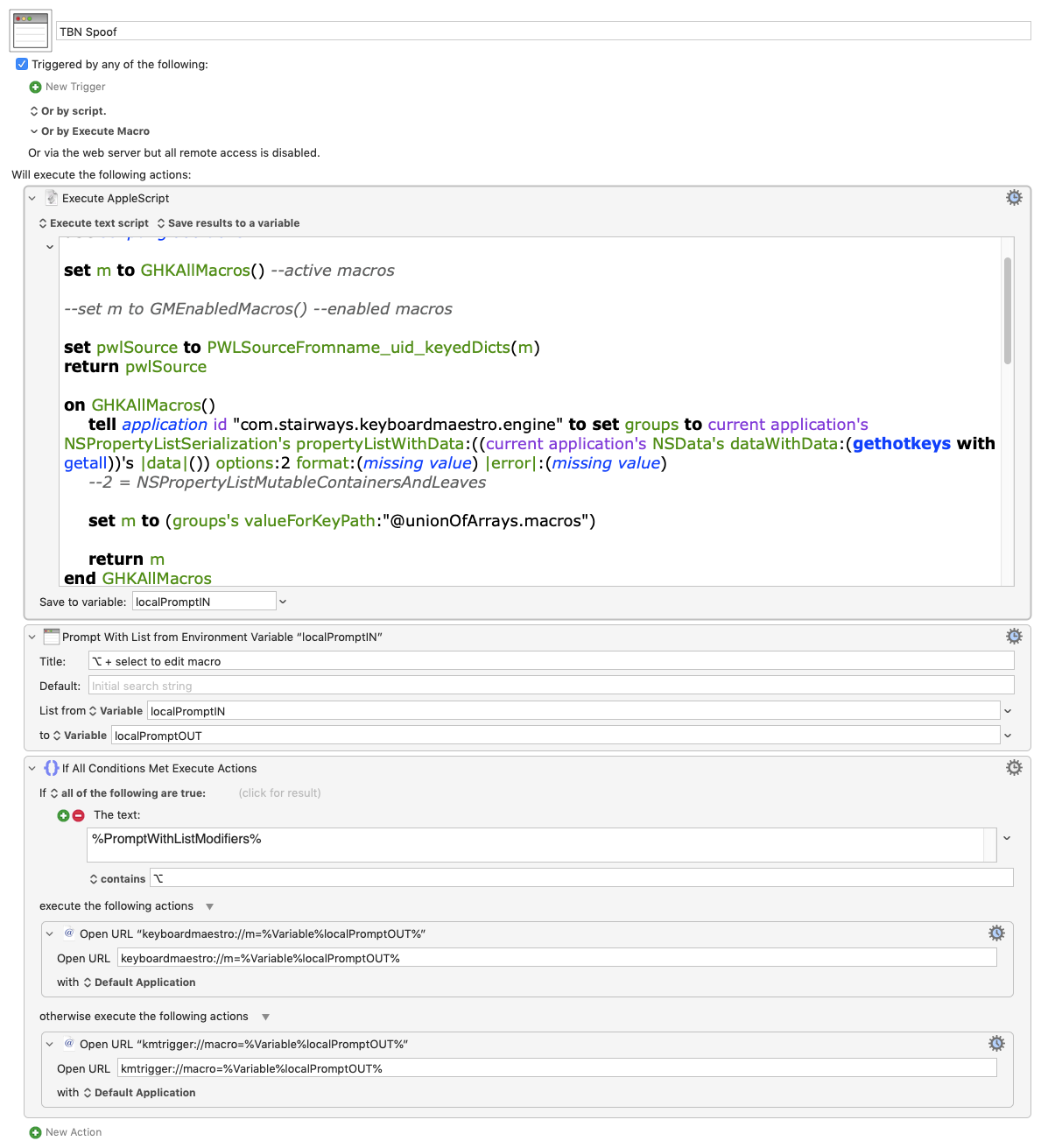
Yet another spoof of Trigger By Name with Prompt With List.

(No icons of course.)

Of the various parsing tools--xpath, regex, Apple deserialization--I've tried, I've found the latter's queries best optimized for the task.

How

You can query plural objects in same way--with different syntax--that you do in AppleScript when you say:

set macroNames to name of macros

=
or
set macroUIDs to id of macros

:white_check_mark: Here's the incantation for macros.

valueForKeyPath:"@unionOfArrays.macros"

Script Summary
  • Deserialize the live plist from the Engine's gethotkeys with getall command.

  • Pull name/uid paired lists

  • From there AppleScript makes the Prompt With List source.

  • Return as newline separated text.

The AppleScript
use AppleScript version "2.4" -- Yosemite (10.10) or later
use framework "Foundation"
use scripting additions

set m to GHKAllMacros() --active macros

--set m to GMEnabledMacros() --enabled macros

set pwlSource to PWLSourceFromname_uid_keyedDicts(m)
return pwlSource

on GHKAllMacros()
	tell application id "com.stairways.keyboardmaestro.engine" to set groups to current application's NSPropertyListSerialization's propertyListWithData:((current application's NSData's dataWithData:(gethotkeys with getall))'s |data|()) options:2 format:(missing value) |error|:(missing value)
	--2 = NSPropertyListMutableContainersAndLeaves 
	
	set m to (groups's valueForKeyPath:"@unionOfArrays.macros")
	
	return m
end GHKAllMacros

on PWLSourceFromname_uid_keyedDicts(theDicts)
	set delimiter to "__"
	-- Pull paired lists: uid/name 	
	set tempDict to theDicts's dictionaryWithValuesForKeys:{"uid", "name"}
	set {theUIDs, theNames} to (tempDict's objectsForKeys:{"uid", "name"} notFoundMarker:"") as list
	
	-- make list of lines: uid__name 
	set resultLines to {}
	set i to 1
	repeat with aUID in theUIDs
		set aName to item i of theNames
		if (aUID ≠ "" and aName ≠ "") then
			set end of resultLines to (aUID & delimiter & aName)
		end if
		set i to i + 1
	end repeat
	
	-- Return newline-joined result
	set text item delimiters to linefeed
	set resultLines to resultLines as text
	set text item delimiters to ""
	return resultLines
end PWLSourceFromname_uid_keyedDicts

on GMEnabledMacros()
	tell application id "com.stairways.keyboardmaestro.engine" to set groups to current application's NSPropertyListSerialization's propertyListWithData:((current application's NSData's dataWithData:(getmacros))'s |data|()) options:2 format:(missing value) |error|:(missing value)
	--2 = NSPropertyListMutableContainersAndLeaves
	set m to (groups's valueForKeyPath:"@unionOfArrays.macros")
	
	set m to m's filteredArrayUsingPredicate:(current application's NSPredicate's predicateWithFormat:"%K == %@" argumentArray:{"active", true})
	return m
end GMEnabledMacros

(Sorry, I couldn't get the coloring to work for the script)

See if the query helps.

To switch output from active to enabled macros change this in the AppleScript:

set m to GHKAllMacros() --active macros

--set m to GMEnabledMacros() --enabled macros

to this:


--set m to GHKAllMacros() --active macros

set m to GMEnabledMacros() --enabled macros

Like the Trigger By Name action, option (⌥) + select opens the KM Editor to the macro

Image

TBN Spoof.kmmacros (5.9 KB)

1 Like